Free Lessons
Courses
Seminars
TechHelp
Fast Tips
Templates
Topic Index
Forum
ABCD
 
Home   Courses   TechHelp   Forums   Help   Contact   Merch   Join   Order   Logon  
 
Back to Access Forum    Comments List
Upload Images   @Reply   Bookmark    Link   Email   Next Unseen 
Too many fields defined
Sandi Cushion 
      
2 years ago
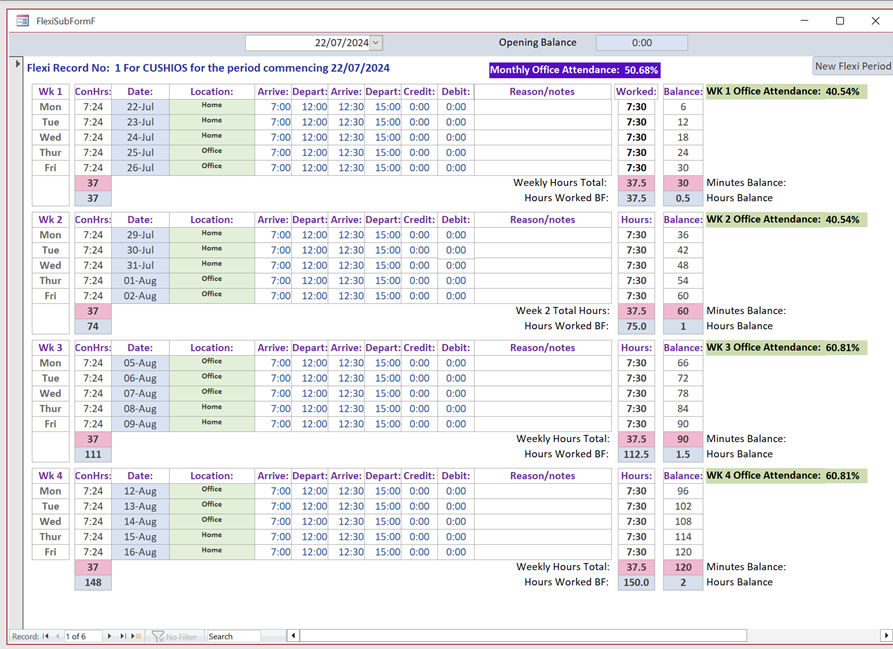
I have been asked to create a database to show a data entry form to replicate the existing one made in Excel.  I have tried to explain that Access and Excel are two different things, but my boss is insisting that I try to do this.  
In each flexi record are 4 repeated 1-week sections. Which needs 75 fields.  That's not counting totals etc., this because each record requires e.g., 20 Arrival1, 20 Depart1, 20 Arrival2 and 20 Arrival2 per 4-week period.  Also, 20 conditioned hours, 20 locations and so on.
This 4-week period is using a huge number of fields.  With all the calculated fields (time converting to digital hours), I have reached (with still more to go) a ridiculous number of fields in the query, resulting in a 'Too many fields defined' error.
Many of the fields can be calculated on the form, but I need to be able to extract some totals at the end of each flexi period.
Is there any way around this problem? Should I be learning/using VBA to tackle this problem?
Kevin Robertson  @Reply  
          
2 years ago
You're facing a challenge because Access, unlike Excel, is designed for relational data, and using a flat structure with many fields can quickly hit limitations. Instead of trying to replicate the spreadsheet layout directly, consider normalizing your data. Break down the data into related tables, such as one for the main record (e.g., employee or period) and others for weekly data. This approach avoids excessive fields and makes it easier to calculate totals and generate reports.

Access forms can be customized to handle data entry across these tables, and you can use queries to perform calculations like summing hours or generating totals. For complex logic, VBA can be employed, but the first step is restructuring the data to fit Access's strengths, allowing for a more efficient and scalable solution.
Matt Hall  @Reply  
           
2 years ago
The hump to get over is changing your paradigm of what a table is.  In access, as Kevin said, this will be different than an excel worksheet.  I would recommend starting by watching Normalizing Data.
Sandi Cushion OP  @Reply  
      
2 years ago
Thank you both for your comments.  I do fully understand the whole concept of normalising tables.  I've never been an Excel fan, disliking the fact that it has a flatbed structure rather than a relationship structure.  I have built databases (albeit simple ones) going back to the 90's but it's because my boss wants Access to behave like Excel which is causing the problem.  I have the single form ready, and each record will contain 80 arrival/departures, and a whole lot of other fields.  I have 4 tables, StaffT, DateT, DailyInputT and TimesheetT.  The problem comes when I try to set up query to deal with the fields.  There are too many. Spreading the flexi sheet over the 4 weeks the tables and calculated fields comes to about 300 fields, if not more.
When I get home from work in an hour or so I will upload an image of what I want to replicate.  At the moment I am stuck behind a firewall.
Matt Hall  @Reply  
           
2 years ago
255 fields is the limit for a query.  Since replicating Excel is the requirement, you might be able to use a continuous form and configure either one row or one week of the worksheet.  Also, you might be able to move some calculations to the form.
Kevin Yip  @Reply  
     
2 years ago
This is more like a business problem than an Access problem.  You need to convince your boss that this is not feasible, not only technically, but financially.  An unwieldy application would be difficult to make, time-consuming to make, likely difficult for the users to use even if made, hurt your company's productivity, hurt his wallet, bottom line, etc.  You need to talk to him in a language he understands to convince him.  

This is why the person who runs a company needs to be at least technically literate at some level.  He doesn't have to be an expert, but at least be literate at a baseline level -- so he wouldn't make nonsensical requests like this and waste everybody's time.
Sandi Cushion OP  @Reply  
      
2 years ago

Sandi Cushion OP  @Reply  
      
2 years ago
Thank you all for your comments.  Most of the calculations are in the form, but still no joy.  I think I agree with Kevin.  I will have a talk with my boss.    Thought it was a mad idea when he asked me to do it.  I think the main problem is that everyone in this company seems to think Excel will take care of everything and it is easier to use.  However, with 1600 excel flexi sheets required, I think had Access been a bit more generous with the 255 field rule, it would have handled it better had my boss not been so inflexible. I worked long and hard getting what I have to work and it's quite disheartening to have to go back to the drawing board.
Kevin Yip  @Reply  
     
2 years ago
If there are many users in your company, you may need to consider the time it would take to train all of them to use Access -- after you've made your Access application.  I would consider convincing your boss or anyone not on board to do this to be part of the "training" cost.  And you have to be sure they are on board -- you wouldn't want to spend much time and effort developing an Access database only to find out later they've changed their minds.

If the time and cost for all that is too prohibitive, Excel should still be an option.  You may consider making Excel the "front end" while having an Access database as a back end.  You still have to a lot of design work, but the cost of training your users may be reduced.  In my old job, I also used Access and Excel (and Word) in tandem, because they served different needs.  MS Office has something called "automation" that lets you write program code so that Access, Excel, and Word (and Outlook too) can "talk" to one another.
Kevin Yip  @Reply  
     
2 years ago
You need to come up with some kind of cost analysis to convince your boss one way or another.  How many hours it would take to design the app, train the users, etc., and what kind of benefits the new app will produce (e.g. speeding up data entry, report generation, etc.), you need to find out.  Any in-house developer needs to know these things regardless of whether they have an uncooperative boss or not.
Sandi Cushion OP  @Reply  
      
2 years ago
Hi Kevin, thank you for your help and insight in this matter.   I was not aware of the power of using Excel and Access in tandem.  I think that may well be the solution I am looking for. If I can pull that off, I think I can keep everybody happy.

This thread is now CLOSED. If you wish to comment, start a NEW discussion in Access Forum.
 

Next Unseen

 
New Feature: Comment Live View


The following is a paid advertisement
Computer Learning Zone is not responsible for any content shown or offers made by these ads.
 

Learn
 
Access - index
Excel - index
Word - index
Windows - index
PowerPoint - index
Photoshop - index
Visual Basic - index
ASP - index
Seminars
More...
Customers
 
Login
My Account
My Courses
Lost Password
Memberships
Student Databases
Change Email
Info
 
Latest News
New Releases
User Forums
Topic Glossary
Tips & Tricks
Search The Site
Code Vault
Collapse Menus
Help
 
Customer Support
Web Site Tour
FAQs
TechHelp
Consulting Services
About
 
Background
Testimonials
Jobs
Affiliate Program
Richard Rost
Free Lessons
Mailing List
PCResale.NET
Order
 
Video Tutorials
Handbooks
Memberships
Learning Connection
Idiot's Guide to Excel
Volume Discounts
Payment Info
Shipping
Terms of Sale
Contact
 
Contact Info
Support Policy
Mailing Address
Phone Number
Fax Number
Course Survey
Email Richard
[email protected]
Blog RSS Feed    YouTube Channel

LinkedIn
Copyright 2026 by Computer Learning Zone, Amicron, and Richard Rost. All Rights Reserved. Current Time: 5/1/2026 7:20:57 PM. PLT: 1s