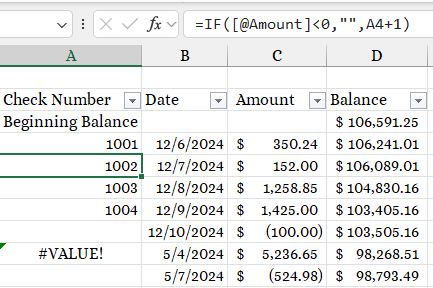
I have a simple check register that I am playing with, is the a function to auto number the checks as I fill the record in? I have included a screenshot. As you can see with a deposit it messes my formula up as deposits do not have numbers. Can you point me where to look for this?
Richard Van WagonerOP
@Reply 2 years ago
Kevin Robertson
@Reply 2 years ago
What is the formula in the cell with the error?
Richard Van WagonerOP
@Reply 2 years ago
The formula is in the screenshot at the top right. It has been auto filled down so it would be =IF([@Amount]<0,"",A9+1).
Kevin Robertson
@Reply 2 years ago
So you want to remove the error? Use the IFERROR function.
=IFERROR(IF([@Amount]<0,"",A4+1),"")
Richard Van WagonerOP
@Reply 2 years ago
What I want it to do is find the highest number and add one to it. Is there a Dmax function that can be used to do that?
Richard Van WagonerOP
@Reply 2 years ago
Let me explain more, In the column I want to find the highest number and add 1 to it unless it is a deposit then leave blank or write "Deposit" in the cell.
Richard Van WagonerOP
@Reply 2 years ago
I have Changed the formula to =IFERROR(IF([@Amount]<0,"Deposit",A4+1),"") and it works except numbering the cells after deposits. That is why I need something to look at the column and find the highest number and add one to it.
Matt Hall
@Reply 2 years ago
Try substituting MAX(A$4:A4)+1 in place of A4+1 in your formula.
Richard Van WagonerOP
@Reply 2 years ago
That works thanks! Here is my formula now =IF([@Amount]="","",IFERROR(IF([@Amount]<0,"Deposit",MAX(A$4:A4)+1),"")). The first if prevent the A Column from filling with numbers if the table has been extended with no data.
Sorry, only students may add comments.
Click here for more
information on how you can set up an account.
If you are a Visitor, go ahead and post your reply as a
new comment, and we'll move it here for you
once it's approved. Be sure to use the same name and email address.
This thread is now CLOSED. If you wish to comment, start a NEW discussion in
Excel Expert 3.