Free Lessons
Courses
Seminars
TechHelp
Fast Tips
Templates
Topic Index
Forum
ABCD
 
Home   Courses   TechHelp   Forums   Help   Contact   Merch   Join   Order   Logon  
 
Back to Access Search Template    Comments List
Upload Images   @Reply   Bookmark    Link   Email   Next Unseen 
Dynamic Combo Box Filter
Bryan Gravely 
    
2 years ago
When using a combo box for the Filter Field, is there a way to make the list dynamic based on the current data in the form.  
For example from the sample database:
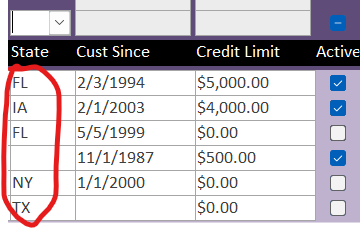
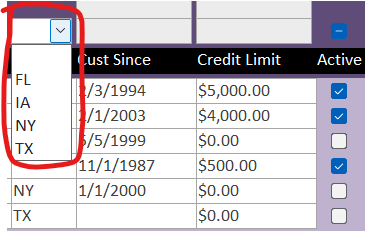
When the StateFilter combo box is the only filter being used, it would show <Blank>, IA, FL, NY, and TX.
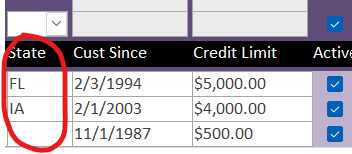
But if you check the IsActiveEquFilter box, the data in the form changes, so then the StateFilter combo box would only show <Blank>, IA, and FL?
Bryan Gravely OP  @Reply  
    
2 years ago

Bryan Gravely OP  @Reply  
    
2 years ago
Example of what I mean by the current data in the form.  When Active is set to Null, the combo box would show all of these options.
Bryan Gravely OP  @Reply  
    
2 years ago

Bryan Gravely OP  @Reply  
    
2 years ago
But once the Active box is checked, the combo box would only show these options.
Bryan Gravely OP  @Reply  
    
2 years ago

Bryan Gravely OP  @Reply  
    
2 years ago
As it is now, no matter what other filters are set, it always shows all of the options for the states.
I hope that makes sense.
Sami Shamma  @Reply  
             
2 years ago
you need to set the Row Source of the Combo box in After Update of the check box.
This video shows you how
Cascading Combo Boxes
Bryan Gravely OP  @Reply  
    
2 years ago
Ok, I was able to get the meshed combo boxes working the way I want, so that they each show values based on the others, thanks.  But I'm running into another issue.
Due to poor design when I set up the database, one of my filters runs against a multi-valued field.  I know that in the long run, I need to go back and replace the multi-valued field with a junction table to relate the data, but that's going to be a bigger projec than I can get to right now.  In the meantime, I need to get the search to work with the multi-valued field.
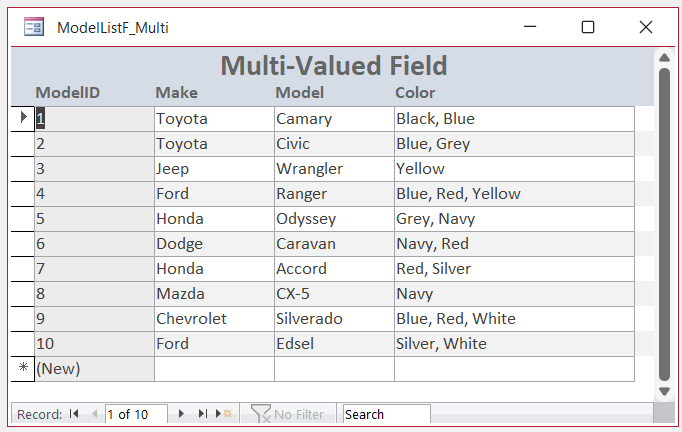
So I've got a field in my table named Color and it could contain data like Red, Blue, Yellow or Red, Blue Yellow, Green.  But when I try to use a filter against that field my list always comes back empty.  I've tried using both the regular Filter and the FilterEqu, but both return an empty list.  I even tried adding another section called FilterAr and doing something like ColorFilterAr IN Color or ColorFilterAR in Color.VAlue but still get an empty list.
Kevin Robertson  @Reply  
          
2 years ago
Take a look at Multivalued Fields.
The Extended Cut might have what you are looking for.

I may actually be quicker in the long run to replace the Multivalued Field as soon as you get the chance. It will probably save a lot of problems in the future.
Sami Shamma  @Reply  
             
2 years ago
Multi value fields will be a continuous pain for you. Take Kevin's advice and replace them ASAP.
Bryan Gravely OP  @Reply  
    
2 years ago
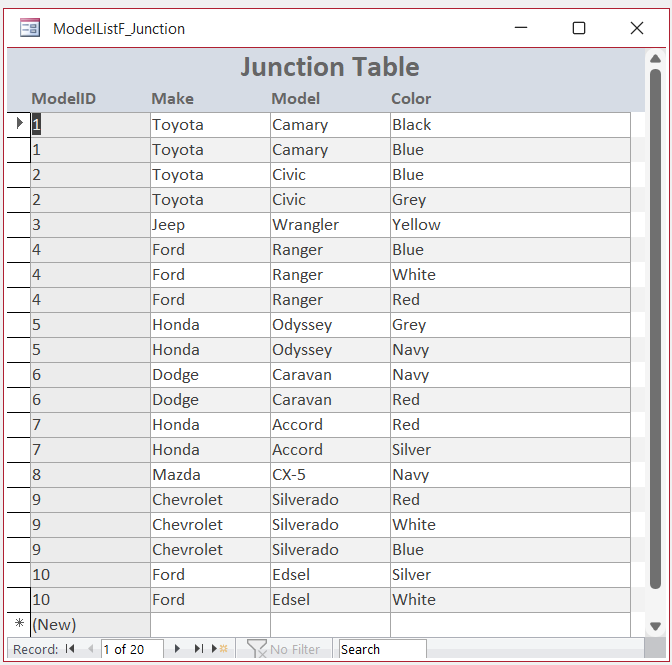
Ok, I bit the bullet and converted 950 records from multi-valued fields to a Junction Table.  But that presented a whole different problem.  It's actually the problem I was trying to avoid when I opted for Multi-Valued Fields instead of a Junction Table to start with.  When using a multi-valued field, if I created a form with the list of cars, it would show one line for each car with all of the colors separated by comas.  When using the Junction table, I end up with a separate line for every color of the same car.  I know this isn't the place for it, but my next hurdle is using junction tables to getting my lists to look like the first one shown below and not the second.
Bryan Gravely OP  @Reply  
    
2 years ago

Bryan Gravely OP  @Reply  
    
2 years ago

Sami Shamma  @Reply  
             
2 years ago
Watch the following video
Access developer 17 lesson 3
Bryan Gravely OP  @Reply  
    
2 years ago
Thank you!  I'd been looking through the indexes trying to find it, this helps a lot!

This thread is now CLOSED. If you wish to comment, start a NEW discussion in Access Search Template.
 

Next Unseen

 
New Feature: Comment Live View


The following is a paid advertisement
Computer Learning Zone is not responsible for any content shown or offers made by these ads.
 

Learn
 
Access - index
Excel - index
Word - index
Windows - index
PowerPoint - index
Photoshop - index
Visual Basic - index
ASP - index
Seminars
More...
Customers
 
Login
My Account
My Courses
Lost Password
Memberships
Student Databases
Change Email
Info
 
Latest News
New Releases
User Forums
Topic Glossary
Tips & Tricks
Search The Site
Code Vault
Collapse Menus
Help
 
Customer Support
Web Site Tour
FAQs
TechHelp
Consulting Services
About
 
Background
Testimonials
Jobs
Affiliate Program
Richard Rost
Free Lessons
Mailing List
PCResale.NET
Order
 
Video Tutorials
Handbooks
Memberships
Learning Connection
Idiot's Guide to Excel
Volume Discounts
Payment Info
Shipping
Terms of Sale
Contact
 
Contact Info
Support Policy
Mailing Address
Phone Number
Fax Number
Course Survey
Email Richard
[email protected]
Blog RSS Feed    YouTube Channel

LinkedIn
Copyright 2026 by Computer Learning Zone, Amicron, and Richard Rost. All Rights Reserved. Current Time: 6/20/2026 12:48:21 PM. PLT: 2s