You don't want Empty. That's a special condition for a variant. What you probably mean is Null.
IsNull(FieldName)
And if the field is on a subform it would be:
IsNull(SubformName.Form!FieldName)
Robert BlanchetteOP
@Reply 2 years ago
Thanks very much for your prompt answer,
Note that I'm on a french version of Access. I don't think it makes any difference as far as VBA is concerned.
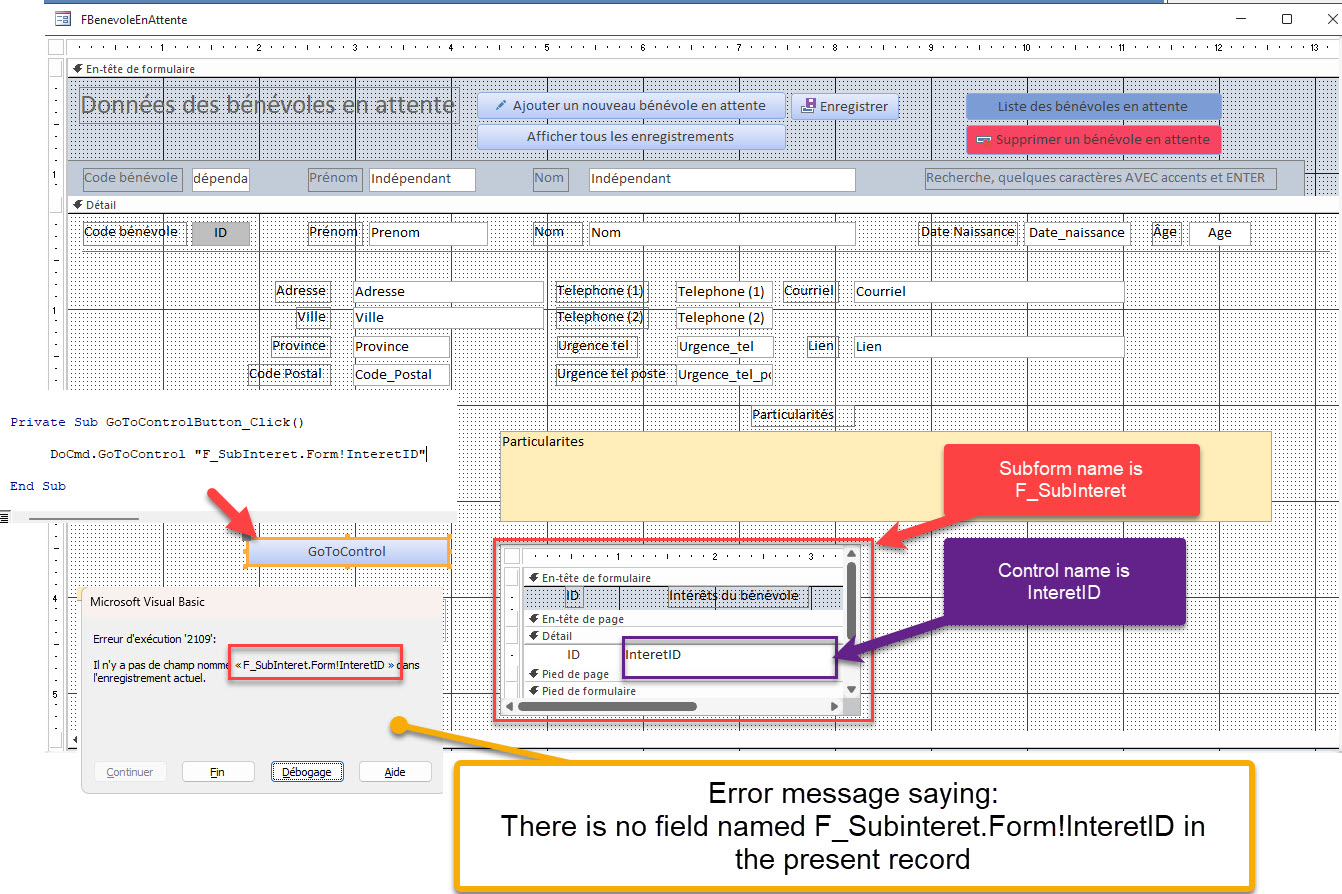
I tried to make a simple button with code that follows your suggestion for a field on a subform.
-----------------------------
Private Sub GoToControlButton_Click()
DoCmd.GoToControl "F_SubInteret.Form!InteretID"
End Sub
---------------------------------
I get an error message that says that there is no field named F_Subinteret.Form!InteretID in the present record.
I'll include a screen shot that tries to show this.
It looks like I'm doing something wrong.
Robert BlanchetteOP
@Reply 2 years ago
Kevin Robertson
@Reply 2 years ago
With DoCmd.GoToControl it has to be the actual field name.
For a field on a Subform use SetFocus.
Thanks for your input.
However, I still can't get the result I wanted in my initial post. I wanted to check if a control on a subform was null, then take some action before the record was saved.
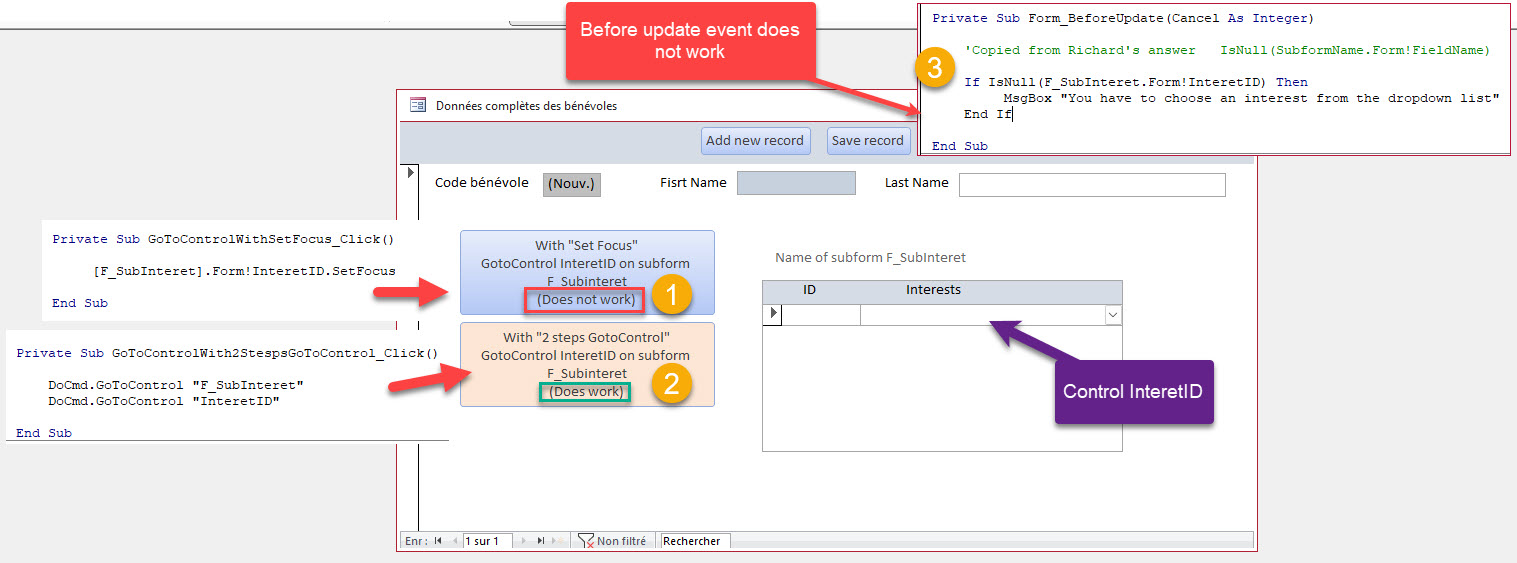
I tried your suggestions, first by simply creating buttons that would bring me to the control on the subform
1 (in yellow) DID NOT work with the "SetFocus"
2 (in yellow) DID work with the 2 steps gotocontrol
3 (in yellow) DID NOT work to check if the control on the subform was null
Please let me know what I'm doing wrong.
Thanks for your time. I'll include a screen capture and explanations on the next post.
OK, with regards to the SetFocus command, it is working. It just doesn't look like it's working. It is setting the focus on that field in that subform. However, your primary focus is still on the button that you're clicking on in the main form. So what you'd need to do is use two SetFocus commands: one to set the focus on the subform object itself, and then the second command would set the focus on the field in that form that you want. It's very similar to my two DoCmd.GoToControl commands.
Now, as far as that BeforeUpdate event goes, that will only run once the user does something in that subform record. If they don't put anything in either field, the BeforeUpdate event is never triggered. So in this particular case, what you'd have to do is check to see if there are any subform items before the user is allowed to save the parent form. This is called checking for widows and orphans. Technically, you're looking for a widow of an order that has no detail items, for example. And I happen to have a video on that. Widows & Orphans
And if you're checking to see if the field is null from the parent form, it all depends on what record the user is sitting on. So even if they add five records in the subform, if they're currently sitting on the blank new record on the bottom, it's going to return a null, so you can't just check to see if it's null. You have to check to see if there are any records related to that parent.
Robert BlanchetteOP
@Reply 2 years ago
Thanks very much for the time you spent helping me on this. I really appreciate.
Keep up the good work.
Sorry, only students may add comments.
Click here for more
information on how you can set up an account.
If you are a Visitor, go ahead and post your reply as a
new comment, and we'll move it here for you
once it's approved. Be sure to use the same name and email address.
This thread is now CLOSED. If you wish to comment, start a NEW discussion in
Access Developer 2.