Free Lessons
Courses
Seminars
TechHelp
Fast Tips
Templates
Topic Index
Forum
ABCD
 
Home   Courses   TechHelp   Forums   Help   Contact   Merch   Join   Order   Logon  
 
Back to Access Forum    Comments List
Upload Images   @Reply   Bookmark    Link   Email   Next Unseen 
SubForm Based on Query
Stephen Gledhill 
     
2 years ago
Hi, I'm new to the forum, so be gentle on me!
I am working my way through all the Access lessons (currently at Expert 22) and my aim is to become proficient enough to convert a database I use to run my small business which I wrote many many years ago using Ffenics (formerly DataEase).
At the moment, I am trying to build an order entry system using an "Orders" Primary table, and a subform for the order items. The subform is based on a query which pulls in data from tblOrders, tblOrderItems and tbl Products.
Following all the advice in the lessons, I am using a Query because of a few calculations (total value, total weight), and the three tables.
However, the output from the Query is not editable. When I try to use the subform, it displays the existing sales data without problem, but I can't enter new orders of course.
I have watched all the Tech Help videos as well as the lessons, but I just can't work out how to get the order entry to work.
Can you help?
Sami Shamma  @Reply  
             
2 years ago
The causes for this are explained in this video
Not Updateable

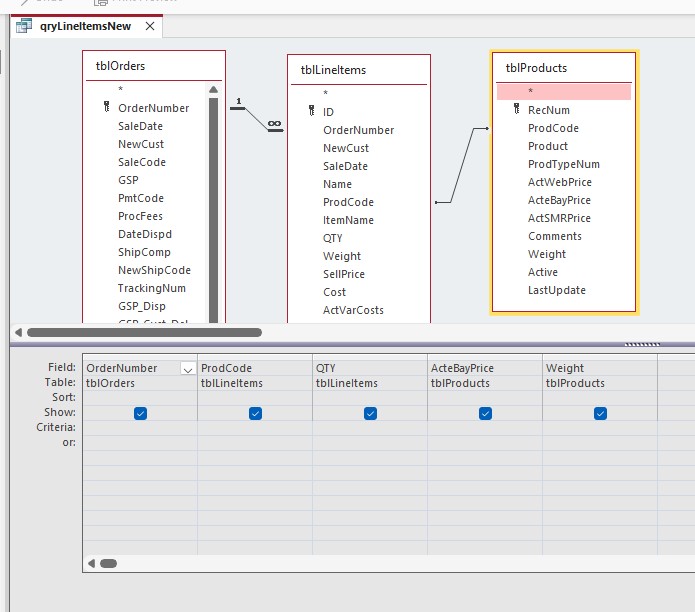
Also send an image of the query in design layout
Stephen Gledhill OP  @Reply  
     
2 years ago

Stephen Gledhill OP  @Reply  
     
2 years ago
Thanks for the very fast reply Shami.
I have watched the "Not Updateable" video, and the Trouble-shooter too.
I have attached the query as requested.
Kevin Robertson  @Reply  
          
2 years ago
Take a look at Invoicing where Richard shows how to build an order entry system.
John Davy  @Reply  
         
2 years ago
Hi Stephen
I highly recommend that you follow Kevin's advice. It will help you greatly.

John
Stephen Gledhill OP  @Reply  
     
2 years ago
Thanks guys.
I have been through the Invoicing video, but the order items subform was very basic, based on a single table, so didn't have a combo box to lookup the product and price from the Products table, etc. I will go through it again though.
Kevin Yip  @Reply  
     
2 years ago
Hi Stephen, a data entry form should be based on a single table, not a query, to avoid the form being non-updateable.  I know you want a query to include fields from other tables, but you can do that without using a query.  You can use combo boxes, DLookup(), etc., and other methods to bring data from other tables onto the form.
Stephen Gledhill OP  @Reply  
     
2 years ago
But doesn't that go against what Richard is teaching in his lessons and Tech Help videos Kevin?
He says that any calculations should be done in a Query, not a form as in his "Invoicing" video and in Access Expert 8 classes.
Have I completely misunderstood?
I have just watched them again and he does use Queries and data from more than one form.
Kevin Yip  @Reply  
     
2 years ago
He has also said a data entry form should be based on a single table, although I can't recall where he said it.  Calculations in a query do not necessarily make a query non-updateable.  If it's non-updateable, then you have to make changes in order to enter data.  And the best way is to use a single table for a data entry form.
Stephen Gledhill OP  @Reply  
     
2 years ago
So in my case then, I would have to do the data entry in 3 steps somehow?
Data-entry form 1 to add order info
Data-entry form 2 to add product info
Data-entry form 3 to add line item info
It seems like a lot of work - do you know of any videos that show you how to do this?
Acess is obviously very different to my current database where the process is really easy with just a primary form and subform.
Kevin Yip  @Reply  
     
2 years ago
That is exactly what I'm suggesting: separate data entry forms for separate tables.  Order form and order line-item form can be combined into one form, in a main form-subform setup -- but main form should be based on a single table, subform based on a single table.  Products should be on a different form, customers should be on a different form, etc.  You can have forms open one another to make for a better user experience.  For instance, on the order form, make a little button for the user to open up the customer form to add/edit customers.

Yes, you may need to do (much) more work at your end as a developer, but it is the end-user experience that counts.  If you have to spend twice the time to develop something that will enable your users to get things done in half the time, what would you do?  Exactly.  Your time spent on development is only a one-time occurrence, but the time your users spend on using your app will be *recurring* (weeks, months, years).  So you always try to minimize the users' time, not your time.  If your boss tells you otherwise, tell him what I just told you: double your development time, and you will halve your users' computing time and double their productivity.
Stephen Gledhill OP  @Reply  
     
2 years ago

Stephen Gledhill OP  @Reply  
     
2 years ago
Thanks Kevin
To be honest, it's the end-user I'm worried about, I'm not worried about my development time (it's my small company).
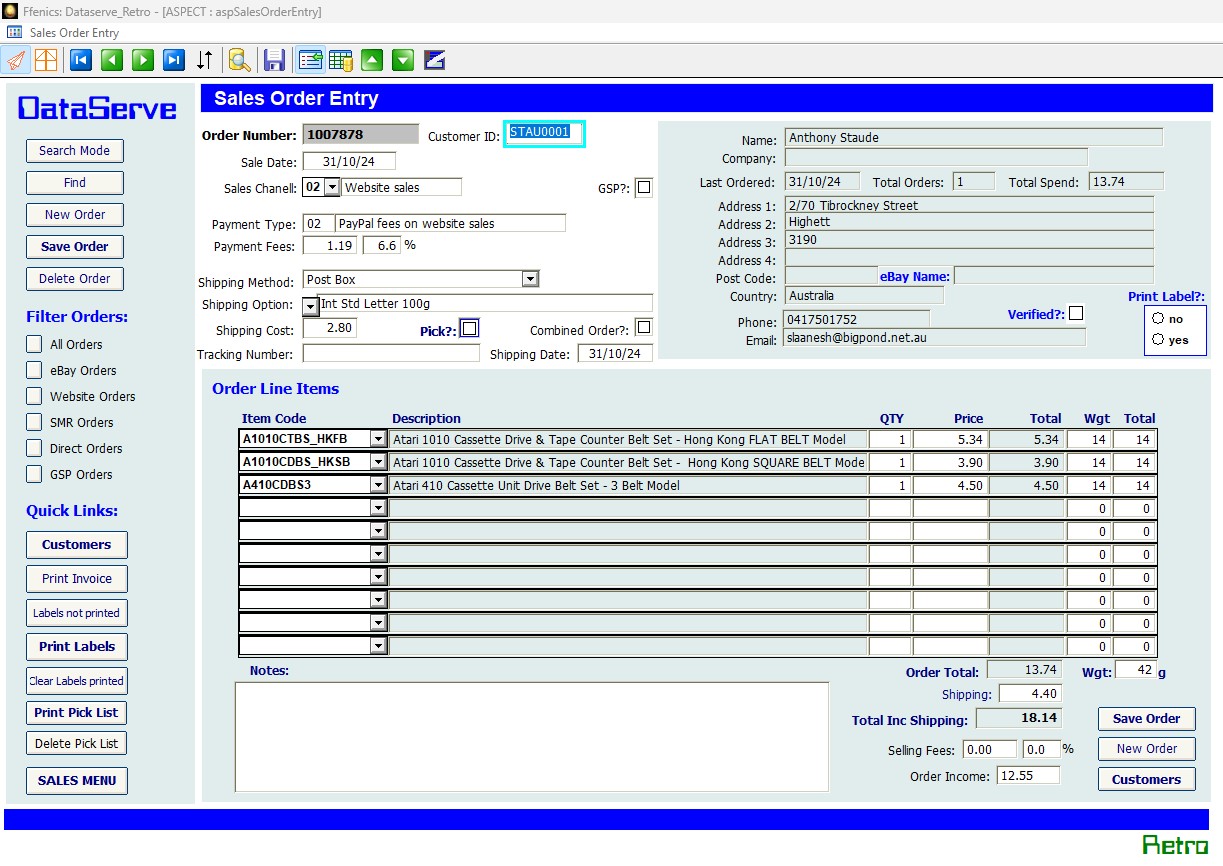
In my current system (attached screenshot), they have just one form (with two subforms) to open. The primary Orders form pulls information from the Orders table and the Customers table. There's a button to jump to the full Customers form if the customer doesn't currently exist.
The Line Items subform pulls from the Orders table and the Products table.
This Priary / subform / subforms works really well - it draws and saves data instantly during data entry, and is equally fast when using it to search for records.
I just don't seem to be able to do the same (or better) with Access. I'm struggling to see how to link the customer to a sales order and a product without joins between the three tables.
I'll keep researching,  but every tutorial I find (either Richard's or others) do it the same way with a query to pull from the three tables and perform the calculations.
Kevin Yip  @Reply  
     
2 years ago
In my old job where I used Access for exactly this kind of thing, my order line item table had its own "line item message" field.  When the user selected a product from the combo box, the product description was copied from the combo box's Column property to the "line item message" field, so the user could see the description, plus any additional info from other tables that DLookup() could get if I chose to.  What's more, the user could add additional line item message into the order, since it was part of the table.  That would be one way to do it with just a single table.
Stephen Gledhill OP  @Reply  
     
2 years ago
Sorry for the late reply Kevin, been tied up with other things (house moves) for a good few days.
Thanks for your suggestion, I'll go away and try a completely different approach as you suggest.
One question though - do you find that DLookUp() slows things up a lot?
Kevin Yip  @Reply  
     
2 years ago
Your user won't notice the slowness of DLookup in that instance because DLookup runs during data entry, when there are pauses between the user entering one field and the next.  Unless your user types faster than the time it takes for DLookup to run (which is usually less than a second), then your user won't notice the difference.  The slowness of DLookup (and other domain aggregate functions) is much more noticeable when it runs hundreds or thousands of times in succession, such as in a query.

This thread is now CLOSED. If you wish to comment, start a NEW discussion in Access Forum.
 

Next Unseen

 
New Feature: Comment Live View


The following is a paid advertisement
Computer Learning Zone is not responsible for any content shown or offers made by these ads.
 

Learn
 
Access - index
Excel - index
Word - index
Windows - index
PowerPoint - index
Photoshop - index
Visual Basic - index
ASP - index
Seminars
More...
Customers
 
Login
My Account
My Courses
Lost Password
Memberships
Student Databases
Change Email
Info
 
Latest News
New Releases
User Forums
Topic Glossary
Tips & Tricks
Search The Site
Code Vault
Collapse Menus
Help
 
Customer Support
Web Site Tour
FAQs
TechHelp
Consulting Services
About
 
Background
Testimonials
Jobs
Affiliate Program
Richard Rost
Free Lessons
Mailing List
PCResale.NET
Order
 
Video Tutorials
Handbooks
Memberships
Learning Connection
Idiot's Guide to Excel
Volume Discounts
Payment Info
Shipping
Terms of Sale
Contact
 
Contact Info
Support Policy
Mailing Address
Phone Number
Fax Number
Course Survey
Email Richard
[email protected]
Blog RSS Feed    YouTube Channel

LinkedIn
Copyright 2026 by Computer Learning Zone, Amicron, and Richard Rost. All Rights Reserved. Current Time: 6/16/2026 2:55:02 PM. PLT: 2s