Free Lessons
Courses
Seminars
TechHelp
Fast Tips
Templates
Topic Index
Forum
ABCD
 
Home   Courses   TechHelp   Forums   Help   Contact   Merch   Join   Order   Logon  
 
Back to Access Forum    Comments List
Upload Images   @Reply   Bookmark    Link   Email   Next Unseen 
Sorting in an aggregate query
Karen Wilfong 
    
2 years ago
The query that is run on my size_namefilter control looks like this:

SELECT [size_name]
FROM TBLonesies
GROUP BY [size_name]
HAVING [size_name] Is Not Null
ORDER BY [size_name];  

I don't want to order by size_name because it is not the natural order of my sizes (it orders them alphabetically).  In my table I have a unique, auto-sequential field named "sortby". Every record in my table is entered in the correct order according to size (newborn through 4T).

So If I can somehow sort my filter using the sortby column, the size_namefilter would be sorted correctly (beginning with Newborn, etc.).

I don't know how to add a field in this type of query. I've tried adding sortby to both the select and group by, but each combination of this is unique so it does not restrict it to the 20 sizes that I have.  

I don't know if this makes sense or if I'm wording this correctly. This week is the first time I have used Access in well over 10 years!
Kevin Robertson  @Reply  
          
2 years ago
Please post a screenshot of your Query.
Kevin Robertson  @Reply  
          
2 years ago
Can you set up your Combo Box like this?

Example:

Combo Box Row Source
   SELECT [SortBy], [size_name] FROM TBLonesies WHERE [size_name] Is Not Null ORDER BY [SortBy];

Column Count: 2
Column Widths: 0";2"

Change the width of the second column to suit your Combo Box width.
Karen Wilfong OP  @Reply  
    
2 years ago
Richard states in his video that it needs to be an aggregate query. This is part of the members cut video I watched on "Find Record Combo".  He said the query also needs to include "HAVING ... " to work with the updatefilter() function.

I copy/pasted the query so not sure why you need a screenshot? The query works as is.  It is just not sorting the way I want it to.
Karen Wilfong OP  @Reply  
    
2 years ago

Karen Wilfong OP  @Reply  
    
2 years ago
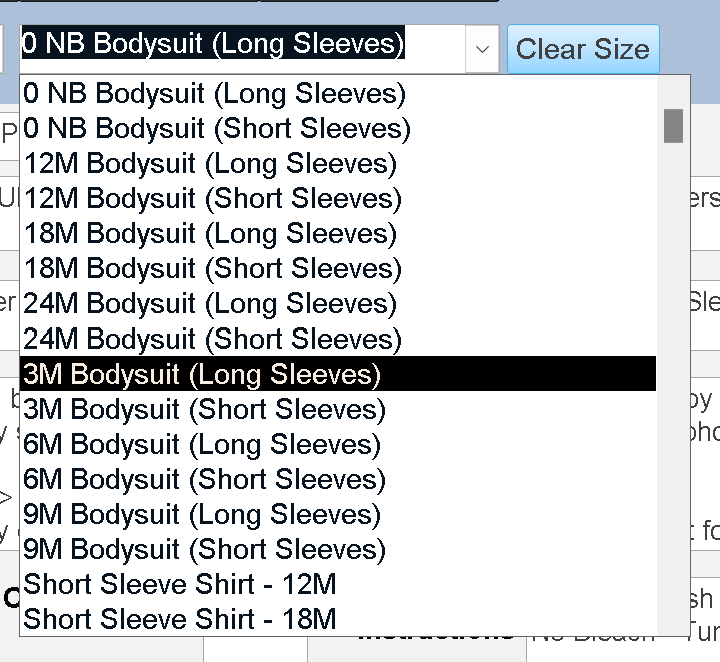
This is how it looks now.  At least the short and long sleeve versions of the same size are together.  

Kevin Robertson  @Reply  
          
2 years ago
I have played with the stock database and couldn't get the Combo Box to sort the way I wanted.
In my opinion a better way to filter the form would be to build an SQL statement that feeds the Record Source of the Form.
This method will give you more control.
Karen Wilfong OP  @Reply  
    
2 years ago
Well, that is the problem. I need this type of query to work with this very unique filter I have.  Not sure if I can ask Richard directly since he built the code.
John Davy  @Reply  
         
2 years ago
I am not sure which of Richard's videos you are looking at; however, Expert 11 lesson 02 might help
John
Karen Wilfong OP  @Reply  
    
2 years ago
Thanks but I don't have access to that at my level.
The video is Find Record Combo Box Extended Cut
Kevin Yip  @Reply  
     
2 years ago
Hi Karen, if you want to add the sortby field without using GROUP BY on it, you can use an aggregate function on it.  In an aggregate query, every field needs to be either (a) in a GROUP BY, or (b) in an aggregate function.  Once the field is added, you can sort it with ORDER BY.   E.g.:

     SELECT size_name, First(sortby), ... FROM ... GROUP BY size_name ... ORDER BY First(sortby)

The caveat is that you need to order by First(sortby), not sortby.  But that's just a minor inconvenience.
Richard Rost  @Reply  
          
2 years ago
If you have to put multiple items together, then use the aggregate query first. Then, once you've got that one put together, you can build a second query based on the first one and do your sorting in there. Then, once you've got them aggregated, you can bring them back together again and pull in your custom sort order. I need to see a sample of some of your table data in order to give you the best advice.
Karen Wilfong OP  @Reply  
    
2 years ago
Kevin's idea sort of worked. However, the sizes were still not in the correct order.
But it got me thinking and trying a few things till I came up with this instead (which works perfect).

SELECT size_name, min(sortby) FROM TBLonesies GROUP BY size_name ORDER BY min(sortby);

In each of my designs, the parent SKU does not have a size_name, so it will return as a blank line (null) at the top of the list.  I got to thinking that's actually okay because then I can navigate to the parent SKU (if it's blank, that means it's the parent).

If I added Richards suggested code it would not return the null one in the set:
HAVING [size_name] Is Not Null

I wonder if there is a way to return a different field (specifically item_SKU) if size_name is null.  That is likely asking too much!

But at least now all of my sizes are in the correct order. Thanks!
Karen Wilfong OP  @Reply  
    
2 years ago
Or even just the word "Parent SKU"?
Karen Wilfong OP  @Reply  
    
2 years ago
Well .. it does not actually work the way I thought it would.  

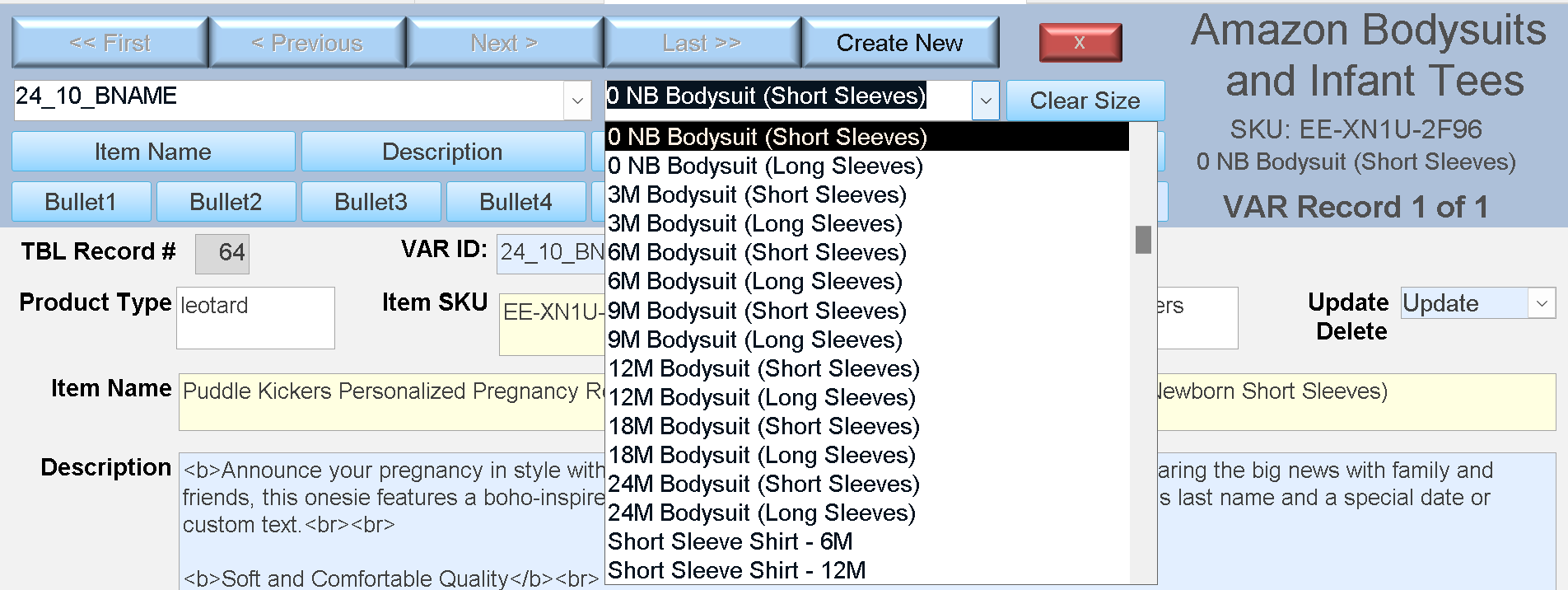
It IS pulling up all of my sizes, in the correct order, and will display the correct record if I click on a size (and it already exists), but when I begin a new VAR_ID, all of the sizes are present in the list, before I even create them.  So, it's not filtering based on the first filter "VAR_IDfilter".

I'm thinking about what you said Richard and will try to sort some of that out myself.  If I need to send a sample of my table data how would I do that?

So basically if the size I'm looking for already exists within the new VAR_ID, then it will take me to the correct record, but if it does NOT yet exist, it displays a new record. I'm trying to work some of this out on my own but it's obviously above my skill level.

Richard Rost  @Reply  
          
2 years ago
Post images of your data here along with what you want things to look like... Mock it up in Excel if you want. Helps if we can see it. Remember, we don't know your database.
Karen Wilfong OP  @Reply  
    
2 years ago

Karen Wilfong OP  @Reply  
    
2 years ago

Karen Wilfong OP  @Reply  
    
2 years ago

Karen Wilfong OP  @Reply  
    
2 years ago
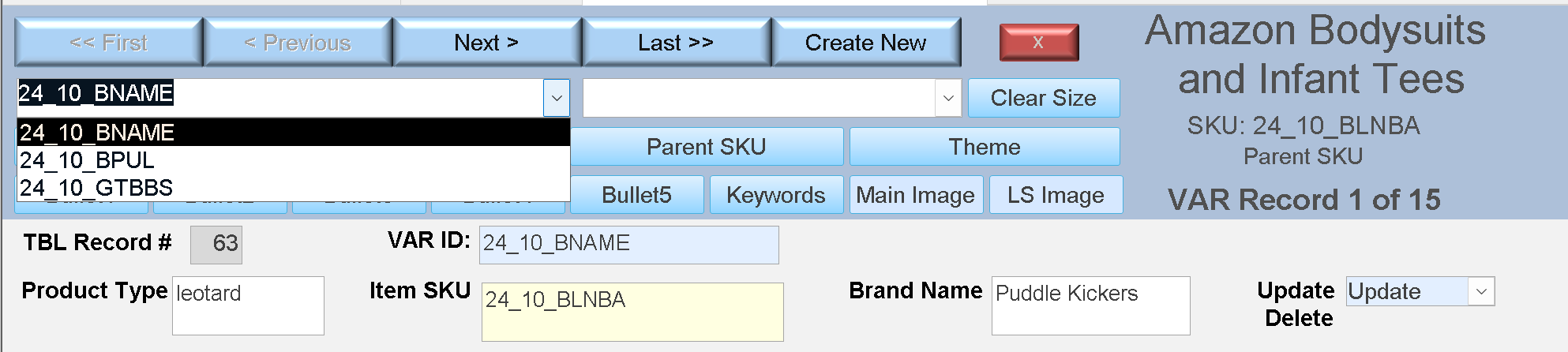
In my header I have all my controls to make data insertion easy for me.  The first dropdown field is VAR_IDfilter and that currently has the VAR_ID 24_10_BNAME.  The 2nd dropdown is size_namefilter.  I was thinking this would only show records that were assigned to the VAR_ID.  They do work with each VAR_ID as they should, but if a size is on the list that is not yet been created, then I just get a New Record.
Karen Wilfong OP  @Reply  
    
2 years ago
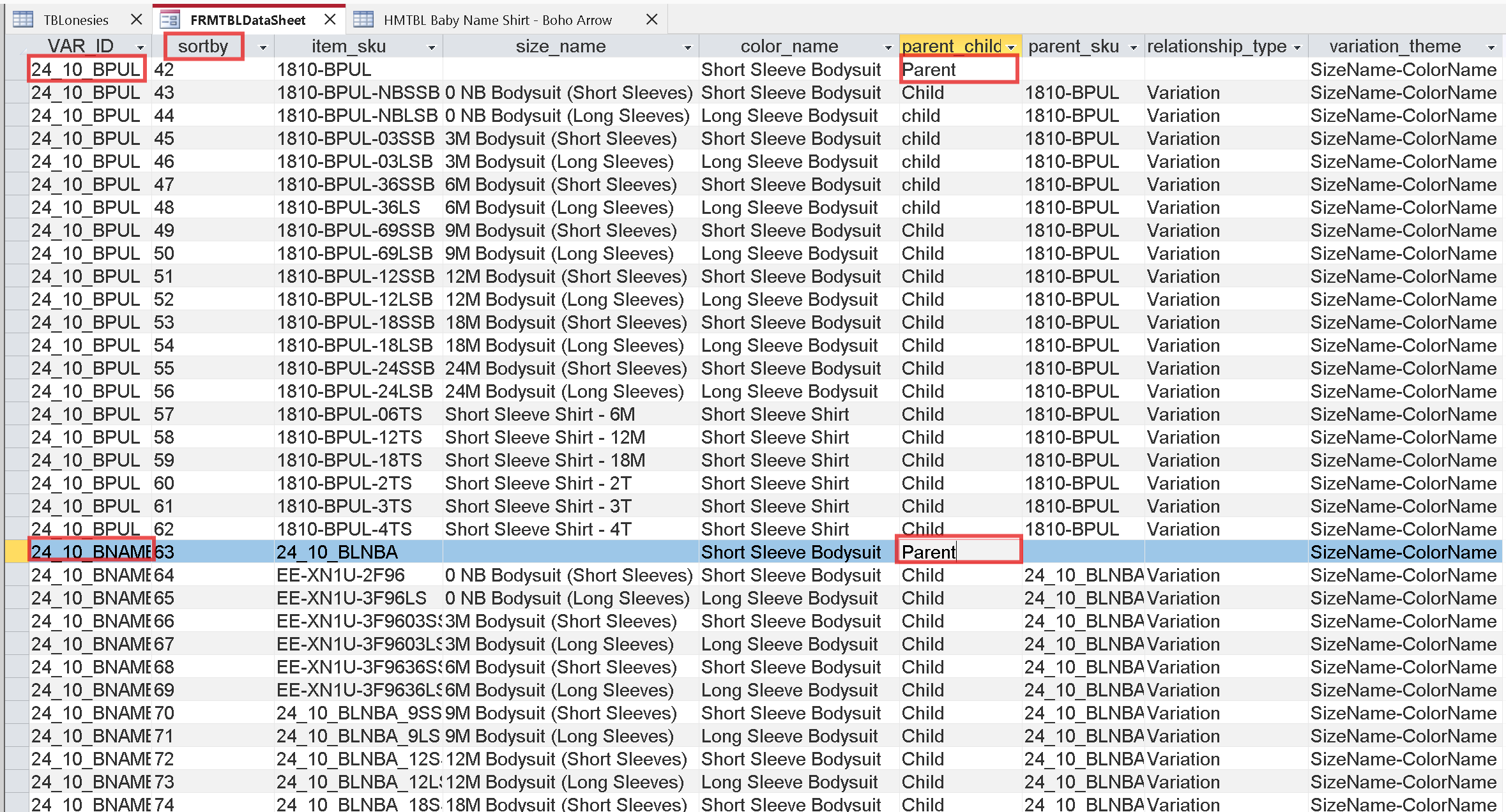
some of the SKU names are very old 10+ years and were assigned by Amazon. I now make my own SKU names to be more meaningful to me.
Karen Wilfong OP  @Reply  
    
2 years ago
VAR_ID and sortby are my added column names.  The rest are Amazon columns (only showing the ones that will help you see what I'm doing, there are 64 total fields required for the excel sheet).
Karen Wilfong OP  @Reply  
    
2 years ago
The reason there are only 15 records for the VAR_ID I screenshot is because I don't make infant t-shirts for this particular design. So 7 short sleeve records, 7 long sleeve records and 1 parent makes 15 records (in the top right corner I added a label to show the current record count).  But the shirt sizes still show up on the list.
Kevin Yip  @Reply  
     
2 years ago
In my old job (also in the garment industry), we assigned a size code to each garment, and each size code represented a group of sizes (e.g. S/M/L), not just a single size.  So we would know in advance what sizes a particular garment would have before a size was even created.  We would know a tank top would be cut in small, medium, and large before those sizes were made.  Such a system would benefit you here.  If you have to wait till a size is actually in the system first before you can do anything, that may be a flaw in the system.  In your business, you should already know what sizes to cut very early in the production.  So the size info should be in your system early on.
Kevin Yip  @Reply  
     
2 years ago
In our system, our sizes were not created in our database till we made UPC barcodes, which was usually very late in our production cycle.

The best system for you is largely determined by your business needs, and the right database implementation (table structure, relationship, etc.) to best suit those needs.
Karen Wilfong OP  @Reply  
    
2 years ago
The data I am using does not affect order production.  This is for creating a new listing on Amazon (or updating an existing one).  I make the designs myself (in Corel Draw or Adobe PS), I make mockup images for each of the sizes, and write the title, description, bullet points and backend keywords for each new listing.  I am fulfilled by merchant (not FBA).

This data is only uploaded once and done.  I never use this information again after receiving an order (unless I want to change my bullet points or keywords or something).  I have another system for fulfilling the orders. I print designs on the bodysuit/shirt in my home studio after an order is placed, not before. So I don't stock any inventory other than blank shirts.

I have listings dating back to when I first started selling on Amazon (2012?). And they are out of date.  If they don't comply with the latest TOS Amazon starts removing parts of the listing.  So I need to go through every listing (hundreds) and each listing has up to 20 variations (sizes/colors) to update and refresh those listings.

I absolutely hate working with an excel sheet for this.  So I decided to make a form to enter the data before pasting it into my excel sheet.
Karen Wilfong OP  @Reply  
    
2 years ago
However I get what you mean.  Most of my designs will go on all 20 sizes (including the shirts).  Some designs are strictly for babies, like pregnancy announcement onesies and things like that so I don't add the shirt.

It doesn't bother me to see the entire list of 20 sizes.  I can live with it.  I'll try adding more of my designs and see what, if any, disruption this creates for me.  

One thing is, 90% of the fields are exactly the same for each variation.  Those could be prefilled as soon as I begin (I put them as defaults in the form, but if I add the sizes more quickly in the table then those defaults are never entered).  This is where my table structure is likely lacking in efficiency).
Kevin Yip  @Reply  
     
2 years ago
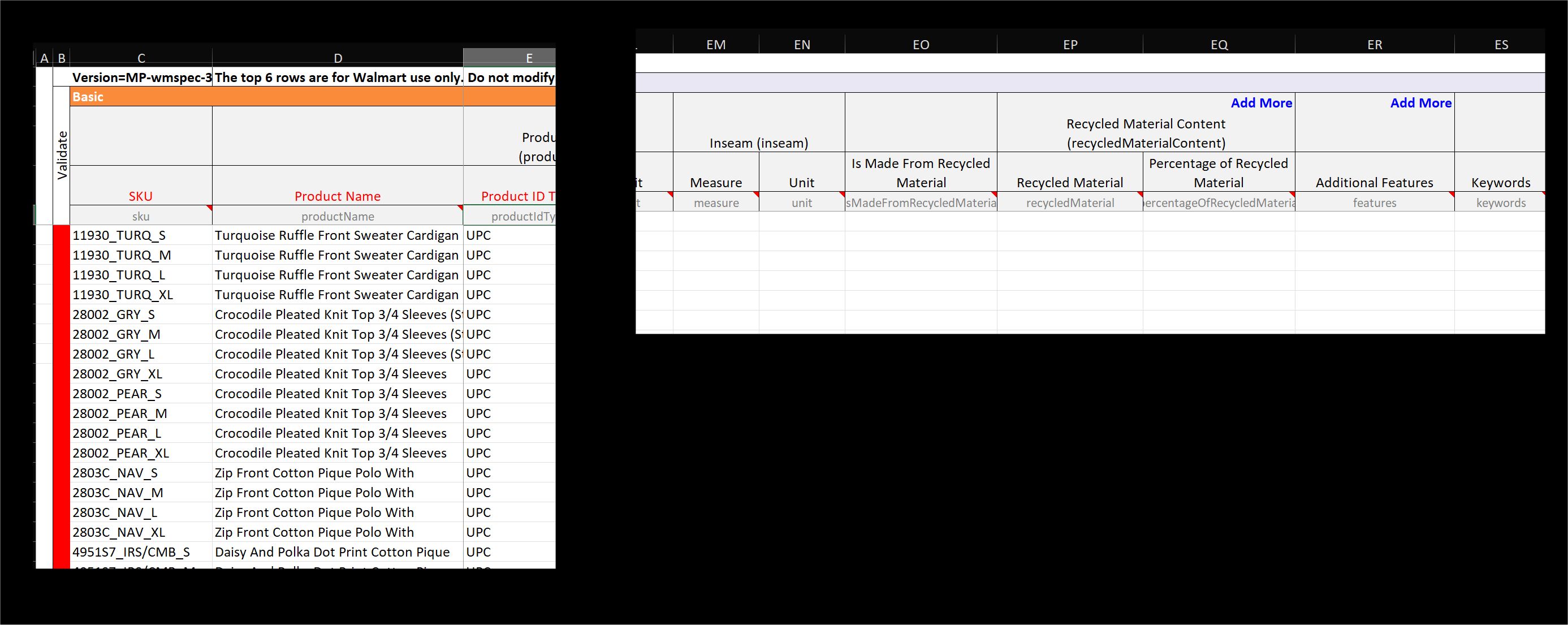
We did something like that too in my job, but with Walmart.  We would export our product data from Access to Excel, then upload the data to Walmart (see picture below), and our products would appear on Walmart's website.  But these data were for export only and used only once, like you said.  No one would do anything more with it afterwards, like sorting, or even making an Access frontend like you are doing.  These data are unstructured and hard to work with, hence all these difficulties you are experiencing.  If you need to do anything with these data, you need to do it *before or while* you are exporting for Amazon.  In my job, I had one big VBA procedure to check for compliance (no blank fields, valid data, etc.) and then export to Excel.  We hardly looked at the Excel sheet -- which spanned up to column ES as shown below, and was not really intended for the user to actually use.
Kevin Yip  @Reply  
     
2 years ago

Karen Wilfong OP  @Reply  
    
2 years ago
With my listings, I make all of my items myself, in my home studio. Since they are uniquely mine, I am the only person who can list on my Amazon listing. Back in the day I had to constantly defend myself from hijackers, but I am brand registered now so they can't do it anymore.

Because I am the original creator, I have to write my own Titles, Descriptions, 5 Bullet Points, backend Keywords, and also describe what needs to go in the various fields (sleeve length, variation type, material, etc ... everything).  I have a little "chat" with ChatGPT to help me with some of these fields (namely creating the title, description, bullet points and keywords to be SEO friendly and good search terms, etc.).  It is very helpful.

The Amazon excel sheet that they give me has 255 fields on it.  I was able to remove all but the 60ish fields that I need to enter my data.  I really like the form I built in Access, it makes my life much easier.

It's just a whole lot easier to have all the data on one page rather than scrolling in thin lines across a spreadsheet.
Karen Wilfong OP  @Reply  
    
2 years ago
So basically I'm a one-woman show here. I wear every single hat from listing to shipping (no employees) - including figuring out how to build this Access form :). You guys have been so helpful and I really appreciate all of your input!
Karen Wilfong OP  @Reply  
    
2 years ago
Soooo.  I am thinking, in my particular case would it be a cardinal sin to put my default field data (the data that is the same for every listing no matter the size or design) .. right in the table defaults?  Then I can tweak each size in the form as needed.
Richard Rost  @Reply  
          
2 years ago
That's not a sin at all... it's what those default values are for. :)

This thread is now CLOSED. If you wish to comment, start a NEW discussion in Access Forum.
 

Next Unseen

 
New Feature: Comment Live View


The following is a paid advertisement
Computer Learning Zone is not responsible for any content shown or offers made by these ads.
 

Learn
 
Access - index
Excel - index
Word - index
Windows - index
PowerPoint - index
Photoshop - index
Visual Basic - index
ASP - index
Seminars
More...
Customers
 
Login
My Account
My Courses
Lost Password
Memberships
Student Databases
Change Email
Info
 
Latest News
New Releases
User Forums
Topic Glossary
Tips & Tricks
Search The Site
Code Vault
Collapse Menus
Help
 
Customer Support
Web Site Tour
FAQs
TechHelp
Consulting Services
About
 
Background
Testimonials
Jobs
Affiliate Program
Richard Rost
Free Lessons
Mailing List
PCResale.NET
Order
 
Video Tutorials
Handbooks
Memberships
Learning Connection
Idiot's Guide to Excel
Volume Discounts
Payment Info
Shipping
Terms of Sale
Contact
 
Contact Info
Support Policy
Mailing Address
Phone Number
Fax Number
Course Survey
Email Richard
[email protected]
Blog RSS Feed    YouTube Channel

LinkedIn
Copyright 2026 by Computer Learning Zone, Amicron, and Richard Rost. All Rights Reserved. Current Time: 5/2/2026 7:11:31 AM. PLT: 1s