Free Lessons
Courses
Seminars
TechHelp
Fast Tips
Templates
Topic Index
Forum
ABCD
 
Home   Courses   TechHelp   Forums   Help   Contact   Merch   Join   Order   Logon  
 
Back to Access Forum    Comments List
Upload Images   @Reply   Bookmark    Link   Email   Next Unseen 
Locked by user Admin on machine
Robert Valentin 
     
2 years ago
Hi:

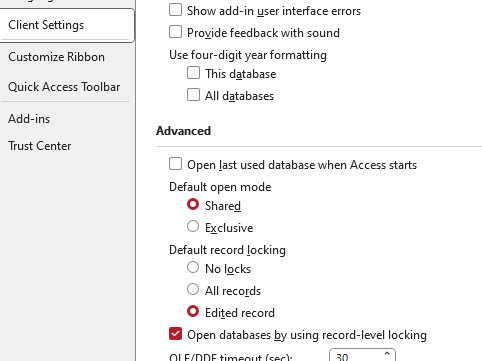
My application is split in BE (Database) shared on 1 machine and FE (App) installed in (1) machine with same Office 365 Access version and the DB is setup shared and no locks and also on all the forms i used no locks.

Suddenly working with records i noticed that on the left bottom of the screen the word "Calculating" stays there for long time and then i get the error on both machines  
Could not update;currently locked by user 'Admin' on machine [PC Name1 and PC Name2].

I check all the permissions on the folders and now Everyone also has full access etc but get the same error i was thinking of an access error with the DB lock file that a second user can override etc.

Working on machine 1 that has the DB and App installed locally everything works fine.

I will appreciate if someone has encounter this same situation that can provide me links or any information on how to resolve or workaround this situation.

Thanks,
Robert
Richard Rost  @Reply  
          
2 years ago
Sounds like a network issue. Wireless or wired?

And why do you not have record locks on? You should have record-level locking ON and set it to lock edited records. See: Record Locks
Richard Rost  @Reply  
          
2 years ago

Robert Valentin OP  @Reply  
     
2 years ago
Ric thanks for your fast response. I'm on wireless beside the router on the same room with 2-3 feet of each machine.
I have the BE DB configured before the same way you show on the screenshot and was getting the error message so i will reverse those changes back to the one's shown. I'm thinking if there's something wrong with the BE DB Lock file.
Richard Rost  @Reply  
          
2 years ago
I've said many times that running Access over a WIRELESS network can cause issues. I have done it before, yes, but unless your network is PERFECT, you're going to run in to issues. Access likes a constant clean connection. Any drop or latency will cause issues. If they're that close, get a cheap router and string some cable between them (or you might even be able to plug them both into your wireless router).
Robert Valentin OP  @Reply  
     
2 years ago
Thx again and yes i have heard the wireless issues with access but on a client that has to moved with a surface between each patient room we installed (4) Google Wifi Nest Pro Routers to cover the floor with good signal.
I just saw your Record Locks video and recommendations so i will change the form and sub-forms to record lock on "edited record" and set back the BE DB parameters as before because as you mention the default is "No Locks" so even if you change the parameter after the forms were created and saved on the BE DB the form record lock parameter is the is the one that persist at the end.
Thanks a lot and I will let you know the results after the changes.
Robert Valentin OP  @Reply  
     
2 years ago
Ric I just make all the changes to the BE DB and the primary patients form to have also the record locking set to "edited record" and make some testing simulating (3) FE and looks OK so it looks that the form locking parameter is the one that persist over the BE DB locking parameters. Tomorrow i will make some more testing so i want to appreciate your tips with this issue with my 1st time posting on the forum.
Richard Rost  @Reply  
          
2 years ago
Sounds good. Let me know how it goes. I'm going to be gone tomorrow and all weekend, but I'll be back Monday.
Robert Valentin OP  @Reply  
     
2 years ago
Ric test are just fine i have to uncheck the "open databases by user record-level locking" because i have a table with 12 patients and when i access record #1, record #7 and record #12 on different machines and edit record #12 it locks record #7 and when i save #7 is unlock and when i edit record #1 it locks record #7 and is unlock when i save record #1 so i remember on the video that you mention that access use big pages to store more than the record selected to make the find record faster so i uncheck that option.
Looks better but sometimes i edit a record and on one of the other machines their record turn "lock" but i can deal with that.
So thanks again and i appreciate your time

This thread is now CLOSED. If you wish to comment, start a NEW discussion in Access Forum.
 

Next Unseen

 
New Feature: Comment Live View


The following is a paid advertisement
Computer Learning Zone is not responsible for any content shown or offers made by these ads.
 

Learn
 
Access - index
Excel - index
Word - index
Windows - index
PowerPoint - index
Photoshop - index
Visual Basic - index
ASP - index
Seminars
More...
Customers
 
Login
My Account
My Courses
Lost Password
Memberships
Student Databases
Change Email
Info
 
Latest News
New Releases
User Forums
Topic Glossary
Tips & Tricks
Search The Site
Code Vault
Collapse Menus
Help
 
Customer Support
Web Site Tour
FAQs
TechHelp
Consulting Services
About
 
Background
Testimonials
Jobs
Affiliate Program
Richard Rost
Free Lessons
Mailing List
PCResale.NET
Order
 
Video Tutorials
Handbooks
Memberships
Learning Connection
Idiot's Guide to Excel
Volume Discounts
Payment Info
Shipping
Terms of Sale
Contact
 
Contact Info
Support Policy
Mailing Address
Phone Number
Fax Number
Course Survey
Email Richard
[email protected]
Blog RSS Feed    YouTube Channel

LinkedIn
Copyright 2026 by Computer Learning Zone, Amicron, and Richard Rost. All Rights Reserved. Current Time: 4/30/2026 6:52:44 PM. PLT: 0s