Free Lessons
Courses
Seminars
TechHelp
Fast Tips
Templates
Topic Index
Forum
ABCD
 
Home   Courses   TechHelp   Forums   Help   Contact   Merch   Join   Order   Logon  
 
Back to Access Forum    Comments List
Upload Images   @Reply   Bookmark    Link   Email   Next Unseen 
Required fields stop macros error
Debra Triolo 
     
2 years ago
I posted this in the wrong forum so I am reposting it here.

I was not sure exactly what to call this... so let me explain.  I have a form in my database where the user can enter a new record. I have set up some of the fields via VBA code to be "required" and they work great with one exception.  I have buttons at the top of my form that enable the user to save and go to Main Task List, and save and go to Main Menu.  There is also a SAVE button and an Add Next Record button.  If the user clicks on the Save or Add Next buttons and one of the required fields is missing- the msgbox pops up and tells them to enter the info. However, if the user hits the Main Menu button or Main Task List button it opens those new forms, then the error messages pop up asking the user to add the info, followed up an error message stopping all macros and the original add record form remains open in the background. I really want to give the user the option to go to these menus from this particular form, and I know its got to have something to do with the fact that its opening the new form and trying to save the current form at the same time... Is there a way to fix this? Sorry so long. Hope this makes sense.
Debra Triolo OP  @Reply  
     
2 years ago
Does anyone have any suggestions on how to execute this?  Saving the form checks to be sure all the required fields have been filled out.  When it goes to close the current form and go to a new form via the main menu button, for instance, if a field is missing its still opening the new form, while keeping the old one open and throwing the errors. I can't just remove the buttons, because then the user will have no way to navigate the database. I know its prob something simple that I am overthinking. Any advice?
Debra Triolo OP  @Reply  
     
2 years ago
oh in case anyone needs to know- the navigation buttons were made via the wizard.
Kevin Yip  @Reply  
     
2 years ago
The short answer is this can't be done, at least not with bound forms.  If the user hasn't entered a valid entry, he shouldn't go anywhere until he has.  This is not only how Access is designed, but how an application should be designed.  If you let the user go wherever he wants, how do you force him to go back and finish entering a valid entry?  Also, only one form can have the focus at any time.  Even if you showed the user the other forms, he wouldn't be able to click on them.
Debra Triolo OP  @Reply  
     
2 years ago
Kevin - I am not sure I am explaining the issue correctly.  What I have is a form that has some fields (like 5) which are required fields. The rest of the fields are not required. If the user hits the "save" button at the top of the form, but forgets to fill out one of the required fields- a message box pops up asking the user to please fill out the missing information.  If a user misses a required field- and just hits the "Main Menu" button, it opens the main menu form, keeps the original form open in the background, and then realizes a field was missed and the message boxes pop up. When you click on them and try and go back the error message pops up shutting down all macros.  I do not want the user to be able to go anywhere if any of those required fields are not filled out.  I want to figure out a way to prevent any of the navigation buttons from working, unless all the required fields have been filled out.  There must be a way to trigger the missing fields sooner - before the user has the opportunity to even try to leave the form... I don't know why access is even allowing the user to leave the form before the fields are filled out.
Sami Shamma  @Reply  
             
2 years ago
Debra
Try this : In the 'Main Menu' button, first line of code before you open the main menu, call the code in the 'save' button
Kevin Yip  @Reply  
     
2 years ago
Just disable the Main Menu and Save buttons until the user completes all the entries.  If the user can't click those buttons, you won't get the errors.  You need to make your buttons "contextual" in these situations.
Debra Triolo OP  @Reply  
     
2 years ago
Kevin - How would I disable the buttons until then? Sami -  I did have it "saving" the data automatically when it closes the form, but it still ignored everything and opened the new form anyway :(
Sami Shamma  @Reply  
             
2 years ago
Debra

Start the "MainMenu" Button as disabled. Once the "Save" button is successful, then set the MainMenu Button Disabled to "False"
Kevin Yip  @Reply  
     
2 years ago

You change a button's Enabled property to true or false to enable or disable it.  A disabled control is greyed out.

You need to disable the Save button when there is nothing to be saved -- when the user first opens the form (form's Open event), just saved the record (save button's Click event), or just undid the changes (form's Undo event).  The user can also go anywhere in this situation, i.e. main menu button can be enabled.

The save button should be enabled whenever there are unsaved changes.  The form's BeforeInsert event is triggered if the user is adding a new record.  The form's BeforeUpdate event runs if he is editing an existing record.  This should also be the time when the user can't go anywhere else (i.e. main menu button disabled, etc.).

Depending on the complexity of your form design, there may be other events you need to code for.  The more buttons and controls that need contextualizing, the more complicated will be the code.  This is not exactly a trivial matter, and I don't know if Richard has ever covered contextualizing controls.

But I think it's quite an essential topic.  Some buttons and controls just should not be enabled in certain moments, or troublesome errors and error-handling would occur as you have seen.

This would also add quality of life for the user -- if the user sees the Save button is disabled, he knows he hasn't made any changes.
Debra Triolo OP  @Reply  
     
2 years ago
Yes, this makes a lot of sense. I will have to see if I can find out more info about this and try and see if I can put some of what you have advised into practice.  Thank you!
Kevin Yip  @Reply  
     
2 years ago
The Save button should also be disabled when the form's Current event runs.  When the user just arrives at a record, nothing needs to be saved in that record.
Richard Rost  @Reply  
          
2 years ago
You could just use an unbound form and don't commit the changes to the table until the user clicks the actual save button.
Richard Rost  @Reply  
          
2 years ago
I have another video on something similar to this coming up. Stay tuned.
Kevin Yip  @Reply  
     
2 years ago
Switching a bound form to unbound may require considerable re-coding since some of the form events only work with bound forms.  Also, whether you use bound or unbound forms, you still have to consider controlling user behavior -- by controlling when a button or control can be used.  You don't want the user clicking the Save button 100 times when there is nothing to be saved, for instance.
Debra Triolo OP  @Reply  
     
2 years ago
So far I have not found much out there on exactly how to go about doing this. As soon as I figure out something I will try and navigate back here to update you all.....
Debra Triolo OP  @Reply  
     
2 years ago
still struggling to figure out how and where to code this... did Richard post a video on this yet?
Sami Shamma  @Reply  
             
2 years ago
No not yet
Debra Triolo OP  @Reply  
     
2 years ago
I am finding some similar videos and posts online that speak about having one required field, but I have multiple required fields.
Debra Triolo OP  @Reply  
     
2 years ago
I decided to go a different way with this and am greying out all the buttons until the fields are all filled out and the save button is hit. The only thing I am stuck on now... is what to do if the user ends up on the "add new task" page by accident, or changes their mind and needs to leave the page without entering any data.....I need to figure out an 'out' so they can leave the page and return to the main menu if no fields are entered. Any suggestions? I have the code set now so when the page loads all the buttons are greyed out.
Kevin Yip  @Reply  
     
2 years ago
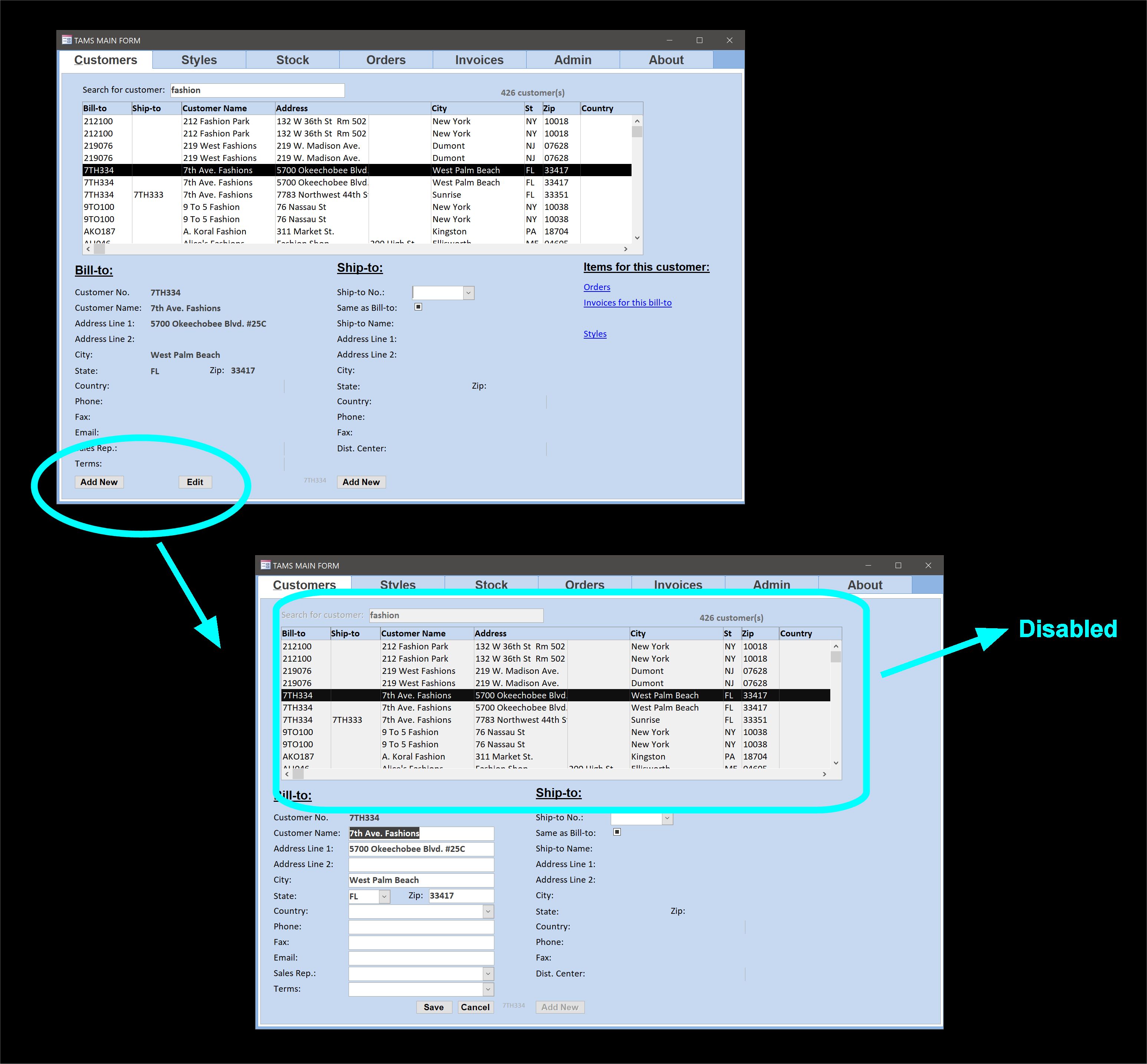
You can make a "Cancel" button, so the user can quit the form without saving.  Make a "Save" button so he can quit the form after saving.  The picture below was how I did it in my old job.  The user has to click "Add" or "Edit" to enter a new record or edit an existing one.  Once inside "edit mode," the user cannot navigate away to another record (all navigation controls disabled and greyed out) until the user click "Save" or "Cancel."

Making a form "modal" (set in the Modal property on the form's property sheet) will also force the user to stay on the form and not go anywhere else until the form is closed, either by himself manually or via code.
Kevin Yip  @Reply  
     
2 years ago

Debra Triolo OP  @Reply  
     
2 years ago
So I would just have the cancel button - on click - just close the form without saving and go back to the previous form instead? This would automatically bypass the required fields?
Debra Triolo OP  @Reply  
     
2 years ago
Ok I actually have it working. I programmed a Quit button that clears the form (if they entered anything) and then goes to the main menu without saving.  My NEXT problem that I uncovered while testing to make sure everything was working is that once the user completes the form with all the required fields filled out and the user hits save the previously greyed out buttons come back into play (which is what they are supposed to do).  HOWEVER, if the user wants to enter another record using the "Add Next Record" button, it brings up a clean form but the buttons are all active and not greyed out.  How can I have them start off as greyed out, as they did when the form was initially opened?

I hope what I am asking makes sense.  If I can get this last bit figured out- I should be able to roll out my update to my users...TIA for your help!
Kevin Robertson  @Reply  
          
2 years ago
I'm assuming you have written a Sub Routine that controls whether the Buttons are enabled or disabled. Just call this procedure in the On Current event.
Richard Rost  @Reply  
          
2 years ago
Or make a "ResetButtons" sub and call that from either your OnCurrent like KR said, or from your button code. Or both. Can't hurt.
Debra Triolo OP  @Reply  
     
2 years ago
Hi Kevin - Yes I have a sub routine in the On Load and Before and After Update for the form. I will add it to the On Current and see if that resolves it. Thank you!

Hi Richard - I am not familiar with the ResetButtons sub, but I will definitely look into that as well.

I will post and let you know how it goes. Thank you!
Sami Shamma  @Reply  
             
2 years ago
Hi Debra

ResetButtons is the name Richard gave to the sub. You can name it as you like. This way you do not repeat the code in multiple places. you put your code that manipulates the buttons in this sub, then just call it from After update, On Current etc.
Debra Triolo OP  @Reply  
     
2 years ago
The On Current worked like a charm. Thank you!

This thread is now CLOSED. If you wish to comment, start a NEW discussion in Access Forum.
 

Next Unseen

 
New Feature: Comment Live View


The following is a paid advertisement
Computer Learning Zone is not responsible for any content shown or offers made by these ads.
 

Learn
 
Access - index
Excel - index
Word - index
Windows - index
PowerPoint - index
Photoshop - index
Visual Basic - index
ASP - index
Seminars
More...
Customers
 
Login
My Account
My Courses
Lost Password
Memberships
Student Databases
Change Email
Info
 
Latest News
New Releases
User Forums
Topic Glossary
Tips & Tricks
Search The Site
Code Vault
Collapse Menus
Help
 
Customer Support
Web Site Tour
FAQs
TechHelp
Consulting Services
About
 
Background
Testimonials
Jobs
Affiliate Program
Richard Rost
Free Lessons
Mailing List
PCResale.NET
Order
 
Video Tutorials
Handbooks
Memberships
Learning Connection
Idiot's Guide to Excel
Volume Discounts
Payment Info
Shipping
Terms of Sale
Contact
 
Contact Info
Support Policy
Mailing Address
Phone Number
Fax Number
Course Survey
Email Richard
[email protected]
Blog RSS Feed    YouTube Channel

LinkedIn
Copyright 2026 by Computer Learning Zone, Amicron, and Richard Rost. All Rights Reserved. Current Time: 5/6/2026 12:53:42 PM. PLT: 0s