Free Lessons
Courses
Seminars
TechHelp
Fast Tips
Templates
Topic Index
Forum
ABCD
 
Home   Courses   TechHelp   Forums   Help   Contact   Merch   Join   Order   Logon  
 
Back to Access Forum    Comments List
Upload Images   @Reply   Bookmark    Link   Email   Next Unseen 
Decimals as inches
Todd Clapp 
    
2 years ago
I'm looking for a good resource on how to display decimals as inches with fractions in a form. Also, if a user inserts 4 1/2 in a form can it be converted to 4.5 before saving to the table?
Alex Hedley  @Reply  
           
2 years ago
Could create your own Function to convert it

Create Function
F to C
Alex Hedley  @Reply  
           
2 years ago
Todd Clapp OP  @Reply  
    
2 years ago
Thanks Alex
Kevin Yip  @Reply  
     
2 years ago
Excel has the built-in feature of converting decimals to fractions and vice versa, but sadly Access doesn't have it, so you have to create a custom function yourself as Alex suggested.  To code this for every conceivable fraction would be a daunting task, so I propose a simpler solution: create a "lookup table" that contains your most often used fractions:

FracFormat     DecValue
0              0
1/2            0.5
1/3            0.333333
2/3            0.666667
1/4            0.25
2/4            0.5
3/4            0.75
.
.
1/8            0.125
2/8            0.25
3/8            0.375
.
.
14/16           0.875
15/16           0.9375
Etc.

Then you create a custom function to look up the table (using OpenRecordset) to find the fraction of a decimal, or the decimal of a fraction.

You also need to take the user entry's precision into account.  Whether the user enters 0.333 or 0.333333, your function should return 1/3.  But if the user enters 0.3, you need to return 3/10 instead.  So you need to control this precision.

And if you need more fractions, you can always add to the lookup table.
Kevin Robertson  @Reply  
          
2 years ago
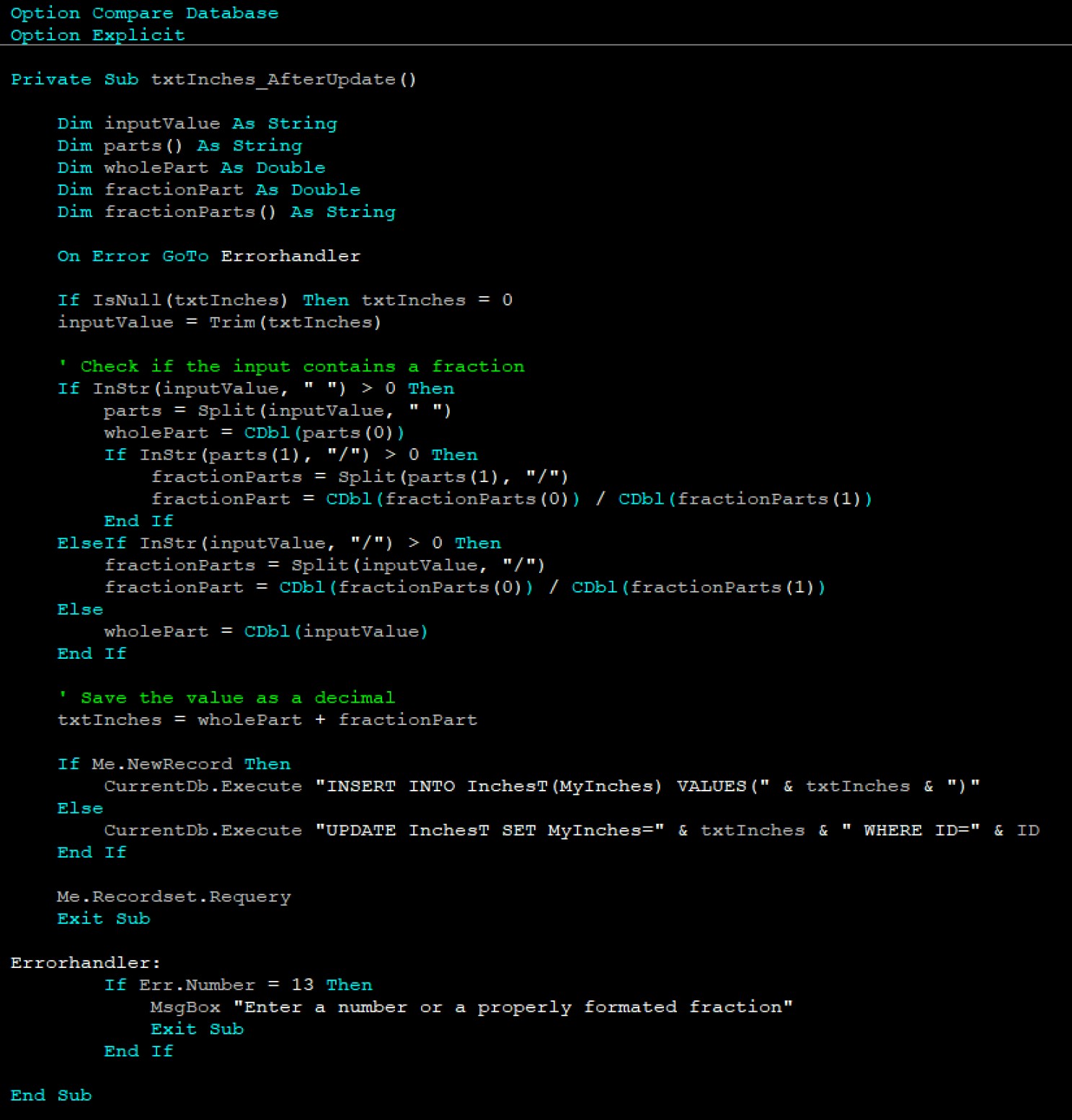
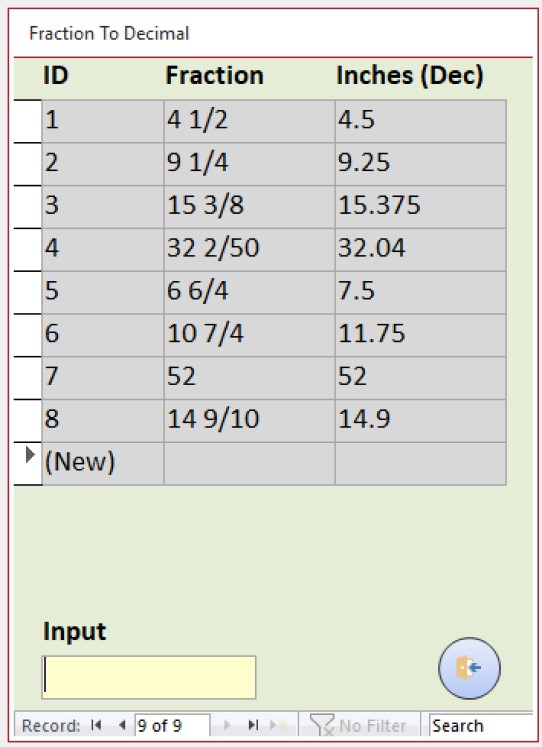
Give this a go (see screenshot). Modify for your needs Table Name, Field Name(s))

Note: I used an unbound field for the conversion then wrote the converted value to the table.
Kevin Robertson  @Reply  
          
2 years ago

Kevin Robertson  @Reply  
          
2 years ago
I added a Fraction field to my table for illustration purposes.
Kevin Robertson  @Reply  
          
2 years ago

Kevin Yip  @Reply  
     
2 years ago
How about converting decimals to fractions?  The original poster did say he wanted conversion both ways.  That could be a lot more complicated, and may even be consultant-level work.  Excel has this built-in, as I said.  Maybe automation between Access and Excel could be considered.
Gary James  @Reply  
      
2 years ago
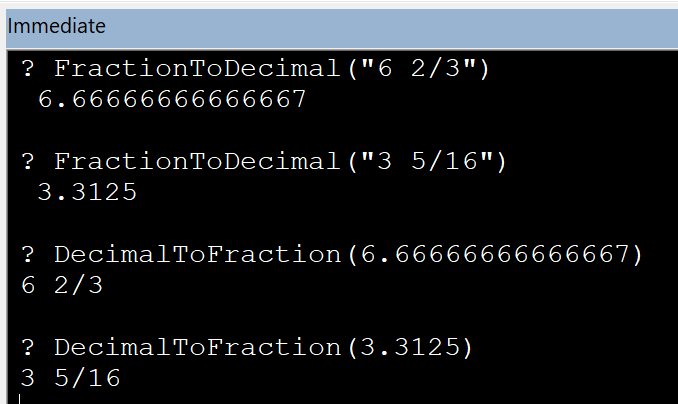
These two functions should do what you want.

DetailsFunction FractionToDecimal(fraction As String) As Double
    Dim parts() As String
    Dim wholeNumber As Double
    Dim numerator As Double
    Dim denominator As Double
    Dim decimalValue As Double
    
    ' Split the fraction by space to separate whole number and fraction part
    parts = Split(fraction, " ")
    
    If UBound(parts) = 1 Then
        ' There is a whole number part
        wholeNumber = Val(parts(0))
        fraction = parts(1)
    Else
        wholeNumber = 0
        fraction = parts(0)
    End If
    
    ' Split the fraction part by "/" to separate numerator and denominator
    parts = Split(fraction, "/")
    
    numerator = Val(parts(0))
    denominator = Val(parts(1))
    
    ' Calculate the decimal value
    decimalValue = wholeNumber + (numerator / denominator)
    
    FractionToDecimal = decimalValue
End Function

Function DecimalToFraction(decimalValue As Double) As String
    Dim wholeNumber As Long
    Dim fractionPart As Double
    Dim numerator As Long
    Dim denominator As Long
    Dim gcdValue As Long
    Dim fraction As String

    ' Separate the whole number part
    wholeNumber = Fix(decimalValue)

    ' Calculate the fraction part
    fractionPart = decimalValue - wholeNumber

    ' If the fraction part is zero, just return the whole number
    If fractionPart = 0 Then
        DecimalToFraction = CStr(wholeNumber)
        Exit Function
    End If

    ' Set an initial precision level
    Dim precision As Double
    precision = 0.00001
    
    ' Find numerator and denominator by approximation
    Dim tempNumerator As Double
    Dim bestNumerator As Long
    Dim bestDenominator As Long
    Dim minError As Double
    minError = 1 ' Initialize with a large error

    For denominator = 1 To 10000 ' Limit the maximum denominator for practical purposes
        tempNumerator = fractionPart * denominator
        tempNumerator = Round(tempNumerator)
        If Abs(fractionPart - (tempNumerator / denominator)) < minError Then
            minError = Abs(fractionPart - (tempNumerator / denominator))
            bestNumerator = tempNumerator
            bestDenominator = denominator
        End If
    Next denominator

    numerator = bestNumerator
    denominator = bestDenominator

    ' Combine the whole number and the fraction part
    If wholeNumber <> 0 Then
        fraction = wholeNumber & " " & numerator & "/" & denominator
    Else
        fraction = numerator & "/" & denominator
    End If

    DecimalToFraction = fraction
End Function

' Helper function to find the Greatest Common Divisor (GCD) using the Euclidean algorithm
Function GCD(a As Long, b As Long) As Long
    Do While b <> 0
        Dim temp As Long
        temp = b
        b = a Mod b
        a = temp
    Loop
    GCD = a
End Function

Matt Hall  @Reply  
          
2 years ago
Another approach may be to store the whole number, numerator, and denominator in the table.  Use a query to pull in table data and calculate the decimal expression for calculations.  Then you can design the form to show the fractions or decimal as needed.  Without the look-up table option or some VBA, you would be limited to entering data in fractional form.
Gary James  @Reply  
      
2 years ago
Here's a couple examples of using the conversion functions I provided above.
Gary James  @Reply  
      
2 years ago

Gordon Merkosky  @Reply  
     
4 months ago
Kevin Works Great! All the other Fraction to Decimal VBA I tried would not work because the would not return just the whole number without the fraction. I tried Gary James's to but it would not return just a whole number.

This thread is now CLOSED. If you wish to comment, start a NEW discussion in Access Forum.
 

Next Unseen

 
New Feature: Comment Live View


The following is a paid advertisement
Computer Learning Zone is not responsible for any content shown or offers made by these ads.
 

Learn
 
Access - index
Excel - index
Word - index
Windows - index
PowerPoint - index
Photoshop - index
Visual Basic - index
ASP - index
Seminars
More...
Customers
 
Login
My Account
My Courses
Lost Password
Memberships
Student Databases
Change Email
Info
 
Latest News
New Releases
User Forums
Topic Glossary
Tips & Tricks
Search The Site
Code Vault
Collapse Menus
Help
 
Customer Support
Web Site Tour
FAQs
TechHelp
Consulting Services
About
 
Background
Testimonials
Jobs
Affiliate Program
Richard Rost
Free Lessons
Mailing List
PCResale.NET
Order
 
Video Tutorials
Handbooks
Memberships
Learning Connection
Idiot's Guide to Excel
Volume Discounts
Payment Info
Shipping
Terms of Sale
Contact
 
Contact Info
Support Policy
Mailing Address
Phone Number
Fax Number
Course Survey
Email Richard
[email protected]
Blog RSS Feed    YouTube Channel

LinkedIn
Copyright 2026 by Computer Learning Zone, Amicron, and Richard Rost. All Rights Reserved. Current Time: 5/8/2026 9:09:52 AM. PLT: 1s