Free Lessons
Courses
Seminars
TechHelp
Fast Tips
Templates
Topic Index
Forum
ABCD
 
Home   Courses   TechHelp   Forums   Help   Contact   Merch   Join   Order   Logon  
 
Back to Access Forum    Comments List
Upload Images   @Reply   Bookmark    Link   Email   Next Unseen 
It's a Wonderful Life
Colin Eastaugh 
     
2 years ago
Simple database
Two tables
one film DB called tblFilmDB, two fields - DBID, Title
two watch DB called tblWatchDB, three fields - WatchID, DateX, DBID

I' have a form which is used to input the films seen, includes a combo box to get the DBID number, the row source in the combo box is as follows:

SELECT [DBID], [Title] FROM tblFilmDB ORDER BY [Title];

The column/field [DBID] is the hidden column, the title of the film [Title] is typed in, the combo field produces the DBID field

The problem is a film such as "It's a Wonderful Life"
After typing "I" into the combo box the combo list goes haywire. 'I've tried putting double double quotes and single quotes into the row source but nothing seems to work. 'I guess SQL can't handle such phrases as "I've". 'Is there a solution/workaround?' Many thanks.
Kevin Robertson  @Reply  
          
2 years ago
Can you post some screenshot of what is happening?
I just did a test an it works as expected.
Richard Rost  @Reply  
          
2 years ago
Yeah, I was going to say the same thing. Need more info please.
Colin Eastaugh OP  @Reply  
     
2 years ago
Richard/Kevin

Many thanks for coming straight back to me.  Much appreciated.

I've tried using the snipping tool for screenshots but the dropdown menu disappears as soon as I come out of Microsoft Access.

Further background/for interest, for the Combo Box, I am using On Change the following VBA to get the dropdown menu:

    Combo12.SetFocus
    Combo12.Dropdown

On further investigation, thanks for the encouragement, I don't think the film "It's a Wonderful Life" is the problem.

I think the following films in the film list are the problem:

I'm All Right Jack
I'm No Angel

I press "I", I get a list of all the films that start with the letter "I", no problems, but when I then type "T" to get to films starting with the characters "IT" the list goes back to the start of the list, in this instance to 10 and 10 Angry Men.

Looking through the film list, for instance films that commence with the letter "C" I don't seem to have the same problem because I don't have films that start "C'".  So for instance I can easily find the film "Claire's Knee" by typing in the characters "CLAIRE".  

The work around I'm using for films that start with the letter "I" is to just type in the letter "I" and then use the down arrow until I have highlighted the film that I want to select.  Cumbersome.

Colin
Sami Shamma  @Reply  
             
2 years ago
try Ctl+ Print Screen. then past in "Paint"
Richard Rost  @Reply  
          
2 years ago
What code are you using to filter this?
Colin Eastaugh OP  @Reply  
     
2 years ago

Colin Eastaugh OP  @Reply  
     
2 years ago

Colin Eastaugh OP  @Reply  
     
2 years ago
First off thanks for the tip on screen saving.

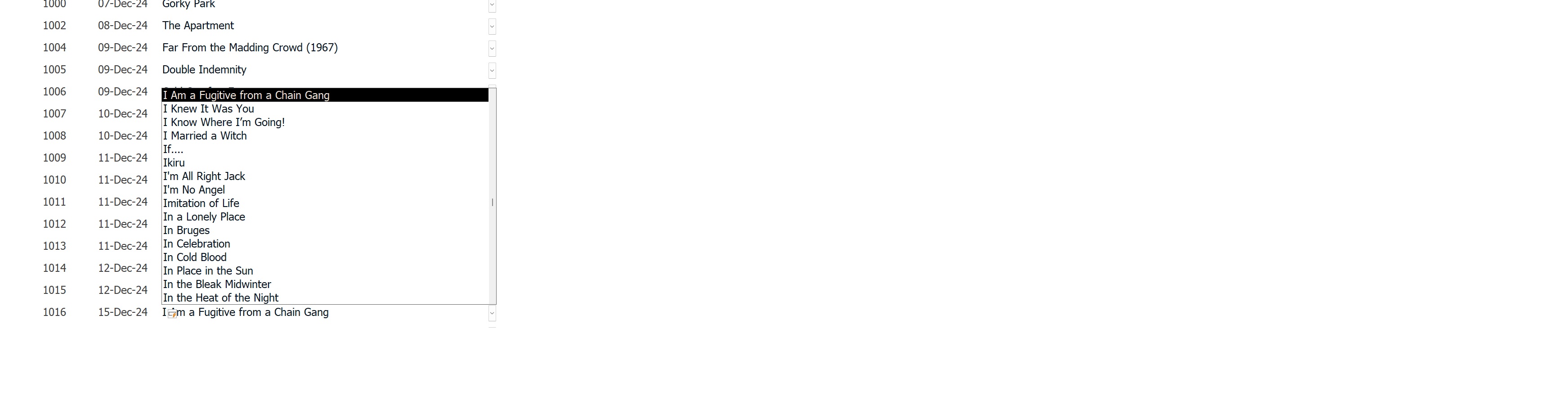
First screen shows what happens when I press "I" in the combo box, I get all the films, in order, beginning with the letter "I".

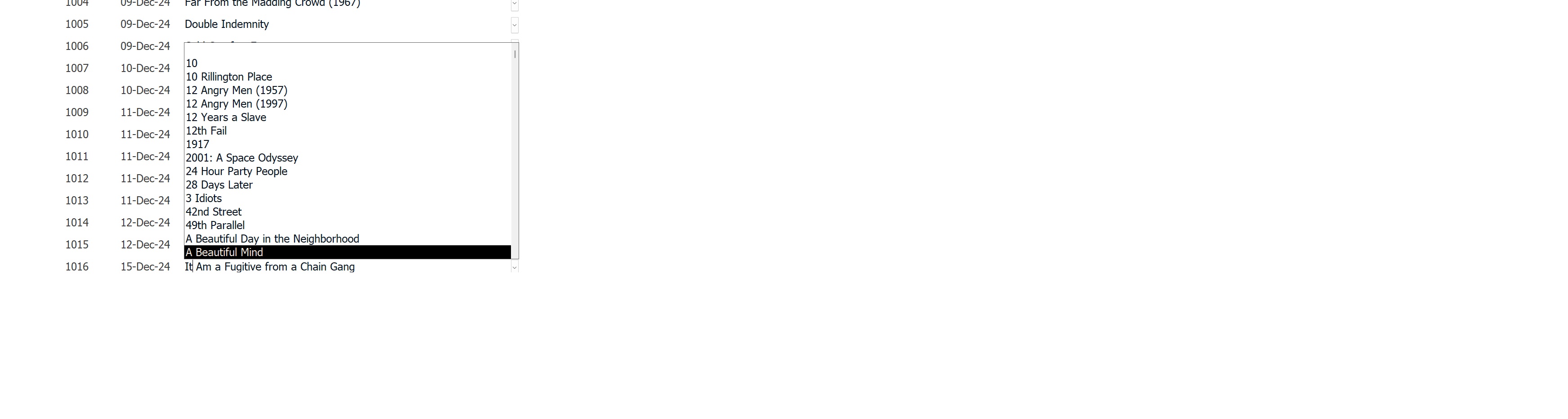
The second screen shows what happens when I have pressed "I", then "T", as in "IT", as in 'It's a Wonderful Life".  

So the combo box starts okay, but I think 'I'm Alright Jack', or 'I'm No Angel' take your pick, is creating the problem. When the combo starts searching "IT" it comes across "I'" and promptly gives up the ghost, so to speak.

This thread is now CLOSED. If you wish to comment, start a NEW discussion in Access Forum.
 

Next Unseen

 
New Feature: Comment Live View


The following is a paid advertisement
Computer Learning Zone is not responsible for any content shown or offers made by these ads.
 

Learn
 
Access - index
Excel - index
Word - index
Windows - index
PowerPoint - index
Photoshop - index
Visual Basic - index
ASP - index
Seminars
More...
Customers
 
Login
My Account
My Courses
Lost Password
Memberships
Student Databases
Change Email
Info
 
Latest News
New Releases
User Forums
Topic Glossary
Tips & Tricks
Search The Site
Code Vault
Collapse Menus
Help
 
Customer Support
Web Site Tour
FAQs
TechHelp
Consulting Services
About
 
Background
Testimonials
Jobs
Affiliate Program
Richard Rost
Free Lessons
Mailing List
PCResale.NET
Order
 
Video Tutorials
Handbooks
Memberships
Learning Connection
Idiot's Guide to Excel
Volume Discounts
Payment Info
Shipping
Terms of Sale
Contact
 
Contact Info
Support Policy
Mailing Address
Phone Number
Fax Number
Course Survey
Email Richard
[email protected]
Blog RSS Feed    YouTube Channel

LinkedIn
Copyright 2026 by Computer Learning Zone, Amicron, and Richard Rost. All Rights Reserved. Current Time: 5/6/2026 2:41:30 PM. PLT: 0s