Free Lessons
Courses
Seminars
TechHelp
Fast Tips
Templates
Topic Index
Forum
ABCD
 
Home   Courses   TechHelp   Forums   Help   Contact   Merch   Join   Order   Logon  
 
Back to Access Forum    Comments List
Upload Images   @Reply   Bookmark    Link   Email   Next Unseen 
Multi Select Keyword Search
Jasen Hicks 
     
2 years ago
Back to the talking point database questions - every time I get close to wrapping this project up, I find some new feature to add or get told "it sure would be nice...." and I have to add things :) The latest need/ask is to allow for multi-keyword searching. I.e., find all talking points that have specific tags associated with it. Here's how my tables are setup:

1. tTalkingPoints - this is the table with the talking point text and links to other tables.

2. tTalkingPointKeywords - this is a mapping table. It has a column for idTalkingPoints (from the tTalkingPoints table) and a column for idKeywords (from the tKeywords table). This is how I do my one to many relationships in the back end.

3. Finally, the tKeywords table. ID and keyword columns only.

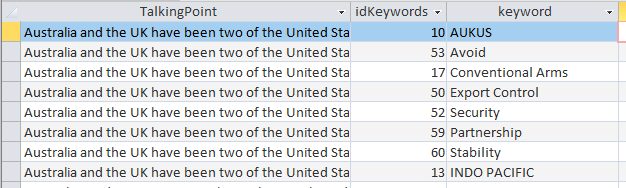
Right now, I have one big join query called aggregateQ that links all the data together, so I end up with row multiplication for the talking points (as expected) - so if there are 7 keywords associated with a talking point --> it returns 7 rows.

My keyword search now, is simple... combo box with a list of keywords; find rows with that keyword. Works brilliantly. What my users want to be able to do: find talking points based on more than one keyword. I.e. if this talking point has TRUCK & VAN as a keyword, show it. They want to be able to select as many keywords as possible. Given the way I have the tables setup; I suspect I need subqueries... but given that I have *n possible keyword selections - not sure where to begin. To snag the keywords, I intend on using a multiselect list box. I think the following code will get my values from it:

DetailsPrivate Sub btnRunQuery_Click()
    Dim varItem As Variant
    Dim strCriteria As String
    Dim strSQL As String
    
    ' Check if items are selected
    If Me.lstBox.ItemsSelected.Count = 0 Then
        MsgBox "Please select at least one item."
        Exit Sub
    End If
    
    ' Loop through the selected items
    For Each varItem In Me.lstBox.ItemsSelected
        strCriteria = strCriteria & "'" & Me.lstBox.ItemData(varItem) & "',"
    Next varItem
    
    ' Remove the trailing comma
    strCriteria = Left(strCriteria, Len(strCriteria) - 1)
    
    ' Build the SQL query
    strSQL = "SELECT * FROM YourTable WHERE YourField IN (" & strCriteria & ");"
    
    ' Run the query or use it in a form/report
    Me.RecordSource = strSQL
End Sub
John Davy  @Reply  
         
2 years ago
Hi Jason
Richard has several great videos on searching. Take a look at https://599cd.com/VideoPlayer/?FN=https://s3.us-east-2.wasabisys.com//Tips/access/multi-field-search.mp4 and go from there His Search Seminar is excellent.

John
Jasen Hicks OP  @Reply  
     
2 years ago
I have watched the top two.... my current search works fine using those or some pieces and parts of those, assuming you only want to find records that match a single keyword. I need to find records that have multiple keywords; i.e. return records that have "this and this". So if we consider how my current list of talking points is returned with all the joins to get through the multiple relations and no filtering (simplified):

Talking Point 1 | Keyword A
Talking Point 1 | Keyword B
Talking Point 1 | Keyword C
Talking Point 2 | Keyword A
Talking Point 2 | Keyword C
Talking Point 3 | Keyword B


Search Form is setup using a a multiselect list, its populated form my keyword table.

If I select both Keyword A and Keyword B the results returned should be:

Talking Point 1

Talking Point 1 is the only one that has both Keyword A and Keyword B attached to it.

Jasen Hicks OP  @Reply  
     
2 years ago

Jasen Hicks OP  @Reply  
     
2 years ago

John Davy  @Reply  
         
2 years ago
Hi Jasen
Try the Search Seminar

John

This thread is now CLOSED. If you wish to comment, start a NEW discussion in Access Forum.
 

Next Unseen

 
New Feature: Comment Live View


The following is a paid advertisement
Computer Learning Zone is not responsible for any content shown or offers made by these ads.
 

Learn
 
Access - index
Excel - index
Word - index
Windows - index
PowerPoint - index
Photoshop - index
Visual Basic - index
ASP - index
Seminars
More...
Customers
 
Login
My Account
My Courses
Lost Password
Memberships
Student Databases
Change Email
Info
 
Latest News
New Releases
User Forums
Topic Glossary
Tips & Tricks
Search The Site
Code Vault
Collapse Menus
Help
 
Customer Support
Web Site Tour
FAQs
TechHelp
Consulting Services
About
 
Background
Testimonials
Jobs
Affiliate Program
Richard Rost
Free Lessons
Mailing List
PCResale.NET
Order
 
Video Tutorials
Handbooks
Memberships
Learning Connection
Idiot's Guide to Excel
Volume Discounts
Payment Info
Shipping
Terms of Sale
Contact
 
Contact Info
Support Policy
Mailing Address
Phone Number
Fax Number
Course Survey
Email Richard
[email protected]
Blog RSS Feed    YouTube Channel

LinkedIn
Copyright 2026 by Computer Learning Zone, Amicron, and Richard Rost. All Rights Reserved. Current Time: 5/6/2026 12:36:58 AM. PLT: 1s