Free Lessons
Courses
Seminars
TechHelp
Fast Tips
Templates
Topic Index
Forum
ABCD
 
Home   Courses   TechHelp   Forums   Help   Contact   Merch   Join   Order   Logon  
 
Back to Access Forum    Comments List
Upload Images   @Reply   Bookmark    Link   Email   Next Unseen 
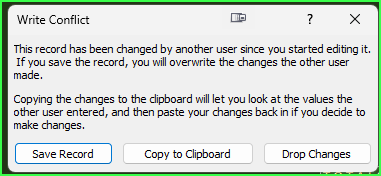
Write Conflict Error
Bruce McCormick 
   
2 years ago
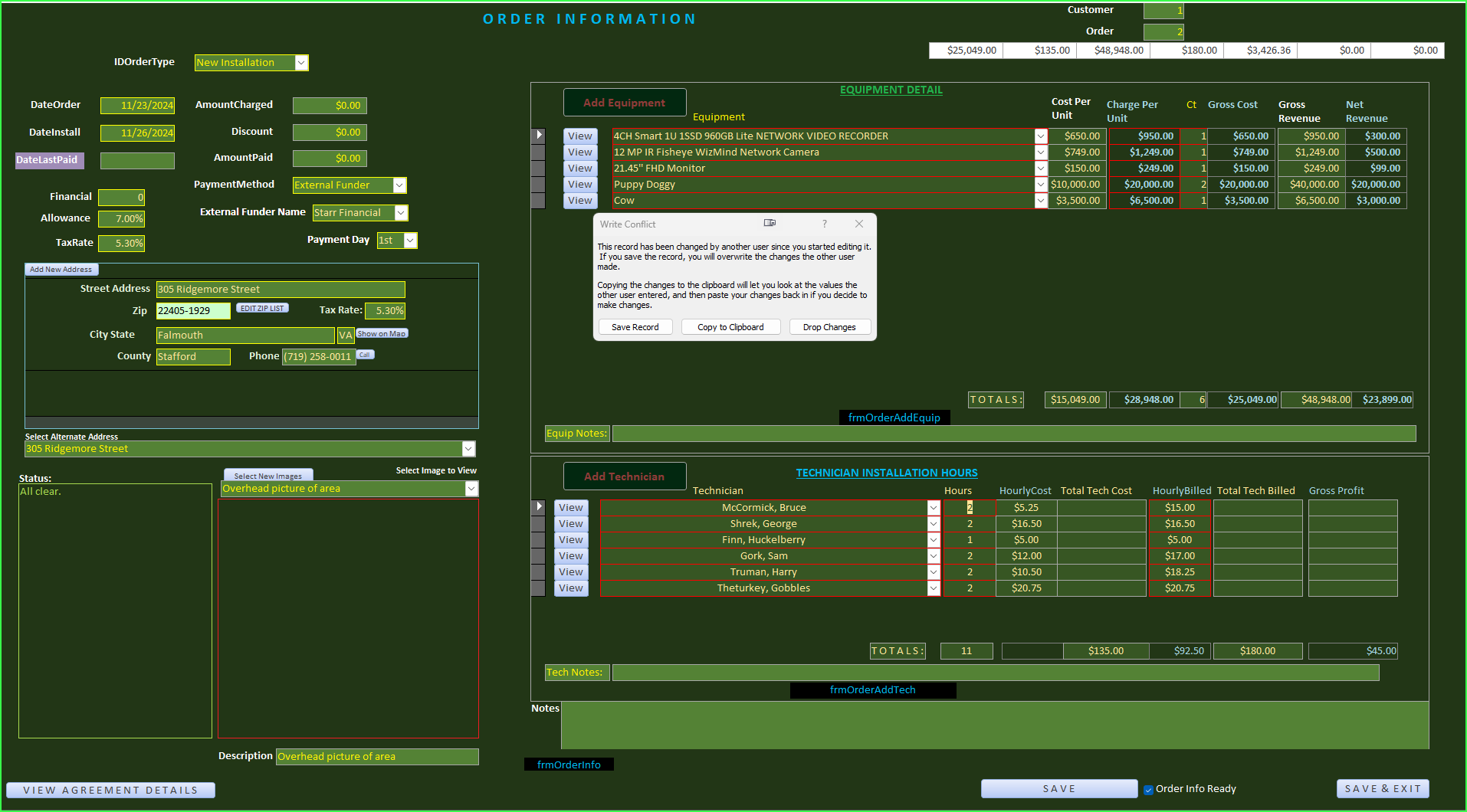
I am getting a "write conflict" error and can't seem to resolve it. At first i would read it, starting with "The record has been changed by another user...", mutter some obscenities and remark "I am the only damn user!" (Yes, i do talk to my computer.) Then i realized it was almost certainly referring to some calculated fields that i store for easy (i've got to say it) access. The issue is in a form that has several child forms. I will make a change of a number then at some point save the form. I even have the child forms run a save on change prior to saving the parent form on exit. After closing, when i open that parent form back up is when i get the error - not when i am saving and shutting it down (close). Even if i make a change, save & close the form, go back to the main menu, save and shut down the db and Access entirely, when i open Access then the db then go to that form, the write conflict warning pops back up. If i choose Save or Drop Changes from the warning, things proceed as they should.

Can i make this thing go away? I'd rather solve the underlying issue, but i am wondering if there is a solution without driving you good folks as nuts as i am becoming-

Many thanks,
-Bruce
Bruce McCormick OP  @Reply  
   
2 years ago

Bruce McCormick OP  @Reply  
   
2 years ago

Bruce McCormick OP  @Reply  
   
2 years ago
Uhg. Moderator, would you be so kind as to change that to "Write" Conflict error please?...
Donald Blackwell  @Reply  
       
2 years ago
How do your totals get populated in the white fields at the top of Order Info?

It seems like your main order information form might be calculating those totals and filling them in and then the subform(s) are also trying to write information to those fields at the same time.

A write conflict often occurs when another form is trying to update data in a form you are viewing that while you are viewing it without refreshing/requerying the information so Access has 2 sets of information trying to change the same record at the same time.
Bruce McCormick OP  @Reply  
   
2 years ago
THANK YOU!

Interesting. VERY possible. As that form does have much spaghetti construction - multiple revisions, modifications, tamperings, this is very likely. I need to review the generation of those figures, but they are the ones that are instantly recalculated when a subform changes AND saved to the table directly which thinking about it is a bad idea. If i am going to insist on saving them to the table, for which i must review my reasoning (i think it was likely a cheap shortcut), at best the point they are recalculated based from changes in the subform changes should be thought through along with the point at which they are recorded, but preferably, not saved at all.

Thank you very much for letting me know how i was becoming the other person who was changing field values. I strongly suspect i will now be able to fix; will advise. (Oh - i did try form-by-form/subform refreshing, requerying, and saving but getting rid of those entirely is the best idea).

Best Regards,
-Bruce
Bruce McCormick OP  @Reply  
   
2 years ago
It wasn't the figures in those white background fields, but it certainly was the computational fields that have the exact same amounts in each of the two subforms that simply had their values copied to the white fields.

I'll have to engineer a workaround, which simply means background calculations.

Thank you VERY much for putting me on the right track. It almost offsets my figuring out a half hour ago that my one daughter who lives at home has a destroyed exhaust valve in her car...(Still in partial shock over that one due to other circumstances)-

Best Regards,
-Bruce
Donald Blackwell  @Reply  
       
2 years ago
Glad I was able to point you into the right direction
Bruce McCormick OP  @Reply  
   
2 years ago
You might even have saved my computer from being thrown out a window!
Bruce McCormick OP  @Reply  
   
2 years ago
And on yet another form in the chain i am getting the same error. Once again, thank you so much for coming to my aid, i wouldn't have a clue (and didn't) without your telling me what i was looking for!

This thread is now CLOSED. If you wish to comment, start a NEW discussion in Access Forum.
 

Next Unseen

 
New Feature: Comment Live View


The following is a paid advertisement
Computer Learning Zone is not responsible for any content shown or offers made by these ads.
 

Learn
 
Access - index
Excel - index
Word - index
Windows - index
PowerPoint - index
Photoshop - index
Visual Basic - index
ASP - index
Seminars
More...
Customers
 
Login
My Account
My Courses
Lost Password
Memberships
Student Databases
Change Email
Info
 
Latest News
New Releases
User Forums
Topic Glossary
Tips & Tricks
Search The Site
Code Vault
Collapse Menus
Help
 
Customer Support
Web Site Tour
FAQs
TechHelp
Consulting Services
About
 
Background
Testimonials
Jobs
Affiliate Program
Richard Rost
Free Lessons
Mailing List
PCResale.NET
Order
 
Video Tutorials
Handbooks
Memberships
Learning Connection
Idiot's Guide to Excel
Volume Discounts
Payment Info
Shipping
Terms of Sale
Contact
 
Contact Info
Support Policy
Mailing Address
Phone Number
Fax Number
Course Survey
Email Richard
[email protected]
Blog RSS Feed    YouTube Channel

LinkedIn
Copyright 2026 by Computer Learning Zone, Amicron, and Richard Rost. All Rights Reserved. Current Time: 5/2/2026 8:20:00 AM. PLT: 1s