Free Lessons
Courses
Seminars
TechHelp
Fast Tips
Templates
Topic Index
Forum
ABCD
 
Home   Courses   TechHelp   Forums   Help   Contact   Merch   Join   Order   Logon  
 
Back to Access Forum    Comments List
Upload Images   @Reply   Bookmark    Link   Email   Next Unseen 
How to reference field controls on Nested Subforms
Robert Valentin 
     
16 months ago
Hi:
I have a main form with (2) subforms. I create first subform2 and insert it on the subform1 and create the link and when i enter a value on subform2 i update a field named balance on subform1 so is working.

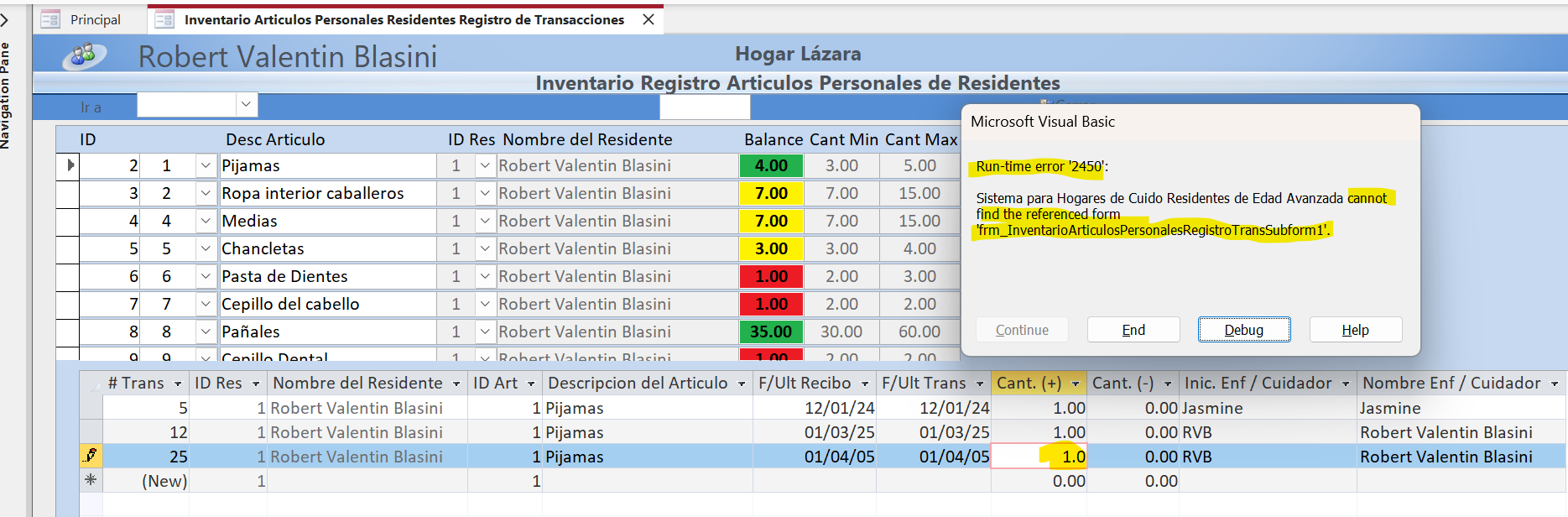
Then when i insert subform1 that has the subform2 on it i create the link and is showing the correct records on main, subform1 and subform2 but now when i enter a value on the subform2 to update the balance field i get a 2450 error cannot find the reference form.
Alex Hedley  @Reply  
           
16 months ago
Kevin Robertson  @Reply  
           
16 months ago
Can get pretty tricky working with nested subforms.

    Forms!ParentFormName!Subform1.Form!Subform2.Form!FieldName
Robert Valentin OP  @Reply  
     
16 months ago
Thx yes you are right !!! I tried that sequence but i get the error 2489 the object (form name) isn't open is like when i'm working with subform2 both forms subform1 and main are not open at that time. So i'm not able to reference a control field from subform1 working on subform2. I will keep looking because how it works on the subform1 with subform2 on the footer section.
Kevin Robertson  @Reply  
           
16 months ago
I'm getting confused about which Form the Button is on and what you are trying to reference. Please post some screenshots and what you have actually tried. It almost always help if we can see what you see.
Robert Valentin OP  @Reply  
     
16 months ago

Robert Valentin OP  @Reply  
     
16 months ago
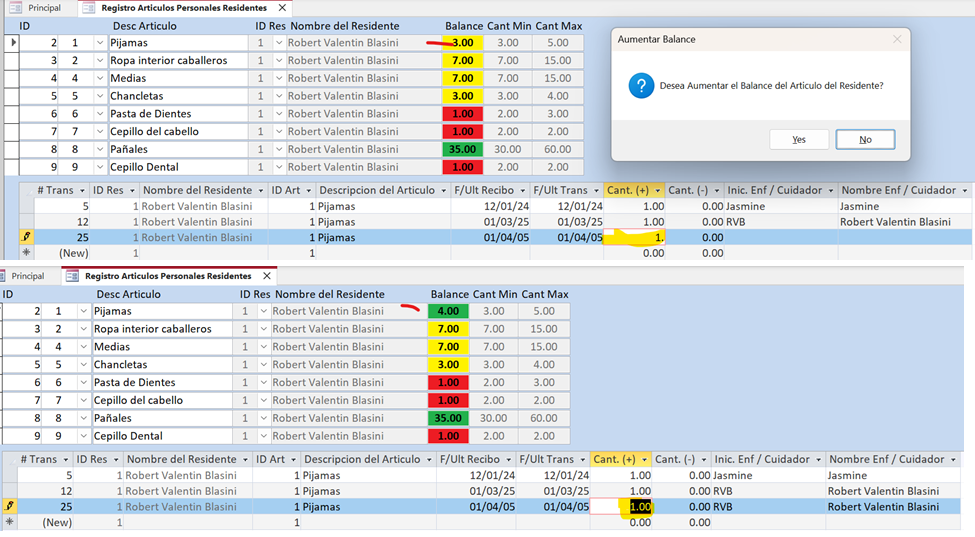
Subform1 and Subform2 screens
Subform1 list all personal articles from the resident and subform2 list all In/Out transactions of the resident articles.
On the subform2 I’m adding 1 for PJ’s and the balance field on the subform1 is updated after I press “Yes”.
So it's working until i insert them on the main form that is the resident info
Kevin Robertson  @Reply  
           
16 months ago
I see ONE Subform on a continuous form.
Robert Valentin OP  @Reply  
     
16 months ago

Robert Valentin OP  @Reply  
     
16 months ago
Here's the Main Form with the SubForms with the error message when i try to update the balance field on the Subform1 with the data entered on the Subform2 for the item PJ's selected on Subform1 for the resident (Robert Valentin) selected on the Main Form.
Robert Valentin OP  @Reply  
     
16 months ago
On the One Subform on a continuous form send before the field balance get's updated so it's working. I'm also looking on the source object name control and the Name control on the Other Tab is there's any in-congruence.
Kevin Robertson  @Reply  
           
16 months ago
Looks like you need to Requery Subform1 in the After Update event of the field on Subform2
Try this:
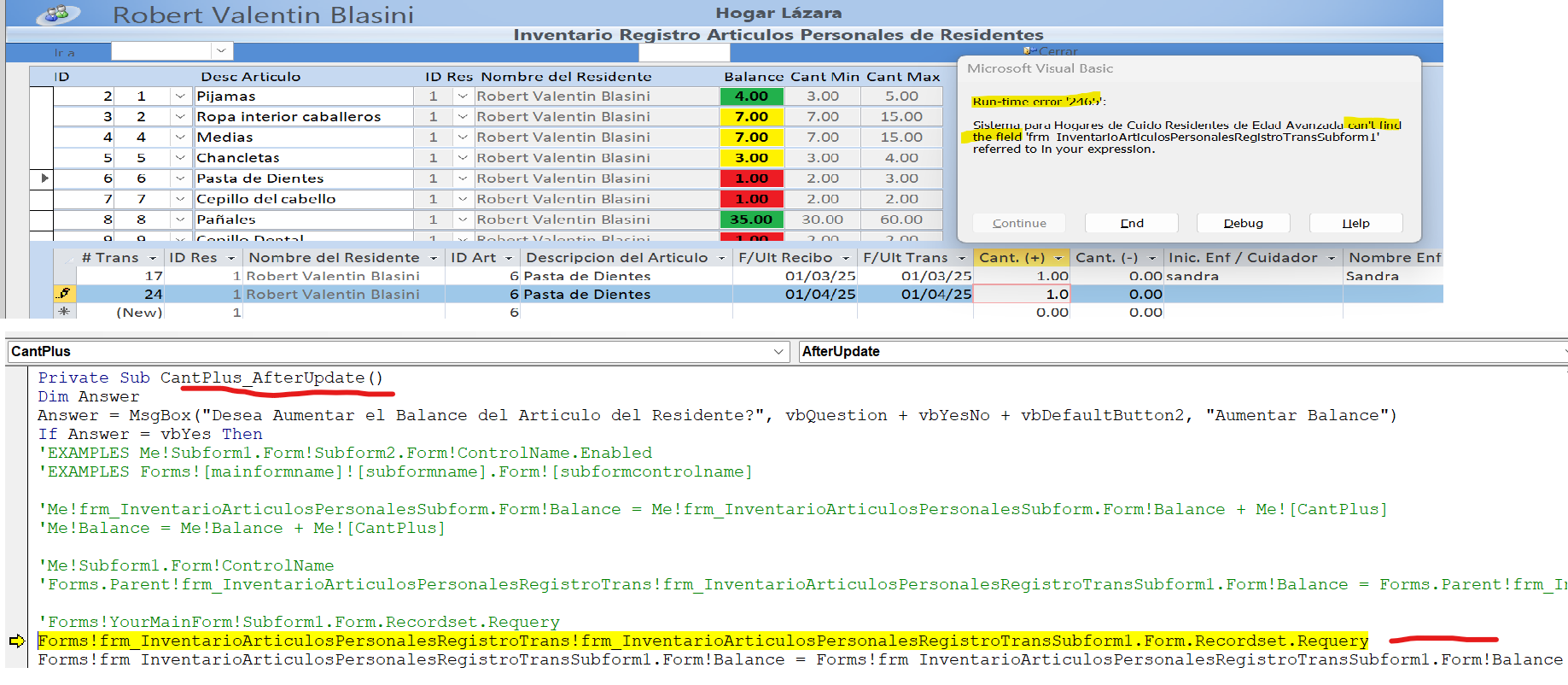
   Forms!YourMainForm!Subform1.Form.Recordset.Requery
Robert Valentin OP  @Reply  
     
16 months ago
OK i will try that and let you know
Robert Valentin OP  @Reply  
     
16 months ago

Robert Valentin OP  @Reply  
     
16 months ago
Kevin i really appreciate all your help and support on this issue. I will stop for today and see if tomorrow a new day i can finally have this running probably i'm missing a simple / stupid detail that i don't see it today.
Alex Hedley  @Reply  
           
16 months ago
One thing that might be worth a try is creating a really simple form with next to nothing on it, short names and see if you can get that working.
Kevin Robertson  @Reply  
           
16 months ago
Check the Name of the Subform control is spelled correctly.
Since you have an underscore in the name I would enclose them in square brackets (example below).

    Forms![frm_YourMainForm]![Frm_Subform1].Form.Recordset.Requery
Sami Shamma  @Reply  
             
16 months ago
Robert, take Alex's advice
Robert Valentin OP  @Reply  
     
16 months ago
I try with the form names between [] and get the same error 2465 cant find the field.
I will try then creating all the forms with short names from scratch and with just 1 or 2 fields and let's see what happens.
Robert Valentin OP  @Reply  
     
16 months ago
Hi, i really appreciate your time, help, guidance and patience lol!!! to finally fix this issue with the nested subform.

Just to let you know that finally is working looking at the video Value From Subform instead of typing the form full name i just type Me.Parent!Balance = Me.Parent!Balance + Me.CantPlus and the subform will resolve the name of his Parent Form so i don't know the reason why typing the full form name didn't work.

I'm curious does the FORM control Name located on the <Other TAB> should be the same name located on the control SourceObject on the <Data TAB>?

This thread is now CLOSED. If you wish to comment, start a NEW discussion in Access Forum.
 

Next Unseen

 
New Feature: Comment Live View


The following is a paid advertisement
Computer Learning Zone is not responsible for any content shown or offers made by these ads.
 

Learn
 
Access - index
Excel - index
Word - index
Windows - index
PowerPoint - index
Photoshop - index
Visual Basic - index
ASP - index
Seminars
More...
Customers
 
Login
My Account
My Courses
Lost Password
Memberships
Student Databases
Change Email
Info
 
Latest News
New Releases
User Forums
Topic Glossary
Tips & Tricks
Search The Site
Code Vault
Collapse Menus
Help
 
Customer Support
Web Site Tour
FAQs
TechHelp
Consulting Services
About
 
Background
Testimonials
Jobs
Affiliate Program
Richard Rost
Free Lessons
Mailing List
PCResale.NET
Order
 
Video Tutorials
Handbooks
Memberships
Learning Connection
Idiot's Guide to Excel
Volume Discounts
Payment Info
Shipping
Terms of Sale
Contact
 
Contact Info
Support Policy
Mailing Address
Phone Number
Fax Number
Course Survey
Email Richard
[email protected]
Blog RSS Feed    YouTube Channel

LinkedIn
Copyright 2026 by Computer Learning Zone, Amicron, and Richard Rost. All Rights Reserved. Current Time: 5/6/2026 1:50:29 PM. PLT: 0s