Free Lessons
Courses
Seminars
TechHelp
Fast Tips
Templates
Topic Index
Forum
ABCD
 
Home   Courses   TechHelp   Forums   Help   Contact   Merch   Join   Order   Logon  
 
Back to Access Forum    Comments List
Upload Images   @Reply   Bookmark    Link   Email   Next Unseen 
Best Way To Build
David Clement 
      
16 months ago
Hello,
I would like to create a Database to display Filter Kits for Models of Heavy Trucks,but not exactly sure how to do this.
I think I would need 3 Tables. 1 for CustomerT, one for TruckT and 1 for ProductT.
CustomerT would have CustomerName, CustomerID.
TruckT would have CustomerID and TruckID
ProductT would have TruckID and PartNumber and Quantity

What I don't quite understand is how to link CustomerID and TruckID in the TruckT when the TruckID could and will have letters in the ID number

Would this be a 1 to many relationship?
I would like to see all the filters needed for TruckID 01-1127 in one record.
Is this possible?
Thank you,
Dave
Julie Bennett  @Reply  
     
16 months ago
set up TruckID is an auto number and is only used by Access, then use TruckModelID as a short-text field.  Then have CustomerID as a relationship field in your truck table.  Then in Relationship window, Join CustomerID between the two tables.
Julie Bennett  @Reply  
     
16 months ago
Oops:  CustomerID should be a long-number field in the Truck table that is only included as a joining or relationship field.  It is hard to type with one finger in a brace :)
David Clement OP  @Reply  
      
16 months ago
Thank you Julie, I will try that.
I still have a lingering question though.
My CustomerT table has both a CustomerID and a TruckID field. lets say Customer 1 has 20 Trucks total. 10 trucks are slightly older than the 10 other ones, meaning that some of the filter part numbers are different that the other 10.  I have made a MasterPartT for all filters any truck will use. How would I set my database up to account for this? 1 to many or many to 1 for the realtionship? I just want to enter a TruckID and it return all the filters that truck uses. It Could be as many as 10 different filters, depending on the truck.
Thank you.
Julie Bennett  @Reply  
     
16 months ago
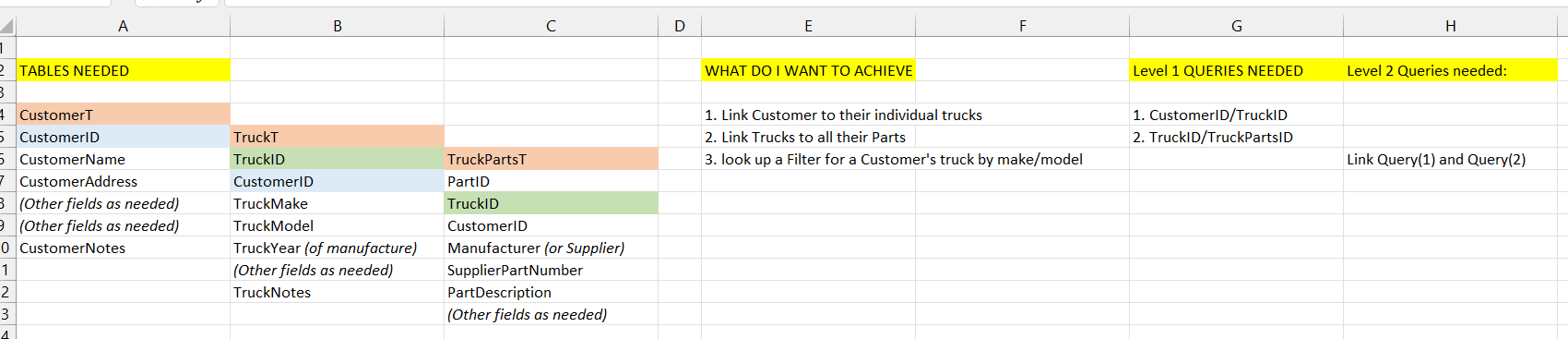
Customer table to Truck table is one to many, Truck table to Parts Table would be many to many as more than one customer will have the same make/model of truck.  If you have a look at Richard's free videos on how to set up Customers with orders with order details, it will give you ideas on how to set up your Customer-Truck-Parts database.  These helped me by giving me ideas on how to look at the problem from my perspective.  Often I found I had missed a step in my mental evaluation of the database.  I also found Richard's idea of using Excel to draw up a outline or plan of what I wanted to achieve; I often found I had missed a clue and had to add another field to my table or do another query or two to get to my end result.  If your queries aren't working, then figuring out relationships is necessary, otherwise build your tables first then worry about relationships when building queries.
You are on the right track.
Julie Bennett  @Reply  
     
16 months ago
David, I've drawn up a quick outline in Excel of how I see your database (image attached). I hope this helps.  I use colour to show the links between tables and gave a brief idea of queries needed to join them
Julie Bennett  @Reply  
     
16 months ago

David Clement OP  @Reply  
      
16 months ago
Thank you Julie.

This thread is now CLOSED. If you wish to comment, start a NEW discussion in Access Forum.
 

Next Unseen

 
New Feature: Comment Live View


The following is a paid advertisement
Computer Learning Zone is not responsible for any content shown or offers made by these ads.
 

Learn
 
Access - index
Excel - index
Word - index
Windows - index
PowerPoint - index
Photoshop - index
Visual Basic - index
ASP - index
Seminars
More...
Customers
 
Login
My Account
My Courses
Lost Password
Memberships
Student Databases
Change Email
Info
 
Latest News
New Releases
User Forums
Topic Glossary
Tips & Tricks
Search The Site
Code Vault
Collapse Menus
Help
 
Customer Support
Web Site Tour
FAQs
TechHelp
Consulting Services
About
 
Background
Testimonials
Jobs
Affiliate Program
Richard Rost
Free Lessons
Mailing List
PCResale.NET
Order
 
Video Tutorials
Handbooks
Memberships
Learning Connection
Idiot's Guide to Excel
Volume Discounts
Payment Info
Shipping
Terms of Sale
Contact
 
Contact Info
Support Policy
Mailing Address
Phone Number
Fax Number
Course Survey
Email Richard
[email protected]
Blog RSS Feed    YouTube Channel

LinkedIn
Copyright 2026 by Computer Learning Zone, Amicron, and Richard Rost. All Rights Reserved. Current Time: 5/6/2026 4:37:25 AM. PLT: 0s