|
|||||
Excel Expert 4VLOOKUP, HLOOKUP, MATCH, INDEX, INDIRECTWelcome to Excel Expert 4. In this course you will learn how to use popular lookup functions in Microsoft Excel, including VLOOKUP, HLOOKUP, MATCH, INDEX, ADDRESS, and INDIRECT, to retrieve data from different parts of your workbook. We will discuss using cell reference functions, performing range and exact lookups, building an employee timesheet, comparing lists, and finding the closest value in a list. This course is designed for users comfortable with logic functions covered in earlier levels and will help you use lookup tools more effectively in your spreadsheets. Lessons
ResourcesLesson SummaryWelcome! VLOOKUP, HLOOKUP & Lookup Tools - Welcome to Excel Expert Level 4. In this course we will focus on popular lookup functions, including VLOOKUP, HLOOKUP, LOOKUP, MATCH, INDEX, ADDRESS, and INDIRECT, and discuss how you can use them to retrieve data from different parts of your workbook. We will cover using VLOOKUP for range and exact match lookups, building an employee timesheet, working with cell reference functions, comparing lists, and finding the closest value in a list. This course is designed for users who have completed previous Excel Expert levels and are comfortable with logic functions introduced earlier.
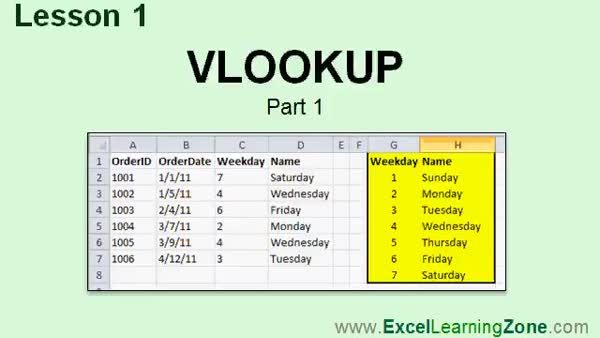
Lesson 1: VLOOKUP & Day Lookup Tables - In Lesson 1, we will learn about lookup functions in Excel, with a focus on the VLOOKUP function. I will explain what lookup functions do, the difference between VLOOKUP and HLOOKUP, and briefly mention MATCH and INDEX. We will walk through a practical example using VLOOKUP to convert weekday numbers into day names with a lookup table, discuss how to format the table array using absolute references to avoid autofill errors, and demonstrate how to create and use a named range for the table array.
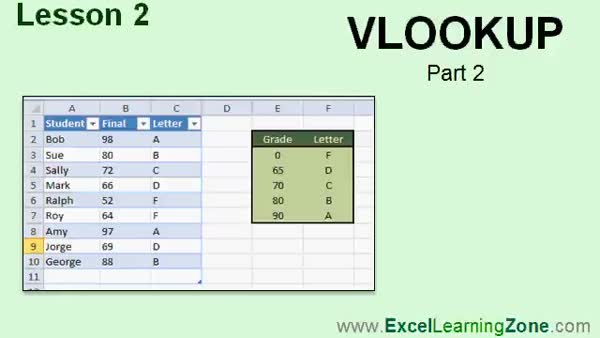
Lesson 2: VLOOKUP: Numeric to Letter Grades - In Lesson 2, we continue learning about VLOOKUP by walking through how to use a range lookup to convert student numeric grades into letter grades using a lookup table. We will discuss the importance of arranging the table in ascending order, setting up a named range, and using the VLOOKUP formula to return the correct letter grade for each student. I will also show you how to incorporate the ISBLANK and IF functions to leave cells blank when no grade is entered and how to work with tables to efficiently manage your data.
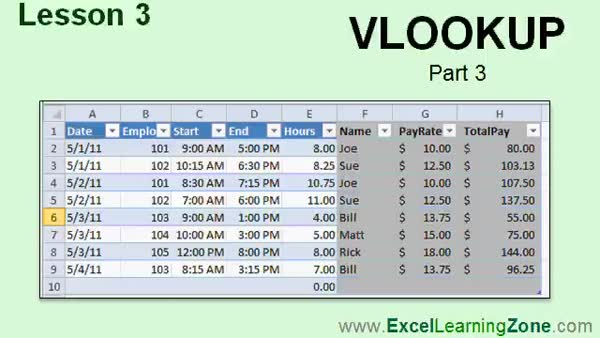
Lesson 3: VLOOKUP Exact Match & Timesheets - In Lesson 3, we continue exploring the VLOOKUP function by performing an exact match lookup and building an employee timesheet in Excel. I will show you how to create an employee table, format and name it, and then construct a timesheet that uses VLOOKUP to automatically pull in employee names and pay rates based on the entered employee ID. We will also calculate hours worked and total pay, discuss formatting, and mention how to handle blank values and cell protection for calculated fields.
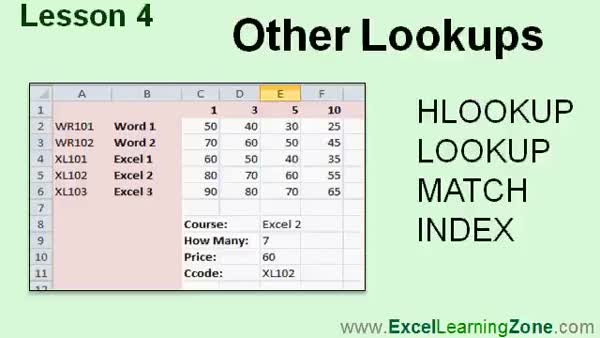
Lesson 4: HLOOKUP, LOOKUP, MATCH & INDEX Tips - In Lesson 4, we will explore other lookup functions in Excel, including HLOOKUP, LOOKUP, MATCH, and INDEX. I will show you how HLOOKUP is used for horizontal data, how the LOOKUP function works with vectors, and discuss practical uses for these functions. We will walk through using MATCH and INDEX, both separately and together, to perform flexible lookups, such as finding positions in a range, handling wildcards, and doing backward lookups. You will see step-by-step examples to help you understand when to use these other lookups and how they differ from VLOOKUP.
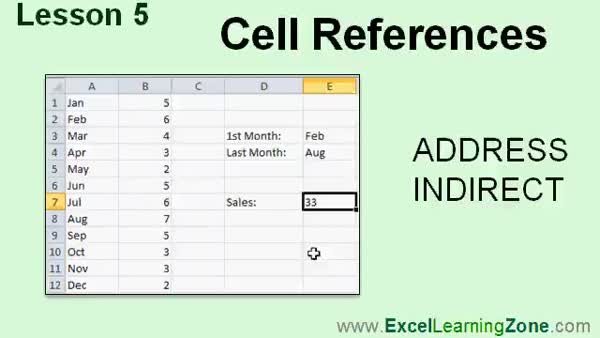
Lesson 5: Dynamic ADDRESS & INDIRECT Use - In Lesson 5, we will explore cell references in Excel, focusing on the ADDRESS and INDIRECT functions. I will show you how to construct cell references from row and column numbers using ADDRESS, as well as how to convert text into live references with INDIRECT. We will walk through practical examples such as dynamically summing sales data through a date input and working with lists of months, using functions like MATCH alongside these cell reference tools. Understanding ADDRESS and INDIRECT allows you to make your spreadsheets more dynamic, even if you only use these features occasionally.
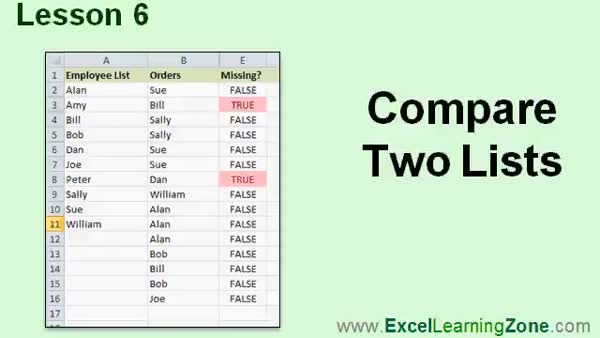
Lesson 6: Compare Lists: Find Missing Items - In Lesson 6, we will walk through how to compare two lists in Excel to find out if any items are missing from one list when matched against another. Using practical examples with employee data, I will show you how to use the MATCH function to check for missing entries, and how to apply functions like ISBLANK and ISNA to handle blanks and return TRUE or FALSE results. We will also discuss how to use conditional formatting to highlight missing items, making it easy to see which entries from your main list are absent in the comparison list.
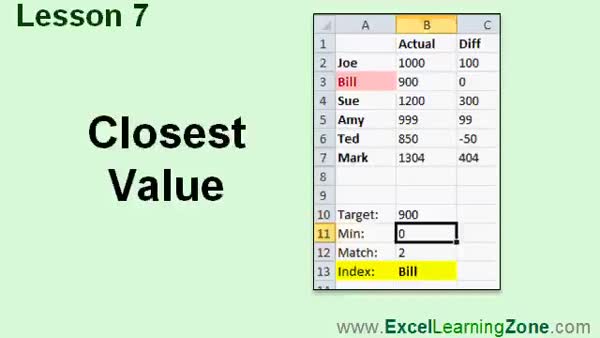
Lesson 7: Closest Value to Target with ABS MIN MATCH - In Lesson 7, we will walk through how to find the closest value to a target number in a list using functions like ABS, MIN, MATCH, and INDEX in Excel. We will use a real-world scenario of determining whose guess is closest to the actual number of gumballs, calculate the differences, convert them to absolute values, and identify the closest guess. We will also discuss how to highlight the closest value with conditional formatting and briefly mention how to use the average as a dynamic target.
Lesson 8: VLOOKUP, HLOOKUP & More Excel Functions - In this course we learned how to use the VLOOKUP function to look up values from a list, perform both range and exact lookups, and use related functions like HLOOKUP, LOOKUP, MATCH, and INDEX, including using MATCH and INDEX together for backward lookups. We also covered the ADDRESS and INDIRECT functions for working with cell references, demonstrated how to compare lists and find the closest value to a target, and discussed where to get additional help and resources. Finally, we encouraged student feedback to help improve future lessons.
NavigationKeywordsVLOOKUP, HLOOKUP, MATCH, INDEX, ADDRESS, INDIRECT, lookup functions, Excel lookup, range lookup, exact match, employee timesheet, cell references, compare lists, find closest value, ISBLANK, ISNA, conditional formatting
More InformationTranscriptWelcome to Excel 2010 Expert, Level 4, brought to you by ExcelLearningZone.com. I am your instructor, Richard Rost. In today's class, we will learn many of the popular lookup functions. Lookup functions are used to look up a value from a different part of your workbook. We'll learn several different types of lookup functions, including the lookup, HLOOKUP, MATCH and INDEX, ADDRESS, and INDIRECT. We will use the VLOOKUP function, for example, to find the student's letter grade based on his final average. Plus, we'll cover many other examples for the other lookup functions. This class is designed to be used with Excel 2010, part of Microsoft Office 2010. However, even if you're using an older version of Excel, most of the topics in today's class, if not all, will work just fine with every version of Excel, back to at least Excel 2000. This is an expert-level course for Excel 2010. This class was designed for the user who has a good amount of experience with Excel, preferably, who has taken my basic courses one through five, and the first three expert-level courses. The prerequisite for this course is Excel Expert-Level 3, which talks about logic functions. You'll learn TRUE, FALSE, AND, OR, and NOT. The IF function, which is very important, is also covered. If you haven't learned the IF function yet, you should watch Expert-Level 3, plus the IS functions. We'll be using a couple of these in today's class. My courses are broken up into four different groups: Beginner, Expert, Advanced, and Developer. The Beginner courses are for novice users with little or no experience with Excel. The Expert series, which is what you're watching right now, is designed for more experienced users who are already comfortable with Excel. Expert classes go into a lot more depth about each topic than the Beginner classes did, and we'll cover more functions, features, tips, and so on. When you've mastered the Expert classes, move up to the Advanced lessons. You'll learn how to build macros, build user forms, create your own templates, and many more advanced features. Not everyone will use these, but they really add enhanced functionality and professionalism to your spreadsheets. Finally, my Developer series is designed to teach you how to program in Visual Basic for Applications with Microsoft Excel. This will allow you to create Excel-based programs for your users, automate your spreadsheets, and integrate Excel tightly with the other Office applications. Each of my series is broken down into different levels. For example, the Beginner series contained five different levels, which you should have watched previously. This class is the fourth level of the Expert series. Each level teaches you new and different topics in Microsoft Excel, building on the lessons learned in the previous levels. When you've finished all the Expert classes, move up to the Advanced series, then finally, the Developer series. Now, I'll start a more detailed look at exactly what we're going to learn in today's class. In Lesson One, we're going to learn about lookup functions. We're going to start with one of my favorite lookup functions, VLOOKUP. In Lesson Two, we're continuing with VLOOKUP. In this lesson, we'll perform a range lookup where we'll look up the student's numeric grade and return a letter value. In Lesson Three, we continue our look at the VLOOKUP function. We'll perform an exact match lookup and we'll build an employee timesheet. In Lesson Four, we'll take a look at some of the other lookup functions, including HLOOKUP, LOOKUP, MATCH, and INDEX. In Lesson Five, we're going to learn some cell reference functions: ADDRESS and INDIRECT. In Lesson Six, we'll learn how to compare two lists to see if an item in List One is missing from List Two. In Lesson Seven, we'll use a combination of functions to figure out what the closest value is to a target number in a list of numbers. If you need help with the topics covered in today's lessons, please feel free to post your questions in the Excel Interactive Student forums. If you're watching this course using my custom video player software or online in my web theater, you should see the student forum for each lesson appear in a small window next to the class videos if you have an active Internet connection. Here, you'll see all the questions that the other students have asked, as well as my responses to them and the comments that some of the other students may have made. I encourage you to read through these questions and answers as you start each lesson. Feel free to post your own questions and comments as well. If you're not watching your lessons online, you can still visit the student forums later by visiting ExcelLearningZone.com/forums. To get the most out of this course, I recommend you sit back, relax, and watch each lesson completely through once without trying to do anything on your computer. Then, replay the lesson from the beginning and follow along with my examples. Actually create the same spreadsheet that I make in the video. Build the spreadsheet with me step by step. Don't try to apply what you're learning right now to other projects until you've mastered the sample spreadsheet. If you get stuck or don't understand something, watch the video again from the beginning or tell me what's wrong in the student forum. Most importantly, keep an open mind. Excel might seem intimidating at first, but once you get the hang of it, you'll see that it's really easy to use. IntroIn lesson 4 of the Microsoft Excel 2010 Expert series, you will learn how to use various lookup functions including VLOOKUP, HLOOKUP, LOOKUP, MATCH, and INDEX, as well as cell reference functions like ADDRESS and INDIRECT. I'll show you how to look up a student's letter grade based on their score, compare lists to find missing items, and find the closest value in a range. This lesson is designed for users who have completed the first three expert-level courses and are ready to expand their skills with advanced lookup techniques. QuizQ1. What is the primary topic covered in this Excel 2010 Expert, Level 4 class? A. Lookup functions in Excel B. Formatting cells C. Creating charts D. Printing worksheets Q2. Which function is used in Lesson Two to convert a numeric grade to a letter value? A. HLOOKUP B. VLOOKUP C. INDEX D. INDIRECT Q3. What prerequisite knowledge is recommended before taking this course? A. Basic knowledge of charts and graphs B. Completion of Expert-Level 3, which covers logic functions and IF functions C. VBA programming skills D. Advanced Pivot Table techniques Q4. Which lookup functions are introduced or reviewed in this course? A. VLOOKUP, HLOOKUP, MATCH, INDEX, ADDRESS, INDIRECT, LOOKUP B. SUM, AVERAGE, COUNTIF, IFERROR C. LEFT, MID, RIGHT, CONCATENATE D. PMT, FV, NPV Q5. What is the difference between the Beginner and Expert Excel series according to the video? A. Beginner focuses only on charting, while Expert focuses on VBA macros B. Expert covers topics in greater depth and introduces more advanced functions C. Expert skips teaching functions and formulas D. There is no difference; they cover the same material Q6. In this course, which function will be used to build an employee timesheet? A. MATCH B. ADDRESS C. VLOOKUP D. INDIRECT Q7. What should a student do if they need help with the course material? A. Only search external websites B. Use the student forums available at ExcelLearningZone.com C. Wait until the next class for answers D. Contact Microsoft support directly Q8. What does the instructor suggest students do after watching each lesson for the first time? A. Try to apply the concepts immediately to personal work projects B. Replay the lesson and build the example spreadsheet step by step C. Skip practice and move to the next topic D. Memorize all formulas shown Q9. Which cell reference functions are covered in Lesson Five? A. SUM and AVERAGE B. INDEX and MATCH C. ADDRESS and INDIRECT D. LEFT and RIGHT Q10. What is the suggested approach if you get stuck during the lessons? A. Skip the problematic lesson B. Watch the video again from the beginning or ask for help in the student forum C. Use only printed manuals D. Ignore it and continue with the next lesson Answers: 1-A; 2-B; 3-B; 4-A; 5-B; 6-C; 7-B; 8-B; 9-C; 10-B DISCLAIMER: Quiz questions are AI generated. If you find any that are wrong, don't make sense, or aren't related to the video topic at hand, then please post a comment and let me know. Thanks. SummaryToday's video from ExcelLearningZone.com focuses on expert-level topics in Excel 2010, specifically around lookup functions. My name is Richard Rost, and I'll be guiding you through this class. The primary goal for today is to introduce you to several of Excel's most useful lookup functions. These tools are essential when you need to extract information from different areas of your workbook. We'll cover functions such as VLOOKUP, HLOOKUP, LOOKUP, MATCH, INDEX, ADDRESS, and INDIRECT. For example, you will see how to use VLOOKUP to determine a student's letter grade based on a numeric average. Alongside this, I will provide a variety of examples to help illustrate how the other lookup functions work in different situations. While the lessons are tailored for Excel 2010 as part of Microsoft Office 2010, almost everything we'll discuss today applies to previous versions of Excel as far back as Excel 2000. So, regardless of your version, you should be able to follow along and use what you learn. This is a course intended for advanced users. To get the most out of this class, you should already have substantial experience with Excel. It's ideal if you have completed my basic courses one through five, as well as the first three expert-level classes. As a prerequisite, Excel Expert Level 3 is particularly important because it covers logic functions such as TRUE, FALSE, AND, OR, NOT, the IF function, and some IS functions. We will reference some of these during today's lessons. Let me give you a sense of how I structure my courses. They are organized into four categories: Beginner, Expert, Advanced, and Developer. The Beginner series is aimed at those brand new to Excel. The Expert series, including this class, is designed for those who already have a solid grasp of working with spreadsheets and want to dig deeper. Here, we go well beyond basics by exploring a wider array of functions and features. Once you have mastered the material in the Expert classes, you can move up to the Advanced series, where you'll encounter topics like building macros, designing user forms, creating templates, and exploring many other advanced features that can significantly enhance your spreadsheets. The Developer series takes things further, teaching you how to program in Visual Basic for Applications, giving you the tools to automate processes and build custom solutions that integrate with other Office programs. Each series has multiple levels, with each level introducing you to new topics that build on what you've previously learned. The Beginner series, for instance, includes five levels. This course is the fourth in the Expert series, continuing your journey through more sophisticated Excel topics. Now let's review the structure of today's lessons: Lesson One introduces you to lookup functions, starting with VLOOKUP, which is one of my preferred tools for searching and returning data. In Lesson Two, we continue our exploration of VLOOKUP, this time performing a range lookup. You'll see how to take a student's numeric grade and return the corresponding letter grade. Lesson Three expands on VLOOKUP by demonstrating how to set up an exact match lookup, and you'll build an employee timesheet as an example. Lesson Four turns our attention to other lookup functions, including HLOOKUP, LOOKUP, MATCH, and INDEX, so you get a well-rounded understanding of your options. In Lesson Five, you'll learn about cell reference functions such as ADDRESS and INDIRECT and see how these are useful for referencing cells dynamically. Lesson Six will show you how to compare two lists to determine if any items from one list are missing in another. Finally, Lesson Seven demonstrates how you can use combinations of functions to identify which value in a list is closest to a target number. If you have questions about any of these topics, I encourage you to make use of the Excel Interactive Student forums. If you're watching this course using my custom video player or through my web theater, you'll find that each lesson has a corresponding forum where you can read other students' questions and my answers. You're welcome to read through the discussions or add your own questions and thoughts. For those not viewing the lessons online, you can still access all of the forums later on the ExcelLearningZone.com website. My suggestion for getting the most out of this training is to first watch each lesson all the way through without working in Excel. After that, replay the lesson and follow along by building the example spreadsheet with me step by step. It is important not to try to apply the concepts immediately to your own projects until you are confident you have mastered the examples used in the lesson. If you find yourself stuck or unsure about a concept, watch the lesson again or post your question in the student forum. Above all, keep an open mind. Excel can seem a bit overwhelming at first, but once you've worked with these functions a bit, you'll find that the program is quite approachable and powerful. You can find a complete video tutorial with step-by-step instructions on everything discussed here on my website at the link below. Live long and prosper, my friends. Topic ListUsing the VLOOKUP function for lookups Performing a range lookup with VLOOKUP Returning letter grades based on numeric grades Performing exact match lookups with VLOOKUP Building an employee timesheet with VLOOKUP Using the HLOOKUP function Using the LOOKUP function Using the MATCH and INDEX functions Using the ADDRESS function Using the INDIRECT function Comparing two lists for missing items Finding the closest value to a target number in a list Primary TopicsVLOOKUP, HLOOKUP, LOOKUP, MATCH, INDEX, ADDRESS, INDIRECT, comparing lists, finding closest value Secondary Topicscourse structure, prerequisites, student forum usage, learning strategies |
||
|
| |||
| Keywords: VLOOKUP, HLOOKUP, MATCH, INDEX, ADDRESS, INDIRECT, lookup functions, Excel lookup, range lookup, exact match, employee timesheet, cell references, compare lists, find closest value, ISBLANK, ISNA, conditional formatting PermaLink How To Use VLOOKUP, HLOOKUP, MATCH, INDEX, ADDRESS, and INDIRECT Lookup Functions in Microsoft Excel |