|
|||||
Excel Expert 5SUM, SUMIF, SUMIFS, Counting, Rounding, TrigWelcome to Excel Expert 5. In this course you will learn advanced math and statistics functions in Microsoft Excel, including how to use SUM, create running balances, and work with SUMIF and SUMIFS for conditional summing. We'll also discuss counting and rounding functions, explore statistical functions like median and mode, and look at math operations such as product, power, square root, and generating random numbers. Finally, you will see how to use trigonometric functions like tangent and convert between degrees and radians for calculations. Lessons
ResourcesLesson SummaryWelcome! SUM, COUNT & Trig Functions Guide - Welcome to Excel Expert Level 5. In this course we will cover advanced math and statistics functions in Microsoft Excel, including the use of SUM, creating running balances, and working with SUMIF and SUMIFS for summing data based on specific criteria. We will also discuss various counting and rounding functions, explore mathematical and statistical functions such as median, mode, product, square root, and generating random numbers, and talk about trigonometric functions like tangent. This course is designed for experienced Excel users and is part of a larger series that progresses from beginner to developer levels.
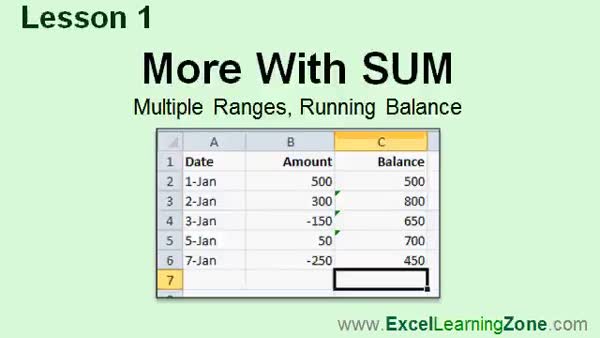
Lesson 1: SUM Multiple Ranges & Running Total - In Lesson 1, we are going to learn more with the SUM function. We will discuss how to use SUM with multiple non-contiguous ranges in Excel and I will show you how to apply the SUM function to create a running balance in a column, using absolute references and the ISBLANK function to keep your spreadsheet clean and accurate as you add new transactions.
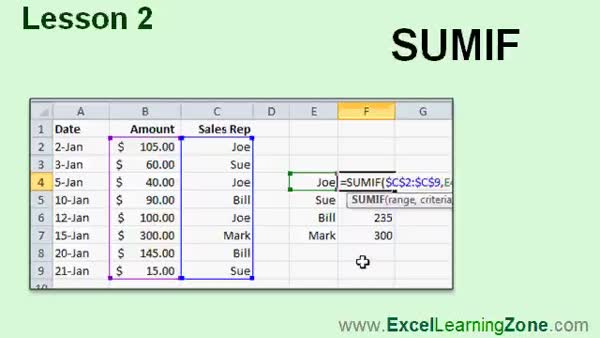
Lesson 2: SUMIF: Add Conditional Totals - In Lesson 2, we are going to learn about the SUMIF function, which allows you to add values in a range based on specific criteria. We will walk through examples such as calculating total sales over a certain amount and summing sales by individual sales reps. I will show you how to structure the SUMIF formula for different scenarios, make your criteria variable using cell references, and use absolute references to prevent errors when copying formulas. We will also briefly discuss related functions like COUNTIF and AVERAGEIF.
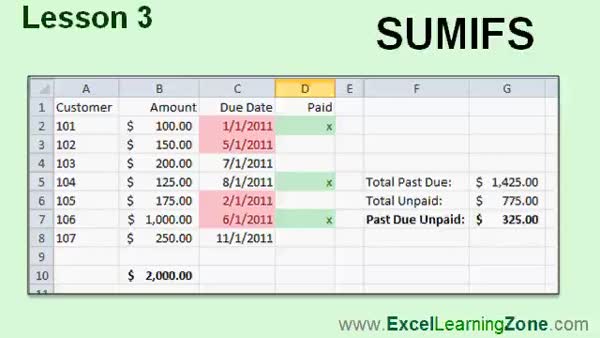
Lesson 3: SUMIFS for Multiple Criteria - In Lesson 3, we will learn how to use the SUMIFS function in Excel, which allows you to sum values based on multiple criteria. I will show you step-by-step examples, such as calculating commissionable sales for sales reps and summarizing order data based on factors like due dates and payment status. We will also look at using SUMIFS with date functions and text criteria, and apply conditional formatting to highlight data. We will briefly discuss related functions like AVERAGEIFS and COUNTIFS, which work similarly for calculating averages and counts with multiple criteria.
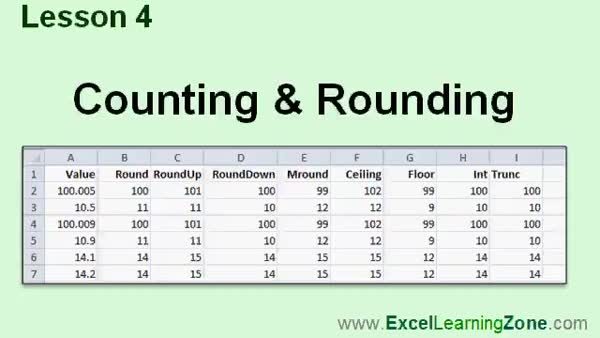
Lesson 4: COUNT, COUNTA, COUNTBLANK & Rounding - In Lesson 4, we will cover counting and rounding in Excel by exploring the COUNT, COUNTA, and COUNTBLANK functions to count numbers, non-blank cells, and blank cells. We will discuss ISBLANK, and then I will show you how rounding functions work - including ROUND, ROUNDUP, ROUNDDOWN, MROUND, CEILING, FLOOR, INT, and TRUNC - to help control how your numbers are displayed and used in calculations, especially when working with decimals and multiples. We will also discuss the difference between the value displayed and the value actually stored in a cell.
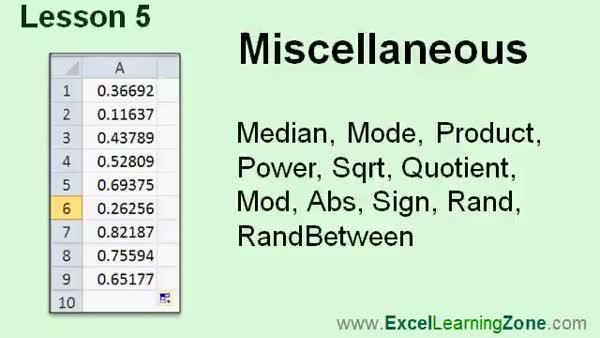
Lesson 5: Median, Mode, Product, More Functions - In Lesson 5, we will explore a variety of miscellaneous math and statistics functions in Excel including median, mode, product, power, square root, quotient, mod, absolute value (ABS), sign, rand, and randbetween. I will show you how these functions work, discuss when to use scientific notation, and demonstrate how to generate random numbers or perform integer division. We will also talk about using modulus to check divisibility, and look at practical uses for the ABS and sign functions. This lesson introduces several math functions in Excel that are useful for calculations and data analysis.
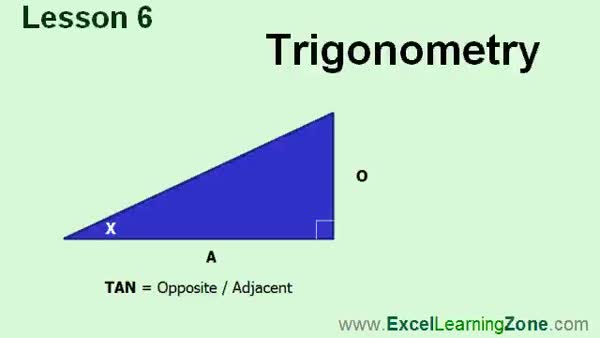
Lesson 6: Sine, Cosine & Tangent in Excel - In Lesson 6 we are going to take a quick look at trigonometry in Excel. I will show you how to use the tangent function to calculate the height of a building, and we will talk about the sine and cosine functions, their inverses, and how Excel uses radians instead of degrees for trigonometric calculations. We will also discuss how to convert between degrees and radians using Excel functions, and briefly mention the PI function. This lesson assumes you already understand basic trigonometry and want to apply it in Excel.
Lesson 7: SUM, IFs, Count & Math Review - In this course we learned about using the SUM function for non-contiguous and multiple ranges, creating running balances, and working with the SUMIF and SUMIFS functions for summing values based on one or more criteria. We covered various counting and rounding functions like COUNTA, COUNTBLANK, ROUNDUP, ROUNDDOWN, CEILING, and FLOOR, as well as math and statistics functions like MEDIAN, MODE, PRODUCT, ABS, and generating random numbers. We also discussed basic trigonometry functions in Excel, such as using TAN to calculate building heights, and discussed resources for further help and feedback.
NavigationKeywordsSUM function, SUMIF, SUMIFS, running balance, COUNT, COUNTA, COUNTBLANK, ROUND, ROUNDUP, ROUNDDOWN, MROUND, CEILING, FLOOR, INT, TRUNC, median, mode, product, power, mod, ABS, rand, randbetween, quotient, sign, trigonometric functions, sine, cosine, tange
More InformationTranscriptWelcome to Excel 2010 Expert Level 5, brought to you by ExcelLearningZone.com. I am your instructor, Richard Rost. Today's class is all about math and statistics functions. We will start out by working more with the SUM function. You will learn how to create a running balance, for example. We will learn about two very powerful functions, SUMIF and SUMIFS, which allow you to sum up values if they match specific criteria. For example, given a list of orders, you can show all of the orders that are past due and unpaid and total those up. We will learn about all the different counting and rounding functions. We will cover tons of different mathematical functions: median, mode, product, square root, absolute value, generating random numbers, and lots more. We will also see some different trigonometric functions in Excel. I will show you how to calculate the height of a building using the tangent function. This class is designed to be used with Excel 2010. However, even if you are using an older version of Excel, most of the material covered today should work just fine. This is an expert level course for Excel 2010. This class was designed for users who have a good amount of experience with Excel, preferably those who have taken all of my beginner classes and the first four expert classes. My courses are broken up into four different groups: beginner, expert, advanced, and developer. The beginner courses are for novice users with little or no experience with Excel. The expert series, which is what you are watching right now, is designed for more experienced users who are already comfortable with Excel. Expert classes go into a lot more depth about each topic than the beginner classes did, and we will cover more functions, features, tips, and so on. When you have mastered the expert classes, move up to the advanced lessons. You will learn how to build macros, build user forms, create your own templates, and many more advanced features that not everyone will use, but they really add enhanced functionality and professionalism to your spreadsheets. Finally, my developer series is designed to teach you how to program in Visual Basic for Applications with Microsoft Excel. This will allow you to create Excel-based programs for your users, automate your spreadsheets, and integrate Excel tightly with the other Office applications. Each of my series is broken down into different levels. For example, the beginner series contained five different levels, which you should have taken previously. This class is the fifth level of the expert series. Each level teaches you new and different topics in Microsoft Excel, building on the lessons learned in the previous levels. When you finish all the expert classes, move up to the advanced series, and then finally, the developer series. Now, I will take a more detailed look at exactly what we are going to learn in today's class. In lesson one, we are going to work more with the SUM function. We will learn how to use SUM with multiple ranges, and we will see how to create a running balance. In lesson two, we are going to learn about the SUMIF function, which allows you to sum up a list of numbers if specific criteria are met. In lesson three, we are going to learn about SUMIFS, which is related to SUMIF, but it allows multiple criteria for each of your calculations. In lesson four, we are going to learn about a couple of different functions for counting and rounding numbers. In lesson five, we are going to look at a bunch of different functions that have to do with math and statistics: median, mode, product, power, square root, quotient, MOD, ABS, SIGN, RAND, and RANDBETWEEN. There is a lot of different material in this lesson. In lesson six, we are going to take a quick look at trigonometry in Excel. I will show you the TANGENT function and how to use it to calculate the height of a building, and we will talk about the other trig functions like SINE and COSINE, DEGREES and RADIANS, and so on. If you need help with the topics covered in today's lessons, please feel free to post your questions in the Excel Interactive Student forums. If you are watching this course using my custom video player software, or online on my web theater, you should see the student forum for each lesson appear in a small window next to the class videos, if you have an active internet connection. Here, you will see all the questions that other students have asked, as well as my responses to them, and the comments that some of the other students may have made. I encourage you to read through these questions and answers as you start each lesson. Feel free to post your own questions and comments as well. If you are not watching your lessons online, you can still visit the student forums later by visiting ExcelLearningZone.com/forums. To get the most out of this course, I recommend you sit back, relax, and watch each lesson completely through once without trying to do anything on your computer. Then, replay the lesson from the beginning and follow along with my examples. Actually create the same spreadsheet that I make in the video. Build the spreadsheet with me step by step. Do not try to apply what you are learning right now to other projects until you have mastered the sample spreadsheet. If you get stuck or do not understand something, watch the video again from the beginning, or tell me what is wrong in the student forum. Most importantly, keep an open mind. Excel might seem intimidating at first, but once you get the hang of it, you will see that it is really easy to use. IntroIn lesson 5 of the Microsoft Excel 2010 Expert series, you will learn about advanced math and statistics functions, including SUM, SUMIF, and SUMIFS, plus a range of counting, rounding, and statistical functions such as median, mode, and product. We will also cover random number generation, trigonometric functions, and creating running balances. This lesson is designed for users experienced with Excel who want to expand their skills with expert-level concepts. QuizQ1. What is the primary focus of Excel 2010 Expert Level 5? A. Formatting spreadsheets for printing B. Math and statistics functions C. Data validation techniques D. Chart creation and customization Q2. Which function allows you to sum values in Excel based on a single criterion? A. SUMIFS B. PRODUCT C. SUMIF D. COUNTIF Q3. What is the difference between the SUMIF and SUMIFS functions? A. SUMIF is for finding averages, SUMIFS is for rounding numbers B. SUMIF is for summing a list, SUMIFS is for trigonometry C. SUMIF uses multiple criteria, SUMIFS uses single criterion D. SUMIF uses single criterion, SUMIFS uses multiple criteria Q4. Which of the following is NOT mentioned as a mathematical or statistical function to be covered in this class? A. MEDIAN B. PRODUCT C. VLOOKUP D. ABS Q5. If you wanted to generate a random whole number between two values in Excel, which function would you use? A. SQUARE B. ABS C. RAND D. RANDBETWEEN Q6. What should you do if you do not understand a lesson or get stuck while following along? A. Skip the lesson B. Watch the video again or ask questions in the student forum C. Close Excel and reopen it D. Wait for the next lesson to cover it Q7. What trigonometric function will be demonstrated to calculate the height of a building? A. SINE B. COSINE C. TANGENT D. COTANGENT Q8. Which series teaches programming in Visual Basic for Applications with Microsoft Excel? A. Beginner series B. Expert series C. Advanced series D. Developer series Q9. What is recommended before trying to apply what you have learned to your own projects? A. Take a break and come back later B. Master the sample spreadsheet from the lesson C. Immediately use the new function in all your reports D. Skip to the developer series Q10. Where can you find responses to other students' questions about the course? A. In the Excel Interactive Student forums B. On the Excel help menu C. Only in the course textbook D. In the printout provided with the class Answers: 1-B; 2-C; 3-D; 4-C; 5-D; 6-B; 7-C; 8-D; 9-B; 10-A DISCLAIMER: Quiz questions are AI generated. If you find any that are wrong, don't make sense, or aren't related to the video topic at hand, then please post a comment and let me know. Thanks. SummaryToday's video from Excel Learning Zone covers Excel 2010 Expert Level 5, and the main focus is on math and statistics functions. I begin by exploring the SUM function in greater depth, including how to use it to establish a running balance within a spreadsheet. I also introduce two particularly useful functions, SUMIF and SUMIFS, which help you aggregate values that meet certain conditions. For example, these functions can be used to total all unpaid past due orders in a list. Moving forward, I discuss various counting and rounding functions available in Excel. I cover an array of mathematical operations such as finding the median and mode, calculating the product of a series of numbers, working with square roots and absolute values, and generating random numbers. There are many more features to explore as well. I also briefly introduce some of the trigonometric capabilities of Excel, and I'll demonstrate how to determine the height of a building using the tangent function. This course is structured around Excel 2010, but much of what I show applies to earlier versions of the program as well. This is an expert-level course created for users who are already well-versed in Excel, ideally those who have completed my beginner courses and the prior expert classes. My coursework is organized into beginner, expert, advanced, and developer categories. The beginner series is intended for those new to Excel, while the expert series, which you are currently working through, delves more deeply into specific topics and provides a greater variety of functions, features, and helpful tips than the beginner classes. After completing all expert topics, you can proceed to my advanced lessons, where you'll learn about macros, user forms, creating custom templates, and other features that boost the functionality and appearance of your spreadsheets. Beyond the advanced classes, my developer series will teach you to program with Visual Basic for Applications (VBA) in Microsoft Excel. Programming skills enable you to automate tasks, create Excel-based software for users, and tightly integrate Excel with other Office applications. Each of these series is broken up into multiple levels. As an example, my beginner series consisted of five levels. The course you are currently viewing is the fifth level in the expert sequence. Each new level builds on what was introduced in the previous ones, so the learning is cumulative and structured. I now want to outline exactly what is included in the lessons for today's class. - In the first lesson, we work further with the SUM function, including its use with multiple ranges and for creating a running balance. - The second lesson introduces SUMIF, which allows you to sum numbers based on certain criteria. - In lesson three, we look at SUMIFS, which operates like SUMIF but lets you apply more than one condition to your calculations. - The fourth lesson covers different counting and rounding functions. - Lesson five is a broad overview of various math and statistical tools in Excel, including ways to find the median, mode, calculate products and powers, work with square roots, and perform additional operations such as obtaining absolute values and random numbers. - In lesson six, I give an introduction to trigonometry in Excel. I explain the use of the TANGENT function to measure the height of a building and also discuss other related functions such as SINE, COSINE, DEGREES, and RADIANS. If you require assistance with anything covered in this class, I recommend using the Excel Interactive Student forums, where you can post questions and receive help. If you are watching on my website or using my video player, you will see the student forum next to each lesson, provided you have an internet connection. Reviewing questions and answers from other students is a great way to gain additional understanding, and you are encouraged to post your own questions or comments. If you are not watching your lessons online, you can still visit the forums at ExcelLearningZone.com. To get the most out of this course, start by sitting back and watching each lesson from start to finish before trying anything on your own computer. Next, replay the lesson while following along: create the same spreadsheet that I demonstrate, building it step by step as you see it in the video. Don't try to apply these concepts to other projects until you feel comfortable with the sample spreadsheet. If you run into trouble or are confused, watch the relevant section again or let me know what you're struggling with in the student forum. Above all, try to remain open minded. Excel might initially feel overwhelming, but once you become familiar with it, you'll find it is actually quite user friendly. You can find a complete video tutorial with step-by-step instructions on everything discussed here on my website at the link below. Live long and prosper, my friends. Topic ListUsing the SUM function with multiple ranges Creating a running balance with SUM Using the SUMIF function with single criteria Using the SUMIFS function with multiple criteria Counting functions in Excel Rounding functions in Excel Using MEDIAN and MODE functions Using PRODUCT function Using POWER and SQRT functions Using QUOTIENT and MOD functions Using ABS and SIGN functions Generating random numbers with RAND and RANDBETWEEN Using trigonometric functions in Excel Calculating height using the TANGENT function Working with SINE and COSINE functions Using DEGREES and RADIANS functions Primary TopicsSUM function, SUMIF, SUMIFS, counting functions, rounding functions, median, mode, product, power, square root, trigonometric functions Secondary Topicsrunning balance, MOD, ABS, SIGN, RAND, RANDBETWEEN, quotient, SINE, COSINE, DEGREES, RADIANS |
||
|
| |||
| Keywords: SUM function, SUMIF, SUMIFS, running balance, COUNT, COUNTA, COUNTBLANK, ROUND, ROUNDUP, ROUNDDOWN, MROUND, CEILING, FLOOR, INT, TRUNC, median, mode, product, power, mod, ABS, rand, randbetween, quotient, sign, trigonometric functions, sine, cosine, tange PermaLink How To Use SUM, SUMIF, SUMIFS, Trigonometric, and Statistical Functions in Microsoft Excel 2010 |