|
|||||
Excel Expert 6Loan Calculators, Interest, PMT, FV, AmortizationWelcome to Excel Expert 6. In this course you will learn how to use financial functions in Microsoft Excel to build calculators for loans, investments, and credit card payments. We will cover key financial terms like present value, future value, payment, and interest rate, and work through building tools such as a loan calculator, investment calculator, and loan amortization schedule. You will also see how to use Excel formulas to compare loan scenarios, analyze credit card payments, and apply functions like PMT, FV, RATE, NPER, PV, and others to solve common financial problems. Lessons
ResourcesLesson SummaryWelcome! Loan & Investment Calculators Guide - Welcome to Excel Expert Level 6. In this course we will cover a range of advanced financial functions in Microsoft Excel, starting with key financial terms and commonly used functions. We will build calculators for loans, investments, interest rates, millionaire goals, initial deposits, home value, and loan amortization schedules, as well as review how to analyze credit card payments. We will also discuss how the course fits into the broader sequence of Excel lessons and ways to get help through the student forums. This course is designed for users who have completed earlier beginner and expert Excel courses.
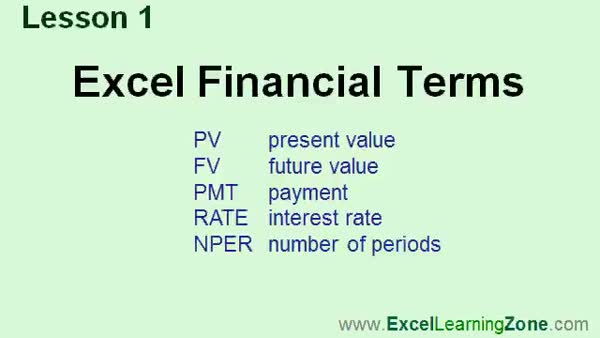
Lesson 1: PV, FV, PMT, Rate & NPER Guide - In Lesson 1, we will cover some of the basic financial terms and functions in Excel, including present value (PV), future value (FV), payment (PMT), interest rate (rate), and number of periods (NPER). We will discuss how these financial terms are used in Excel to perform common calculations, such as determining loan payments, future values, and interest for loans or investments. We will also talk about the concepts of simple and compound interest, explaining how Excel's financial functions can help with these calculations. This lesson lays the foundation for working with financial terms in Excel.
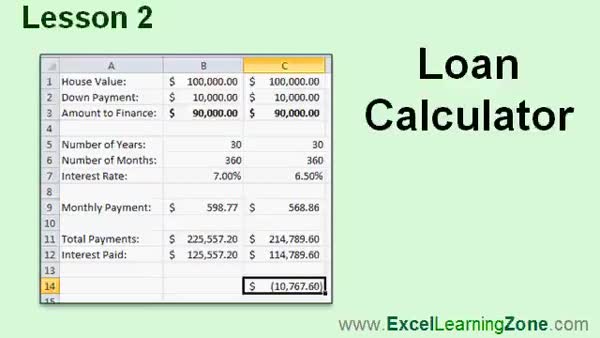
Lesson 2: Mortgage Payments & Loan Comparison - In Lesson 2, we will walk through building a loan calculator in Excel to figure out the monthly payment for a home mortgage. I will show you how to enter the loan amount, down payment, mortgage duration, and interest rate, then use the PMT function to calculate monthly payments. We will also discuss calculating total payments and total interest paid, and compare different scenarios by adjusting the down payment, mortgage term, and interest rate to see their effects on payment amounts and interest costs using Excel formulas and basic formatting tools.
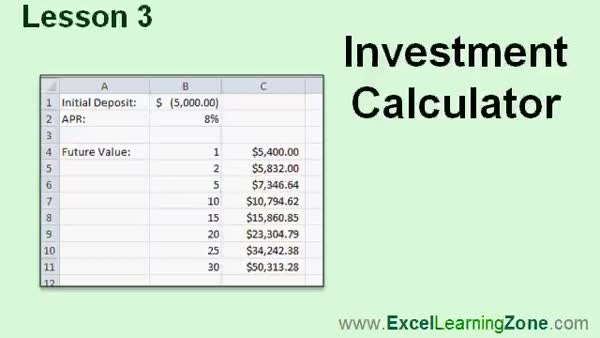
Lesson 3: Calculate Future Investment Value - In Lesson 3, we will build an investment calculator in Excel to determine how much an initial deposit grows over time with a given interest rate. We will walk through using the future value function to calculate the worth of a $5,000 investment at 8 percent interest over several years, and discuss how to use absolute references for easier calculation across different time periods. We will also look at how compounded interest affects growth and mention that adding regular payments is a topic for a future lesson.
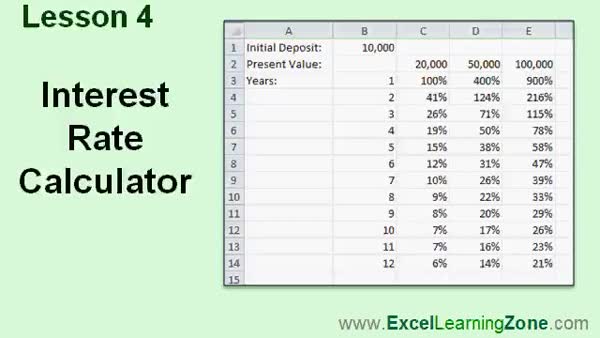
Lesson 4: ROI & Interest Rate with RATE Function - In Lesson 4, we will build an interest rate calculator using the RATE function to determine your return on investment based on the amount you invested, the amount you receive back, and the investment period. I will show you how to set up your spreadsheet to calculate your annual percentage rate, adjust for different periods and payouts, and handle common Excel errors related to positive and negative cash flow. We will also explore how changing the numbers affects your investment returns and briefly mention customizing the formula for different scenarios.
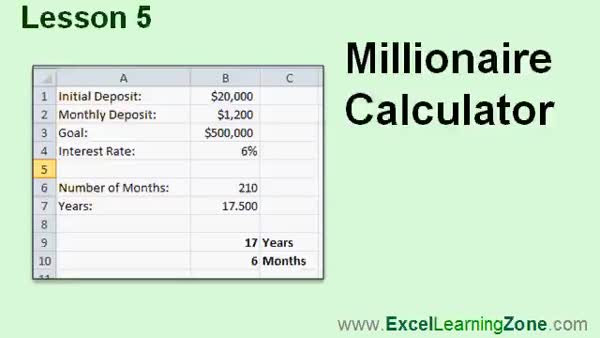
Lesson 5: Millionaire Interest Calculator - In Lesson 5, we will walk through building a millionaire calculator to determine how long it will take to reach a goal of one million dollars by making monthly deposits into a bank account with interest. We will discuss using the NPR function to calculate the number of months needed, adjusting for initial deposits, monthly payments, and interest rates, and explore how to display the result in years and months. I will also show you how changing deposit amounts or interest rates affects the time needed to reach your goal.
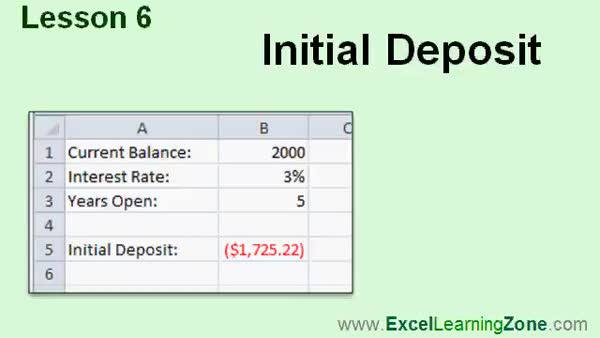
Lesson 6: Initial Deposit with PV Formula - In Lesson 6, we will calculate the initial deposit in an account using the Initial Deposit Calculator, given the current balance, interest rate, and the number of years the account has been open. We will discuss how to use the PV (Present Value) function to figure out what the starting deposit was when you know these variables. I will walk through a specific example with a $2,000 current balance, a 3 percent interest rate, and a period of five years to show how the calculation is done.
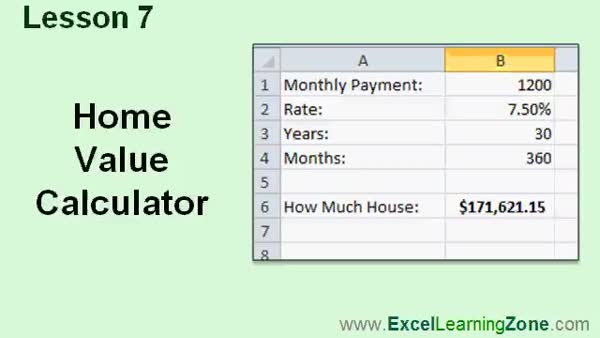
Lesson 7: House Affordability with PV Function - In Lesson 7, we will walk through how to use the PV (Present Value) function to create a home value calculator. I will show you how to calculate the maximum home price you can afford based on your monthly payment budget, the bank's interest rate, and a 30-year mortgage period. We will discuss the required and optional parameters for the PV function, including payment timing and future value considerations, and see how changing your payment or loan terms affects the affordable home value. Note that this home value calculator does not include taxes, insurance, or maintenance costs.
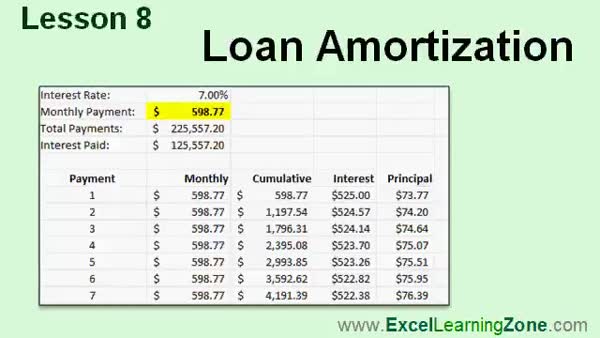
Lesson 8: Loan Amortization & Payment Calc - In Lesson 8, we will walk through building a loan amortization schedule to show how each monthly payment is divided between interest and principal. We will discuss how interest is front-loaded on loans, demonstrate the use of Microsoft's Loan Amortization Schedule template in Excel, and then create our own amortization table. I will show you how to use the IPMT and PPMT functions to calculate interest and principal for each payment, as well as introduce the CUMIPMT and CUMPRINC functions for calculating cumulative interest and principal over a range of periods.
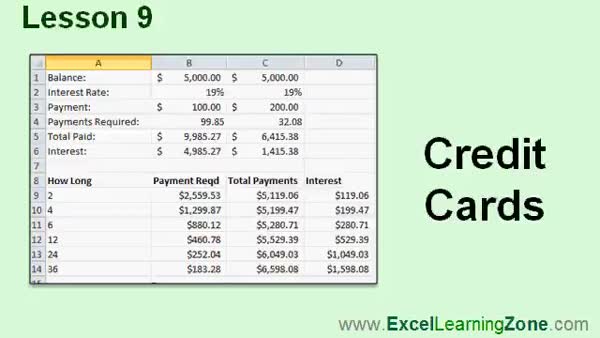
Lesson 9: Credit Card Payment & Interest - In Lesson 9, we will walk through how to analyze your credit card statement using financial functions. We will see how long it takes to pay off a credit card balance by making only the minimum payments, and compare that to larger payment amounts. I will show you how to use functions like NPER and PMT to calculate the number of months to pay off your balance, your total payments, and how much interest you pay. We will also discuss building a chart to see what payments are needed to pay off your credit card in different time frames.
Lesson 10: PMT & FV: Key Excel Finance Tools - In this course we learned about key Excel financial terms and functions such as present value, future value, payment, interest rate, and number of periods. We discussed annual percentage rate, simple and compound interest, and built a variety of calculators using functions like PMT, FV, RATE, NPER, PV, IPMT, and PPMT. We covered creating a loan amortization schedule, credit card calculator, and explored cumulative interest and principal calculations. We also briefly discussed other advanced Excel financial functions and resources available for further help, as well as ways to provide feedback and access additional tips on the website.
NavigationKeywordsExcel financial functions, loan calculator, investment calculator, PMT, FV, RATE, NPER, PV, mortgage calculator, millionaire calculator, loan amortization, home affordability, credit card payments, compound interest, IPMT, PPMT, CUMIPMT, CUMPRINC
More InformationTranscriptThis course is all about using different financial functions in Microsoft Excel. We'll begin by learning all the popular financial terms and the functions that go with them. We'll learn how to build a loan calculator and an investment calculator. We'll learn how to calculate interest rate. We'll build something I like to call a millionaire calculator, which will show how long it will take you to become a millionaire. We'll make a home value calculator, and we'll learn how to build a loan amortization schedule. This course was developed with Excel 2010. However, most of the functions used in this class are available in previous versions of Excel. This is an expert level class for Microsoft Excel. You should have at least taken my beginner classes 1 through 5, and preferably my other expert level classes 1 through 5 as well before taking this course. My courses are broken up into four different groups: beginner, expert, advanced, and developer. The beginner courses are for novice users with little or no experience with Excel. The expert series, which is what you are watching right now, is designed for more experienced users who are already comfortable with Excel. Expert classes go into a lot more depth about each topic than the beginner classes did, and we'll cover more functions, features, tips, and so on. When you have mastered the expert classes, move up to the advanced lessons. You'll learn how to build macros, build user forms, create your own templates, and many more advanced features that not everyone will use, but which really add enhanced functionality and professionalism to your spreadsheets. Finally, my developer series is designed to teach you how to program in Visual Basic for Applications with Microsoft Excel. This will allow you to create Excel-based programs for your users, automate your spreadsheets, and integrate Excel tightly with the other Office applications. Each of my series is broken down into different levels. For example, the beginner series contains five different levels, which you should have taken previously. This is the sixth level of the expert series. Each level teaches you new and different topics in Microsoft Excel, building on the lessons learned in the previous levels. When you finish all the expert classes, move up to the advanced series and finally the developer series. Now let's take a more detailed look at exactly what we are going to learn in today's class. In lesson one, we'll learn about some of Excel's financial terms and functions. In lesson two, we're going to build a loan calculator. We'll figure out the monthly payment on a home mortgage. In lesson three, we'll build an investment calculator. We'll figure out if you deposit so much money into an investment, earning a certain interest rate, how much it will be worth after a year, two years, ten years, and so on. In lesson four, we'll build an interest rate calculator. You know the amount that you are investing. You know the amount you are getting back and you want to see if it was a good investment. What is your return on investment? What was your annual percentage rate that you received from your investment? In lesson five, we're going to build something I like to call the millionaire calculator. You start off with an initial deposit. You are going to deposit so much money in the bank every month. How long will it take to reach your goal of a million dollars? In lesson six, we'll calculate the initial deposit in an account if we know the current balance, the interest rate, and how many years the account has been open. In lesson seven, we'll create a home value calculator. If you know how much money you can afford to pay for a house every month, the bank has told you what your interest rate is going to be, and you want a 30-year mortgage, we'll use the PV function to calculate how much house you can afford when you go house shopping. In lesson eight, we're going to build a loan amortization schedule. This is where you can see a breakdown of each month's payments, including interest and principal paid. In lesson nine, we'll take a look at your credit card statement. We'll see how long it will take to pay off that credit card balance if you just make the minimum payments every month. We'll also make a chart to determine what your monthly payment would have to be to pay off that credit card in two months, six months, twelve months, and so on. If you need help with the topics covered in today's lessons, please feel free to post your questions in the Excel Interactive Student forums. If you are watching this course using my custom video player software, or online in my web theater, you should see the student forum for each lesson appear in a small window next to the class videos, if you have an active internet connection. Here, you'll see all the questions that the other students have asked, as well as my responses to them, and the comments that some of the other students may have made. I encourage you to read through these questions and answers as you start each lesson. Feel free to post your own questions and comments as well. If you are not watching your lessons online, you can still visit the student forums later by visiting excellearningzone.com/forums. To get the most out of this course, I recommend you sit back, relax, and watch each lesson completely through once without trying to do anything on your computer. Then, replay the lesson from the beginning and follow along with my examples. Actually create the same spreadsheet that I make in the video. Build the spreadsheet with me step by step. Do not try to apply what you are learning right now to other projects until you have mastered the sample spreadsheet. If you get stuck or do not understand something, watch the video again from the beginning, or tell me what is wrong in the student forum. Most importantly, keep an open mind. Excel might seem intimidating at first, but once you get the hang of it, you will see that it is really easy to use. IntroIn lesson 6 of the Microsoft Excel Expert series, you will learn how to use a range of financial functions to solve real-world problems. We will cover popular terms and essential functions, and you'll learn how to build calculators for loans, investments, interest rates, and even a "millionaire calculator" to see how long it will take to reach your savings goals. You will also learn how to create a home value calculator, calculate initial deposits, build a loan amortization schedule, and analyze credit card payments. This class is intended for experienced Excel users ready to explore more advanced financial features. QuizQ1. What is the primary focus of this Excel course? A. Using different financial functions in Microsoft Excel B. Programming games in Excel C. Formatting spreadsheets for presentations D. Creating pie charts and graphs Q2. Which group is this course designed for? A. Beginners with no experience in Excel B. People who have completed beginner and expert level Excel courses C. Only professional accountants D. Anyone interested in Word or PowerPoint Q3. What is one of the first things covered in this course? A. Reviewing the Excel user interface B. Popular financial terms and their functions in Excel C. How to write VBA code D. Setting up printing layouts Q4. Which calculator will help determine the monthly payment on a home mortgage? A. Millionaire calculator B. Loan amortization schedule C. Loan calculator D. Investment calculator Q5. What is the purpose of the investment calculator built in the course? A. To track credit card expenses B. To see future value of a deposit with a specific interest rate over time C. To find the fastest way to save one million dollars D. To schedule home mortgage payments Q6. What will the millionaire calculator help you figure out? A. The initial amount in a savings account B. How much house you can afford C. How long it will take to reach one million dollars with regular deposits D. The interest paid on a loan Q7. Which Excel function is specifically mentioned for calculating how much house you can afford? A. FV (Future Value) B. NPV (Net Present Value) C. PV (Present Value) D. PMT (Payment) Q8. What does the loan amortization schedule built in the course display? A. Only interest paid over the loan period B. A breakdown of each month's payments, including interest and principal C. Current home values in your city D. Future value of an investment Q9. What advice is given on how to approach the lessons in this course? A. Watch each lesson once, then follow along step by step to build the spreadsheets B. Jump around to topics as they interest you C. Don't try to create the sample spreadsheet D. Memorize all formulas before starting Q10. Where can students ask questions about the course material? A. Microsoft technical support B. The Excel Interactive Student forums C. The course instructor's personal email D. Through social media only Q11. What is suggested if you do not understand something in the video? A. Skip it and move to the next lesson B. Watch the video again and/or ask for help in the forum C. Give up and exit the course D. Search random websites for answers Q12. What is a key recommendation before applying what you learn to your own projects? A. Try to use the functions immediately in a real-world spreadsheet B. Master the sample spreadsheet provided in the lesson C. Memorize the financial terms only D. Only read the lesson transcript Answers: 1-A; 2-B; 3-B; 4-C; 5-B; 6-C; 7-C; 8-B; 9-A; 10-B; 11-B; 12-B DISCLAIMER: Quiz questions are AI generated. If you find any that are wrong, don't make sense, or aren't related to the video topic at hand, then please post a comment and let me know. Thanks. SummaryToday's video from Excel Learning Zone focuses on mastering various financial functions in Microsoft Excel. In this class, I will guide you through some of the most common financial terms and their corresponding functions, which are useful for building practical tools such as loan and investment calculators. We will explore how to determine interest rates and even create what I like to call a millionaire calculator, which can estimate how long it will take to accumulate a million dollars. Additionally, we will develop a home value calculator and learn to set up a loan amortization schedule. Although this course was put together using Excel 2010, the vast majority of functions we will use are available in earlier versions as well. Please note that this is an expert-level class. You should have already completed my beginner series, especially lessons 1 through 5, and it would be best if you have covered the expert series up to level 5 before starting this course. I organize my courses into four main groups: beginner, expert, advanced, and developer. The beginner courses are designed for those with little or no prior experience in Excel. This expert course is intended for those who are already comfortable with Excel and are ready to dig deeper into its features and functions. In the expert series, we cover each topic in greater detail than in the beginner courses and introduce more complex formulas, functions, and techniques. Once you complete the expert courses, you will be ready to move on to the advanced series. There, we take things further by discussing macros, user forms, custom templates, and a variety of advanced features that can add flexibility and professionalism to your Excel spreadsheets. Finally, the developer series is focused on teaching you how to program with Visual Basic for Applications in Excel. This will help you create custom Excel-based solutions, automate tasks, and integrate Excel with other Office tools. Each main series is divided into several levels. For instance, the beginner series has five levels, all of which should be completed beforehand. The class you are watching now is the sixth level of the expert series, which builds upon the concepts from earlier levels. Once you are comfortable with everything in the expert courses, you can progress to the advanced series and then to the developer series. Let me outline the topics we will cover in this class: Lesson one introduces key financial terms and Excel's financial functions. In lesson two, we will create a loan calculator to determine monthly mortgage payments. Lesson three involves building an investment calculator. You will learn how to calculate the future value of an investment after a specified period, given a certain interest rate. In lesson four, I will show you how to construct an interest rate calculator. This will help you evaluate the annual return on an investment and see whether it was worthwhile. Lesson five focuses on the millionaire calculator. Starting with an initial deposit and monthly contributions, you will see how to figure out how long it will take to reach a million dollars. For lesson six, we will calculate the initial deposit in an account based on its current balance, interest rate, and the number of years the account has been open. Lesson seven covers a home value calculator. By using the PV function, you will determine how much house you can afford based on your monthly payment capacity, the given interest rate, and a 30-year mortgage. In lesson eight, we will develop a loan amortization schedule to break down each month's payments into interest paid and principal paid. Lesson nine addresses credit card statements. You will learn how long it will take to pay off a credit card balance making only minimum payments, as well as determine what payments you need to make to pay it off in various time frames. If you need assistance with any of the topics, you are encouraged to participate in the Excel Interactive Student forums. If you are viewing this course through my custom video player or web theater, the student forum for each lesson appears next to the class videos when you have an internet connection available. There, you will find questions from other students, my responses, and additional comments. Please take the time to read through these as you start each lesson, and feel free to post your own questions or comments. If you are not watching the lessons online, you can access the forums later at excellearningzone.com forums. To maximize your learning, I suggest watching each lesson through once without interruption. Afterward, replay the lesson and follow along by recreating the sample spreadsheet step by step. Build it together with me as shown in the video, and do not try to transfer the concepts to your own projects until you are comfortable with the examples provided. If you encounter difficulties or something does not make sense, watch the video again or post your specific issue in the student forum. Above all, keep an open mind throughout the course. Excel can seem overwhelming at first, but with practice, you will find it straightforward and powerful. You can find a complete video tutorial with step-by-step instructions on everything discussed here on my website at the link below. Live long and prosper, my friends. Topic ListExcel financial terms and functions overview Building a loan calculator Calculating monthly mortgage payments Building an investment calculator Projecting investment growth over time Building an interest rate calculator Calculating return on investment Annual percentage rate calculation Building a millionaire calculator Projecting time to reach financial goals Calculating required initial deposit Using the PV function for home value Building a home value calculator Calculating mortgage affordability Building a loan amortization schedule Breaking down loan payments by principal and interest Credit card payment schedule analysis Calculating time to pay off credit card balances Charting required credit card payments for set payoff periods Primary TopicsExcel financial functions, loan calculator, investment calculator, interest rate calculation, millionaire calculator, home value calculation, loan amortization schedule, credit card payoff planning Secondary Topicscourse structure, prerequisites, learning approach, user forums |
||
|
| |||
| Keywords: Excel financial functions, loan calculator, investment calculator, PMT, FV, RATE, NPER, PV, mortgage calculator, millionaire calculator, loan amortization, home affordability, credit card payments, compound interest, IPMT, PPMT, CUMIPMT, CUMPRINC PermaLink How To Build Financial Calculators And Analyze Loans Investments And Interest Rates In Microsoft Excel |