Access Video Quiz B1.1
By Richard Rost

 3 months ago
Ready to Test Your Knowledge of Microsoft Access?
Which Microsoft Access object is primarily used to store data? Welcome to Microsoft Access Video Quiz #1. You will be asked five beginner-level questions to test your basic understanding of Access, including topics like tables, reports, records, and fields. Answer each question as they appear, keep track of your score, and see how well you know Microsoft Access.
Recommended Courses
Want More
Keywords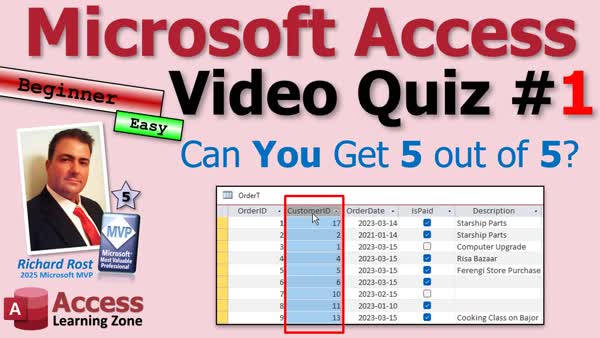
Access Video Quiz, tables, reports, forms, queries, records, fields, relational database, printing reports, data storage, beginner quiz, Access objects, row vs record, column vs field, types of databases, relationships between data
More InformationTranscript Welcome to the first ever video quiz from Access Learning Zone. Today's quiz is for beginners, but do not get cocky. I will ask five questions, give you a few seconds to think about each one, then reveal the answer. Keep track of your score and we will see how you did at the end.
Are you ready? Here we go.
Question 1. Which Microsoft Access object is primarily used to store data? Is it a form, report, table, or query? That one is a table. All of your data is stored in one or more tables.
Question 2. Which Access Object is designed specifically for printing? A form, a report, a table, or a query? That is a report. Remember, forms are for working with data on the screen. Reports are for printing information, PDFing, and giving information to somebody who is not using your database. Can you print the form? Yes, you can, but reports are for printing.
Question 3. What is another name for one complete row of information in a table? Think about it. That is a record. A record is another name for a row.
Question 4. What is this thing called in Access, and hint, it is not a column? Anybody? Bueller? Bueller? That is called a field in Microsoft Access. That is the customer ID field, the order ID field, and so on.
All right, last question. How are you doing so far?
Question 5. Microsoft Access is what type of database? Equational, hierarchical, sequential, or linear? Access is a relational database. That means it can recognize relationships between different types of data, like customers and their orders, so you do not have to duplicate information.
All right, how did you do? Are you an Access Jedi? Or is it time for another lesson?
Now, if you missed any, these topics and a lot more are covered in my Access Beginner Level 1 course, Lesson 1, which is absolutely free. You will find a link down below.
Thanks for playing, post your score in the comments, and until next time, live long and prosper, my friends. Intro Which Microsoft Access object is primarily used to store data? Welcome to Microsoft Access Video Quiz #1. You will be asked five beginner-level questions to test your basic understanding of Access, including topics like tables, reports, records, and fields. Answer each question as they appear, keep track of your score, and see how well you know Microsoft Access. Quiz Q1. Which Microsoft Access object is primarily used to store data?
A. Table
B. Form
C. Report
D. Query
Q2. Which Access object is designed specifically for printing?
A. Form
B. Report
C. Table
D. Query
Q3. What is another name for one complete row of information in a table?
A. Record
B. Field
C. Form
D. Query
Q4. In Microsoft Access, what is the term for a single piece of information in a table, such as customer ID or order ID?
A. Column
B. Record
C. Report
D. Field
Q5. Microsoft Access is what type of database?
A. Equational
B. Hierarchical
C. Sequential
D. Relational
Answers: 1-A; 2-B; 3-A; 4-D; 5-D
DISCLAIMER: Quiz questions are AI generated. If you find any that are wrong, don't make sense, or aren't related to the video topic at hand, then please post a comment and let me know. Thanks. Summary Today's video from Access Learning Zone is a beginner-friendly Microsoft Access quiz. The goal today is to test your basic knowledge of Microsoft Access with five straightforward questions. I encourage you not to get overconfident, as some of these might make you think.
I will ask each question, give you a moment to consider your answer, and then I will explain the correct response. Keep track of your score as we go, and see how you do by the end.
The first question asks which Microsoft Access object is mainly used for storing data. Your options are form, report, table, or query. The answer is table. In Access, all of your information is held within tables. They are the fundamental building blocks for data storage in the database.
Next, I ask which object in Access is best suited for printing. Are reports, forms, tables, or queries intended for that purpose? The correct choice is report. While you can technically print a form, reports are specifically designed for formatting and sending out data, either as a printed copy or as a PDF. Reports are more suitable for sharing information with others who might not have access to your database.
For question three, I want to know what we call a complete row of data inside a table. The answer is a record. In Access, a record represents all the information associated with one entry or item within a table - in other words, a row.
Question four is about terminology. What do we call each individual category of information in a table? For example, you might have a customer ID or an order ID. In Access, these are called fields, not columns. Each field is a specific type of data that makes up part of a record.
The final question challenges you to identify the type of database Access is. Is it equational, hierarchical, sequential, or linear? Actually, Access is classified as a relational database. This means it is able to recognize and manage relationships between different kinds of data, such as linking customers with their orders, which helps you avoid repeating the same information in multiple places.
How did you do? Did you ace all five questions, or do you need to brush up a bit more? If you missed any, do not worry. All of these introductory topics, and much more, are included in my Access Beginner Level 1 course, beginning right with lesson one, which is completely free to start. You can find a link to that course below.
Thanks for joining in this quiz. Feel free to share your score in the comments. For more in-depth, step-by-step instructions and tutorials, visit my website at the link below. Live long and prosper, my friends. Topic List Purpose of tables in Microsoft Access
Purpose of reports in Microsoft Access
Difference between forms and reports
Definition of a record in a table
Definition of a field in a table
Relational database concepts in Access Article This is a video quiz. No article needed. Primary Topics Access database objects, tables, reports, forms, queries, records, fields, relational databases Secondary Topics print output, data organization |




