Free Lessons
Courses
Seminars
TechHelp
Fast Tips
Templates
Topic Index
Forum
ABCD
 
Home   Courses   TechHelp   Forums   Help   Contact   Merch   Join   Order   Logon  
 
Back to Customer Report    Comments List
Pinned    Upload Images   @Reply   Bookmark    Link   Email   Next Unseen 
Save Object As Report
Donald Blackwell 
       
17 months ago
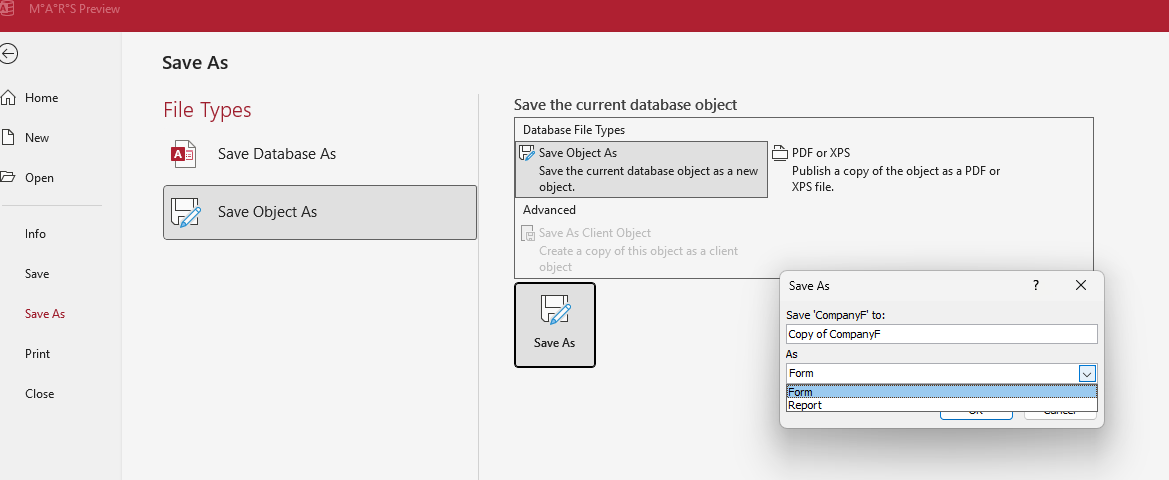
You still have to go and fine-tune/edit it, but you can save a form as a report in the backstage.

If you open a form in design view, then go to backstage, click "Save As".

Under "File Types" choose "Save Object As".

It will open a file dialog where you choose "Save FormF" to [objectname] and there is a drop down to save as and you can choose "Report"

It will link the data source for the new report automatically but you may have to edit any code that might be attached to the controls
Donald Blackwell OP  @Reply  
       
17 months ago

Richard Rost  @Reply  
           
17 months ago
I love it. Thanks. I knew someone would chime in with something I didn't know about! :)

Personally, I think it's faster and easier to have a blank report template that has all of your settings that you like for reports (page size, margins, etc.) and then copy and paste the controls you want from the form, rather than saving the form as a report and then having to customize the report settings from scratch. Six of one, half-dozen of another.
Richard Vaneveld  @Reply  
      
17 months ago
Here is another one for you.

I have heard you say numerous times, when you’re working with reports in access you don’t like the Report View but always use the Print Preview.

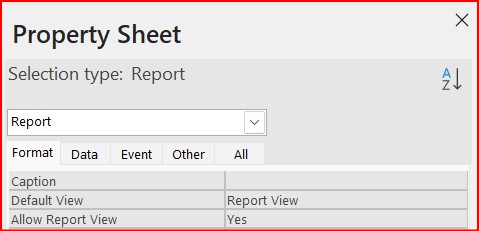
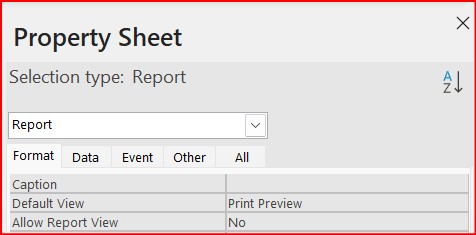
Are you aware of the fact there are two settings in the properties of the report called “Default View” and “Allow Report View” ?

If you change the Default View property to Print Preview and the Allow Report View property to No, that problem is history.

I use it all the time when working with reports.


LLAP
Richard Vaneveld  @Reply  
      
17 months ago

Richard Vaneveld  @Reply  
      
17 months ago

Richard Rost  @Reply  
           
17 months ago
That is amazing! Thank you for sharing that. I learned something new today. See, that's the interesting thing about having learned Access since almost the beginning. I started with version 2.0 - I think that was, what, 1994? - and I've been working with it ever since. The developers have snuck in little things like that which I didn't have when I was learning Access, so I didn't even know that existed. A lot of these little minor changes aren't even documented anywhere, so it's not like I can go over a list. When they make changes, they document the big things but not little tweaks like that. That's pretty cool. Thank you for sharing that again, and I'm going to put this in the video. Don't worry, I'll give you credit, of course.
Kevin Robertson  @Reply  
          
17 months ago
I've been setting those properties for a while.

I also like to turn off Datasheet View and Layout View for Forms. Doing this means the View button on the Ribbon toggles between Design View and Form View only.

Note: The only time I ever use Layout View is to align my labels above the columns of my List Boxes.
I never move these labels. I position them in Design View and resize them in Layout View. Much easier.

This thread is now CLOSED. If you wish to comment, start a NEW discussion in Customer Report.
 

Next Unseen

 
New Feature: Comment Live View


The following is a paid advertisement
Computer Learning Zone is not responsible for any content shown or offers made by these ads.
 

Learn
 
Access - index
Excel - index
Word - index
Windows - index
PowerPoint - index
Photoshop - index
Visual Basic - index
ASP - index
Seminars
More...
Customers
 
Login
My Account
My Courses
Lost Password
Memberships
Student Databases
Change Email
Info
 
Latest News
New Releases
User Forums
Topic Glossary
Tips & Tricks
Search The Site
Code Vault
Collapse Menus
Help
 
Customer Support
Web Site Tour
FAQs
TechHelp
Consulting Services
About
 
Background
Testimonials
Jobs
Affiliate Program
Richard Rost
Free Lessons
Mailing List
PCResale.NET
Order
 
Video Tutorials
Handbooks
Memberships
Learning Connection
Idiot's Guide to Excel
Volume Discounts
Payment Info
Shipping
Terms of Sale
Contact
 
Contact Info
Support Policy
Mailing Address
Phone Number
Fax Number
Course Survey
Email Richard
[email protected]
Blog RSS Feed    YouTube Channel

LinkedIn
Copyright 2026 by Computer Learning Zone, Amicron, and Richard Rost. All Rights Reserved. Current Time: 6/24/2026 8:22:27 PM. PLT: 1s