Free Lessons
Courses
Seminars
TechHelp
Fast Tips
Templates
Topic Index
Forum
ABCD
 
Home   Courses   TechHelp   Forums   Help   Contact   Merch   Join   Order   Logon  
 
Back to Access Developer Forum    Comments List
Upload Images   @Reply   Bookmark    Link   Email   Next Unseen 
Multiple Users on FE Database
Daniel Golden 
     
15 months ago
I have multiple users for my split database. In the FE file, there are buttons which open a form where the user can select various word documents to open. I currently have the buttons to pen the word documents set to a file path specific to each user. ("""\\networkname\firstfolder\users\username\subfolder\worddocument.docm""") Each of my users have their own copy of the FE file with the file path specific to their own folders. This is currently a lot of work when a new employee is hired and thus a new user folder is created. I currently have to go into the main database and edit the file path for each document to the new user's name in the above example file path.

My thought is that I would like to have a template folder in the main folder of the network where all word documents would be stored as template files and a copy of the FE database would be stored. Then, when a new employee is hired, the admins of the FE file would add him to the FE file. I would have a module that I call when the user is added which copies the template file then creates a new file using the new employee's first name. Would this template folder then be acceptable for use since the word documents are stored as templates and the FE file would be specific to the new user?
Daniel Golden OP  @Reply  
     
15 months ago
I guess basically, this is all to say that in the network folder I would like to have a template folder which contains a generic FE file of the database, along with template versions of several word and PDF documents in separate folders. The FE database has buttons which can open the word and PDF documents. The FE database also has a button with some VBA in it to copy the template folder, and create a new version of it named for any new employees. I just want to ensure before pushing this out to my users that each user would be able to use all of the files on their machines at the same time.
Thomas Gonder  @Reply  
      
15 months ago
@Daniel I could follow the second explanation better, up to the point where you say: "each user would be able to use all of the files on their machines at the same time". Do you mean all the files for all the different users? Or just the files for that one user? Does a user have more than one machine at a time to work on (how many hands do your users have?!!!)? What happens to all the documents for a user when that person is no longer a user?

Have you built a test of what you're trying to do? If so, what's not working?
Daniel Golden OP  @Reply  
     
15 months ago
@Thomas So I guess a bit more explanation is in order here. In the template folder would be a copy of the FE file, then a folder containing the template files for reviews, a folder containing template files for investigations, and a folder containing the template file for CVSA exams. Also there would be a folder where pending and completed reviews would be stored. When the user clicks on the button in the FE file for say a use of force review, the VBA code runs and opens the corresponding blank review file. Then there is VBA code set in the word document that enables the user to save their filled in file in either a pending or completed folder. There is also VBA in the FE file which allows a user to move a review file from the pending folder to the completed folder as needed.

I guess in the end what I am trying to get accomplished is making it easier for the next guy that takes my place to be able to add new users without having to alter a bunch of VBA code in the FE file and the word documents.

Each user has a desktop and laptop but sadly we are unable to hire any Terellians at this point so they only use one machine at a time. (I cannot claim to have any Star Trek knowledge as I had to google any Star Trek characters with more than two hands to make this reference, Sorry Richard!)
Daniel Golden OP  @Reply  
     
15 months ago
Also @Thomas, I have not yet built a test of this as I am working on this for my job in my spare time at home.
Daniel Golden OP  @Reply  
     
15 months ago
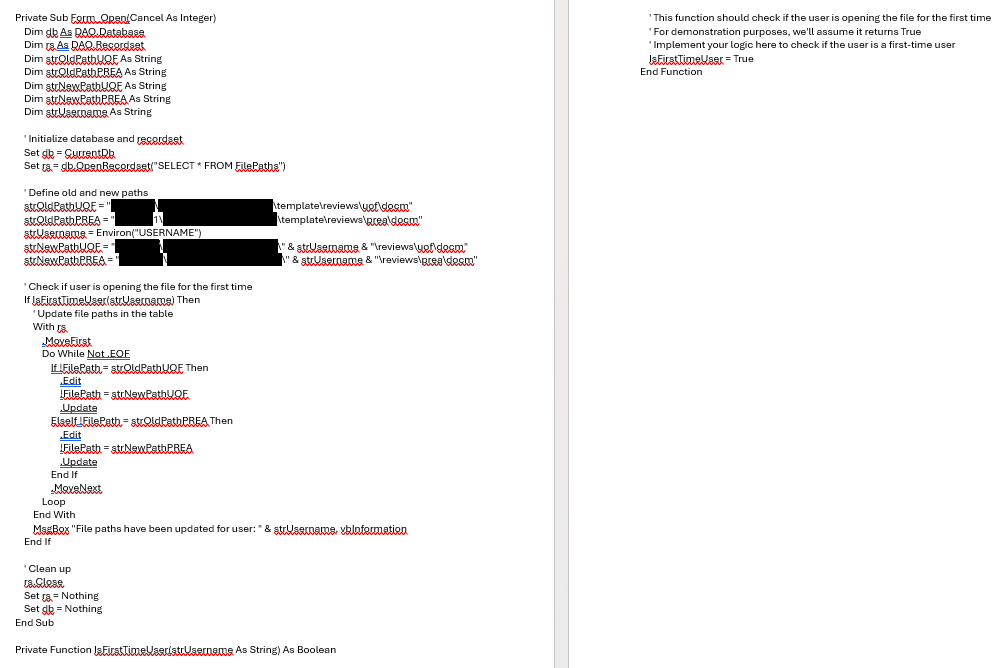
Ok. I think I went in way too deep on this whole idea... I backed down a bit and made a template folder which contains all of the word documents, PDF files, and the FE database. When a new user is added to the FE database, there is code in the button which copies the template folder and asks the Admin user (me for now) for the name of the new user. The copied template folder then gets added to the "Users" folder of the network labeled as the new user's name. Thanks to Kevin, I now have the database record the first date a user logs into the FE database. Earlier today, I asked AI to help me generate some VBA code to help change all of the file paths in the new users copy of the FE database from: \\MainNetworkFolder\SubNetworkFolder\template\reviews\filename.docm
to:
\\MainNetworkFolder\SubNetworkFolder\NewUsername\Reviews\filename.docm
when the user logs in for the first time.

The code I got from AI assumes that there is a method for checking if it is the user's first time logging into the database which thanks to Kevin, there is now. I will post the code which AI generated below.
Daniel Golden OP  @Reply  
     
15 months ago

Daniel Golden OP  @Reply  
     
15 months ago
My apologies, I also just thought about how the template FE file will need to update the file path for all the PDF files in the new user's folder as well just the same as the rest. I would assume that the process would be the same, right??

This thread is now CLOSED. If you wish to comment, start a NEW discussion in Access Developer Forum.
 

Next Unseen

 
New Feature: Comment Live View


The following is a paid advertisement
Computer Learning Zone is not responsible for any content shown or offers made by these ads.
 

Learn
 
Access - index
Excel - index
Word - index
Windows - index
PowerPoint - index
Photoshop - index
Visual Basic - index
ASP - index
Seminars
More...
Customers
 
Login
My Account
My Courses
Lost Password
Memberships
Student Databases
Change Email
Info
 
Latest News
New Releases
User Forums
Topic Glossary
Tips & Tricks
Search The Site
Code Vault
Collapse Menus
Help
 
Customer Support
Web Site Tour
FAQs
TechHelp
Consulting Services
About
 
Background
Testimonials
Jobs
Affiliate Program
Richard Rost
Free Lessons
Mailing List
PCResale.NET
Order
 
Video Tutorials
Handbooks
Memberships
Learning Connection
Idiot's Guide to Excel
Volume Discounts
Payment Info
Shipping
Terms of Sale
Contact
 
Contact Info
Support Policy
Mailing Address
Phone Number
Fax Number
Course Survey
Email Richard
[email protected]
Blog RSS Feed    YouTube Channel

LinkedIn
Copyright 2026 by Computer Learning Zone, Amicron, and Richard Rost. All Rights Reserved. Current Time: 5/6/2026 2:37:47 PM. PLT: 0s