Free Lessons
Courses
Seminars
TechHelp
Fast Tips
Templates
Topic Index
Forum
ABCD
 
Home   Courses   TechHelp   Forums   Help   Contact   Merch   Join   Order   Logon  
 
Back to Access Forum    Comments List
Upload Images   @Reply   Bookmark    Link   Email   Next Unseen 
Smooshed Forms
Michael Craytor 
     
16 months ago
Sometimes my forms open 'smooshed' - the dimensions of the form window are chopped down so that the form window is no longer large enough to display the contents without scroll bars. Sometimes the windows is reduced to almost nothing. Seems like it happens when it tries to open in a location but the Access application boundaries are in the way, like if the form should be 3" wide but it opens 1" away from the right side of the application window then it only makes a 1" wide form window. Usual causes: Using different monitors or resolutions, switching Access from full screen to windowed (like docking it to one side of the screen). I've played around with the different sizing and anchoring properties and haven't figured out yet which property my be involved. Happens regardless of whether I have form positioning VBA involved or not. Could someone point me the right direction?
Sami Shamma  @Reply  
             
16 months ago
Is Access window opened maximized?
Michael Craytor OP  @Reply  
     
16 months ago
Happens when Access is opened maximized - in those cases, it’s usually a result of different screen resolutions or there are some random situations where the firm tries to open higher or lower than usual and the top gets cropped off. Moving the window from one monitor to another (dual monitors, one is laptop with increased zoom in display settings) is another example when it’s maximized. If access window is not maximized, like if I try to dock it to one side of the screen to see other documents, or if I’m running to databases side by side, all of the form windows get truncated in dimension and then open then may open that way still once the access window is maximized again.
Michael Craytor OP  @Reply  
     
16 months ago

Michael Craytor OP  @Reply  
     
16 months ago

Michael Craytor OP  @Reply  
     
16 months ago
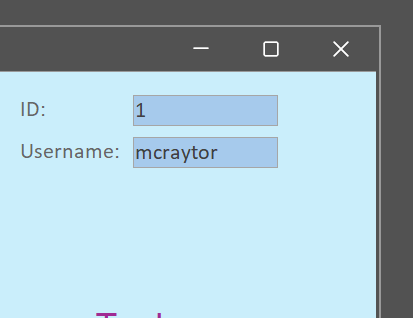
Couple of screen shots - the first as my form opened today when I started up. The second I shrunk  myself for demonstration purposes. My MainF started up with the top cropped off. Application in full screen. The form had been full size and positioned reasonably when I closed the database. It opened 'smooshed' and located halfway off the bottom of the screen. This seems to happen a lot, which is problematic for some forms where I put the close button at the top and a user would not be able to close the form if the top is cropped off. The second photo is an example of how extreme it gets sometimes, where large forms will open up barely visible. I'll upload a third for reference for what the first photo should look like. I've messed around with the different sizing properties and haven't figured out which to manipulate to prevent this. Hoping its a matter of someone point out that I'm missing something obvious :)
Michael Craytor OP  @Reply  
     
16 months ago

Michael Craytor OP  @Reply  
     
15 months ago
Some follow up - I've come across a couple videos where Richard mentions that forms sometimes open completed reduced to just the command bar, and that that is just a bug in Access. I've also found that part of the issue is forms opening up in design mode, e.g., when editing VBA the form will open in the background and may clip the edge of the workspace due to the different workspace dimensions with properties windows and such. And lastly, I found this solution from Mike Wolfe - which I'm not yet able to understand - perhaps in due time: https://nolongerset.com/get-back-here-form/

This thread is now CLOSED. If you wish to comment, start a NEW discussion in Access Forum.
 

Next Unseen

 
New Feature: Comment Live View


The following is a paid advertisement
Computer Learning Zone is not responsible for any content shown or offers made by these ads.
 

Learn
 
Access - index
Excel - index
Word - index
Windows - index
PowerPoint - index
Photoshop - index
Visual Basic - index
ASP - index
Seminars
More...
Customers
 
Login
My Account
My Courses
Lost Password
Memberships
Student Databases
Change Email
Info
 
Latest News
New Releases
User Forums
Topic Glossary
Tips & Tricks
Search The Site
Code Vault
Collapse Menus
Help
 
Customer Support
Web Site Tour
FAQs
TechHelp
Consulting Services
About
 
Background
Testimonials
Jobs
Affiliate Program
Richard Rost
Free Lessons
Mailing List
PCResale.NET
Order
 
Video Tutorials
Handbooks
Memberships
Learning Connection
Idiot's Guide to Excel
Volume Discounts
Payment Info
Shipping
Terms of Sale
Contact
 
Contact Info
Support Policy
Mailing Address
Phone Number
Fax Number
Course Survey
Email Richard
[email protected]
Blog RSS Feed    YouTube Channel

LinkedIn
Copyright 2026 by Computer Learning Zone, Amicron, and Richard Rost. All Rights Reserved. Current Time: 6/22/2026 8:40:41 AM. PLT: 1s