Free Lessons
Courses
Seminars
TechHelp
Fast Tips
Templates
Topic Index
Forum
ABCD
 
Home   Courses   TechHelp   Help   Contact   Merch   Join   Order   Logon   Forums   
 
Back to Access Forum    Comments List
Upload Images   @Reply   Bookmark    Link   Email   Next Unseen 
Dynamic Query Report Builder
Jennifer Neighbors 
     
17 months ago
My client has a database offering a few read-only queries to display their information in a spreadsheet-like format. The client wishes to create custom queries. Has anyone developed a query or report builder that allows users to dynamically select fields for building queries or reports? (Since the database is compiled, I prefer restricting their access and hiding the navigation pane.) Suggestions?
Alex Hedley  @Reply  
           
17 months ago
Depending on what you want to offer them you could use the hidden MSysObjects or just create a new Table that lists the Objects you want to give them access too

You could then use a Table/QueryDef to list the fields in a ListBox, double click to move them into a chosen ListBox.

Create a Query based on chosen.
Could have some way of allowing WHERE clause, etc.

Report Builder is likely to be a little more difficult but possible, although not sure how much effort you'd want to go to, probably easier just to give someone an Admin version and let them build it in Access instead of re-inventing the wheel.
Jennifer Neighbors OP  @Reply  
     
17 months ago
Interesting...Thanks for the suggestions, Alex.
Kevin Robertson  @Reply  
          
17 months ago
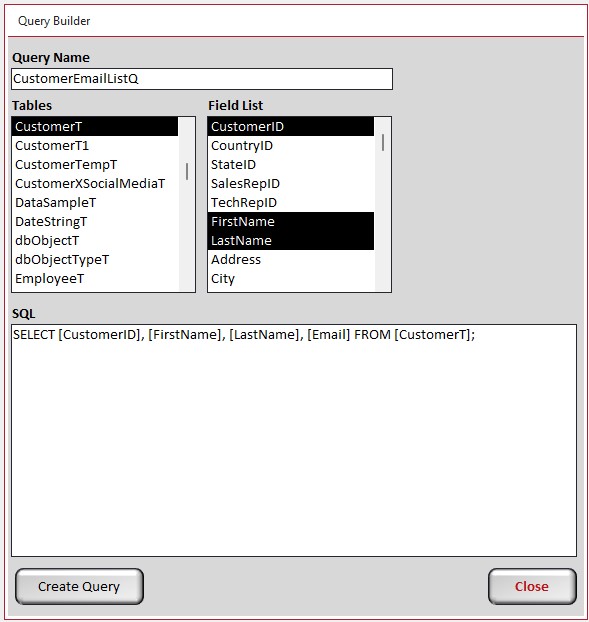
Jennifer Neighbors My Query Builder (shown below) adds the selected fields from the selected table to build the SQL statement. Click the button to create the Query.
Kevin Robertson  @Reply  
          
17 months ago

Jennifer Neighbors OP  @Reply  
     
17 months ago
Kevin, if the user selects a foreign key field like SalesRepID, does the query bring in the sales rep's name by joining the other table? Does your builder allow the user to set a parameter like a date range? How about the ability to sort on a field? I'm curious.
Kevin Robertson  @Reply  
          
17 months ago
No, it's very basic. You can only add one table (for now). I have added the ability to add an ORDER BY. It can sort Ascending. Will be adding Descending soon. This is just a side project I started last night after reading your post that I'm doing just for fun. I plan to add more features when I get the chance.

I haven't locked the SQL Text Box so you can edit the SQL if needed.
Jennifer Neighbors OP  @Reply  
     
17 months ago
I'd be interested to see what you do if you get further with this. Please keep in mind that my users have no insight into databases or Access, although they are familiar with the information and want to see it in new ways. They are unlikely to be able to edit an SQL statement meaningfully or even understand it. However, seeing it helps me understand the results being generated by your builder. I'm very interested in what you may develop along these lines. So cool that you did this!
Richard Rost  @Reply  
          
17 months ago
Yeah Kevin's solution is very elegant. I have found when it comes to giving database capabilities to users who don't know much about the database that AI can play a good role in this. For example, that's one of the reasons I built the AI Query Builder. The end-user can literally just say something like 'Show me all the customers from Florida who have orders over $1000' and the AI can then generate the SQL and show the results. Whereas building something like that by hand could be quite tedious.

This thread is now CLOSED. If you wish to comment, start a NEW discussion in Access Forum.
 

Next Unseen

 
New Feature: Comment Live View


The following is a paid advertisement
Computer Learning Zone is not responsible for any content shown or offers made by these ads.
 

Learn
 
Access - index
Excel - index
Word - index
Windows - index
PowerPoint - index
Photoshop - index
Visual Basic - index
ASP - index
Seminars
More...
Customers
 
Login
My Account
My Courses
Lost Password
Memberships
Student Databases
Change Email
Info
 
Latest News
New Releases
User Forums
Topic Glossary
Tips & Tricks
Search The Site
Code Vault
Collapse Menus
Help
 
Customer Support
Web Site Tour
FAQs
TechHelp
Consulting Services
About
 
Background
Testimonials
Jobs
Affiliate Program
Richard Rost
Free Lessons
Mailing List
PCResale.NET
Order
 
Video Tutorials
Handbooks
Memberships
Learning Connection
Idiot's Guide to Excel
Volume Discounts
Payment Info
Shipping
Terms of Sale
Contact
 
Contact Info
Support Policy
Mailing Address
Phone Number
Fax Number
Course Survey
Email Richard
[email protected]
Blog RSS Feed    YouTube Channel

LinkedIn
Copyright 2026 by Computer Learning Zone, Amicron, and Richard Rost. All Rights Reserved. Current Time: 8/8/2026 10:41:46 AM. PLT: 1s