Free Lessons
Courses
Seminars
TechHelp
Fast Tips
Templates
Topic Index
Forum
ABCD
 
Home   Courses   TechHelp   Forums   Help   Contact   Merch   Join   Order   Logon  
 
Back to Access Forum    Comments List
Upload Images   @Reply   Bookmark    Link   Email   Next Unseen 
Questions and Knowledge
Shane Carruth 
     
14 months ago
I have work order database and currently have vba code to send the requestor and the tech an email notifying them of the assignment. I have it setup that it will read the tech’s name, I however need the vba code to look at the name and then go out and look out at associated email address.
In the tech table, there is an auto number, tech’s name, and email address. The form pulls from the tech table.
John Davy  @Reply  
         
14 months ago
Can you dlookup the emailaddress from the techtable? john
Adam Schwanz  @Reply  
           
14 months ago
DLookup
Heres the video John is talking about
Shane Carruth OP  @Reply  
     
14 months ago
Would that change how the vba code would be written?
Adam Schwanz  @Reply  
           
14 months ago
Yes, did you find the email code online or where is that from?

When you say the form pulls from the tech table, is the email address already available on the form? Is the record source of the form the table with the email address? If so, there's easier solutions.
Shane Carruth OP  @Reply  
     
14 months ago
Adam, I used the code on here, I didn’t use html but used plain text. The techs names are under a table named techs, then the w/o database pulls from that table to get names, so no email in the form.
Shane Carruth OP  @Reply  
     
14 months ago
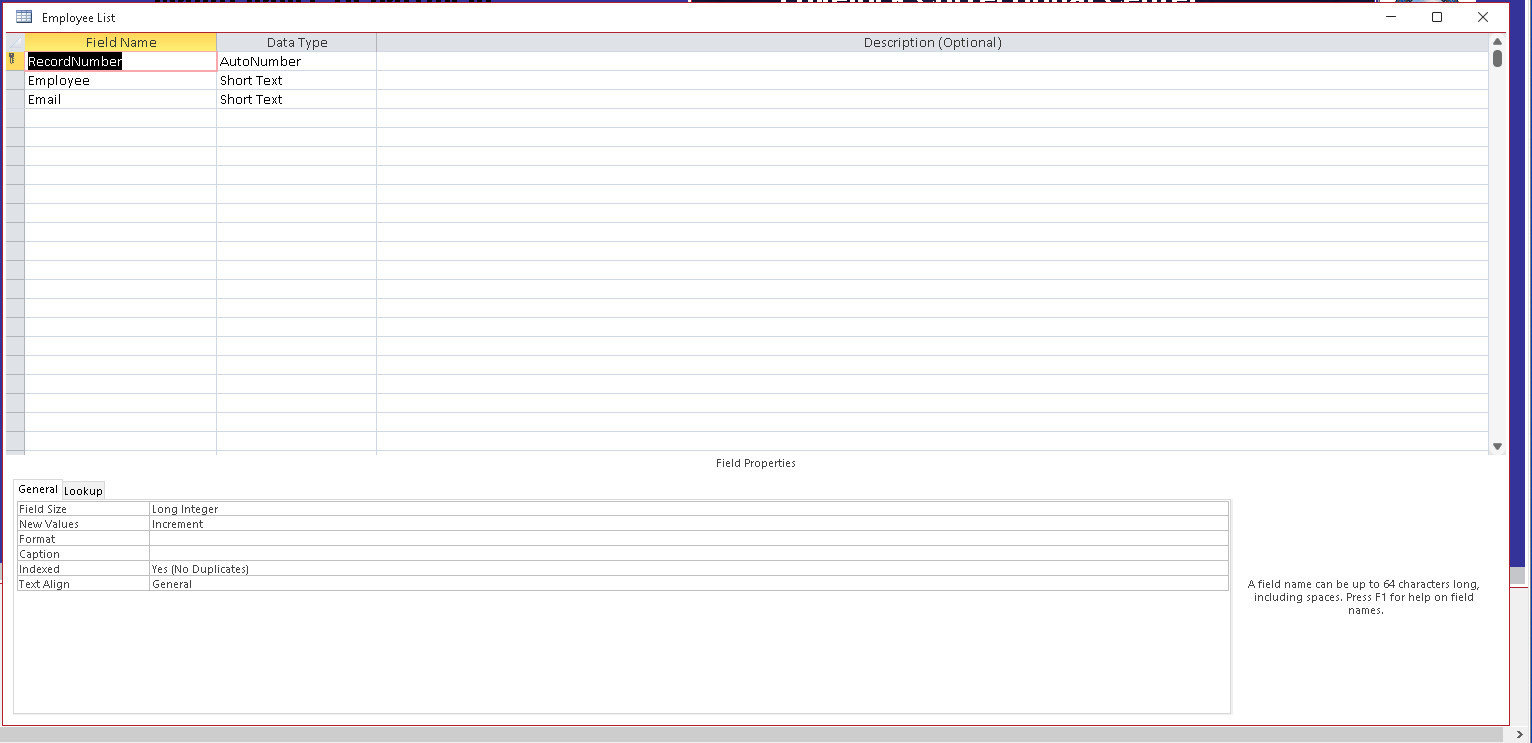
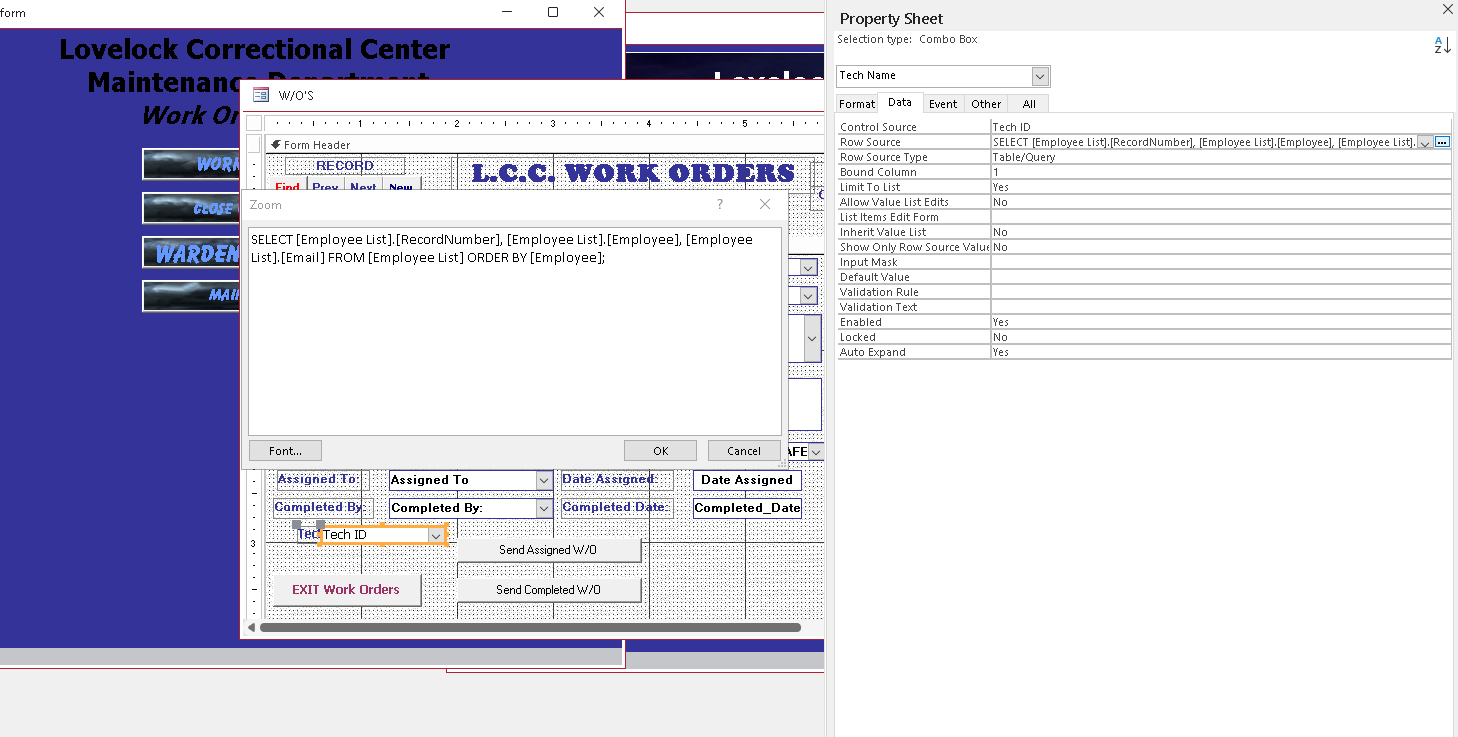
The row source is as follows: select [employee list].record number, [employee list].employee from [employee list]
If I do a dlookup does that change how the code is in vba?
Adam Schwanz  @Reply  
           
14 months ago
It would be in your vba, you would just declare a variable like
Dim EmployeeEmail
EmployeeEmail=DLOOKUP("EmployeeEmail","EmployeeT","EmployeeID=" & YourComboBoxName)

Then in your vba to send email change the to address to the variable.
Shane Carruth OP  @Reply  
     
14 months ago
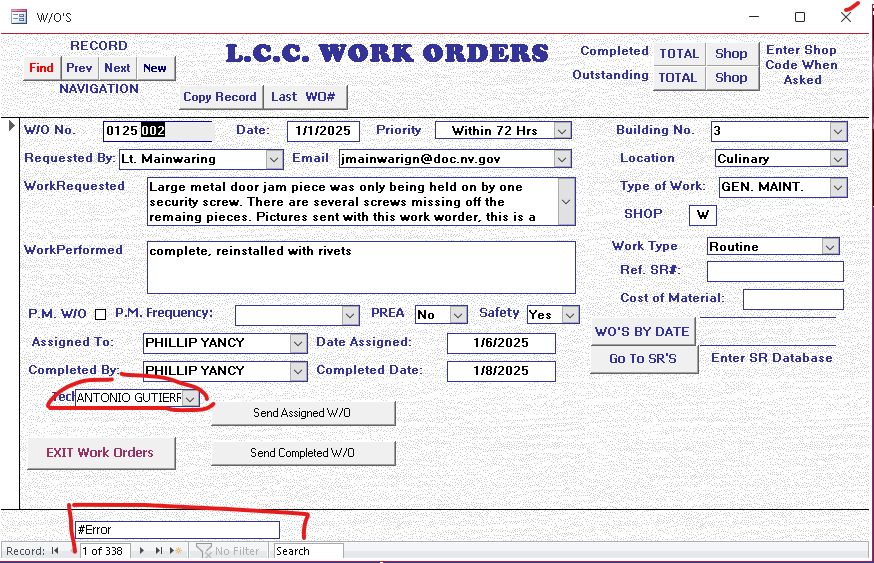
What do I have wrong on this dlookup?
=dlookup([employee list]![email]”,”[employee list]”,”[employee list]![record number]=“& [combo115]

I get #error
Adam Schwanz  @Reply  
           
14 months ago
Review the DLOOKUP video. It's going to be closer to this.
=DLOOKUP("Email","[Employee List]","[record number]=" & combo115)

Also note that you can not use the "curly" or "smart" slanted double quotes if it's also in your code like that. It has to be just the "
Shane Carruth OP  @Reply  
     
14 months ago
I’m sorry Adam, I’ve watched the show and tried multiple things but I am unable to get this to work for me
Kevin Robertson  @Reply  
          
14 months ago
Please post some screenshots and show us EXACTLY what you have.
John Davy  @Reply  
         
14 months ago
Lookup the tech's name to get the emailaddress. John
Shane Carruth OP  @Reply  
     
14 months ago
Tomorrow I will attempt to get some screen shots. I’ve tried to upload pictures from my phone and get an error it exceeds the size limit. Maybe screenshots will be smaller.
John, I’m unsure what you are trying to say.
Shane Carruth OP  @Reply  
     
14 months ago

Shane Carruth OP  @Reply  
     
14 months ago

Shane Carruth OP  @Reply  
     
14 months ago

Lars Schindler  @Reply  
     
14 months ago
The #Error appears with the first DLookUp variant, right?
Does the second DLookUp version return the same error?
Shane Carruth OP  @Reply  
     
14 months ago
yes, I was trying to show that I tried different approaches and got the same result.
Kevin Robertson  @Reply  
          
14 months ago
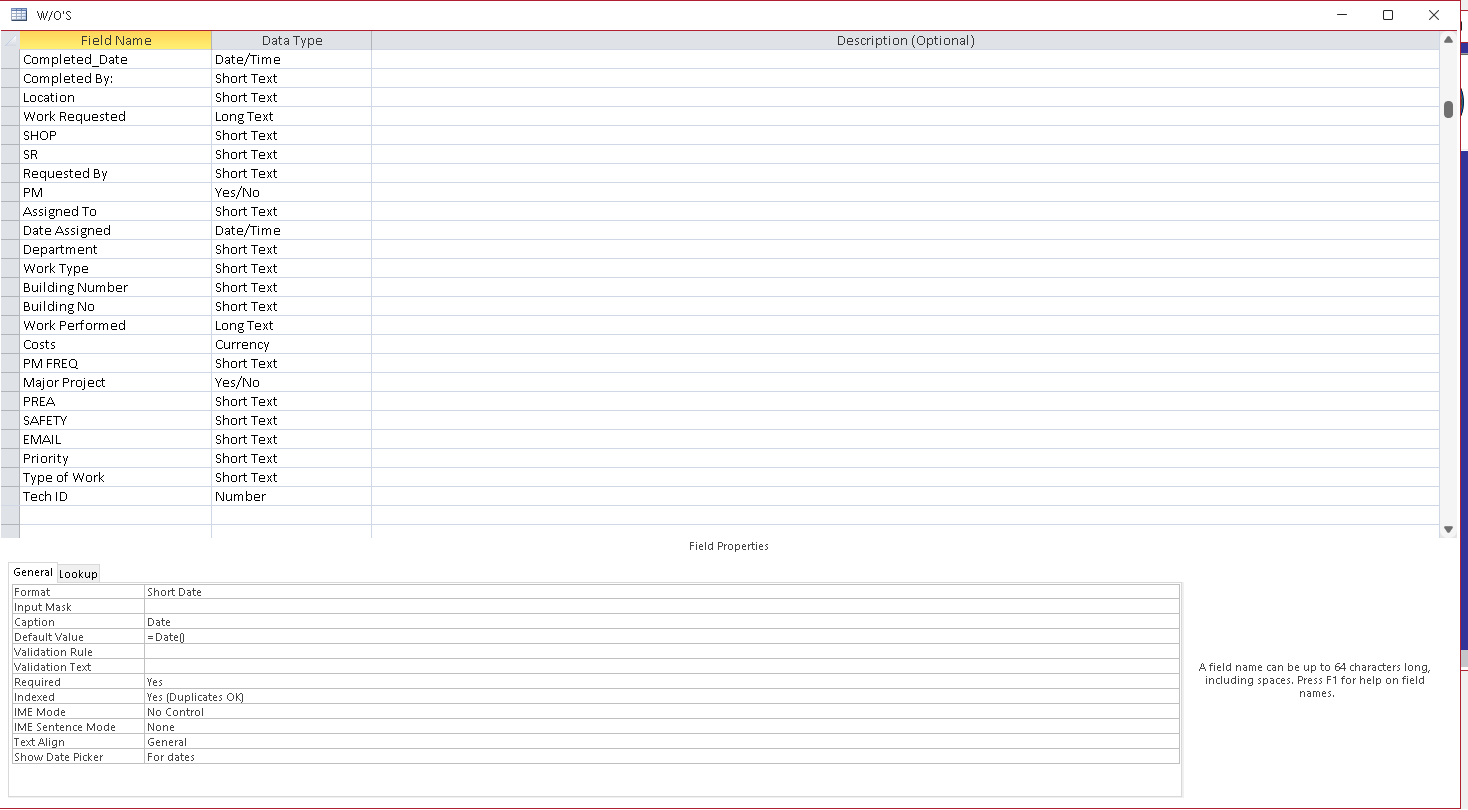
What is RecordNumber?
Why not TechID?
What is the Data Type?
Adam Schwanz  @Reply  
           
14 months ago
What is the name of the Tech combo box? Can you upload a picture of that property sheet too.
Shane Carruth OP  @Reply  
     
14 months ago

Shane Carruth OP  @Reply  
     
14 months ago

Shane Carruth OP  @Reply  
     
14 months ago

Kevin Robertson  @Reply  
          
14 months ago
There is no TechID in the Combo Box and the Combo Box is called Tech Name.

=Nz(DLookup("Email", "[Employee List]", "RecordNumber=" & [Tech Name]),"")
Shane Carruth OP  @Reply  
     
14 months ago
Kevin and all of you thank you so much for all of your help
Shane Carruth OP  @Reply  
     
14 months ago

Shane Carruth OP  @Reply  
     
14 months ago

Shane Carruth OP  @Reply  
     
14 months ago

Shane Carruth OP  @Reply  
     
14 months ago

Shane Carruth OP  @Reply  
     
14 months ago

Shane Carruth OP  @Reply  
     
14 months ago
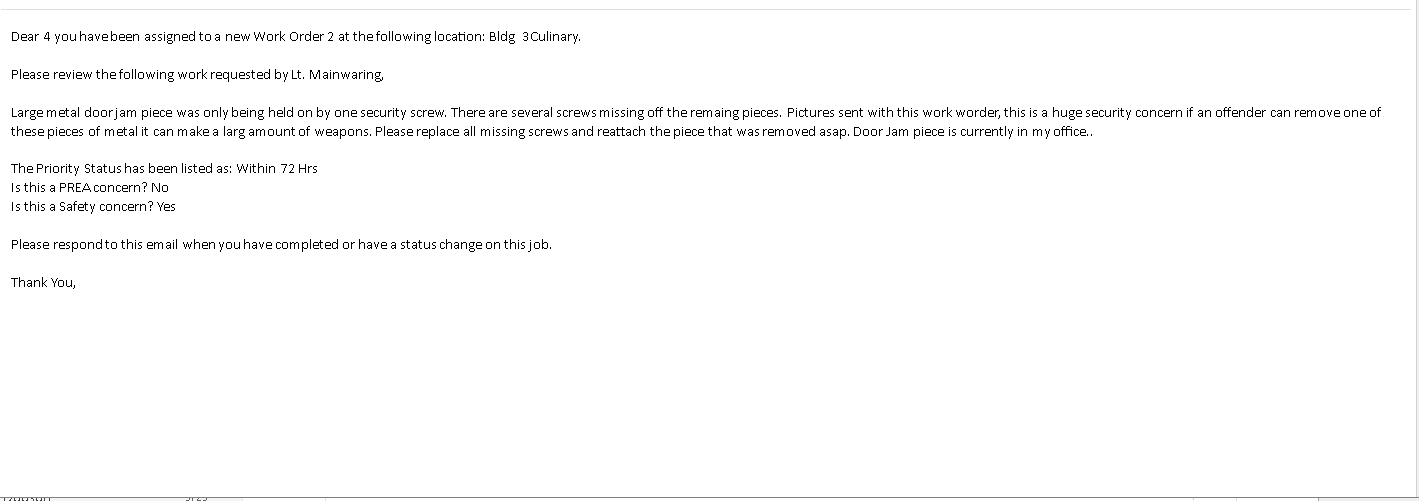
I have one last hurdle for this project, I completed the last dlookup and now that is working correctly but now that I have assigned a new combo box to my email VBA code, I receive the Number and not the text in the email. I've tried changing the column count, and the bound column with the same result. If you look at the picture, instead of the tech name I get a number 4.
Kevin Robertson  @Reply  
          
14 months ago
In your code you need to reference the Column the data is in.
  [Tech_Name].Column(1)

This thread is now CLOSED. If you wish to comment, start a NEW discussion in Access Forum.
 

Next Unseen

 
New Feature: Comment Live View


The following is a paid advertisement
Computer Learning Zone is not responsible for any content shown or offers made by these ads.
 

Learn
 
Access - index
Excel - index
Word - index
Windows - index
PowerPoint - index
Photoshop - index
Visual Basic - index
ASP - index
Seminars
More...
Customers
 
Login
My Account
My Courses
Lost Password
Memberships
Student Databases
Change Email
Info
 
Latest News
New Releases
User Forums
Topic Glossary
Tips & Tricks
Search The Site
Code Vault
Collapse Menus
Help
 
Customer Support
Web Site Tour
FAQs
TechHelp
Consulting Services
About
 
Background
Testimonials
Jobs
Affiliate Program
Richard Rost
Free Lessons
Mailing List
PCResale.NET
Order
 
Video Tutorials
Handbooks
Memberships
Learning Connection
Idiot's Guide to Excel
Volume Discounts
Payment Info
Shipping
Terms of Sale
Contact
 
Contact Info
Support Policy
Mailing Address
Phone Number
Fax Number
Course Survey
Email Richard
[email protected]
Blog RSS Feed    YouTube Channel

LinkedIn
Copyright 2026 by Computer Learning Zone, Amicron, and Richard Rost. All Rights Reserved. Current Time: 5/2/2026 7:11:57 AM. PLT: 1s