Free Lessons
Courses
Seminars
TechHelp
Fast Tips
Templates
Topic Index
Forum
ABCD
 
Home   Courses   TechHelp   Help   Contact   Merch   Join   Order   Logon   Forums   
 
Back to Access Forum    Comments List
Upload Images   @Reply   Bookmark    Link   Email   Next Unseen 
This Almost Worked but for Form is Read Only
Richard Garber 
    
17 months ago
I have a form that is based on a query.

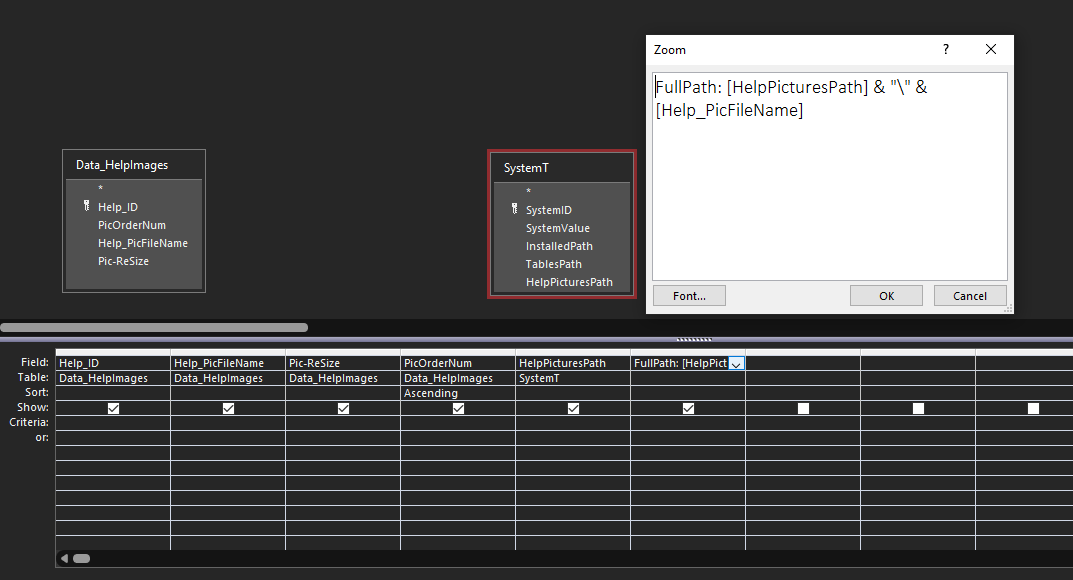
The query is based on two tables: HelpT & SysT  (A settings table which includes a path to a help folder on a HD). I created no join in the Query as there's nothing in common between the two.

I created a calculated field in the query:

HelpPicturePath: SysT.HelpPath & "\" & HelpT.FileName (And it works, pictures shows, very nice!)

But like a Jaws attack, I did not notice, like expressed in Rich's video Recordset Updatable, there is no new record to make. And sure enough when I was trying to add an option box to the form where the user can select Clip, Stretch or Zoom to resize the picture and store the selection in HelpT that's when I got the read only error. The form is picture gallery the user can scroll through.

Because I already have the user storing the Help path in the SysT, I feel I should only have to store the picture filename in the HelpT and do a simple concantation like above.

Is there a fix for this kind of thing?

Rich
Richard Garber OP  @Reply  
    
17 months ago
Sorry, sorry, sorry!! The above did not work and I would still like to know why but I got this to work doing it a different way. I removed the SysT from the query and in the OnCurrent property of the form placed the HelpPicturePath line. I threw in a unbound control on the form and then in the picture property placed the unbound control in the data source and now the picture shows properly.
Richard Rost  @Reply  
          
17 months ago
I can't picture what you're saying. Can you maybe show me some screenshots?
Richard Garber OP  @Reply  
    
17 months ago

Richard Garber OP  @Reply  
    
17 months ago
Here's what I had when I was getting the read only error. The two tables have nothing in common so I didn't make a join. I only needed the second query, SystemT (a table I got from, I think, the ribbon video? But I thought, why waste a table and I can put some other stuff in it as well so I use it also for a Setup type 'thing') to act as a lookup reference to get the Help path. It worked until I needed to resize pictures and save that resize value but in doing so it exposed the read only issue which up to that time I didn't realize was there. I wasn't sure what was causing the read only issue until I watched your Updatable Recordset video which mentioned the lack of a new record asterisk when a read only error is present. Somewhere in all that I posted my OP when it dawned on me I could just use DLookUp to get that Help path reference and put it in the OnCurrent property. What I was saying earlier is I don't save the full path in one field, I have the path divided up into the path and then the filename. It all works now, and I understand why it went wrong but what I was asking originally was why can't two tables like that without a join or anything in common be used in a query? I did some reading on this and I do have a better understanding of the situation. Anyway, just trying to summarize what happened. Thanks!
Richard Rost  @Reply  
          
17 months ago
If you don't have a JOIN clause between your tables and a query, you're going to create something called a Cartesian product where you get a copy of every record from the left table matched up with a copy of every record from the right table. It will always be non-editable.
Richard Rost  @Reply  
          
17 months ago
When you create a query in Access with two tables and no JOIN clause, Access has no way of knowing how the records relate to each other. So it creates what's called a Cartesian product: every record in the first table is combined with every record in the second table. If HelpT has 10 records and SysT has 1, the result is 10 records, but if SysT had 5, you'd get 50 records.

This kind of result set is not tied to a single underlying table in a way that Access can track and update. Since each record in the result doesn't point directly back to a specific, unique record in one table, Access cannot determine which record to update when you try to change something. So it marks the entire query as non-updatable.

To be editable, a query needs a clear one-to-one mapping between each record in the result and a record in one of the source tables. That requires a JOIN, usually with a primary key/foreign key relationship. Without that, you lose update capability.

This is why your fix, removing SysT from the query and using DLookup to pull the path, worked. It gave you a clean, editable recordset from HelpT only, and just used SysT as a read-only reference outside the query.

This is one example where it's actually good to use a DLOOKUP inside of a query or a continuous form.
Richard Garber OP  @Reply  
    
17 months ago
thanks Rich, appreciate the info. :-)

This thread is now CLOSED. If you wish to comment, start a NEW discussion in Access Forum.
 

Next Unseen


What's This?


The following is a paid advertisement
Computer Learning Zone is not responsible for any content shown or offers made by these ads.
 

Learn
 
Access - index
Excel - index
Word - index
Windows - index
PowerPoint - index
Photoshop - index
Visual Basic - index
ASP - index
Seminars
More...
Customers
 
Login
My Account
My Courses
Lost Password
Memberships
Student Databases
Change Email
Info
 
Latest News
New Releases
User Forums
Topic Glossary
Tips & Tricks
Search The Site
Code Vault
Collapse Menus
Help
 
Customer Support
Web Site Tour
FAQs
TechHelp
Consulting Services
About
 
Background
Testimonials
Jobs
Affiliate Program
Richard Rost
Free Lessons
Mailing List
PCResale.NET
Order
 
Video Tutorials
Handbooks
Memberships
Learning Connection
Idiot's Guide to Excel
Volume Discounts
Payment Info
Shipping
Terms of Sale
Contact
 
Contact Info
Support Policy
Mailing Address
Phone Number
Fax Number
Course Survey
Email Richard
[email protected]
Blog RSS Feed    YouTube Channel

LinkedIn
Copyright 2026 by Computer Learning Zone, Amicron, and Richard Rost. All Rights Reserved. Current Time: 9/15/2026 4:22:18 PM. PLT: 1s