Free Lessons
Courses
Seminars
TechHelp
Fast Tips
Templates
Topic Index
Forum
ABCD
 
Home   Courses   TechHelp   Forums   Help   Contact   Merch   Join   Order   Logon  
 
Back to Search Form 2.0    Comments List
Upload Images   @Reply   Bookmark    Link   Email   Next Unseen 
Orderby Variable Defined but Not Used
Nils Larsen 
   
12 months ago
Hi all,

In the extended cut video at time stamp 21:48, you define the variable "OrderBy As String but I don't see you ever using it.  You use ORDER BY in the SQL statement you build, but that is different, unless I am missing something.

Also, I have the default sort set as you do, but when opening the form, it is not sorted by that default.  Maybe I need an event to run on load or on open to make this run so I am looking at the sorted form when it first loads.

Thanks, this was a great video and very informative.

Best,
Nils
Sami Shamma  @Reply  
             
12 months ago
Good morning, Nils.

Good catch! Richard defines a variable "OrderBy", but he does not use it.

For your second point, just make sure that "Requiryform" is either in the open, load or oncurrent event.
Richard Rost  @Reply  
          
12 months ago
Yep. Good catch.
Nils Larsen OP  @Reply  
   
12 months ago
Thanks Gentlemen,
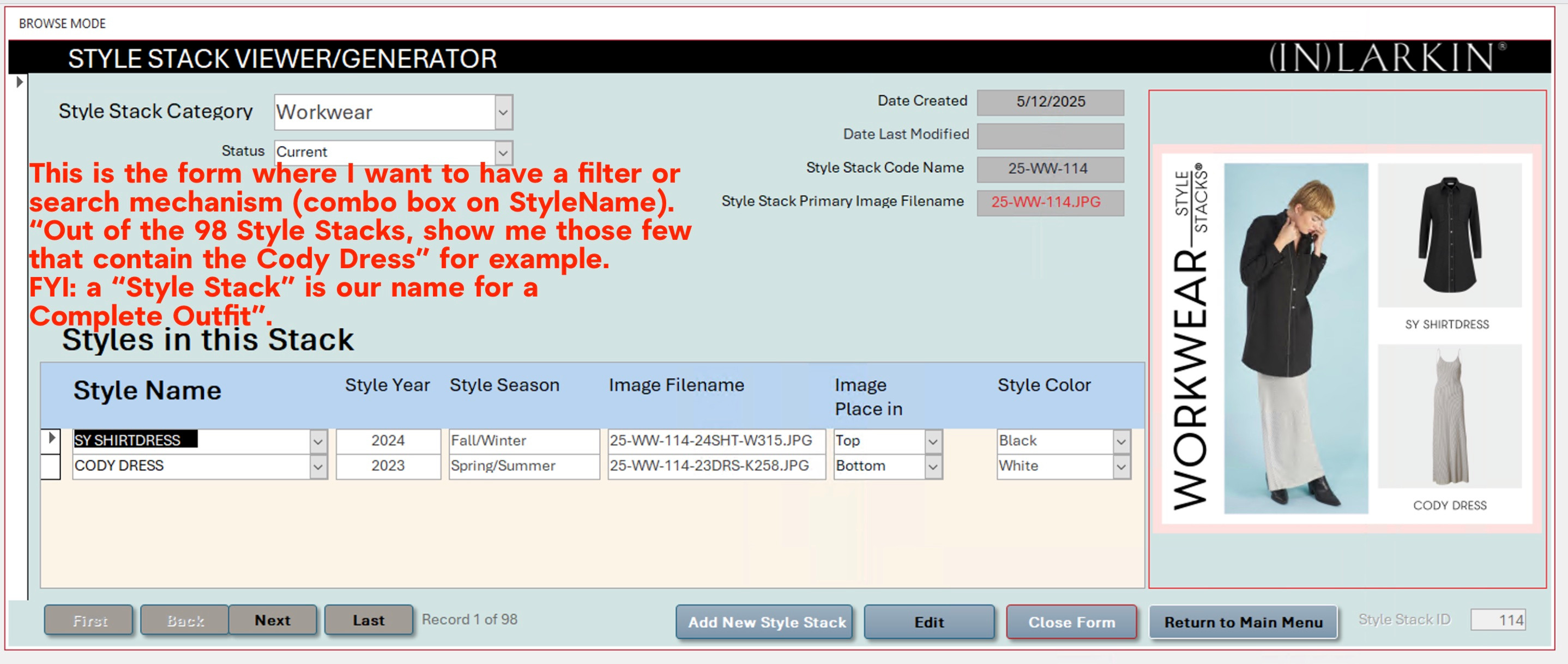
I am looking for a video or course that discusses searching or filtering a main form by a selection of a record in a continuous subform. (filtering the Parent records by selecting a Child record).  Example:  Main form is based on a table of Parents (Mr. & Mrs Smith, Mr. & Mrs Jones, etc).  The subform is based on a table of their children (Richard, Sue, John, Mary, etc.). A one-to-many setup.  I want to be able to select "Richard" from a search or filter box, and have the main form be filtered showing all parents who have a child named "Richard".  In my case the main form is a table of complete outfit names (for my wife's Fashion line), the subform is a list of styles in that outfit (Bomber Jacket, Silky Tee, Sublime Pants, etc.).  I want to filter the main form to show me all outfits that contain the "Bomber Jacket" for example.  Can you steer me towards the Tech Help or Course please?  Thanks,
Nils
Sami Shamma  @Reply  
             
12 months ago
You can easily do that with an event on, for example, double-click on the child's name "Richard". That will trigger a command to open the appropriate parent form with a parent record displayed. This assumes that you have the parent ID stored on the child's table. The command will look something like this:

Docmd.openForm "ParentF",,,"ParentID= " & ParentID
Nils Larsen OP  @Reply  
   
12 months ago
Thanks Sami, but I want ALL of the parent records who have "Richard" as children to get returned.  Then I can browse through those with record selectors.  I think it has to be a query somehow maybe.  I'll keep at it. I saw the Student-Parent set of videos listed on the site, maybe there is something in those.  Thanks again,
Nils
Sami Shamma  @Reply  
             
12 months ago
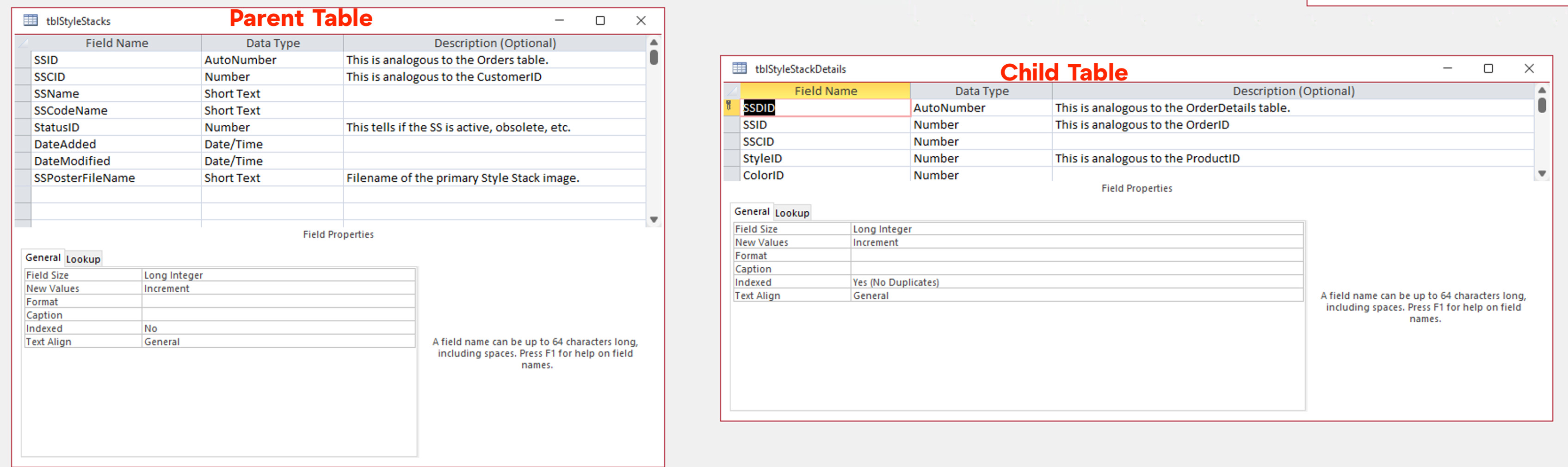
Yes, this will require a little bit more work. Please post screen images of both your parent table and child table in design view.
Nils Larsen OP  @Reply  
   
12 months ago
Hi Sami,  Sorry I am not receiving any notices of your replies and just checked back now and saw this.
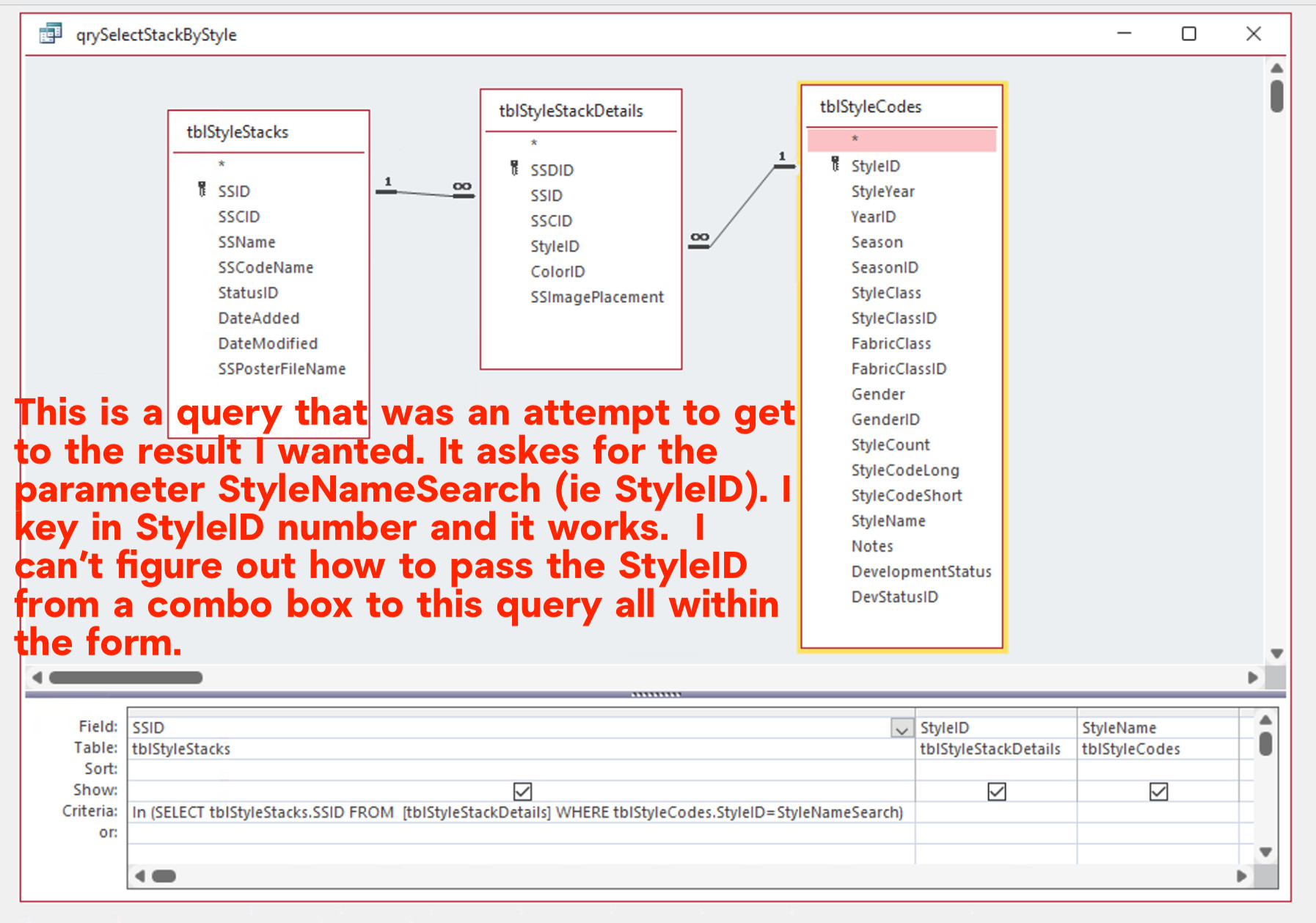
Here is a screen shot.  Let me know if this helps.

Your upload system is not working at all.   First, the file size limit is tiny, so I scaled down my screenshots to accommodate.  Then I am getting the error that only jpg gif and png files allowed which is what I am trying to upload.  Please advise.
Nils Larsen OP  @Reply  
   
12 months ago

Nils Larsen OP  @Reply  
   
12 months ago

Nils Larsen OP  @Reply  
   
12 months ago

Nils Larsen OP  @Reply  
   
12 months ago
Seems spaces in screenshot file names does not work...  I renamed and upload is good now. Thanks.
Kevin Robertson  @Reply  
          
12 months ago
Nils Larsen OP  @Reply  
   
12 months ago
Thank you so much Kevin!  That is what I needed.  It was quite a bit more complicated than the video, but it got me there finally.
Best,
Nils

This thread is now CLOSED. If you wish to comment, start a NEW discussion in Search Form 2.0.
 

Next Unseen

 
New Feature: Comment Live View


The following is a paid advertisement
Computer Learning Zone is not responsible for any content shown or offers made by these ads.
 

Learn
 
Access - index
Excel - index
Word - index
Windows - index
PowerPoint - index
Photoshop - index
Visual Basic - index
ASP - index
Seminars
More...
Customers
 
Login
My Account
My Courses
Lost Password
Memberships
Student Databases
Change Email
Info
 
Latest News
New Releases
User Forums
Topic Glossary
Tips & Tricks
Search The Site
Code Vault
Collapse Menus
Help
 
Customer Support
Web Site Tour
FAQs
TechHelp
Consulting Services
About
 
Background
Testimonials
Jobs
Affiliate Program
Richard Rost
Free Lessons
Mailing List
PCResale.NET
Order
 
Video Tutorials
Handbooks
Memberships
Learning Connection
Idiot's Guide to Excel
Volume Discounts
Payment Info
Shipping
Terms of Sale
Contact
 
Contact Info
Support Policy
Mailing Address
Phone Number
Fax Number
Course Survey
Email Richard
[email protected]
Blog RSS Feed    YouTube Channel

LinkedIn
Copyright 2026 by Computer Learning Zone, Amicron, and Richard Rost. All Rights Reserved. Current Time: 5/10/2026 8:20:08 AM. PLT: 0s