Free Lessons
Courses
Seminars
TechHelp
Fast Tips
Templates
Topic Index
Forum
ABCD
 
Home   Courses   TechHelp   Forums   Help   Contact   Merch   Join   Order   Logon  
 
Back to Access Forum    Comments List
Upload Images   @Reply   Bookmark    Link   Email   Next Unseen 
Can Not Be Any More Frustrated Help
Michael Pignotti 
    
13 months ago
I'm a newbie (for the second time). I'm an old dBase guy. Semi-retired hobbyist. I have tons of art supplies and I want to "Access" my paint inventory. Simple enough right? I want to open a form, select a paint manufacturer from a combo box, which will provide a list of Paint Lines for that manufacturer (cascading combo), followed by various other fields like opacity, Lightfast, Color code, etc... I can make the combo boxes on the form without issue. However, the record is filled with the Manufacturer ID number instead of the NAME - and it's driving NUTS!!!! The Key column is hidden. Much of my data entry depends on this simple routine - but I am stuck. Someone please help!!!!!!!!
Sami Shamma  @Reply  
             
13 months ago
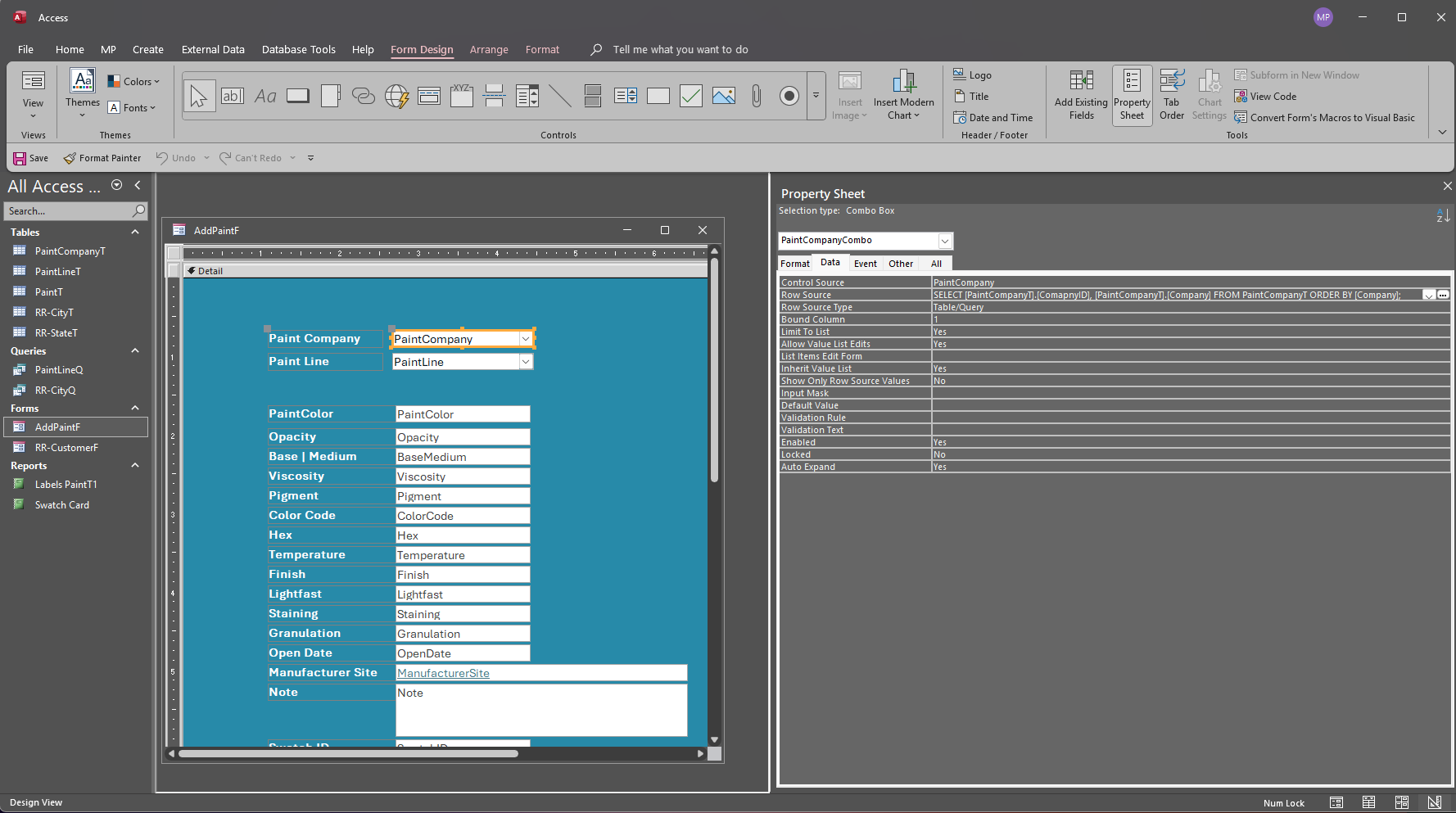
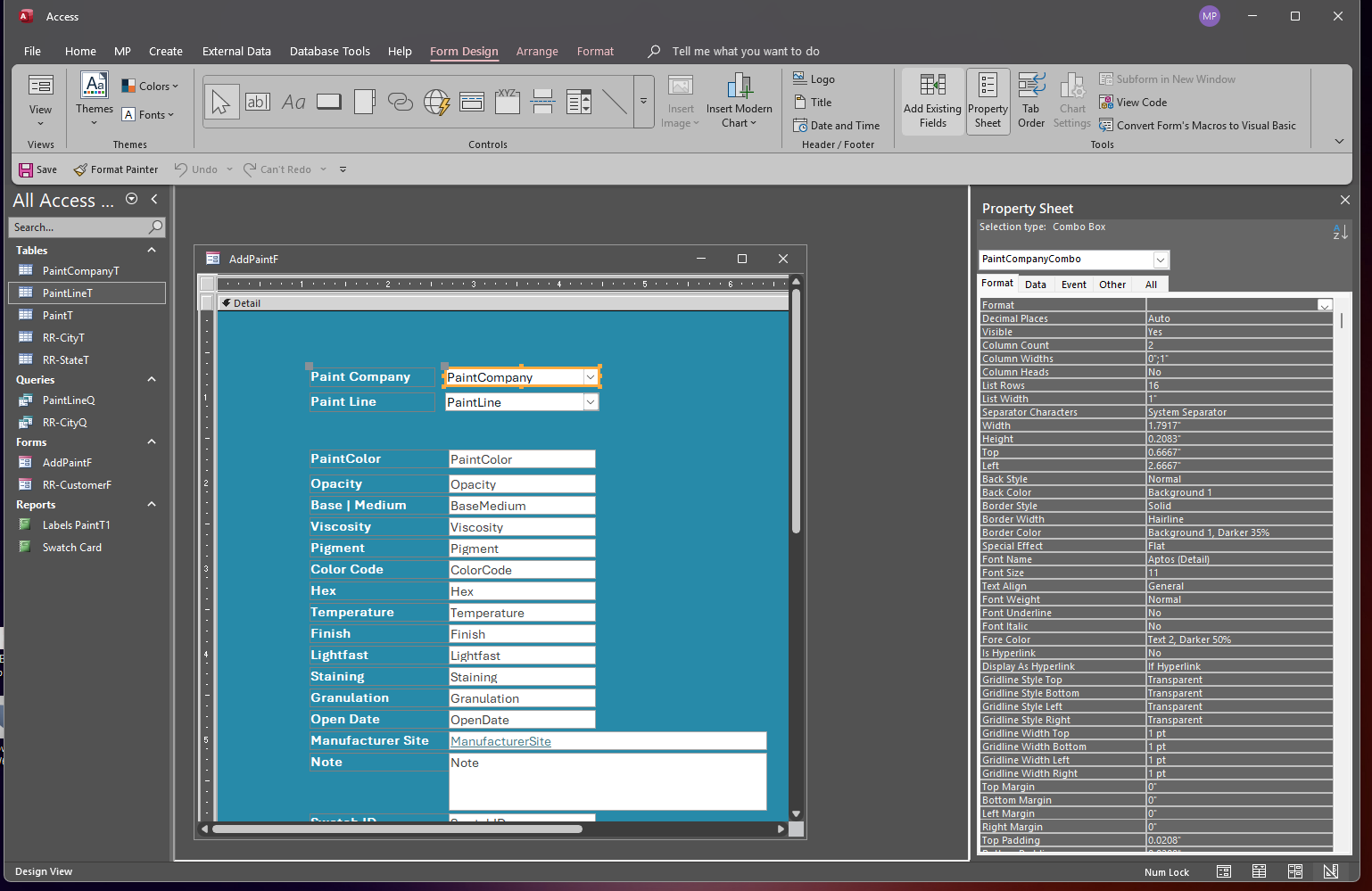
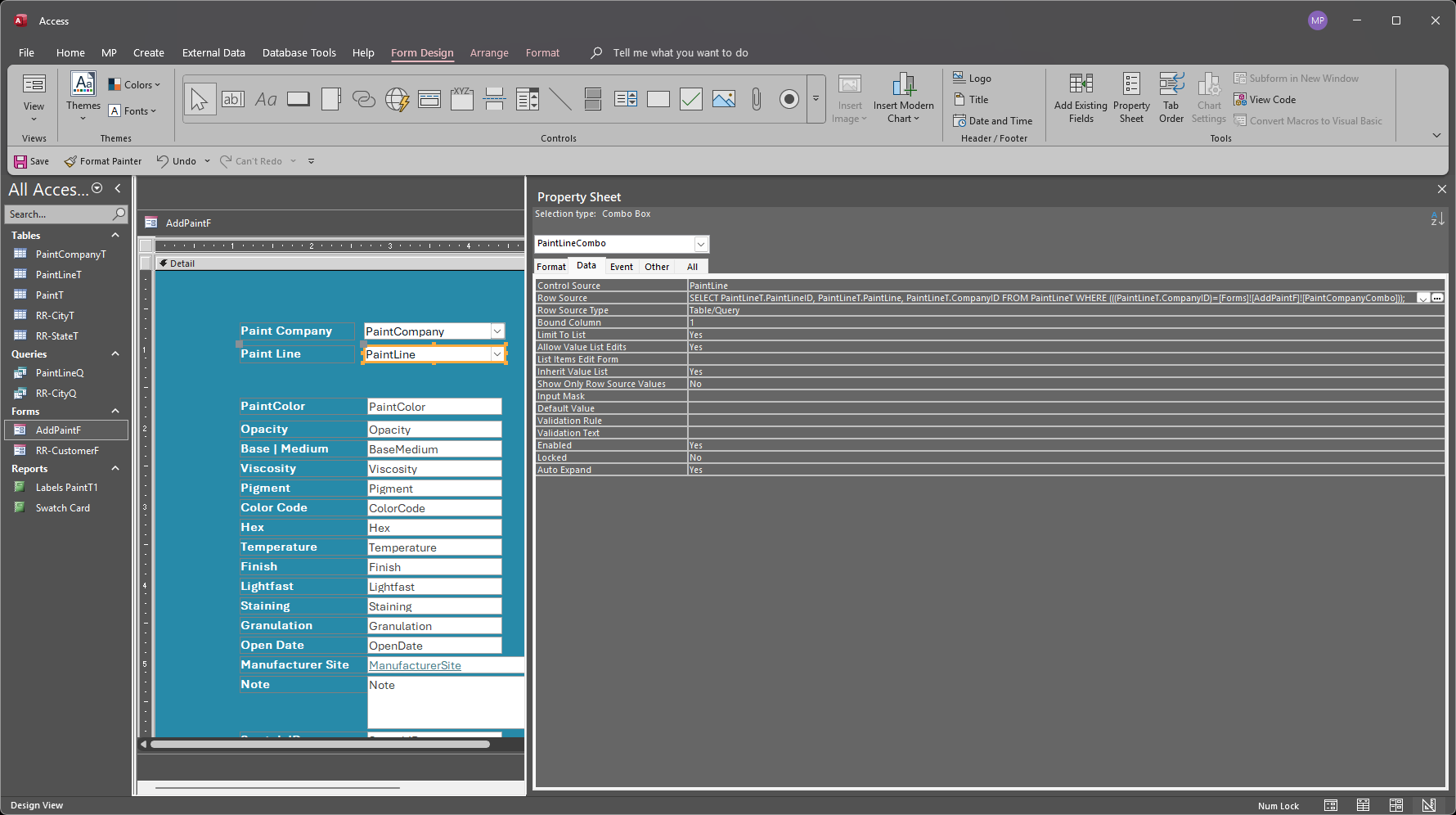
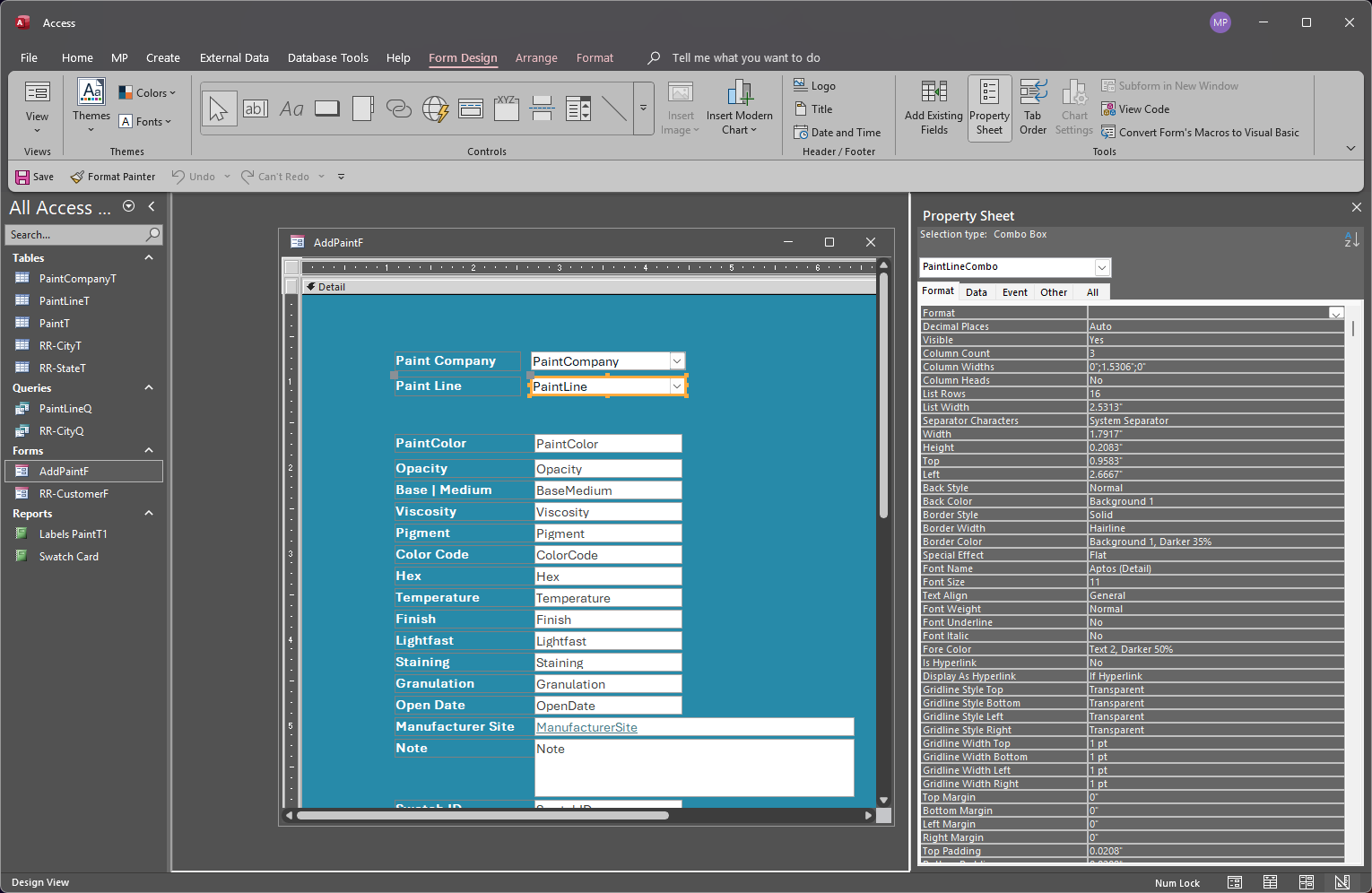
Please show the combo box and design view both the format and the data tabs
Richard Rost  @Reply  
           
13 months ago
The name is in ComboBox.Column(1).

Watch the extended cut of Invoicing.

John Davy  @Reply  
         
13 months ago
Hi Michael, This forum and all of us supporting it are here to help you. We can help alleviate the frustration by taking a look at what you are doing and give you the help you need. All we need is what Sami asked - show us the combobox that you have and how it works. I also encourage you to watch a couple of Richard's videos on comboboxes. We can also take a look at what you have done and help you with that.  John
Michael Pignotti OP  @Reply  
    
13 months ago

Michael Pignotti OP  @Reply  
    
13 months ago

Michael Pignotti OP  @Reply  
    
13 months ago

Michael Pignotti OP  @Reply  
    
13 months ago

Michael Pignotti OP  @Reply  
    
13 months ago

Michael Pignotti OP  @Reply  
    
13 months ago
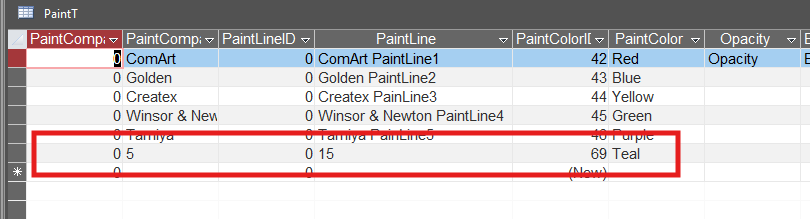
Ok, I think I have uploaded the requested pics - if they are incorrect please let me know. Pics of both combo boxes for data and format. The last pic is the the information as it appears in the table. Numerical values present and of course I want the Company Name and Company Paint Line respectively. Thank you for helping me
Sami Shamma  @Reply  
             
13 months ago
Your control source on both of combo boxes is wrong. They need to be linked to the ID field, not the name.

And when you look at the patient table, you should see the IDs, not the names.
Sami Shamma  @Reply  
             
13 months ago
If you want to see the names, then create a query that brings in the names.
Richard Rost  @Reply  
           
13 months ago
Michael Pignotti OP  @Reply  
    
13 months ago
I want to thank you both for helping me. It's not the concepts that are the problem - I understand relational databases. I wrote a county wide work order system including 275 employees, 15 different trades and 30+ buildings. Forms, queries. reports, everything - Many to many... This time around with Access it's the mechanics of it. Its not coalescing. I need to step back and figure out how I'm going to approach this
Sami Shamma  @Reply  
             
13 months ago
Michael we are always here to help.
Michael Pignotti OP  @Reply  
    
13 months ago
I just cant do this. I have even used chatgpt to walk me through this and I keep getting the same results. I jusat cant do this. I am completely defeated
Sami Shamma  @Reply  
             
13 months ago
Contact me on:

[email protected]. I'll arrange to take a look at your system and give you some guidance.
Michael Pignotti OP  @Reply  
    
13 months ago
Thank you Dr. Shamma. Your guidance was clear and pointed me in the right right direction - much appreciated.

This thread is now CLOSED. If you wish to comment, start a NEW discussion in Access Forum.
 

Next Unseen

 
New Feature: Comment Live View


The following is a paid advertisement
Computer Learning Zone is not responsible for any content shown or offers made by these ads.
 

Learn
 
Access - index
Excel - index
Word - index
Windows - index
PowerPoint - index
Photoshop - index
Visual Basic - index
ASP - index
Seminars
More...
Customers
 
Login
My Account
My Courses
Lost Password
Memberships
Student Databases
Change Email
Info
 
Latest News
New Releases
User Forums
Topic Glossary
Tips & Tricks
Search The Site
Code Vault
Collapse Menus
Help
 
Customer Support
Web Site Tour
FAQs
TechHelp
Consulting Services
About
 
Background
Testimonials
Jobs
Affiliate Program
Richard Rost
Free Lessons
Mailing List
PCResale.NET
Order
 
Video Tutorials
Handbooks
Memberships
Learning Connection
Idiot's Guide to Excel
Volume Discounts
Payment Info
Shipping
Terms of Sale
Contact
 
Contact Info
Support Policy
Mailing Address
Phone Number
Fax Number
Course Survey
Email Richard
[email protected]
Blog RSS Feed    YouTube Channel

LinkedIn
Copyright 2026 by Computer Learning Zone, Amicron, and Richard Rost. All Rights Reserved. Current Time: 6/21/2026 6:49:51 PM. PLT: 1s