Free Lessons
Courses
Seminars
TechHelp
Fast Tips
Templates
Topic Index
Forum
ABCD
 
Home   Courses   TechHelp   Forums   Help   Contact   Merch   Join   Order   Logon  
 
Back to Access Forum    Comments List
Upload Images   @Reply   Bookmark    Link   Email   Next Unseen 
PictureData with Image Control
Joseph Bergman 
     
11 months ago
I have some code from the internet that Creates a Byte Array from a string that I can set to the PictureData property of an image control and display a QR code. This works well of for single form. I am looking for a way to use it on a continuous report. Is there a way to create a img I can save on the computer from that byte array? I tried saving it in a text file like it was with- .bmp, jpg, png, giff. none worked. Or is there a way to use the Edge Browser control?  

Any help would be greatly appreciated
Richard Rost  @Reply  
          
11 months ago
Interesting question. I've never done this myself using a byte array, but I posed your question to the ChatGPT, and here's what it told me...

You're on the right track. Here's a breakdown of your situation and the best solutions:

1. Problem Recap


* You're generating a QR code as a byte array (from an API or string).
* It works on a single form using `.PictureData`.
* You want to use it in a continuous report (or form), but Access doesn't support dynamic image controls per row in continuous views.
* You tried saving the byte array directly to a file with a basic text write  -  but that won't work since it's binary data, not plain text.

---

2. Saving Byte Array to an Image File


Yes, you can write the byte array directly to a file, but you must open the file in binary mode. Here's how to do it in VBA:

CodeFunction SaveByteArrayToFile(ByteArray() As Byte, FilePath As String)
    Dim iFileNum As Integer
    iFileNum = FreeFile
    Open FilePath For Binary As #iFileNum
        Put #iFileNum, , ByteArray
    Close #iFileNum
End Function


Example usage:

CodeDim arr() As Byte
arr = GetQRCodeAsByteArray("https://example.com")  ' however you're getting the data
Call SaveByteArrayToFile(arr, "C:\Temp\qrcode.png")


Make sure the byte array is actual image data (not Base64 or text), and the extension matches the format you're generating (usually `.png`).

---

3. Displaying in a Report


Access reports can't bind images to byte arrays directly. But once the file is saved, you can:

* Add an Image control to the report.
* Set its `ControlSource` to a file path stored in a text field, like:

Code=C:\Temp\qrcode_123.png


Or programmatically populate a folder with all needed images before opening the report, store the file paths in a temporary table, and bind the report to that.

---

4. Using the Edge Browser Control


The Web Browser control in Access is legacy IE-based. The new Edge WebView2 control is only available in Access 365+ (semi-recent versions) and only on forms, not reports.

Even if you use WebView2 to generate/display the QR dynamically with HTML+JS, it won't help on reports. Reports don't render browser controls.

---

5. Suggested Workflow


Code1. Loop through records you want QR codes for
2. Generate byte array for each
3. Save it to disk using SaveByteArrayToFile
4. Store the image path in a temp table
5. Bind your report to that table
6. Use an Image control in the report linked to the file path


---

If you want help writing a complete loop to process and generate QR code images for multiple records, just let me know how you're getting the QR code byte array and what data you're feeding it (e.g., URLs, IDs).

Richard Rost  @Reply  
          
11 months ago
Let me know if it works, and where you're getting your data from online. This might make an interesting video.
Joseph Bergman OP  @Reply  
     
11 months ago
Richard  I am not using an online API I found some code using a module I download(This goes on my Manufacturing floor we try to keep the internet off the computers) reading the posting rules I should pot it here. Do you want me to send it directly to you? I tried the code from Chat GPT, it creates a file that looks similar to what a file I create in paint looks like. Still does not open though. I will keep playing around with it for a while I like to bang my head against the wall for a while.
Richard Rost  @Reply  
          
11 months ago
As long as it's not proprietary and belongs to someone else, you have my permission to post it here. Without the data, it's going to be impossible for me to try it. But I'd be curious to see what you're dealing with. Even just some screenshots might help me understand what kind of information you've got there.
Richard Rost  @Reply  
          
11 months ago
And banging your head against the wall is the best way to learn stuff. Trust me, most of the knowledge I have is from pulling my hair out at 3 a.m. in the days before the Internet.
Joseph Bergman OP  @Reply  
     
11 months ago
I got the code from here https://github.com/wqweto/VbQRCodegen/blob/master/LICENSE
The I currently use it is like this
QRCode.PictureData = QRCodegenConvertToData(QRCodegenBarcode(s))
Now I am trying to save that image so I can use it on a continuous form.

PS. I really want to thank you for all your videos. Several years ago I knew nothing about Access and was looking for software to help run my manufacturing business. All the options were expensive and were going to require workarounds to work correctly for us. With your instructions I was able to build a software that is much more tailored to our needs. I have actually have had several companies ask if I want to license it to them. So Thank you very much.
Joseph Bergman OP  @Reply  
     
11 months ago

Joseph Bergman OP  @Reply  
     
11 months ago
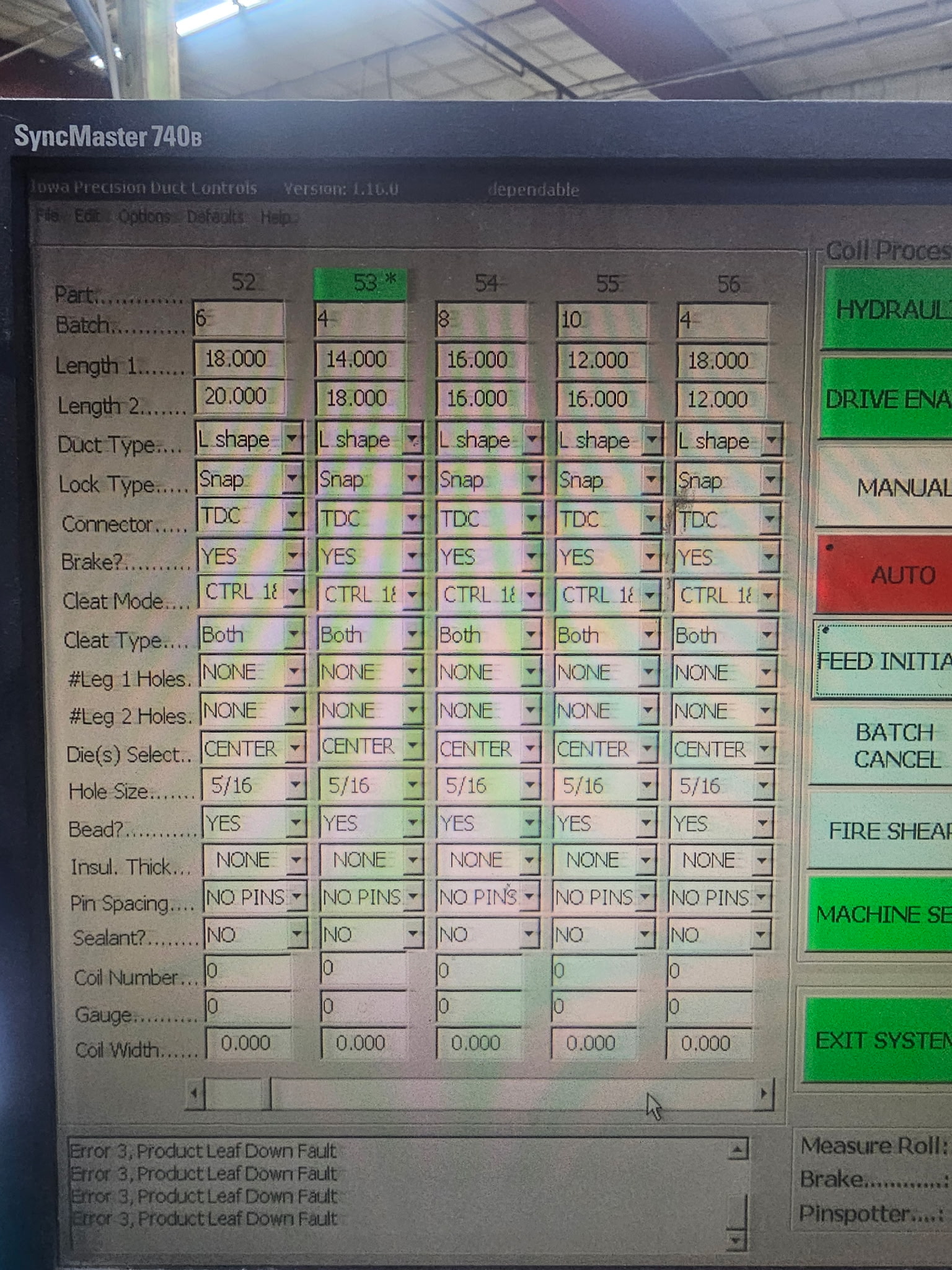
This is the report we are trying to add QR codes to. We have an older machine that we can not connect to the network. So we have to enter the information manually. I have tested it with qr codes it will Retain the Carriage Return. So we want to be able to create a string something like
  
Qty & vbCrLf & W1 & vbCrLf & D2 & vbCrLf & Shape & vbCrLf & "Snap" & vbCrLf & Connector1

This worked in testing. it allowed the operator to Scan the QR code and have it put the information in the program. I am open to other suggestions.

Joseph Bergman OP  @Reply  
     
11 months ago

Joseph Bergman OP  @Reply  
     
11 months ago
I am at a loss. I created a test sub. First it loaded the data from an img file. Then it put the data into a img control. Then I took the data out as a string and a byte arr. I created three images from that two worked. So then I loaded the qrcode data  ran the same code but none of the three pictures worked. So I guess I will have to find another solution. Thank you for your help

Public Sub PictureDataFromFile(Optional s As String)
    Dim imgData As String
    Dim fileNumber As Integer
    
    ' Open the image file as binary
    fileNumber = FreeFile

If Not Len(s) > 0 Then

    Open "C:\temp\Start.bmp" For Binary As #fileNumber
        imgData = String(LOF(fileNumber), 0)
        Get #fileNumber, , imgData
    Close #fileNumber
    

    ' Set the PictureData property of an image control
    Me.Image3.PictureData = StrConv(imgData, vbFromUnicode)
Else
    Me.Image3.PictureData = QRCodegenConvertToData(QRCodegenBarcode(s))
End If

Dim NewImgData As String
Dim byteArr() As Byte
' get the data as a string
NewImgData = Me.Image3.PictureData
'get the data as a arr
byteArr = Me.Image3.PictureData

'out put a new file using string no converting
    Open "C:\temp\StringNoConver.bmp" For Binary Access Write As #fileNumber
        Put #fileNumber, , NewImgData
    Close #fileNumber

'out put a new file using string  converting
NewImgData = StrConv(NewImgData, vbUnicode)
    Open "C:\temp\StringConert.bmp" For Binary Access Write As #fileNumber
        Put #fileNumber, , NewImgData
    Close #fileNumber
    
'out put a new file using arr  converting
    Open "C:\temp\arr.bmp" For Binary Access Write As #fileNumber
        Put #fileNumber, , byteArr
    Close #fileNumber


End Sub
Richard Rost  @Reply  
          
11 months ago
Instead of using a QR code, is it possible you can use regular barcodes? How much data is in that string? I mean, I see values in there like snap and L-shape and all that. If those are ID fields, could they be represented as a series of numbers?

012348102492

Where each digit or digits represents something specific? Then you wouldn't need a QR code, just a regular barcode reader.
Alex Hedley  @Reply  
           
11 months ago
You have it working on a single form?
You want it working on a continuous form?
What happened when you tried using the same method just with
QRCode.PictureData = QRCodegenConvertToData(QRCodegenBarcode(s))
Joseph Bergman OP  @Reply  
     
11 months ago
Richard I was under the impression you could not use “Tab” or “Enter” with a barcode. I just looked it up looks like it might be possible. It could get dense though since the way the QR code works. We just put the cursor in the top field then scan QR code it puts the first data then sends enter and repeats for all the data. One scan per column.
Joseph Bergman OP  @Reply  
     
11 months ago
Alex where would I put that code? I thought I tried it “on load” it just loads the first record.
Richard Rost  @Reply  
          
11 months ago
Is that software that's running on your standalone machine something that you built, or is it industry software that you have to use that someone else provides?

Because if that's software that you built yourself, you could generate a barcode where you wouldn't need the tabs. You could just encode the data in that barcode stream and have a tab be represented by something like a hashtag or whatever, and then just decode it and feed it into your proper fields. That's what I would do.

So you if you needed: 123 {TAB} 456

You could encode it in the barcode as: 123#456

And then on the other end, when you scan the barcode, translate it back.
Joseph Bergman OP  @Reply  
     
11 months ago
It is a standalone machine from 2003.

You need to do a class on PLC programming so I can build my own software for it.

Last quote I got to update the software on that machine was $150k and that was in 2019.

For now, I decided to use a Dymo label printer and just print out a label for each line. I am going to try barcode when I get a little more time.  Thank you for your help.
Joseph Bergman OP  @Reply  
     
11 months ago

Richard Rost  @Reply  
          
11 months ago
I've never done any PLC programming myself, but a quick search shows that there are some other YouTube tutorials available for it. Back in the 90s, I did work for a client that built crash test dummies, so I had to write software to interface with accelerometers and other devices of that nature. The company that manufactured those had APIs available for Visual Basic, which is what I used. As long as you could find someone who's got a library that will interface with your equipment, you might be able to do it in Visual Basic.
Alex Hedley  @Reply  
           
11 months ago
Just to double check is this in Access of a VB6 app?

You mentioned Continuous Form not DatGrid.

Does the CF have an Image Control in it?
Matt Hall  @Reply  
          
11 months ago
Is this all on the same pc or are you wanting to scan the QR on one pc with the scanner plugged into the other?
Joseph Bergman OP  @Reply  
     
11 months ago
Matt,

It will be on a different PC, the program running the machine is on Windows NT. It is a very important piece of equipment for us so I would like to keep it off the LAN. So I want to scan the QR code either from another PC or Print a form and scan it.

Alex,

This is a MS access Application I created. The Code I am using for the QRcode I think was made for VB originally. Just with some help from the file I was able to get it to work well in access using an Image Control.

Yes I would like to put an Image Control on the CF. The problem right now I can't figure out how to load the data per record since I can't use the "Control Source". I have to set  imgctl.PictureData to get the QR code to work. So I have to put it in using VBA. Now I am not a programmer at all. So my knowledge is limited.

I can't think of a way to put the data in using vba per record. If I had a form I could do an On Current Event and use the QR code on the header or footer and then the user could just move the Record it should work. I was just hoping to have a report and have a QR by each line item. The other option I could do is use an API call and download the QR code from the internet. We currently do not have internet on the PC's on the shop floor. This Could be changed
Richard Rost  @Reply  
          
11 months ago
Joseph I'm not sure if you mentioned this already or not - there's been a lot of back-and-forth - but have you watched the extended cut of my QR Codes video?

In that video, I show how to generate a QR code using an online API, download it as a local image file, and then store it as an image file that you can use in your database. Once it's saved, you can do whatever you want with it - display it in a report, show it on a continuous form, print it out, whatever.

It sounds to me - and correct me if I'm wrong - that you're trying to use your Access database to generate QR codes that you can then print and scan into your offline machine. If that's the case, why not just generate the QR code with the API like I show in the video? It works well and gives you an actual image file you can use anywhere.

This thread is now CLOSED. If you wish to comment, start a NEW discussion in Access Forum.
 

Next Unseen

 
New Feature: Comment Live View


The following is a paid advertisement
Computer Learning Zone is not responsible for any content shown or offers made by these ads.
 

Learn
 
Access - index
Excel - index
Word - index
Windows - index
PowerPoint - index
Photoshop - index
Visual Basic - index
ASP - index
Seminars
More...
Customers
 
Login
My Account
My Courses
Lost Password
Memberships
Student Databases
Change Email
Info
 
Latest News
New Releases
User Forums
Topic Glossary
Tips & Tricks
Search The Site
Code Vault
Collapse Menus
Help
 
Customer Support
Web Site Tour
FAQs
TechHelp
Consulting Services
About
 
Background
Testimonials
Jobs
Affiliate Program
Richard Rost
Free Lessons
Mailing List
PCResale.NET
Order
 
Video Tutorials
Handbooks
Memberships
Learning Connection
Idiot's Guide to Excel
Volume Discounts
Payment Info
Shipping
Terms of Sale
Contact
 
Contact Info
Support Policy
Mailing Address
Phone Number
Fax Number
Course Survey
Email Richard
[email protected]
Blog RSS Feed    YouTube Channel

LinkedIn
Copyright 2026 by Computer Learning Zone, Amicron, and Richard Rost. All Rights Reserved. Current Time: 5/2/2026 5:47:12 AM. PLT: 1s