Free Lessons
Courses
Seminars
TechHelp
Fast Tips
Templates
Topic Index
Forum
ABCD
 
Home   Courses   TechHelp   Forums   Help   Contact   Merch   Join   Order   Logon  
 
Back to Access Forum    Comments List
Upload Images   @Reply   Bookmark    Link   Email   Next Unseen 
Search Form Not Working in ACCDE
Jennifer Nield 
   
11 months ago
Hi
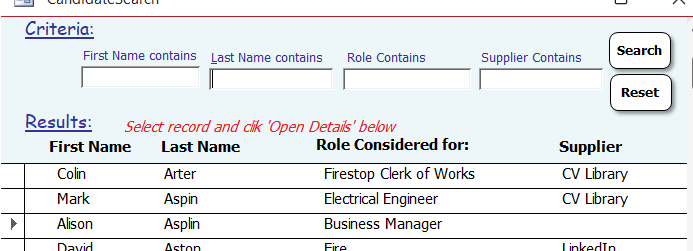
I created a form to do searches.  It's a continuous list and the control boxes for searches are in the header. There are name and role and supplier, and then there are 2 buttons, 1 'Search' and the other'Reset', and it works great.
However when I save the file as .accde for the users, none of the searches work.
Please help
Sami Shamma  @Reply  
             
11 months ago
Please be more specific. See Rule #2.

Please be more specific about what does not work. Can the users enter data in the boxes? Do they get an error message when they hit the search button?

Also, please share the VBA code you used in the search button.
Jennifer Nield OP  @Reply  
   
11 months ago
Thanks Sami
They can enter data but when they click the button 'Search' absolutely nothing happens. No error, nothing happens.
I'm putting the code here but only showing 1 of the boxes to shorten it here.
Private Sub cmdFilter_Click()
    Dim strWhere As String
    Dim lngLen As Long
  
    If Not IsNull(Me.txtFilterLastName) Then
        strWhere = strWhere & "([LastName] Like ""*" & Me.txtFilterLastName & "*"") AND "
    End If
(the same for the other boxes)
        Me.Filter = strWhere
        Me.FilterOn = True
    End If
End Sub


Jennifer Nield OP  @Reply  
   
11 months ago
Not sure how to edit posts here but I should have said the Search button is called cmdFilter
Adam Schwanz  @Reply  
           
11 months ago
Is it in a Trusted Location
Richard Rost  @Reply  
          
11 months ago
Put just a MsgBox in a simple button. Does that work?
Ronald de Boer  @Reply  
      
11 months ago
I have had this problem in previous versions a MS Access where buttons work in accdb files but not accde files.  Look in your VBA code for  any subs with no executable code.  Delete the sub.  Compile the executable again and it works.

Regards

Ron de Boer Geelong Victoria.

PS Richard, Sharma and the rest of the moderators don't leave blank subs in thjere code therefore they never see this happen.
Alex Hedley  @Reply  
            
11 months ago
Jennifer Nield OP  @Reply  
   
11 months ago
I wonder if maybe I should just give up :( !  Don't know what msgBox is, or what a 'Sub' is or 'Compile'.
I am still learning but in the meantime what I've done for the harder stuff so far is taken VBA codes from other databases and templates and adapted them.
But actually I can't give up because the database I've created is loved by my colleagues and has saved loads of time faffing about with excel spreadsheets, and notes and stuff!
So any more explanation would be really appreciated :)

Adam Schwanz  @Reply  
           
11 months ago
A few videos have been linked, have you watched/tried them? Or are you having trouble doing what's in the videos?

Trusted Location
MsgBox
Compile
Ronald de Boer  @Reply  
      
11 months ago
Hi, OK to narrow down where the code is that you have this non executable sub routine I suggest the following. 1. Create a brand new database. 2. Click External Data, New Data Source, Access Data Base (Select Your Database where your tables if you have a split database otherwise your accdb file) and select import *** not link ***) and import your all your tables and queries.  These most likely won't be the problem. Then select your Login Form and/or the first menu on load. Select one other form. Save the database. Give it any name. Click File Save As and create your accde file.  Run the accde file and click on a button that either loads your 1st menu or the form you also imported.  If the button works then you know these forms  *** Do not have the problem I described.  Import say 5 more Forms using the External Data process. Compile again, close open and run again. If the 1st button works you know these 5 forms are OK. You do not need to run each form.  The form (mostly likely where the problem is) being compiled (creating the accde file) by being in the accde causes the problem.  Keep adding forms until your buttons stop working.  When it does open each of the last 5 forms loaded in your accdb file and search through all the VBA code and look for a sub or function that has no executable code.  Eg  Private Sub xxxx() then nothing or just comments and the End Sub .  Delete this Sub Routine Save the accdb and recompile. Run the accde if your buttons work, Problem fixed.  IF not load accdb and look for more blank subs.  Continue until you have deleted all blank subs and functions. Slow and painful but it works. Kepp loading all the Forms Reports (Reports can have VBA code) and Modules until until the whole system is loaded.

Regards
Ron

As I said earlier Rick the Moderators and Shammi are old hands at this I have finally learnt to be careful (most of the time) Stick with it. Access is a great product!
Ronald de Boer  @Reply  
      
11 months ago
Hi Jennifer, I am happy to go through in a Teams session if you like and show you what I mean.  Don't have to use your database we can even use one of Rick's test databases. I'll even show you the problem if you like.

However I am in Australia and we would have to work out a time.  I don't work fulltime therefore I'm flexible most days but obviously need to sleep.

Regards

Ron
Jennifer Nield OP  @Reply  
   
11 months ago

Jennifer Nield OP  @Reply  
   
11 months ago
Hi All, thanks so much. I've attached how the form is.
I did , Compile - nothing happened - All trusted location is all trusted and Msgbox is N/A.
Thanks Ronald, I did what you said, created a new db, imported tables, then imported menu and the form that has the issue. Saved and ran, all working ok, saved to accde  and same thing. Nothing happens, no message and reset doesn't erase.
Jennifer Nield OP  @Reply  
   
11 months ago
Ronald Thanks so much Ron, that would be awesome! The boss of the company is my husband so I can do what I like haha! so any time that suits you, I can fit in.
Richard Rost  @Reply  
          
11 months ago
Ronald I tried to test your theory, and I created a blank subroutine in the TechHelp template. It worked just fine when I converted it into an ACCDE file. This may have been a problem in older versions that I wasn't aware of. I've never heard of it before, but it apparently is not a problem anymore in the latest version of Access 365.
Sami Shamma  @Reply  
             
11 months ago
Hi Ronald. I had that problem once, and the other moderators helped me with it. It was on an older version of Access. Now I use Access 365, and that problem no longer exists.
Ronald de Boer  @Reply  
      
11 months ago
Hi Jennifer,
Sorry for the delay.  I have my head in creating my own LLM (ChatGPT).  Yes you can if you have a high powered PC with a GPU. Which I do!  However back to your problem. You are 9 hours behind me so as I write it is 4:49PM here. Happy to help you up until 10PM my time which is midday your time. Any night. If you want to SMS me on +61 404 857 805.  I use Teams works really well for me once it connects. Do you have a microphone on your PC so we can chat as I show you what I know and believe is your problem. I also have Viber which you can call. Anyrate SMS or call to get together to organise best way forward.

Regards

Ron de Boer
Jennifer Nield OP  @Reply  
   
11 months ago
Thanks Ron, Teams is ggod, will sms you
In the meantime, I watched Richard Rost's video on Search Form, (just so's you know I'm doing my homework!) I did exactly what he did with the query, and everything he did. All worked great, but when I saved as ACCDE  nothing happened again, and no error message. :(
Richard Rost  @Reply  
          
11 months ago
Jennifer have you performed an Office Update recently? Make sure you've got the latest version.
Ronald de Boer  @Reply  
      
11 months ago
Hi Jennifer, I agree with Richard in the newer versions and Richard is always on the latest I believe this problem has been resolved.  Your probably on aversion that had this problem.  It's a little bit of a process but worthwhile doing so you understand what you have done.  Having seen what you have done you will understand why this problem is happening to you. Look forward to sms and helping you out.

Regards
Ron
Jennifer Nield OP  @Reply  
   
11 months ago
Richard  Hiya, I and the 5 other users have Office 365 Business and they are all setup to Update and install Automatically. And just to be sure, I've just checked it is and this is what the version is.
Microsoft® Access® for Microsoft 365 MSO (Version 2505 Build 16.0.18827.20102) 64-bit
Ronald de Boer  @Reply  
      
11 months ago
Hi Jennifer, Sorry for the delay.  I have my head in LLM and AI at the moment as well as my MS Access stuff.  I still say let's get together so I can show you what I mean. What you have described is exactly the problem I have had in  the past and I have been able to help 1 or 2 other people with what you have described as the problem my fix resolves.

Again apologies for the delay in responding.

Ron

This thread is now CLOSED. If you wish to comment, start a NEW discussion in Access Forum.
 

Next Unseen

 
New Feature: Comment Live View


The following is a paid advertisement
Computer Learning Zone is not responsible for any content shown or offers made by these ads.
 

Learn
 
Access - index
Excel - index
Word - index
Windows - index
PowerPoint - index
Photoshop - index
Visual Basic - index
ASP - index
Seminars
More...
Customers
 
Login
My Account
My Courses
Lost Password
Memberships
Student Databases
Change Email
Info
 
Latest News
New Releases
User Forums
Topic Glossary
Tips & Tricks
Search The Site
Code Vault
Collapse Menus
Help
 
Customer Support
Web Site Tour
FAQs
TechHelp
Consulting Services
About
 
Background
Testimonials
Jobs
Affiliate Program
Richard Rost
Free Lessons
Mailing List
PCResale.NET
Order
 
Video Tutorials
Handbooks
Memberships
Learning Connection
Idiot's Guide to Excel
Volume Discounts
Payment Info
Shipping
Terms of Sale
Contact
 
Contact Info
Support Policy
Mailing Address
Phone Number
Fax Number
Course Survey
Email Richard
[email protected]
Blog RSS Feed    YouTube Channel

LinkedIn
Copyright 2026 by Computer Learning Zone, Amicron, and Richard Rost. All Rights Reserved. Current Time: 5/1/2026 8:11:30 PM. PLT: 0s