Free Lessons
Courses
Seminars
TechHelp
Fast Tips
Templates
Topic Index
Forum
ABCD
 
Home   Courses   TechHelp   Forums   Help   Contact   Merch   Join   Order   Logon  
 
Back to Access Forum    Comments List
Upload Images   @Reply   Bookmark    Link   Email   Next Unseen 
Nested Sub Form Continuous Form Not Working
Anthony deGroot 
      
10 months ago
I have created a Nested Subform (3) for my database.  All 3 form are continuous forms.  However, when combined in one Main form, the first subform  changes to a Single Form.  The other 2 subforms work perfectly fine.  When I try to change it back to Continuous form, I get  the message "You can't view a form as a continuous form if it contains a subform, an Active x control, a bound chart or a web browser control".  (I have no Active x, Bound Chart or Browesr Control).  How do I get the first of the nested Subforms to be Continuous?

Thanks,
Anthony deGroot OP  @Reply  
      
10 months ago

John Davy  @Reply  
         
10 months ago
Hi Anthony, Access is wrong. Change it back to a continuous form. John
Anthony deGroot OP  @Reply  
      
10 months ago
I have tried to change it back to Continuous Form and that's when i get that message and it wont allow me to continue.
Raymond Spornhauer  @Reply  
          
10 months ago
Close the Main Form, Open Subform #1, change Subform #1 to a Continuous Form in the Form Properties, Save and close this form.  Now when you open the Main Form, it should be set the way you want it.

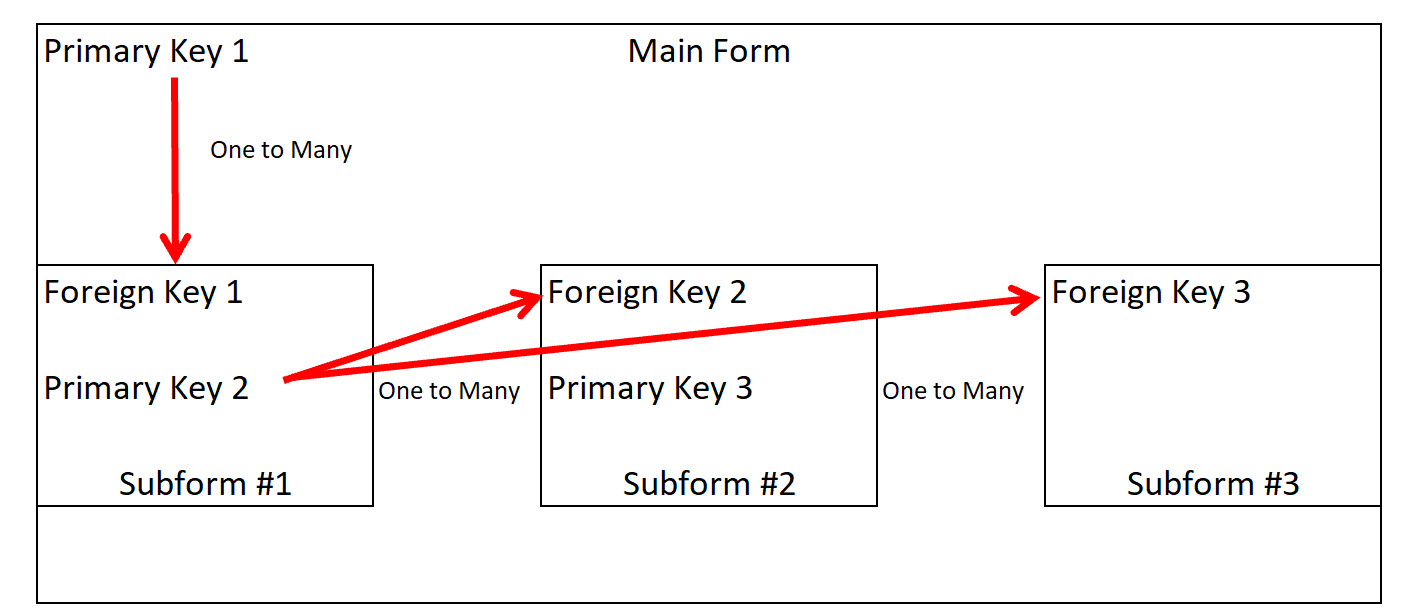
Based on the image you have posted, and I don't know what Table or Query you're using for Main Form 1, but make sure Subform #2 and #3 are actually updating to your Primary Key 2... and not Primary Key 1.

Unless the Main Form is using a Query that contains Primary Key 2, they're probably updating based on Primary Key 1.

If I were building this, I would have Subform #1 updating using Primary Key 1, and in the  'On Current' event of Subform #1 update the query for Subform #2 and #3.  I'm pretty sure Rick has a video for this this, but I don't have time to search for it right now.
Kevin Robertson  @Reply  
          
10 months ago
Anthony Make sure the Subform is in the Form Footer. Access won't allow Subforms to be added to the Detail section of a Continuous Form.
Anthony deGroot OP  @Reply  
      
10 months ago
No Query's involved.  Basically what I am trying to achieve:
One Workorder (main form, single) can have many tasks (Subform 1, continuous)
One task can have many technician notes (Subform 2, continuous)
One task can have many time entries (Subform 3, continuous)

Based on putting subforms in the footer, the only way I seem to get it to work is Subform 1 is in Details, the the other 2 subforms in the footer.  All links work and display as should, But this limits on how the data is viewed. (can't align footer forms with detail forms.
Donald Blackwell  @Reply  
       
10 months ago
Based on your latest description, my interpretation is that your main Form/detail is Workorder - a single form
Also in the detail of the main form is subform 1, tasks - a continuous form
So far if the master/child fields are properly identified, this should work

Next, in the footer of Subform 1, there are two additional subforms:
Subform 2 - a continous form of technicians - and
Subform 3 - a coninuous form of time entries

As long as the master/child fields are properly coordinated with subform 1, they should work. As for alignment, we would have to see what you are trying to do (screen shot(s))

If you are trying to align them beside subform 1, you would have to modify the parent child relationships manually using proper form/subform notation OR add a hidden field on the main form that updates with the subform 1 oncurrent event. Richard's Synchronize Subforms video explains this much better than I can.
Raymond Spornhauer  @Reply  
          
10 months ago
https://www.youtube.com/watch?v=Zq-A03jdkIg
Raymond Spornhauer  @Reply  
          
10 months ago
Rick also has a Work Order Seminar....
https://599cd.com/blog/display-article.asp?ID=1628


And The ABCD is also helpful for changing subforms....
https://599cd.com/blog/display-article.asp?ID=1374
Anthony deGroot OP  @Reply  
      
10 months ago
Thank-you for all your help.  The Syncronize Subforms video was very helpful.  Added the hidden field to Link them together.  I'm gonna have to get the Work Order Seminar, looks like a lot of ideas/processes is what I had in mind for my DB

This thread is now CLOSED. If you wish to comment, start a NEW discussion in Access Forum.
 

Next Unseen

 
New Feature: Comment Live View


The following is a paid advertisement
Computer Learning Zone is not responsible for any content shown or offers made by these ads.
 

Learn
 
Access - index
Excel - index
Word - index
Windows - index
PowerPoint - index
Photoshop - index
Visual Basic - index
ASP - index
Seminars
More...
Customers
 
Login
My Account
My Courses
Lost Password
Memberships
Student Databases
Change Email
Info
 
Latest News
New Releases
User Forums
Topic Glossary
Tips & Tricks
Search The Site
Code Vault
Collapse Menus
Help
 
Customer Support
Web Site Tour
FAQs
TechHelp
Consulting Services
About
 
Background
Testimonials
Jobs
Affiliate Program
Richard Rost
Free Lessons
Mailing List
PCResale.NET
Order
 
Video Tutorials
Handbooks
Memberships
Learning Connection
Idiot's Guide to Excel
Volume Discounts
Payment Info
Shipping
Terms of Sale
Contact
 
Contact Info
Support Policy
Mailing Address
Phone Number
Fax Number
Course Survey
Email Richard
[email protected]
Blog RSS Feed    YouTube Channel

LinkedIn
Copyright 2026 by Computer Learning Zone, Amicron, and Richard Rost. All Rights Reserved. Current Time: 4/30/2026 3:24:08 PM. PLT: 0s