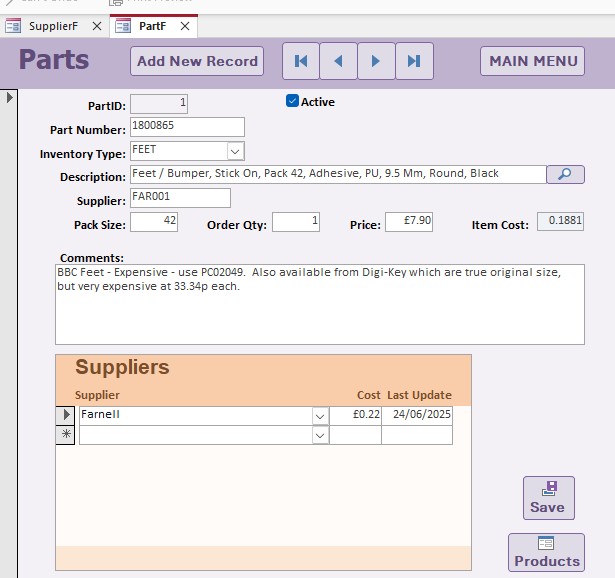
I have built a Parts, supplier and PartXSupplier junction table and associated forms. All works well both ways (Parts Parent Form with Suppliers Subform and vice versa). There is one issue - I have an Item Cost field in my Parts table which needs to be there, as the Parts are the line items for a Product Bill of Materials. This item Cost field is the same as the Cost field in the PartXSupplier Junction Table. When I get updated prices from a supplier, I update the current costs as Richard suggested on the Supplier subform, but because this only updates the field in the junction table, the Item Cost field in the Parts Table isn't updated. I have to do everything twice, which can be very time consumming. Is there a way to automatically update the Item Cost field in the parent PartF form from the subform Cost field? I will add a screen shot.
Stephen GledhillOP
@Reply 15 months ago
Sami Shamma
@Reply 15 months ago
Stephen Yes, you can. You can do that with an update query, or you can do that with a little bit of VBA on the after update event on the change of the cost in the supplier table.
I am curious about your design. What happens when you have multiple suppliers and they have multiple costs? Which one do you take to the header?
So the question is: Which supplier do you want to get the parts cost from? The lowest one? Because if that's the case, then you could have an after update event in your subform that looks at the cost, determines if it is the lowest one, and if so, updates the cost in the parent form. That would all be done with VBA. But it all depends on how you want to figure out which supplier you wanna get the cost from. See what I mean?
That's exactly what Sami is trying to say. For example, I used to do the same thing. Let's say I sold a particular hard drive. Let's call it a Western Digital 2TB hard drive, and I can buy that from three different suppliers: ABC Corp, 123 Corp, and PC Parts R Us Corp.
And so I want to keep track of who has it for each cost. But I don't want to bother updating my costs unless one of the vendors now has a new lower cost. So in that AfterUpdate event, I would look at the other costs from the other suppliers. And if we have a new low, have message box say, "Hey, this supplier now has a new low cost. Do you want to use that?"
The same thing, you might want to change it if the costs have all gone up, right? If the new previous low supplier has gone up, now you gotta increase your cost. So there's a lot of logic behind what you do and when you pick. This would actually make a pretty good video, but it's going to involve some VBA either way.
If you wanted a non-VBA solution, what you could do is use a minimum calculation. Put it in the footer of your subform so you know what the minimum is, and then your parent form could just refer to that minimum value. It'd be a calculated value but wouldn't be stored in the table. =MIN(CostField) in the subform, then =SubFormName.Form!MinField in the parent.
So it's all about if you just want to see it there or not. Then that's what you could do. You can say the minimum cost of this particular hard drive from my 6 vendors is $75 or whatever.
Stephen GledhillOP
@Reply 15 months ago
Thanks Sami, thanks Richard - you've really given me a lot to think about there!
My database (which I'm re-writing in Access) doesn't have the junction table for the parts / supplier many-to-many relationship. There are two completely separate tables. Suppliers (which doesn't contain any pricing information) and Parts which holds the current price for the Supplier I am currently using for that part. The Parts table des link to the Supplier table, but only to show who the current supplier is.
Lesson 7 showed me the power of the junction table and the extra information it would give me, so I (over) enthusiastically got to work!
Let me think more about what I really want from this and I'll come back as soon as possible.
As you say Richard - it would make a great TechHelp video!
Sorry, only students may add comments.
Click here for more
information on how you can set up an account.
If you are a Visitor, go ahead and post your reply as a
new comment, and we'll move it here for you
once it's approved. Be sure to use the same name and email address.
This thread is now CLOSED. If you wish to comment, start a NEW discussion in
Access Expert 7.