Free Lessons
Courses
Seminars
TechHelp
Fast Tips
Templates
Topic Index
Forum
ABCD
 
Home   Courses   TechHelp   Forums   Help   Contact   Merch   Join   Order   Logon  
 
Back to Access Forum    Comments List
Upload Images   @Reply   Bookmark    Link   Email   Next Unseen 
Date Filtering Not Working
Kim Wong 
     
10 months ago
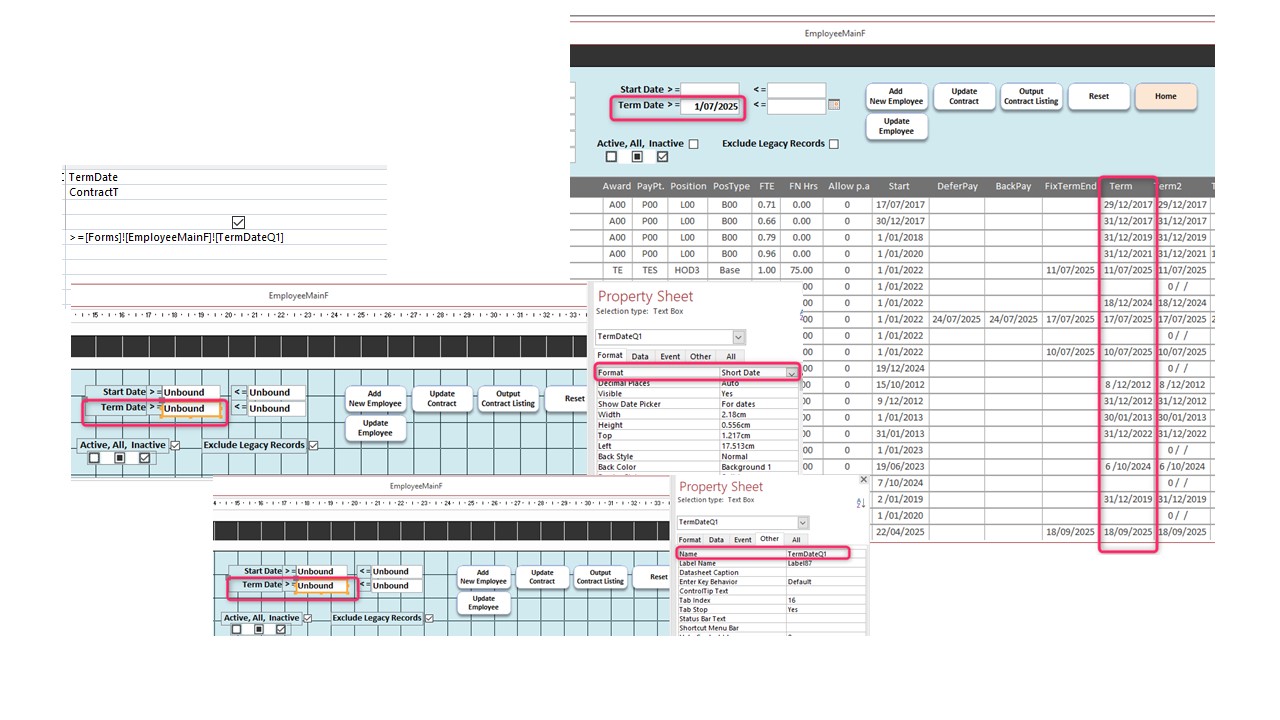
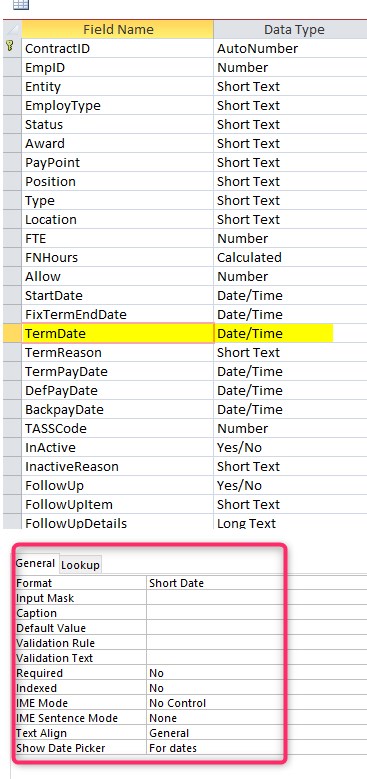
I have a a simple query.  Filtering if Date is >= to a date that is input on form. I can't figure out why its not filtering.
Kim Wong OP  @Reply  
     
10 months ago

Kim Wong OP  @Reply  
     
10 months ago

Kevin Robertson  @Reply  
           
10 months ago
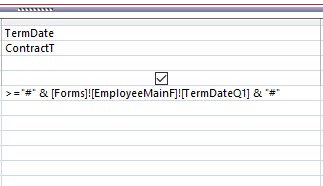
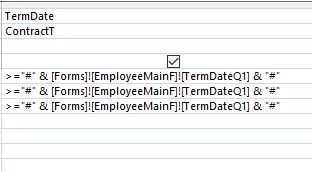
Dates should be enclosed in #

    >="#" & Forms!EmployeeMainF!TermDateQ1 & "#"
Kim Wong OP  @Reply  
     
10 months ago
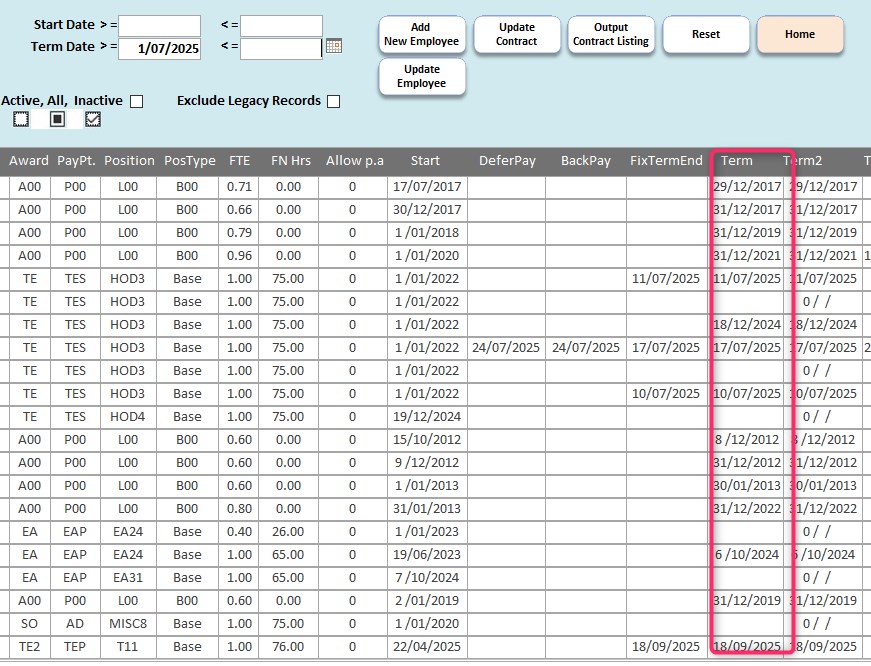
Still not working. Did I get the code correct?
Kim Wong OP  @Reply  
     
10 months ago

Kim Wong OP  @Reply  
     
10 months ago

Kim Wong OP  @Reply  
     
10 months ago
I had another date field Start Date which filtered correctly without the #.  Just cant figure out what is different.  The # doesnt seem to work either.
John Campbell  @Reply  
     
10 months ago
When are you initiating this on the form?  When you enter the term date, when is the form requeried/refreshed?
You should be fine just having the criteria without the # stuff.  Is the recordsource query also looking at the other dates you have listed?  
Kim Wong OP  @Reply  
     
10 months ago

Kim Wong OP  @Reply  
     
10 months ago
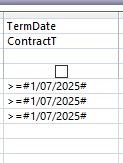
When I hardcode it >=#01/07/2025#, it works
Kim Wong OP  @Reply  
     
10 months ago

Kim Wong OP  @Reply  
     
10 months ago
When I Code it as an input from a form, it doesn't.  Any idea what it is that is wrong?
Kim Wong OP  @Reply  
     
10 months ago
I am going to create a simple query running off a simple form against the date. Hopefully that will throw some light on what is going on.  
Bill Carver  @Reply  
      
10 months ago
try adding "requery" without quotes in the "after update" event of your date field
John Campbell  @Reply  
     
10 months ago
Kim, this is what I have behind a button on a search screen in one of my client's databases.
1. Create a brand new query that the criteria is only looking at the TermDateQ1 field. >=Forms!NameofForm!SearchFieldName
2. Place a button on the main form that does the below.  
3. The below changes the recordsource and then it requeries.


On Error Resume Next

   Me.RecordSource = "NewQueryName"
   Me.Requery
Kim Wong OP  @Reply  
     
10 months ago
I rewrote my query. And its working now. There must have been something in the flow of the command executions that was not  causing the date to be picked up. Spent the whole day yesterday trying to figure it out!

Thanks John, Kevin for your help! Really appreciate your prompt responses and readiness to assist!
Stanley Mc Keown  @Reply  
     
10 months ago
The only thing I know from doing this myself recently ( learned from one of Richards videos ) was that the date selection / input form must be open at the same time as the filter query.
Kim Wong OP  @Reply  
     
10 months ago
Stanley

Thanks Stanley, good info.
Kim Wong OP  @Reply  
     
10 months ago
Kevin

I have to add the what Kevin said about the # is correct. I hardcoded a date in one line of my query as a catchall term date.        TempVars("TermDateFilter2") = "31/12/2125"

It ran OK with no coding errors, and for the most part it looked like it was running correctly. When I did more checking, i realized it was dropping certain records, and I remembered Kevin's input on #.  The use of # corrected it.
        TempVars("TermDateFilter2") = #31/12/2125#

Thanks Kevin!
Kim Wong OP  @Reply  
     
10 months ago
Am i going to get into trouble if i code the following where a ShortDate field on a form is passed to a TempVar.  
TempVars("StartDateFilter1") is used as a filter against a date field in the database.

        TempVars("StartDateFilter1") = Me.StartDateQ1.Value

I tried watching Richard's Extended Cut video but its extremely laggy for some reason and its just churning away.
Stanley Mc Keown  @Reply  
     
10 months ago
Check out the simple security video Richard does it shows how to take a value from a drop down box to a tempvars variable which relates that to a user table where all the values for that user can be accessed -- ie password and user level etc and fed into your code for later use -- I'd say that could equally apply to a date value.
Kim Wong OP  @Reply  
     
10 months ago
Thanks Stanley. Will do.

This thread is now CLOSED. If you wish to comment, start a NEW discussion in Access Forum.
 

Next Unseen

 
New Feature: Comment Live View


The following is a paid advertisement
Computer Learning Zone is not responsible for any content shown or offers made by these ads.
 

Learn
 
Access - index
Excel - index
Word - index
Windows - index
PowerPoint - index
Photoshop - index
Visual Basic - index
ASP - index
Seminars
More...
Customers
 
Login
My Account
My Courses
Lost Password
Memberships
Student Databases
Change Email
Info
 
Latest News
New Releases
User Forums
Topic Glossary
Tips & Tricks
Search The Site
Code Vault
Collapse Menus
Help
 
Customer Support
Web Site Tour
FAQs
TechHelp
Consulting Services
About
 
Background
Testimonials
Jobs
Affiliate Program
Richard Rost
Free Lessons
Mailing List
PCResale.NET
Order
 
Video Tutorials
Handbooks
Memberships
Learning Connection
Idiot's Guide to Excel
Volume Discounts
Payment Info
Shipping
Terms of Sale
Contact
 
Contact Info
Support Policy
Mailing Address
Phone Number
Fax Number
Course Survey
Email Richard
[email protected]
Blog RSS Feed    YouTube Channel

LinkedIn
Copyright 2026 by Computer Learning Zone, Amicron, and Richard Rost. All Rights Reserved. Current Time: 5/19/2026 3:00:47 PM. PLT: 1s