Free Lessons
Courses
Seminars
TechHelp
Fast Tips
Templates
Topic Index
Forum
ABCD
 
Home   Courses   Templates   Seminars   TechHelp   Forums   Help   Contact   Join   Order   Logon  
 
Home > Courses > Access > Expert > X03 > < X02 | X04 >
Back to Access Expert 3    Comments List
Upload Images   @Reply   Bookmark    Link   Email   Next Unseen 
Form Footer Total Showing Error
Abusofian Khokon 
   
5 months ago
Hi Sir,

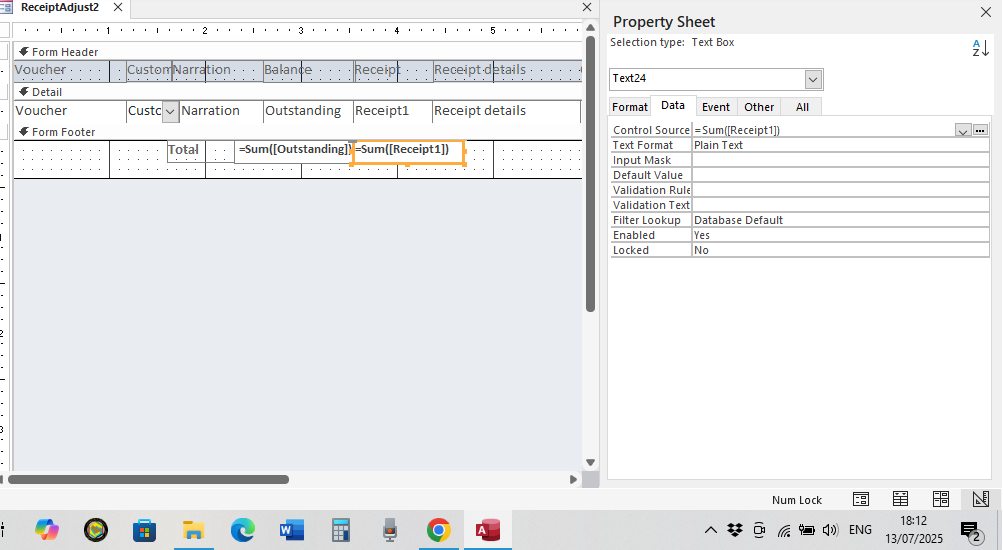
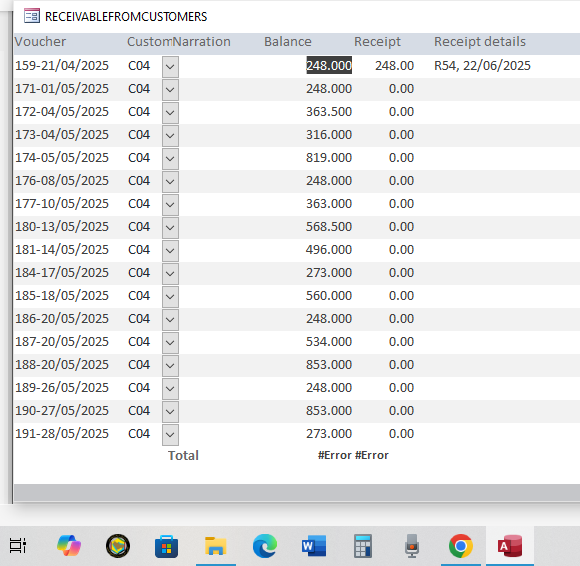
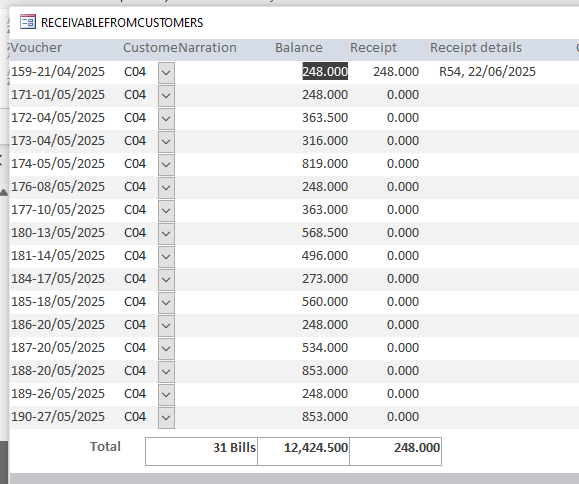
following the Video No.4 ofthe Expert level 3, I made a footer total which is showing error in result.
Could you please advise about it?
Kevin Robertson  @Reply  
          
5 months ago
Show us the formula you used for the Footer Total.
Abusofian Khokon OP  @Reply  
   
5 months ago

Abusofian Khokon OP  @Reply  
   
5 months ago

Abusofian Khokon OP  @Reply  
   
5 months ago
I have added both of design view and form view
Sami Shamma  @Reply  
             
5 months ago
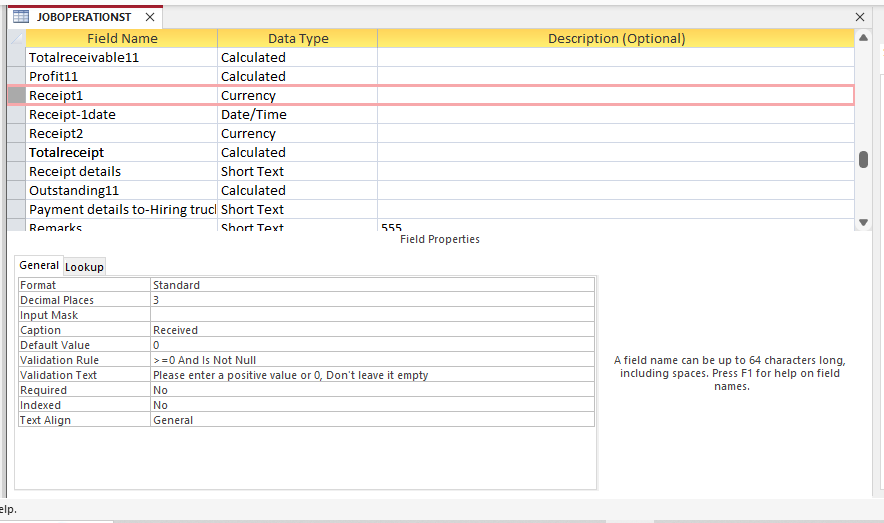
what is the Recipie1 data type?
Richard Rost  @Reply  
          
5 months ago
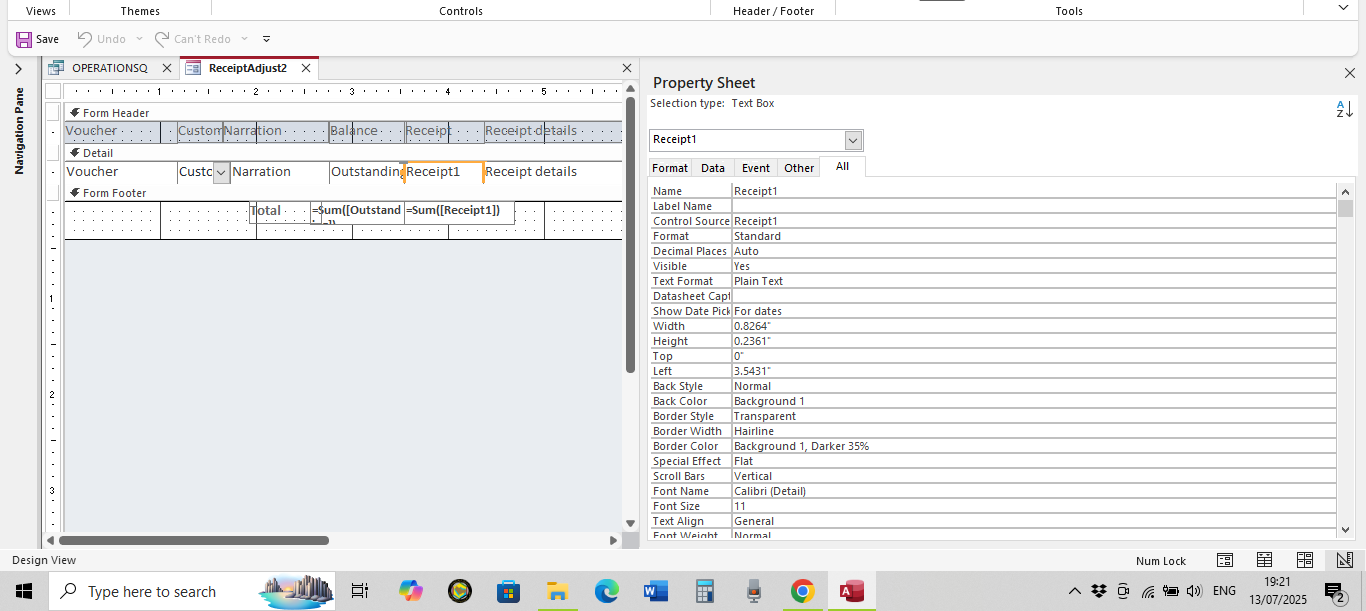
Make sure Receipt1 is the NAME of the control AND the Control Source.
Abusofian Khokon OP  @Reply  
   
5 months ago
Sami  It's Currency Data type
Abusofian Khokon OP  @Reply  
   
5 months ago

Sami Shamma  @Reply  
             
5 months ago
Show Receipt1 field in deign mode "All" tab from the top
Abusofian Khokon OP  @Reply  
   
5 months ago
Richard Yes, It's same Name in the Control and Control Source, I have rechecked.
Abusofian Khokon OP  @Reply  
   
5 months ago

Abusofian Khokon OP  @Reply  
   
5 months ago
Sami I have attached it now
Richard Rost  @Reply  
          
5 months ago
Very strange. Everything looks fine. Try it in a blank new form by itself, just that field.
Raymond Spornhauer  @Reply  
         
5 months ago
I'm used to seeing "$" signs in currency fields.  Not seeing them makes me think you don't have a data type setup correctly.

-Raymond
Raymond Spornhauer  @Reply  
         
5 months ago
In your Table:

Select the Receipt1 Field, then down at the bottom
- Set the Format to "Currency"
- Set the Decimal Places to "Auto"


In your Form:
On the Format Tab, set the Format to "Currency" for the text boxes in the Details section and the Footer.
Make sure you do not have any text or values in the "Default Value" fields.

I would also look at the Form Events and make sure there is no VBA changing values.

-Raymond
Sami Shamma  @Reply  
             
5 months ago
Good catch, Raymond
Kevin Robertson  @Reply  
          
5 months ago
Why do you have 2 calculated fields in your Table?
Richard Rost  @Reply  
          
5 months ago
Are we seeing all the records? Are there some missing? Maybe with NULL values? Try deleting everything and adding just 1 record. See if that works.
Abusofian Khokon OP  @Reply  
   
5 months ago
Richard  Thank you Mr. Richard, yes let me try this.
Abusofian Khokon OP  @Reply  
   
5 months ago
Kevin Thanks, sometimes we receive part amount thats why we kept 2 fields
Abusofian Khokon OP  @Reply  
   
5 months ago
Thank you very much to all of you for your valued comments.
Now it has been solved.
Previously i made copy & paste from the details section, but now I removed all from the footer and added new text box then formatted, now its okay fine.
I am going to add the latest screenshot.
Thank you again.
Abusofian Khokon OP  @Reply  
   
5 months ago

This thread is now CLOSED. If you wish to comment, start a NEW discussion in Access Expert 3.
 

Next Unseen


The following is a paid advertisement
Computer Learning Zone is not responsible for any content shown or offers made by these ads.
 

Learn
 
Access - index
Excel - index
Word - index
Windows - index
PowerPoint - index
Photoshop - index
Visual Basic - index
ASP - index
Seminars
More...
Customers
 
Login
My Account
My Courses
Lost Password
Memberships
Student Databases
Change Email
Info
 
Latest News
New Releases
User Forums
Topic Glossary
Tips & Tricks
Search The Site
Code Vault
Collapse Menus
Help
 
Customer Support
Web Site Tour
FAQs
TechHelp
Consulting Services
About
 
Background
Testimonials
Jobs
Affiliate Program
Richard Rost
Free Lessons
Mailing List
PCResale.NET
Order
 
Video Tutorials
Handbooks
Memberships
Learning Connection
Idiot's Guide to Excel
Volume Discounts
Payment Info
Shipping
Terms of Sale
Contact
 
Contact Info
Support Policy
Mailing Address
Phone Number
Fax Number
Course Survey
Email Richard
[email protected]
Blog RSS Feed    YouTube Channel

LinkedIn
Copyright 2025 by Computer Learning Zone, Amicron, and Richard Rost. All Rights Reserved. Current Time: 12/10/2025 12:16:44 AM. PLT: 1s