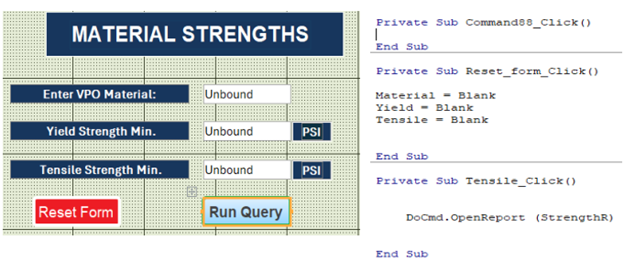
To keep hands out of tables and queries, I would like the data generated through a form to a query to open just a report and not open the query. Is this possible?
I use a form so users can query certain materials to find material properties. At that point, the query results are shown.
I can then run a report based on the query results but my preference is for the form to bypass displaying the query results and have that same data appear in a report. I hope this helps. First post. Thank you.
Sami Shamma
@Reply 14 months ago
Jeff You still need to be more specific. For example, "Show the form that you're talking about in design form." Also show any VBA or macros that you are using to open up the query.
Basically, what you want to do is have your form call the "Report" rather than calling the query directly. Is that correct?
Jeff HunkerOP
@Reply 14 months ago
Jeff HunkerOP
@Reply 14 months ago
Your last statement is correct. A very elementary application for Access within our company.
Since I do not know, I am going to go ahead and make assumptions. Generally, it is a bad idea, but here we go.
Your query receives its parameters from your form. On the click of a button called "Run Report", you will run that report that will get its data from the query, which is now been filtered by the values you have entered on the form.
Good luck.
Jeff HunkerOP
@Reply 14 months ago
Thank you Mr. Shamma. Yes, I have read Rule 2. I appreciated your help.
Jeff HunkerOP
@Reply 14 months ago
SamiSami To close this, I resolved with adding open form and close query to the command button action. Thank you again for your assistance.
You can have a report that gets its data from the query without actually opening the query. In your form, just open the report with a button. It will load the query in the background.
Jeff HunkerOP
@Reply 14 months ago
Thank you, Richard! I ended up doing just that with a command to close the Query. I appreciate all of the help!
Right, but what I'm saying is that if the report is based on a query, you don't have to open the query separately. The report will open the query by itself in the background to get its data without you ever seeing it. You don't have to open the query and then open the report just to close the query. It's kind of like how you can base a form on a query, and the form will load the query into memory to get the records, but it doesn't actually physically open the query.
Jeff HunkerOP
@Reply 13 months ago
I have it now where the queries do not open and reports refresh automatically with new queries. Thank you!
Sorry, only students may add comments.
Click here for more
information on how you can set up an account.
If you are a Visitor, go ahead and post your reply as a
new comment, and we'll move it here for you
once it's approved. Be sure to use the same name and email address.
This thread is now CLOSED. If you wish to comment, start a NEW discussion in
Access Expert 4.