Free Lessons
Courses
Seminars
TechHelp
Fast Tips
Templates
Topic Index
Forum
ABCD
 
Home   Courses   TechHelp   Forums   Help   Contact   Merch   Join   Order   Logon  
 
Back to Work Order Lessons    Comments List
Upload Images   @Reply   Bookmark    Link   Email   Next Unseen 
Overlapping Appointments
Shallena Ayers 
      
11 months ago
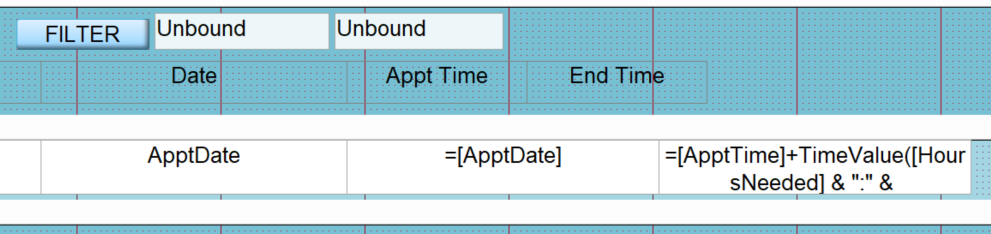
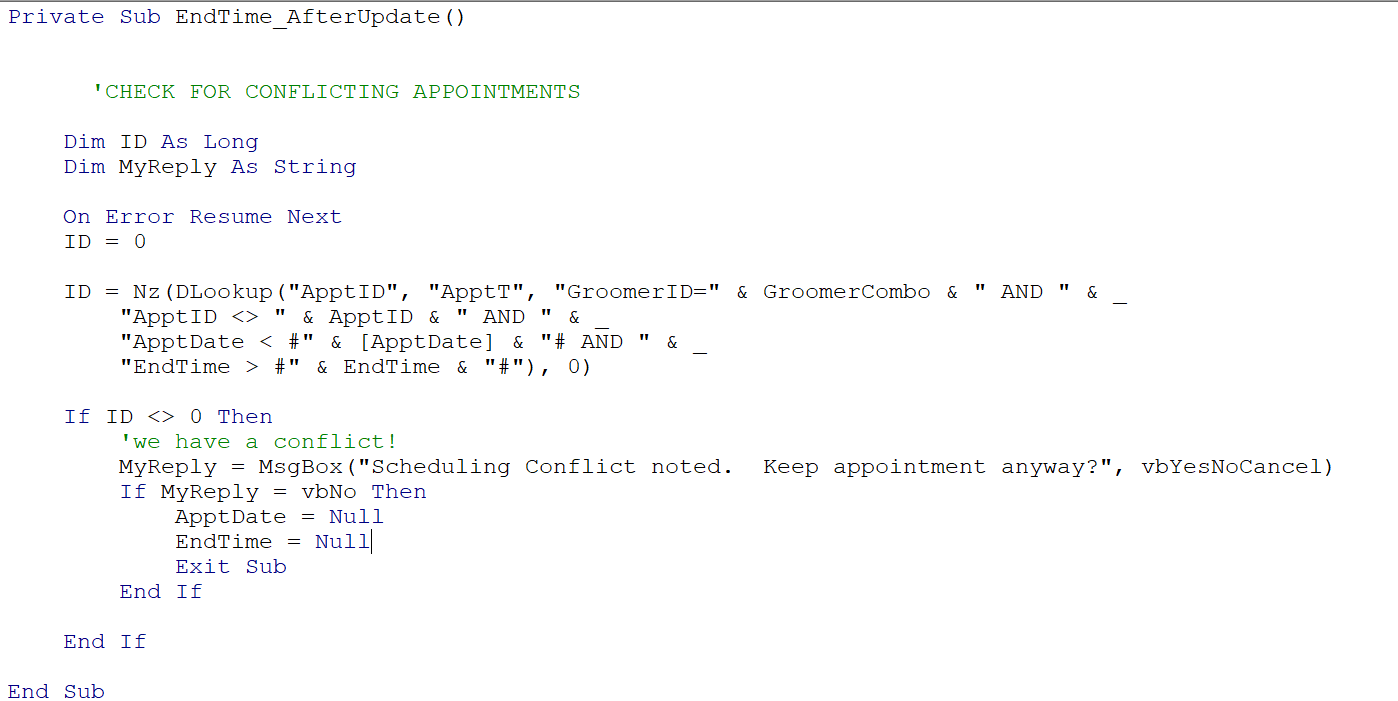
Me again... working on my mobile dog grooming database.  Working on the scheduling sections and need to check for overlapping appointments.  I feel like I have things set up correctly but it is not being triggered. Ignore the ApptTime. That only shows start time for visual purposes. EndTime only shows the end time of the appt. But I wanted to make sure all the dates and times were what they are supposed to be.  The EndTime is calculated based on number of hours and number of minutes each dog takes to groom. I am uploading pics of the design view and code. I can not figure out why the overlapping appointments are not triggering the warning. Thanks in advance!
Shallena Ayers OP  @Reply  
      
11 months ago

Shallena Ayers OP  @Reply  
      
11 months ago

Shallena Ayers OP  @Reply  
      
11 months ago

Donald Blackwell  @Reply  
       
11 months ago
I'm not seeing anything jump out that would cause your conflict message to not show up.

If you're not seeing anything, then I would suggest commenting out the "On Error Resume Next" and try your edit again to see if an error pops up and what error message there is may help you figure out what is going on.

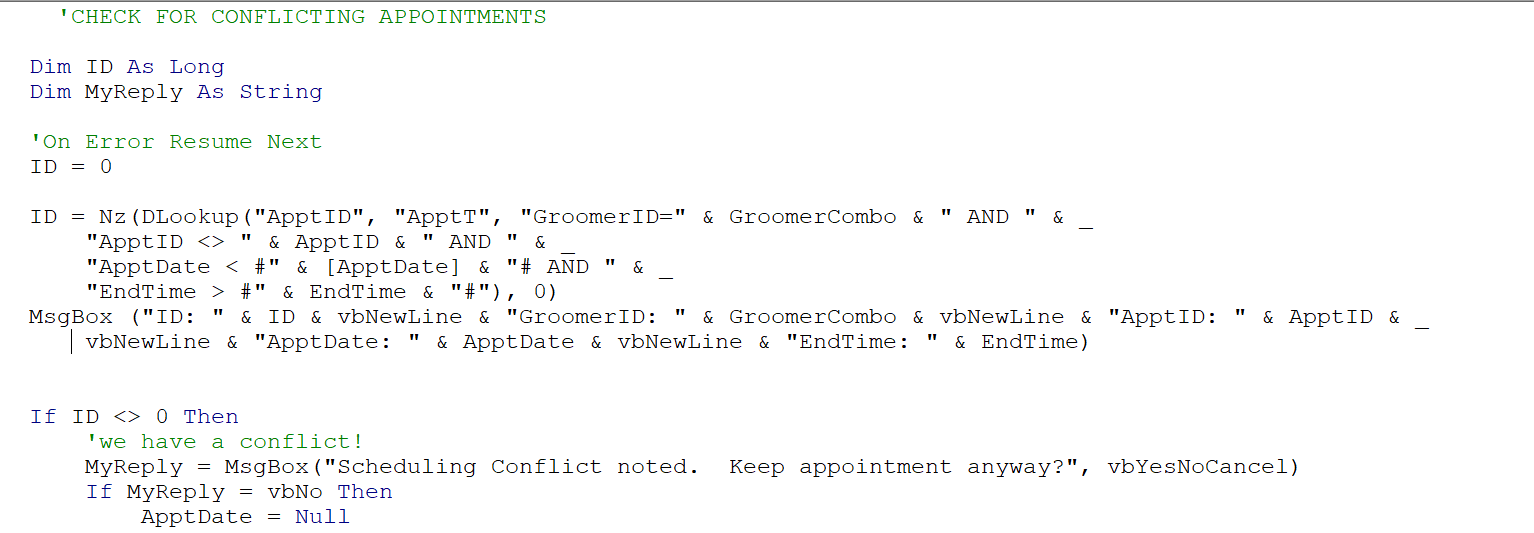
If still no error message, I would add a message box after the DLookup to see what information is being requested and checked, for example:

msgbox("ID: " & ID & vbnewline & "GroomerID: " & GroomerCombo & vbnewline & "ApptID: " & ApptID & _
            vbnewline & "ApptDate: " & ApptDate & vbnewline & "EndTime: " & EndTime)

This will show you what is going into and coming out of the Nz/DLookup which could in turn tell you if the problem is in your code or in your form.
Lars Schindler  @Reply  
     
11 months ago
Am I missing something, or is the problem possibly that you are looking for an "old" EndTime that ends after the "new" EndTime, but your "new" example with 10:35 am ends after the "old" EndTime at 10:20 am?
Shallena Ayers OP  @Reply  
      
11 months ago
Thanks Donald, I will try those things to see what it is doing vs what I want it to do...  Lars... Maybe?  I wondered that also... i will also play with the time.  I think that is what happened in the video as well though and it worked for Rick... but I also know just because Rick does it doesnt mean I can... for whatever reason... lol
Shallena Ayers OP  @Reply  
      
11 months ago
As I sit here sipping coffee and nursing a migraine I am thinking I really also need to take into account drive times in my scheduling overlaps... need time to get from one end appointment to the next beginning appointment... since my daughter is a mobile dog groomer... So many moving parts to remember to include.  sometimes I dont realize I spaced out for a long period of time because in my head i am playing out scenerios of what could happen or might happen that i need to work out after i get the basics to work.  My husband will wave his hand in front of my face and I am like what?!?  I am thinking!  
Shallena Ayers OP  @Reply  
      
11 months ago
Lars... I tested your theory and put the dates inside the start and end times and it let me do it.... so that isnt it...   so gonna try the things Donald gave me to try.
Shallena Ayers OP  @Reply  
      
11 months ago

Shallena Ayers OP  @Reply  
      
11 months ago
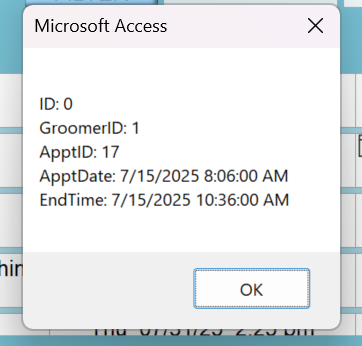
Okay Donald...  Nothing happened when I messaged the On Error.  So I added the MsgBox code in the after update for EndDate.  And nothing happened... no MsbBox... What I took from that is the AfterUpdate is not working which I guess could maybe be because it calculates after ApptDate updates?  Seems strange ... even tabbing through doesnt trigger anything.  So I moved the MsgBox to the after update event for ApptDate since that is where I am initially making the change and that DID give me the MsgBox.  All of the things messaged are correct, except the ID does not change from 0.  So no conflict is being triggered.  but it seems like it should since the new appointment date and start and end times are inside of the other date and time... total conflict.  I am so confused...  I will upload the pics so you can see what I am seeing
Shallena Ayers OP  @Reply  
      
11 months ago

Shallena Ayers OP  @Reply  
      
11 months ago

Shallena Ayers OP  @Reply  
      
11 months ago

Shallena Ayers OP  @Reply  
      
11 months ago
okay... so... I am listening to the lesson 33 again and Rick says those items are coming from the Table... and because EndTime is a calculated field it is not on the ApptT table.  So it is not able to compare the EndTime.  Can I reference the field in that record that was just calculated?   I am also wondering... I mentioned that I need to think about including the drive time to each appointment in the checking for overlapping appointments.  I have the address for each appointment in the customer table.  Is there a way to say to have Access calculate the drive time to the next appointment so that can be taken into account? I know access can go out to the web and get stuff... wasnt sure if it was capable of accessing mapping things?
Donald Blackwell  @Reply  
       
11 months ago
If Endtime isn't in the table, then you'd have to either remove it from the dlookup or put the formula in place of the the "EndTime" field in the dlookup such as (if the appointment time is 2 hours and 30 minutes):

Replace "EndTime > #" & EndTime.... with something like "(DateAdd(""h"",2,ApptDate) + DateAdd(""n"",30,ApptDate)) > #" & EndTime...

Unfortunately, I haven't purchased the work order seminar as yet so I don't currently have videos to follow along with :( Richard does so similar scheduling conflict resolution with a reservation system in Access Developer 24, but in those lessons, the End Date is stored in the table.

Beyond that, it would probably better for me to tap out on this one and let one of the other more experienced students (or someone else who has the work order seminar) step in as I will likely only confuse us both trying to guess at it.

Sorry, Don

This thread is now CLOSED. If you wish to comment, start a NEW discussion in Work Order Lessons.
 

Next Unseen

 
New Feature: Comment Live View


The following is a paid advertisement
Computer Learning Zone is not responsible for any content shown or offers made by these ads.
 

Learn
 
Access - index
Excel - index
Word - index
Windows - index
PowerPoint - index
Photoshop - index
Visual Basic - index
ASP - index
Seminars
More...
Customers
 
Login
My Account
My Courses
Lost Password
Memberships
Student Databases
Change Email
Info
 
Latest News
New Releases
User Forums
Topic Glossary
Tips & Tricks
Search The Site
Code Vault
Collapse Menus
Help
 
Customer Support
Web Site Tour
FAQs
TechHelp
Consulting Services
About
 
Background
Testimonials
Jobs
Affiliate Program
Richard Rost
Free Lessons
Mailing List
PCResale.NET
Order
 
Video Tutorials
Handbooks
Memberships
Learning Connection
Idiot's Guide to Excel
Volume Discounts
Payment Info
Shipping
Terms of Sale
Contact
 
Contact Info
Support Policy
Mailing Address
Phone Number
Fax Number
Course Survey
Email Richard
[email protected]
Blog RSS Feed    YouTube Channel

LinkedIn
Copyright 2026 by Computer Learning Zone, Amicron, and Richard Rost. All Rights Reserved. Current Time: 6/22/2026 2:30:31 PM. PLT: 1s