Free Lessons
Courses
Seminars
TechHelp
Fast Tips
Templates
Topic Index
Forum
ABCD
 
Home   Courses   TechHelp   Forums   Help   Contact   Merch   Join   Order   Logon  
 
Back to Access Forum    Comments List
Upload Images   @Reply   Bookmark    Link   Email   Next Unseen 
Search Trouble
Ken Wykoff 
       
8 months ago
Hello Richard

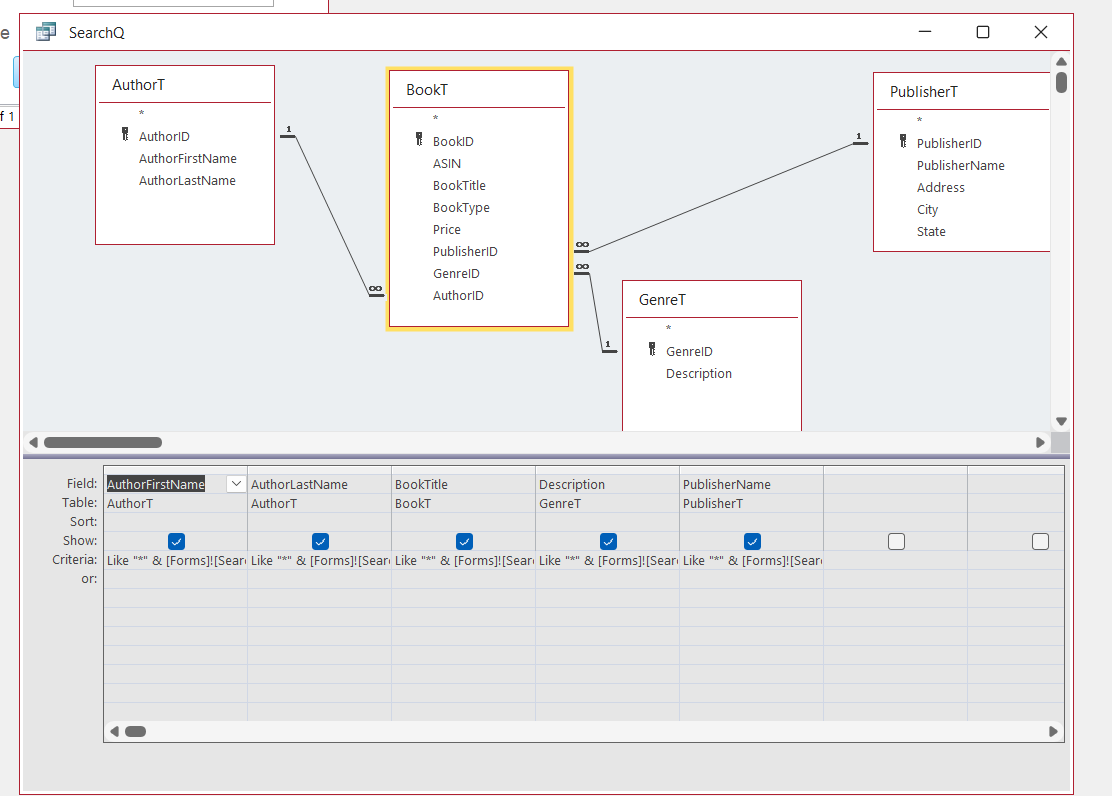
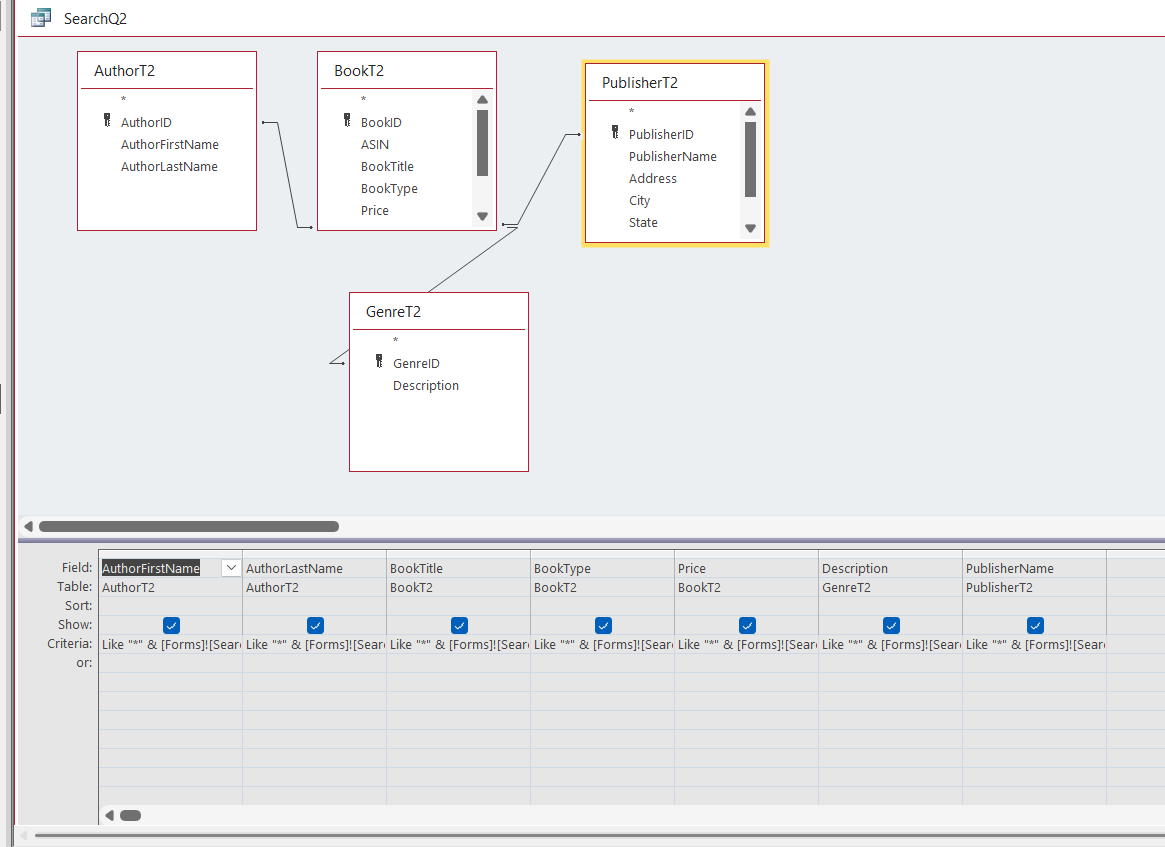
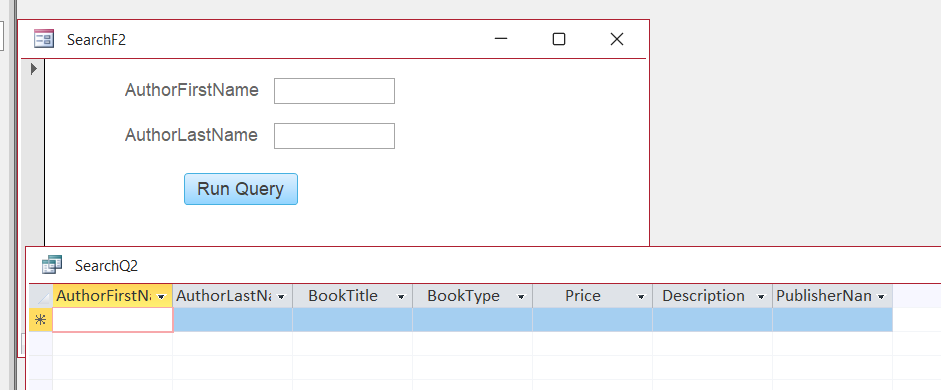
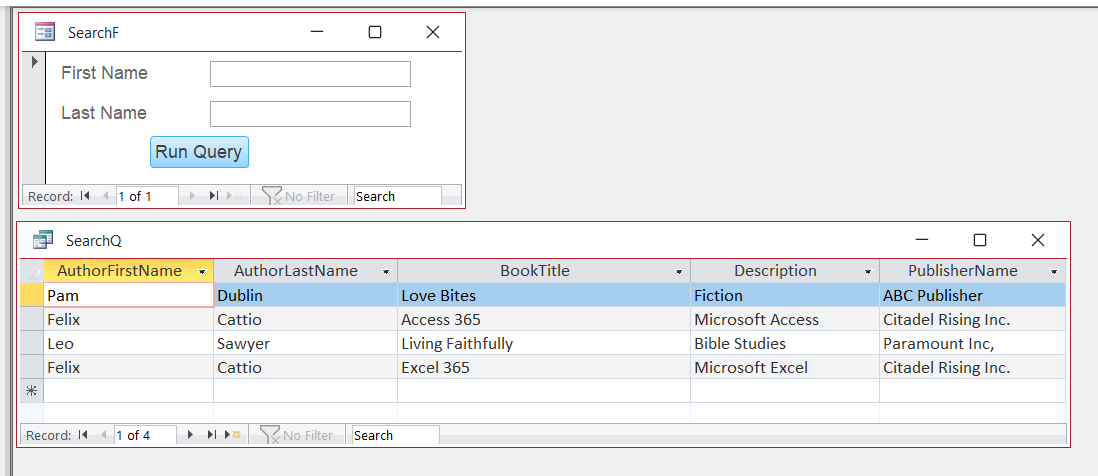
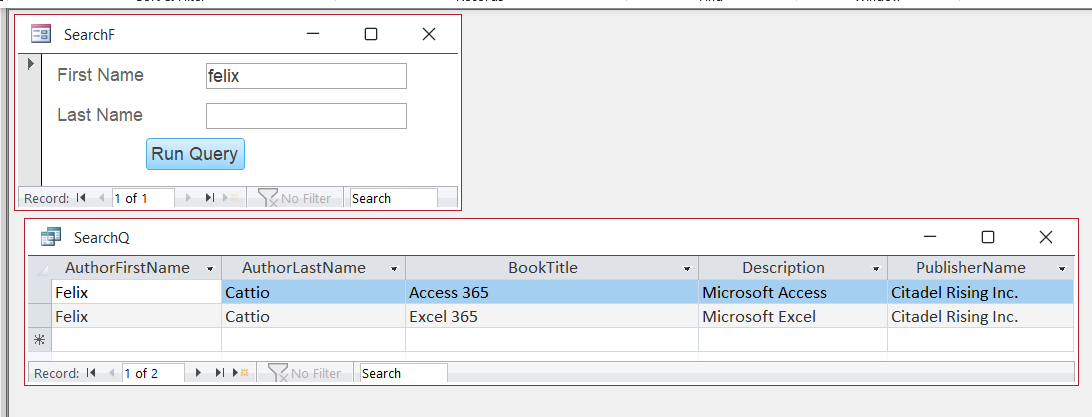
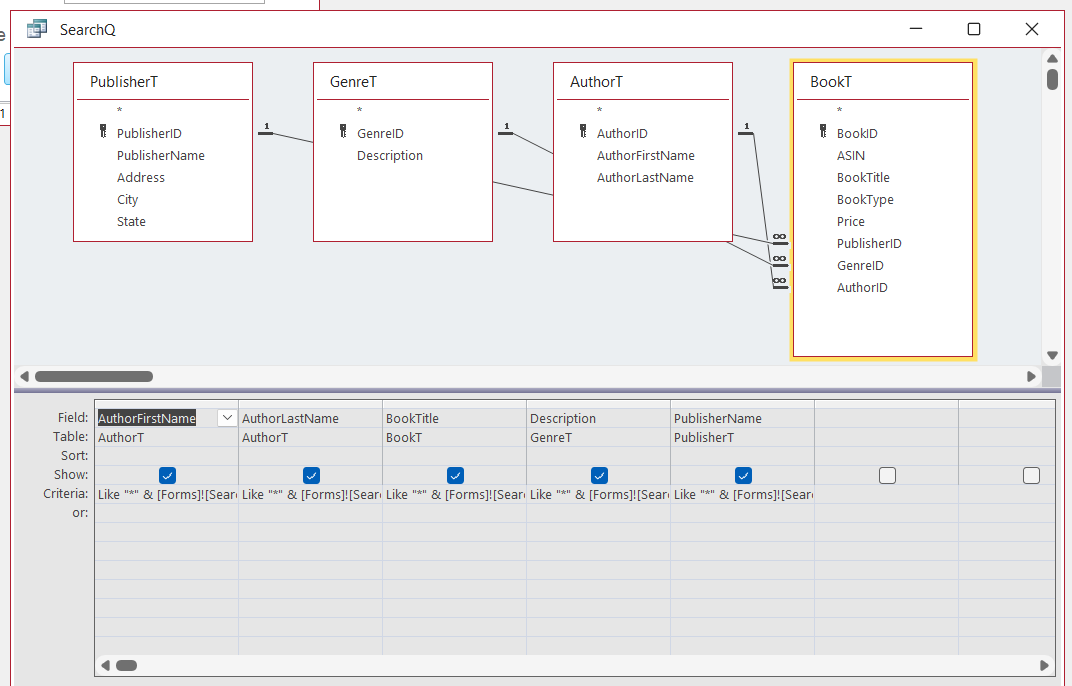
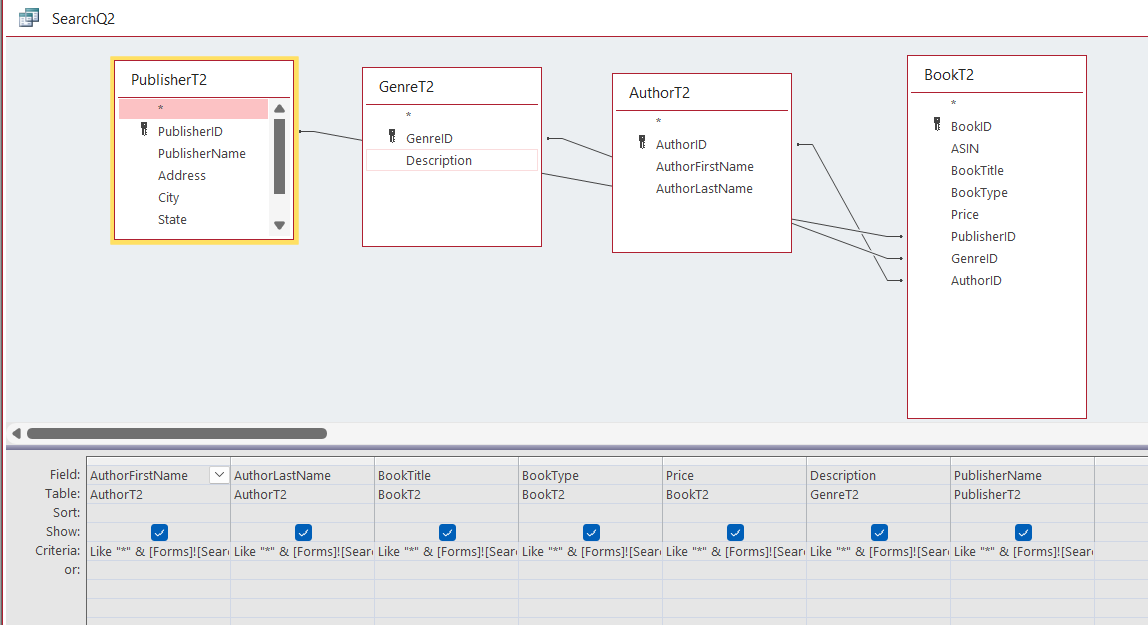
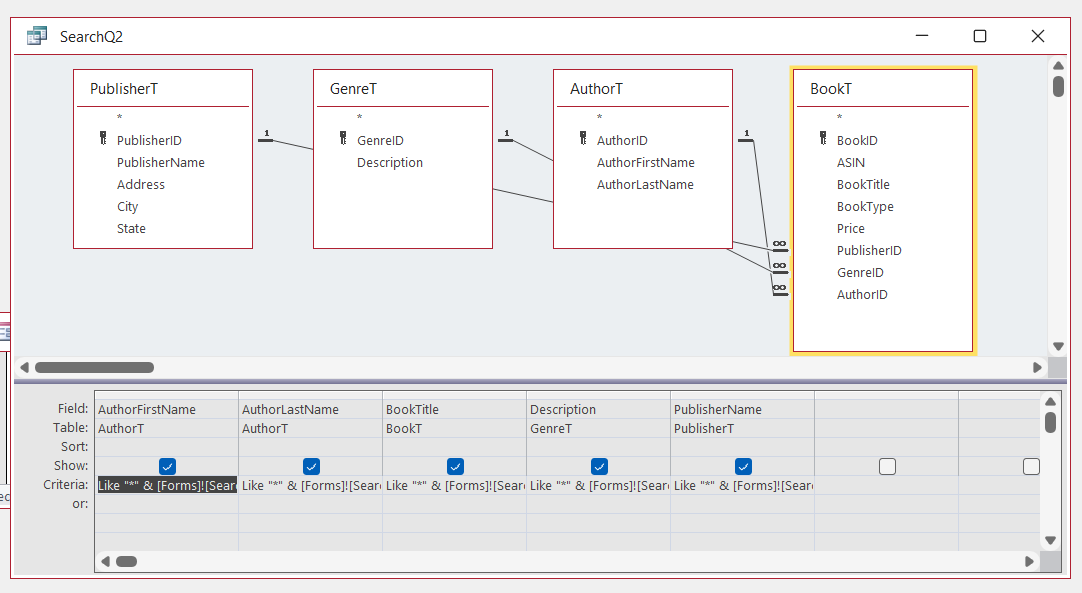
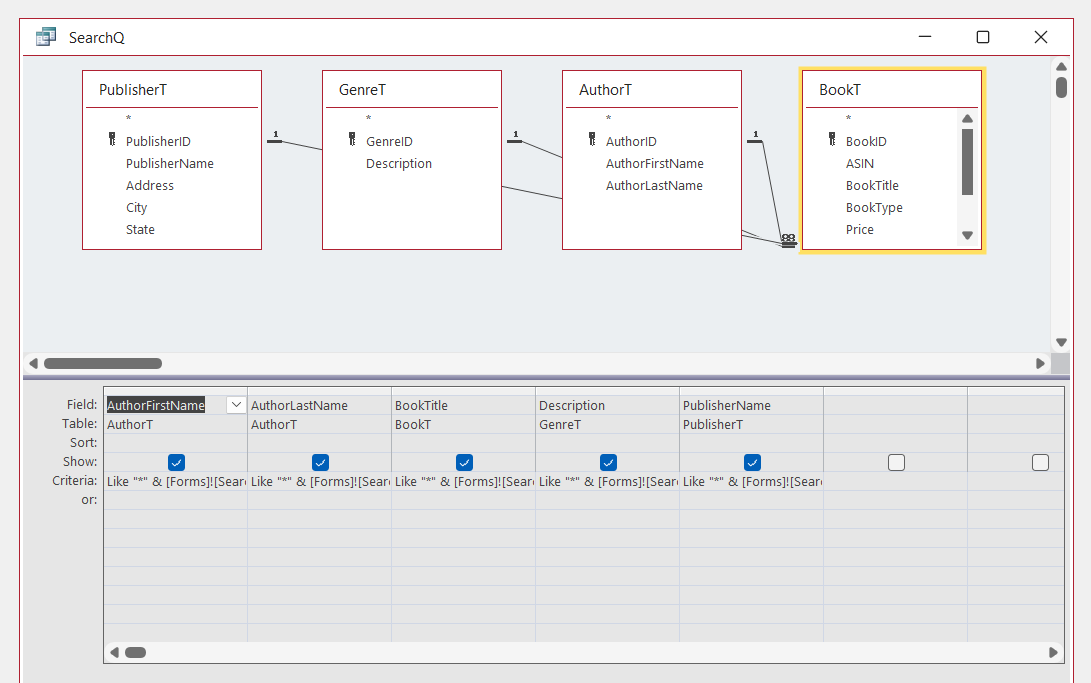
I am having a lot of trouble now with the search query I created in an experimental database. However, it worked after I watched the Tech Help Video and spoke with Sami as well. The problem is, I have tried to reproduce the same steps on the real database, and it will not work. I have no idea why, and it is very frustrating that it works on one but not the other. So I am attaching views from my SearchQ and SearchQ2 setups. The first one work in the experimental database and not in the real database. The first SearchQ shows the lines as One-2-many but the SearchQ2 will not show that screen. Obly the Joint Screen. Totally lost on this if it works for one and not the other that is setup identically with the criteria changed to fit the choices in the columns.
Ken Wykoff OP  @Reply  
       
8 months ago

Ken Wykoff OP  @Reply  
       
8 months ago

Ken Wykoff OP  @Reply  
       
8 months ago

Ken Wykoff OP  @Reply  
       
8 months ago

Ken Wykoff OP  @Reply  
       
8 months ago
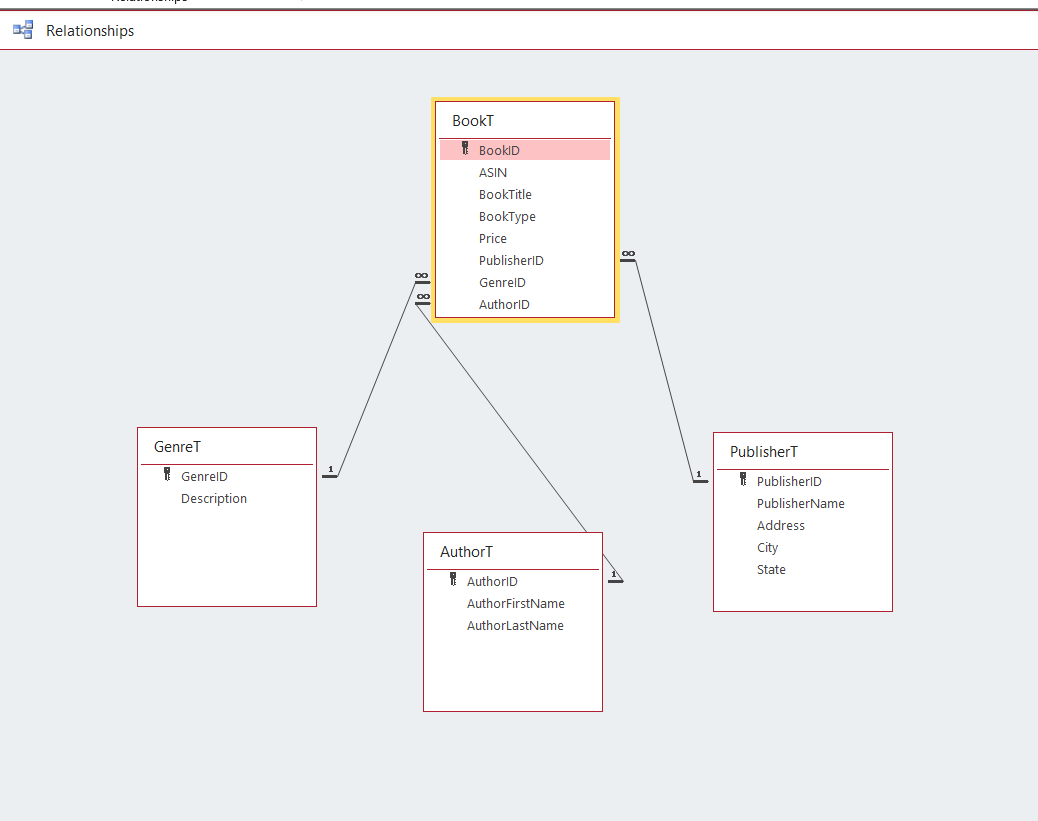
Added the Relationships Table so that you could see it worked with that.
Sami Shamma  @Reply  
             
8 months ago
Ken When you say it does not work, that does not give us much to work with.
What does not work?
Does it give an error?
Does it give wrong results?
SearchQ2 we cannot see the true relationships. Move the boxes around.

Help us help you.
Ken Wykoff OP  @Reply  
       
8 months ago
Sami this is the SQL for the SearchQ2. SELECT AuthorT2.AuthorFirstName, AuthorT2.AuthorLastName, BookT2.BookTitle, BookT2.BookType, BookT2.Price, GenreT2.Description, PublisherT2.PublisherName
FROM ((AuthorT2 INNER JOIN BookT2 ON AuthorT2.AuthorID = BookT2.AuthorID) INNER JOIN GenreT2 ON BookT2.GenreID = GenreT2.GenreID) INNER JOIN PublisherT2 ON BookT2.PublisherID = PublisherT2.PublisherID
WHERE (((AuthorT2.AuthorFirstName) Like "*" & Forms!SearchF2!AuthorFirstName & "*") And ((AuthorT2.AuthorLastName) Like "*" & Forms!SearchF2!AuthorLastName & "*") And ((BookT2.BookTitle) Like "*" & Forms!SearchF2!BookTitle & "*") And ((BookT2.BookType) Like "*" & Forms!SearchF2!BookType & "*") And ((BookT2.Price) Like "*" & Forms!SearchF2!Price & "*") And ((GenreT2.Description) Like "*" & Forms!SearchF2!Description & "*") And ((PublisherT2.PublisherName) Like "*" & Forms!SearchF2!PublisherName & "*"));
Ken Wykoff OP  @Reply  
       
8 months ago
The SearchQ2 used with the SearchF2, just comes up blank when I hit the run query button

Ken Wykoff OP  @Reply  
       
8 months ago
this is a screenshot of the results of both. No errors or anything. Just weird.
Ken Wykoff OP  @Reply  
       
8 months ago

Kevin Robertson  @Reply  
          
8 months ago
Both your fields are blank.
Ken Wykoff OP  @Reply  
       
8 months ago
Kevin I hit the runquery button like this other one and it brings up the entire database. Even if I put a name in the SearchF2 it will come out blank
Ken Wykoff OP  @Reply  
       
8 months ago
view one with experimental database
Ken Wykoff OP  @Reply  
       
8 months ago

Ken Wykoff OP  @Reply  
       
8 months ago

Kevin Robertson  @Reply  
          
8 months ago
Just looked back through previous comments. I'm thinking it's possibly the Join Types in your Query.

Outer Joins
Ken Wykoff OP  @Reply  
       
8 months ago
Hi Kevin,  I am still confused. I set the join up the same as the experimental database. and it worked there. The only difference is that the SearchQ2 would not accept the same settings and only gave me the screen for the 3 different types of joins. I will check again because like you I am certain that is the trouble too.
John Campbell  @Reply  
     
8 months ago
Put the following at the end of each like:

Or is null

Then if the user does not add any search criteria, it will show all the records...
Ken Wykoff OP  @Reply  
       
8 months ago
Hi John,
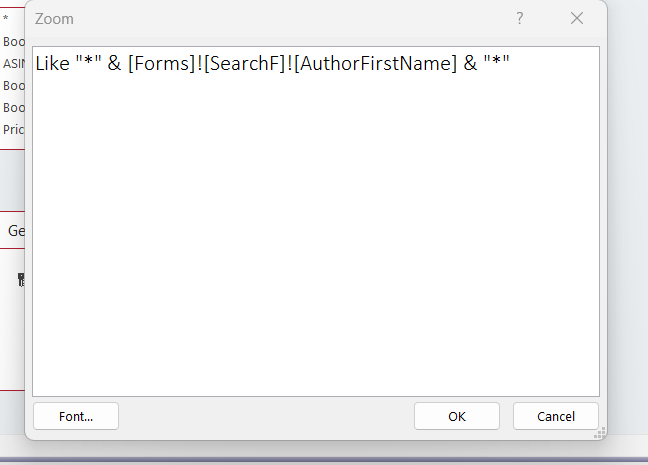
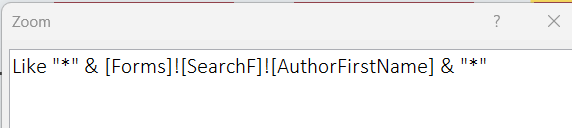
Do you mean to place it like this:  Like Or is Null "*" & [Forms]![SearchF2]![AuthorFirstName] & "*"
Then, in each of the criteria boxes, I should place it like that?  If that works, I wonder why I didn't need to do that on the experimental database? Sorry, I'm just trying to wrap my old brain around this. Thanks, Ken
Donald Blackwell  @Reply  
       
8 months ago
Hi Ken, just piggy-backing on Kevin's last reply, if you look at your image from SearchQ, the join lines show different from SearchQ2.

SearchQ shows a 1 next to AuthorT, PublisherT, and GenreT and a Many (sideways 8 for infinite) on all the connecting lines to BookT. To change SearchQ2 to match, you need to edit the join in the query by double clicking each line and then choosing the option to make the join look the same.

In SearchQ2, it just has the standard join line with no markings so the query will try to output one row for each record in each table for each table it is joined to (Cartesian Product). With 4 tables, it may be too difficult for it to figure out what to show....

Also, to try to use John's suggestion, your criteria would be something similar to:

Is Null Or Like "*" & [Forms]![SearchF2]![AuthorFirstName] & "*"
Ken Wykoff OP  @Reply  
       
8 months ago
Thanks Donald, I tried everything you said. Both SearchQ and SearchQ2 are all set up with the join lines going left to right  and all join windows say the same thing. Still does not show the join lines like in SearchQ. I've included more screenshots and labled them so you know which ones they are. I feel really bad asking you all for so much help but after this I will not bother you all again if it still does not work. I just want you all to know how much it means to me to have you all take the time to offer advise. I'm soon going to be 71 so just getting this far is a lot more than I ever thought of. Ken
Ken Wykoff OP  @Reply  
       
8 months ago

Ken Wykoff OP  @Reply  
       
8 months ago

Ken Wykoff OP  @Reply  
       
8 months ago

Ken Wykoff OP  @Reply  
       
8 months ago
And last the criteria I tried to use with the IsNull : Like "Or isNull "*"" & [Forms]![SearchF2]![AuthorLastName] & "*"
Donald Blackwell  @Reply  
       
8 months ago
Ken We're all happy to help any way we can.

In the screen shot below from your 2 most recent SearchQ shots, you can see how the join lines look different. In SearchQ2 they are all set to show all records from all tables where the linked fields are equal which likely is where your problems are stemming from.

You'll need to double click each join line coming off of BookT2 to the other tables and when the join window opens make sure that the option that is like (for the one going from BookT2 to AuthorT2: "Include ALL records from 'BookT2' and only those records from 'AuthorT2' where the joined fields are equal." Then repeat for "GenreT2" and "PublisherT2".

Even though the lines are connecting to the same fields between tables and the fields at the top of the "Join" properties windows match, if the option selected at the bottom is different, your query will provide different results.

And something that can sometimes confuse things even more, if you look at your relationships in the Database Tools > Relationship viewer, they may be correct, but the settings in the "View"/Query you are creating may bypass those settings.

Donald Blackwell  @Reply  
       
8 months ago

Ken Wykoff OP  @Reply  
       
8 months ago
Hi Donald, I finally got both SearchQ and SearchQ2 to look the same. But now the RunQueryBtn on the SearchQ2 brings up the information on the SearchQ. I checked the information on both buttons, and they were both created with the button wizard using the identical information other than one says it took information from SearchQ, and the other from SearchQ2. So now I'm thinking it has to be the ReQueryBtn's that are not working properly. Perhaps if I try the put an unbound button on each SearchF and using VBA for each of them it may work better. So I am going to review the VBA lesson in my Developer class on that and see what needs to be done.  Also I've attached new screenshots again so you can see how it all looks now. Again thank you for your help and being patient with me. Ken
Ken Wykoff OP  @Reply  
       
8 months ago

Ken Wykoff OP  @Reply  
       
8 months ago

Ken Wykoff OP  @Reply  
       
8 months ago

Ken Wykoff OP  @Reply  
       
8 months ago

Ken Wykoff OP  @Reply  
       
8 months ago
Good Evening, I thought I had the answer, and after watching several different videos, there doesn't seem to be any one that will answer the problem I am trying desperately to get an answer to. At last thought after I got all the SearchQ and SearchQ2 with the join lines fixed, I tried to run the query, and it continually comes up asking to put values in a parameter box. I read up on that and I looked for the mistakes it all suggested, and still blank. I'm pretty sure it has nothing to do with the requery button on the Search Form. So I will ask one last question because I am sure you are all tired of my questions but I am truly trying hard to learn this and find the solutions, I share the SQL from the SearchQ and if someone spots something that does look wrong please let me know so I can fix it and get the run query to work from the query window. Right now, even with the join lines supposedly correct, when I run it, it still comes up blank. I will post the SQL in the following post.
Ken Wykoff OP  @Reply  
       
8 months ago
SELECT AuthorT.AuthorFirstName, AuthorT.AuthorLastName, BookT.BookTitle, BookT.BookType, BookT.Price, GenreT.Description, PublisherT.PublisherName

FROM PublisherT INNER JOIN (GenreT INNER JOIN (AuthorT INNER JOIN BookT ON AuthorT.AuthorID = BookT.AuthorID) ON GenreT.GenreID = BookT.GenreID) ON PublisherT.PublisherID = BookT.PublisherID

WHERE (((AuthorT.AuthorFirstName) Like "*" & Forms!SearchF!AuthorFirstName & "*") And ((AuthorT.AuthorLastName) Like "*" & Forms!SearchF!AuthorLastName & "*") And ((BookT.BookTitle) Like "*" & Forms!SearchF!BookTitle & "*") And ((BookT.BookType) Like "*" & Forms!SearchF!BookType & "*") And ((BookT.Price) Like "*" & Forms!SearchF!Price & "*") And ((GenreT.Description) Like "*" & Forms!SearchF!Description & "*") And ((PublisherT.PublisherName) Like "*" & Forms!SearchF!PublisherName & "*"));
Richard Rost  @Reply  
          
8 months ago
Ken I'm looking over your forum thread right now and I can see how it got a bit overwhelming. Honestly, when a conversation drags out that long and gets so detailed, a lot of people (me included) will look at it and think, "Yikes, that's a lot to wade through" and either skip it for now or plan to get back to it when they've got more time (which in all honestly, might never happen with how busy life gets).

Just from what I've seen, when you post big blocks of SQL or piles of code, folks are a lot less likely to dig in and help, simply because it takes a lot of mental energy to read through and figure out exactly what's going on. I know it feels like you're providing all the details, but what generally works best - especially for me - is if you try to boil your question down to just what you're trying to accomplish. Write it out in plain English. If you can relate the issue to something common like customers, orders, contacts, or something similar, that makes it a lot easier to help. That way, you're more likely to get a focused answer, and it makes it easier for forum moderators or myself to jump in and provide guidance.

Sometimes, it actually helps to just start a new thread rather than adding more to an already long one. You can say something like, "Here's the specific problem I'm stuck on," and keep everything as clear and simple as possible. Trust me, I love answering questions and so do the other moderators, but clarity really helps, especially when everyone's brain is already pretty full. I'm going to go ahead and post these thoughts in your thread as well, since they're helpful for anyone in a similar spot.

Don't let this discourage you from participating in the forums. That's still the best place for technical questions - just remember that breaking things down and keeping them simple gives you a better shot at getting the help you need.
Donald Blackwell  @Reply  
       
8 months ago
@Ken, Please accept my apologies. I had seen your last round of replies when I was looking on my phone and had waited until I got back to my computer just so I could see it better and make sure I was going to give the best suggestion I could. Then when I had my response typed in, a storm hit and I lost power for several hours. The next day it slipped my mind since this post didn't pop up with any new responses. Again, sorry.

I'm not 100% sure I remember what I had thought last week, but perusing today, if you're still having issues, if it's popping up asking for parameter values when you're trying to run from the Query Window, then I would just double check to make sure that you also have the appropriate form (SearchF or SearchF2, depending on which query you are running) open and in Form view.

If still getting issues, then I'd need to see clips of your form and field properties just to give you a "second set of eyes" on checking for typos/misspellings or anything else that might be causing a conflict.

Don
John Campbell  @Reply  
     
8 months ago
Ken, if you want to, you can email me a copy of your database and I can get it working.  Another set of eyes will probably help.  Let me know and I can provide my email...  John
Ken Wykoff OP  @Reply  
       
8 months ago
Donald Donald, thank you, and no problem. I realize I did overwhelm everyone with all I was asking. I just really thought I was getting close to solving it, but turns out I found it easier to reinvent it and simplify the database. I've been working with CoPilot, and it's been interesting how that all works. It's almost like the bot is a real person, but it is not 100% correct all the time. I do want to personally thank you for the time you put into helping me, and I will keep you up to date on how it is going.
Ken Wykoff OP  @Reply  
       
8 months ago
John John, thank you for your help and your offer. As I mentioned to Donald a bit ago, when no one responded, I now realize it was because I overwhelmed people, not intentionally. Still, I apologize to you all for that. I am currently learning with the Copilot bot, and I had no idea how human they seem. But they are far from 100% correct all the time. As I get further into the database building, I am enjoying the learning on the ins and outs of Access. I will keep your offer in mind for the future, too, and again, thank you!
Ken Wykoff OP  @Reply  
       
8 months ago
Ken Hi John, I have tried working with this bot for over a week now, and nothing seems to be getting resolved. I'm not sure if it's me or if Copilot is just not that great. Anyway, if you're still interested in looking at it to see what is going wrong, I would appreciate it. At least I might finally know if it's just me or what it is. I also got the Search Seminar a couple of days ago, which I am working on. Let me know and I will be happy to send you a copy of the test database I have been working with and explain more then. Thanks, Ken
John Campbell  @Reply  
     
7 months ago
Sounds good.  you can email me a copy to [email protected]    Just tell me what search button or which one isn't working..

This thread is now CLOSED. If you wish to comment, start a NEW discussion in Access Forum.
 

Next Unseen

 
New Feature: Comment Live View


The following is a paid advertisement
Computer Learning Zone is not responsible for any content shown or offers made by these ads.
 

Learn
 
Access - index
Excel - index
Word - index
Windows - index
PowerPoint - index
Photoshop - index
Visual Basic - index
ASP - index
Seminars
More...
Customers
 
Login
My Account
My Courses
Lost Password
Memberships
Student Databases
Change Email
Info
 
Latest News
New Releases
User Forums
Topic Glossary
Tips & Tricks
Search The Site
Code Vault
Collapse Menus
Help
 
Customer Support
Web Site Tour
FAQs
TechHelp
Consulting Services
About
 
Background
Testimonials
Jobs
Affiliate Program
Richard Rost
Free Lessons
Mailing List
PCResale.NET
Order
 
Video Tutorials
Handbooks
Memberships
Learning Connection
Idiot's Guide to Excel
Volume Discounts
Payment Info
Shipping
Terms of Sale
Contact
 
Contact Info
Support Policy
Mailing Address
Phone Number
Fax Number
Course Survey
Email Richard
[email protected]
Blog RSS Feed    YouTube Channel

LinkedIn
Copyright 2026 by Computer Learning Zone, Amicron, and Richard Rost. All Rights Reserved. Current Time: 4/30/2026 8:13:58 AM. PLT: 1s