Free Lessons
Courses
Seminars
TechHelp
Fast Tips
Templates
Topic Index
Forum
ABCD
 
Home   Courses   TechHelp   Forums   Help   Contact   Merch   Join   Order   Logon  
 
Back to Access Forum    Comments List
Upload Images   @Reply   Bookmark    Link   Email   Next Unseen 
Subform Data Check
Kim Nielsen 
      
8 months ago
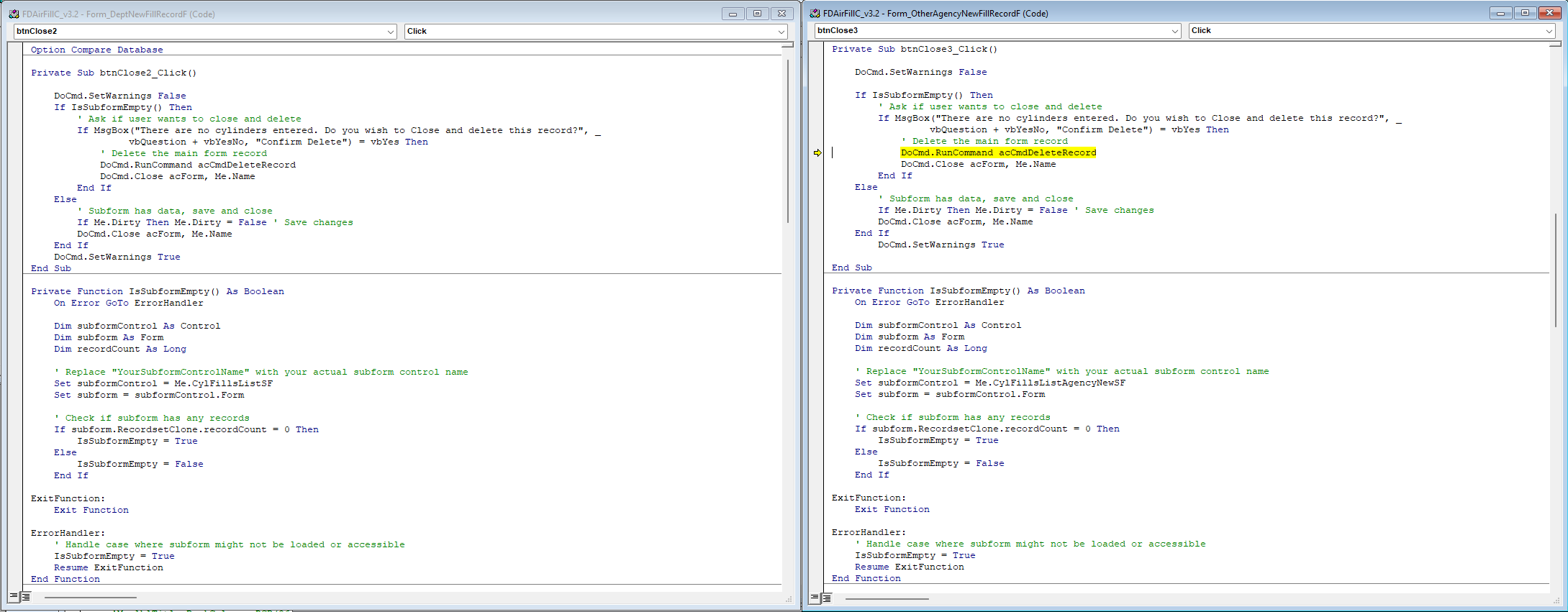
I have 2 forms very similar in design, Both have subforms. The check is if the subform has any data, if yes close and save the form, if no ask user if they wish to delete the complete record and close without saving. One form keeps coming with an error on the cmddeleterecord  line and I still can not find out why. I have an image of both forms side by side with the current code. hoping someone could take a look and present a suggestion
Kim Nielsen OP  @Reply  
      
8 months ago

Kim Nielsen OP  @Reply  
      
8 months ago
Here is an image of the 2 forms and code
Sandra Truax  @Reply  
         
8 months ago
I don't see the issue with your code either, but maybe try this?  Be SURE to BACKUP before running this.

    If MsgBox("There are no cylinders entered. Do you wish to Close and delete this record?", _
              vbQuestion + vbYesNo, "Confirm Delete") = vbYes Then
        
        ' Delete current record safely using DAO
        With Me.RecordsetClone
            .Bookmark = Me.Bookmark
            .Delete
        End With
        
        DoCmd.Close acForm, Me.Name
    End If
Else
    If Me.Dirty Then Me.Dirty = False   ' Save changes
    DoCmd.Close acForm, Me.Name
Kim Nielsen OP  @Reply  
      
8 months ago
Thanks, Will give it a try and let you know
Kevin Robertson  @Reply  
          
8 months ago
Kim What is the error?
Donald Blackwell  @Reply  
        
8 months ago
Not knowing the error, the three things I would look at in that form: 1) Did deletions somehow get disabled in that form, 2) did the form somehow get opened in "Read Only" mode, 3) is the form's recordsource editable
Kim Nielsen OP  @Reply  
      
8 months ago
Donald, i did check all of these. The problem was when I hit the "Close" button the code should run to verify that the subform is empty and if it was to ask the user keep going or delete the record. That is what is supposed to happen. However when i hit the close button the code directs me to the highlighted line. The 2 forms are for comparison the forms are almost identical one works, other one does not. all controls are exactly the same on both forms. I tried the code from Sandra..sorry that did not work. still scratching my head on this problem
Donald Blackwell  @Reply  
        
8 months ago
So what is the exact error message that pips up.before it sends tou to that code. If it isn't showing an error message, you may need to comment out the SetWarnungs false line and try it so you get the error message.

Once we have that message it may help more.
Kevin Yip  @Reply  
     
8 months ago
When DoCmd.RunCommand acCmdDeleteRecord returns a run-time error, that means the record can't be deleted due to the absence of any record, the correct form and record not in focus, the record is still being edited (i.e. dirty), or perhaps some other causes.  

Using RunCommand is like clicking the corresponding button on the Access ribbon bar.  The Delete Record button is a red X on the ribbon.  Running DoCmd.RunCommand acCmdDeleteRecord is like clicking that red X. When no record can be deleted, that button is greyed out, and running DoCmd.RunCommand acCmdDeleteRecord will cause an error.

This thread is now CLOSED. If you wish to comment, start a NEW discussion in Access Forum.
 

Next Unseen

 
New Feature: Comment Live View


The following is a paid advertisement
Computer Learning Zone is not responsible for any content shown or offers made by these ads.
 

Learn
 
Access - index
Excel - index
Word - index
Windows - index
PowerPoint - index
Photoshop - index
Visual Basic - index
ASP - index
Seminars
More...
Customers
 
Login
My Account
My Courses
Lost Password
Memberships
Student Databases
Change Email
Info
 
Latest News
New Releases
User Forums
Topic Glossary
Tips & Tricks
Search The Site
Code Vault
Collapse Menus
Help
 
Customer Support
Web Site Tour
FAQs
TechHelp
Consulting Services
About
 
Background
Testimonials
Jobs
Affiliate Program
Richard Rost
Free Lessons
Mailing List
PCResale.NET
Order
 
Video Tutorials
Handbooks
Memberships
Learning Connection
Idiot's Guide to Excel
Volume Discounts
Payment Info
Shipping
Terms of Sale
Contact
 
Contact Info
Support Policy
Mailing Address
Phone Number
Fax Number
Course Survey
Email Richard
[email protected]
Blog RSS Feed    YouTube Channel

LinkedIn
Copyright 2026 by Computer Learning Zone, Amicron, and Richard Rost. All Rights Reserved. Current Time: 5/7/2026 6:34:56 PM. PLT: 0s