Free Lessons
Courses
Seminars
TechHelp
Fast Tips
Templates
Topic Index
Forum
ABCD
 
Home   Courses   TechHelp   Forums   Help   Contact   Merch   Join   Order   Logon  
 
Back to Access Developer Forum    Comments List
Upload Images   @Reply   Bookmark    Link   Email   Next Unseen 
Sequential Row Number in a Query
Gary Becker 
     
9 months ago
I need to make a query from a linked text file that the query would have an added field that would number the rows beginning at 1. The data has no Auto Number or any unique identifying key other than the physical order that it is in the linked text file. Is this possible to do in a query at run-time?
Kevin Yip  @Reply  
     
9 months ago
It's not possible with Access alone.  You can use Excel VBA (via a technique called "automation") to create the counter field, then import the data back to Access.  Or you can use SQL Server's T-SQL, which lets you use coding technique like variables and loops in SQL statements; you can use that to increment a field at every row.
Raymond Spornhauer  @Reply  
          
9 months ago
Gary

This video shows how to accomplish record numbering.

YT: Automatic Numbering
TH: Automatic Record Numbering

Do not use these as a Primary or Foreign key.  These are not Auto Numbers.

Hope this helps.

-Raymond
Kevin Yip  @Reply  
     
9 months ago
Raymond  Richard's video is for a blank table, whereas Gary already has a table full of data and wants to add counters after the fact.  Also, Gary specifically wants everything in a query.
Gary Becker OP  @Reply  
     
9 months ago
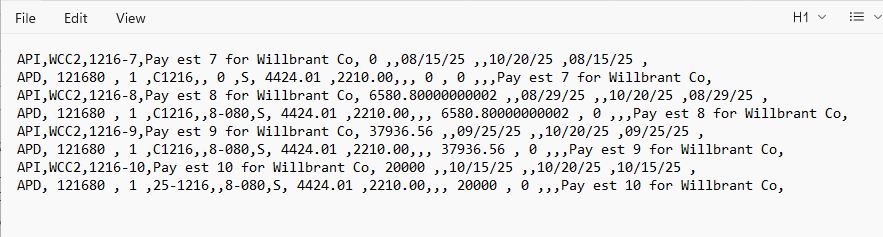
What I have is a text file that has as a row that starts with API--for A/P invoice header info, then the next row starts with APD for A/P invoice distribution information. The text file will be IMPORTED into our accounting software i.e. Sage CRE 300. What I'm wanting to do is link the text file into Access and then display the A/P invoice on a main form and the distribution detail on a subform. I have a query that that lists the header records using the API for criteria and APD for the detail records. These two queries would the data sources for form and the subform. BUT I need a common key to link them. So, with all that being said.

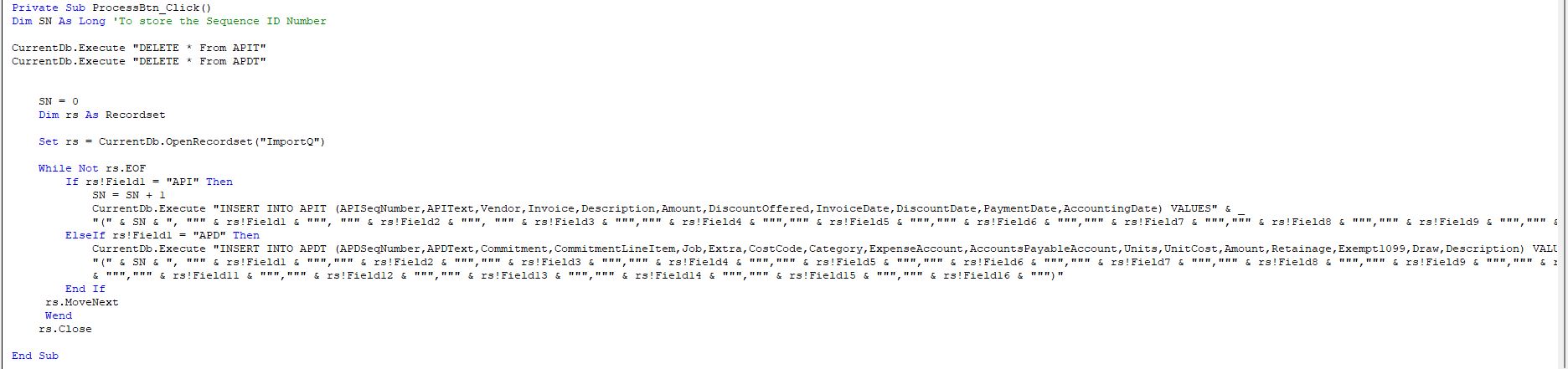
Now what I'm thinking of doing is to loop through the text file records lines with a recordset and append the correct lines to their own tables and using a counter to assign a Sequence Number key field. I'll have to play with it over the weekend.
Gary Becker OP  @Reply  
     
9 months ago
This is not really an Access question, but does anyone use accounting software from Sage?
Alex Hedley  @Reply  
            
9 months ago
Gary Becker OP  @Reply  
     
9 months ago
I looked at that one earlier. But it's using a ID which I don't have in my text file.
Gary Becker OP  @Reply  
     
9 months ago

Alex Hedley  @Reply  
            
9 months ago
What's the reason you are needing a row number?
Donald Blackwell  @Reply  
       
9 months ago
If the data in the text file is always formatted the same, would it be easier to import the data into a table, even a temporary table, using VBA where you could then add a field to each row that would contain a linking ID #. Set that to have a composite key such that only there could only be 1 row ID # 1 that is an API and 1 row ID # 1 that is APD and then that would be your master/child link?

If you would be importing multiple files that you wanted to keep, add a filename field or something to identify that.

I haven't tested this, it's just the first thing that comes to mind.
Richard Rost  @Reply  
           
9 months ago
It wouldn't be too difficult to just import that line-by-line using standard text I/O and then figure out where stuff needs to go. It looks like every odd line has the same data, and every even line has similar data. So it's just a matter of figuring out what everything is.
Gary Becker OP  @Reply  
     
9 months ago
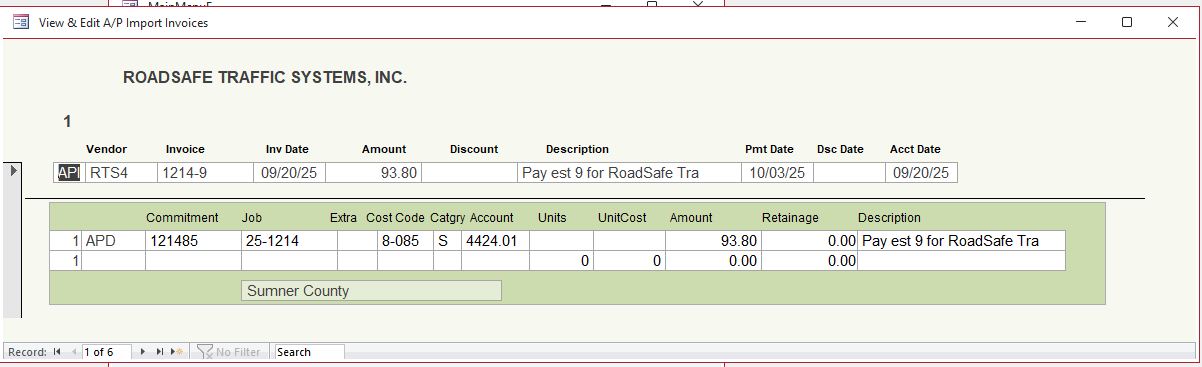
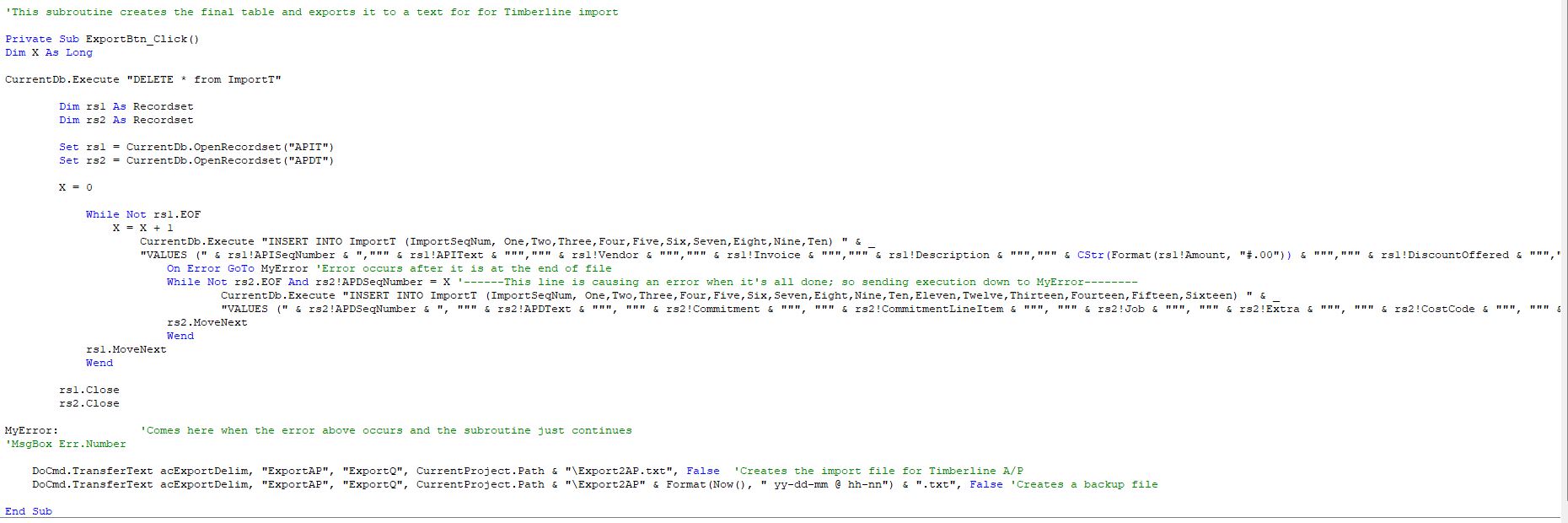
So here is what I ended up doing. And the reason why. This text file is created in Excel (from an invoice-like form) and can have data rows appended to it depending on how many vendors we are paying at one time. I wanted to bring it into Access and into the InvoiceF form so that it could be easily viewed. That's why I had to have an ID and a matching ID in the detail. And after it was viewed, it is all put back into a table that just has text fields and the SQL formats the dates and amounts as text in the format that my accounting program needs. Then that table is exported back out to a text file. I know. I know. I know. It's sort of a run-around. So I can SEE and verify what the data looks like before it's imported into the accounting system. Plus, I may also develop the InvoiceF to ENTER new A/P data to be imported into accounting. Following are 3 pictures.
Gary Becker OP  @Reply  
     
9 months ago

Gary Becker OP  @Reply  
     
9 months ago

Gary Becker OP  @Reply  
     
9 months ago

Richard Rost  @Reply  
           
9 months ago
Looks good. I had put the rs.close commands after your error landing spot. Make sure you close those recordset loops before exiting the sub.

This thread is now CLOSED. If you wish to comment, start a NEW discussion in Access Developer Forum.
 

Next Unseen

 
New Feature: Comment Live View


The following is a paid advertisement
Computer Learning Zone is not responsible for any content shown or offers made by these ads.
 

Learn
 
Access - index
Excel - index
Word - index
Windows - index
PowerPoint - index
Photoshop - index
Visual Basic - index
ASP - index
Seminars
More...
Customers
 
Login
My Account
My Courses
Lost Password
Memberships
Student Databases
Change Email
Info
 
Latest News
New Releases
User Forums
Topic Glossary
Tips & Tricks
Search The Site
Code Vault
Collapse Menus
Help
 
Customer Support
Web Site Tour
FAQs
TechHelp
Consulting Services
About
 
Background
Testimonials
Jobs
Affiliate Program
Richard Rost
Free Lessons
Mailing List
PCResale.NET
Order
 
Video Tutorials
Handbooks
Memberships
Learning Connection
Idiot's Guide to Excel
Volume Discounts
Payment Info
Shipping
Terms of Sale
Contact
 
Contact Info
Support Policy
Mailing Address
Phone Number
Fax Number
Course Survey
Email Richard
[email protected]
Blog RSS Feed    YouTube Channel

LinkedIn
Copyright 2026 by Computer Learning Zone, Amicron, and Richard Rost. All Rights Reserved. Current Time: 6/16/2026 12:28:51 PM. PLT: 1s