Free Lessons
Courses
Seminars
TechHelp
Fast Tips
Templates
Topic Index
Forum
ABCD
 
Home   Courses   TechHelp   Forums   Help   Contact   Merch   Join   Order   Logon  
 
Back to Access Forum    Comments List
Upload Images   @Reply   Bookmark    Link   Email   Next Unseen 
Compile Error
Richard Lanoue 
    
8 months ago
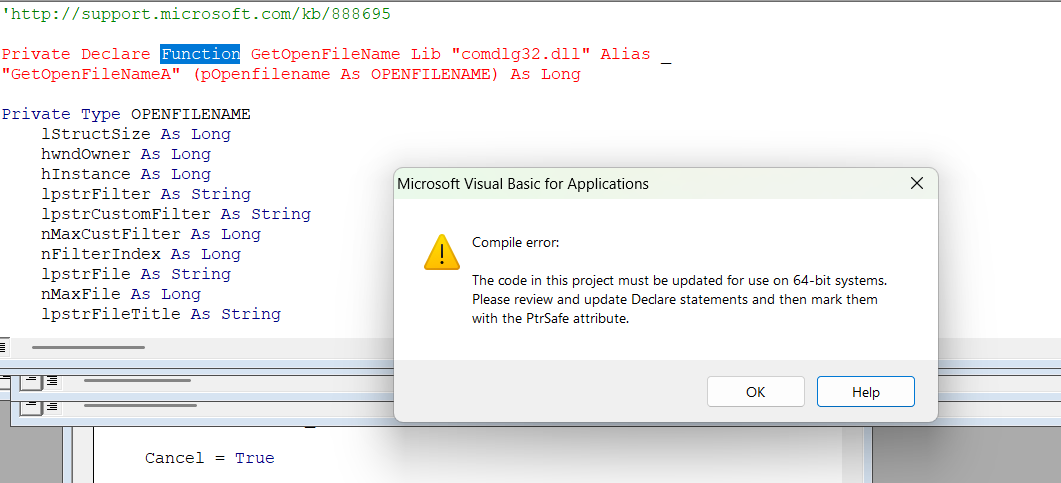
I had to get a new computer and had my Access reinstalled.  On my new computer with the same old program, I'm getting compile error
Richard Lanoue OP  @Reply  
    
8 months ago

Richard Lanoue OP  @Reply  
    
8 months ago
Can anyone help me?  I appreciate it.   I don't know why it's doing this...
Alex Hedley  @Reply  
           
8 months ago
John Davy  @Reply  
         
8 months ago
Hi Richard, take a look at Richard's Video   64-Bit Access in Microsoft Access - Computer Learning Zone
Raymond Spornhauer  @Reply  
          
8 months ago
Change to:

Private Declare PtrSafe Function.......

-Raymond
Jeffrey Kraft  @Reply  
      
8 months ago
Code 32 and you need 64 bit?
Richard Lanoue OP  @Reply  
    
8 months ago

Richard Lanoue OP  @Reply  
    
8 months ago
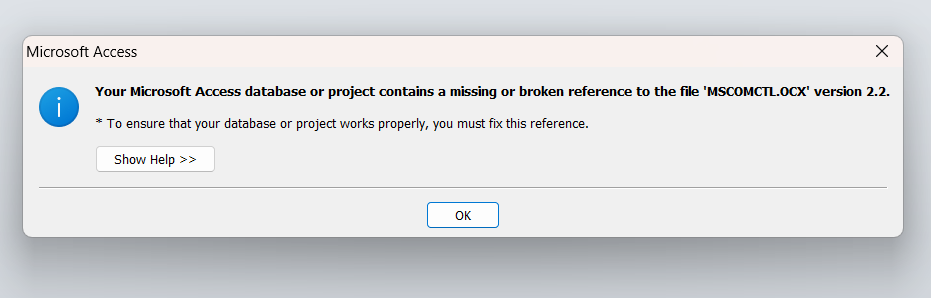
Thanks.  But i also get this error too
Alex Hedley  @Reply  
           
8 months ago
Microsoft Visual Basic 6.0 Common Controls
Update for the Microsoft Visual Basic 6.0 Common Controls: mscomctl.ocx and comctl32.ocx.
https://www.microsoft.com/en-gb/download/details.aspx?id=10019
Alex Hedley  @Reply  
           
8 months ago
Do you know what control you'd added?
Alex Hedley  @Reply  
           
8 months ago
Kevin Yip  @Reply  
     
8 months ago
This file is no longer needed.  Just go to the VBA editor -> Tools -> References, and uncheck the line that says "MISSING: Microsoft Common Control...". Restart Access, and all the errors should go away.
Richard Lanoue OP  @Reply  
    
8 months ago
I want to thank you guys so much for your help.  There is one thing I still am struggling with and that's commondialog module for 64 bit.  I am having trouble locating a script.  I don't have a 32 bit script anymore and i can't find anything to assign pics to
Kevin Yip  @Reply  
     
8 months ago
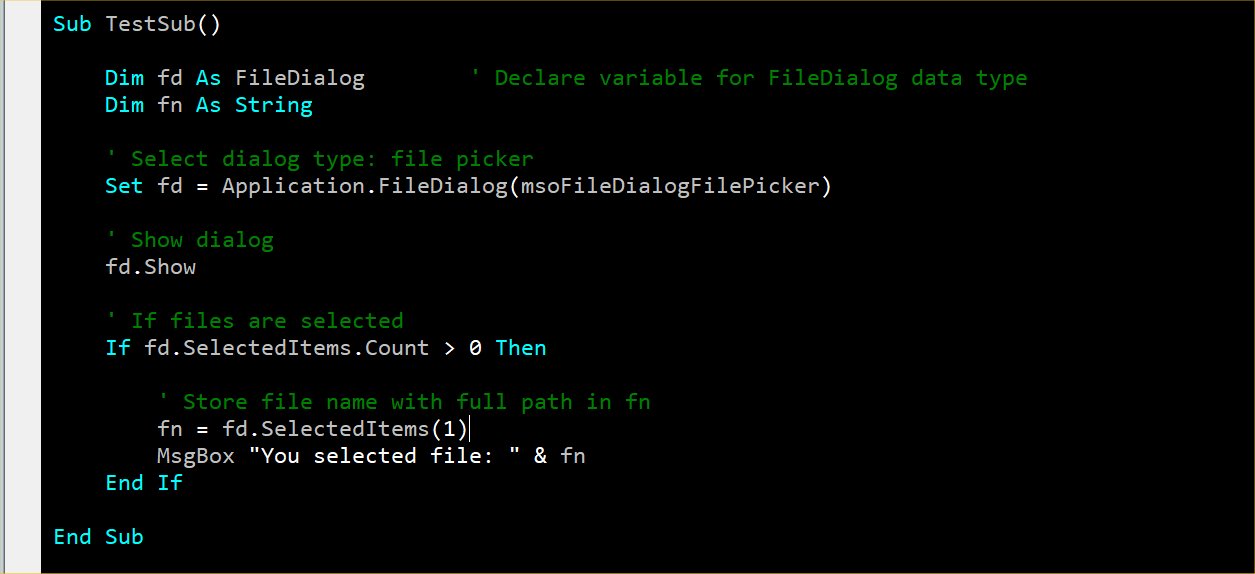
Richard   GetOpenFileName has been replaced with FileDialog, as shown in the sample code below.

In order to use FileDialog, you need to add "Microsoft Office 16.0 Object Library" in the VBA editor -> Tools -> References.

Below only shows how to open the file dialog and pick a single file.  There are lots of other properties to be set: pick multiple files, pick folder(s), pick folder to display, etc.  Richard puts the full info in his developer-level classes (don't know which one) and the code vault.
Kevin Yip  @Reply  
     
8 months ago

Alex Hedley  @Reply  
           
8 months ago
Legacy Tip & Trick: File Dialog
Richard Lanoue OP  @Reply  
    
8 months ago
I copied the code but with the old commonDialog file I'd call upon it as LaunchCD example:

Photo = LaunchCD(Me, "D:\pix\")

How do I call upon this file?
Kevin Yip  @Reply  
     
8 months ago
If "LaunchCD" is a custom function, you need to rewrite it using FileDialog.
Richard Lanoue OP  @Reply  
    
8 months ago
Hi Kevin, That's where I'm lost. How do I do that.  I got the new code From Alex's post:  https://599cd.com/tips/access/150405_filedialog/

But I don't understand it.  When I got the old commondialog code from Richard, it was simply copy and this is how you launch it  so I can manage files specifically jpegs and mp4 files
Alex Hedley  @Reply  
           
8 months ago
What part didn't you understand?
Add a button to your form. I called mine cmdFileDialog
Add the main piece of code from the article into the button's click event.
Press the button and see the FileDialog.
Check the filters to see what's been configured.
Kevin Yip  @Reply  
     
8 months ago
Richard  You need to learn and understand how FileDialog works first and how it differs with common dialog, and learn how it does the things you used to do with common dialog.  Then you can rewrite LaunchCD.

You said you had simply copied Richard's old code?  Before you put someone's code into your database, you need to thoroughly understand how the code works first.  That's what Richard's lessons are for.  Otherwise, you run into a situation like this when you can't fix the code you've been using.
Richard Lanoue OP  @Reply  
    
8 months ago
When I took the image seminar from Richard Rost. He didn't really go over it much other than copy this code at this link, and save it as a module called CommonDialog.  Later in the lesson, he provided a code similar to this "Photo = LaunchCD(Me, "D:\pix\")", which opened a dialog window that went to a specific file on my hard drive, in this example "D:\pix\" . This allowed me to select a file and save that link in a field known as Photo.  I lost that data when I had to get a new computer and the software I have is now 64bit.  This is where I am confused what code do I use? I am looking at the code link Alex posted and i can't figure it out.
Alex Hedley  @Reply  
           
8 months ago
What parts can't you figure out?
Richard Lanoue OP  @Reply  
    
8 months ago
I want to create a button that when pressed opens up a control where I can select a file and it takes that link of where the file is located and place it in a field on the form.

Image Seminar - Common Dialog DLL
https://599cd.com/blog/video-player.asp?FN=/599cd/Videos/AccessSem/ACIMG/12_9256372385.MP4&AUTOPLAY=1&VIDNUM=12&BlogID=1948

The "Photo = LaunchCD(Me, "D:\pix\")" code here does just that.  what happens is MS windoes opens up a dialog box that goes to my hard drive  at D:\pix\ and I can select a jpeg, MP4, doc...etc.  and that link goes to a field on that form labeled Photo.

The old commondialog file Richard posted is gone.  The "https://599cd.com/tips/access/150405_filedialog/" you posted earlier I presumed was a new module upgrade for 64 bit Access.  If so What command do I use on a button (Photo = LaunchCD(Me, "D:\pix\") doesn't work on that File dialog) .  Can you tell me the code I can use to bring up the dialog box and select  a file to Photo?  

This thread is now CLOSED. If you wish to comment, start a NEW discussion in Access Forum.
 

Next Unseen

 
New Feature: Comment Live View


The following is a paid advertisement
Computer Learning Zone is not responsible for any content shown or offers made by these ads.
 

Learn
 
Access - index
Excel - index
Word - index
Windows - index
PowerPoint - index
Photoshop - index
Visual Basic - index
ASP - index
Seminars
More...
Customers
 
Login
My Account
My Courses
Lost Password
Memberships
Student Databases
Change Email
Info
 
Latest News
New Releases
User Forums
Topic Glossary
Tips & Tricks
Search The Site
Code Vault
Collapse Menus
Help
 
Customer Support
Web Site Tour
FAQs
TechHelp
Consulting Services
About
 
Background
Testimonials
Jobs
Affiliate Program
Richard Rost
Free Lessons
Mailing List
PCResale.NET
Order
 
Video Tutorials
Handbooks
Memberships
Learning Connection
Idiot's Guide to Excel
Volume Discounts
Payment Info
Shipping
Terms of Sale
Contact
 
Contact Info
Support Policy
Mailing Address
Phone Number
Fax Number
Course Survey
Email Richard
[email protected]
Blog RSS Feed    YouTube Channel

LinkedIn
Copyright 2026 by Computer Learning Zone, Amicron, and Richard Rost. All Rights Reserved. Current Time: 6/20/2026 9:22:31 PM. PLT: 0s