Free Lessons
Courses
Seminars
TechHelp
Fast Tips
Templates
Topic Index
Forum
ABCD
 
Home   Courses   TechHelp   Forums   Help   Contact   Merch   Join   Order   Logon  
 
Back to Access Forum    Comments List
Upload Images   @Reply   Bookmark    Link   Email   Next Unseen 
Monthly Comparisons by Customer by Year
Brent Davis 
     
8 months ago
I asked this question to ChatGPT and was able to get it to run but I wanted a chart next to the continuous form for the month detail. We were able to get it working but the chart display would not allow the chart to display Months by calendar months order, only numeric. I just want the calendar month order.

In Microsoft access I have a table, Customer List, and a table, Shipper Monthly Totals Table. Customer List fields include AccountID, AccountNumber, Company Name, etc. The Shipper Monthly Totals Table fields include ShipperID, AccountNumber, Revenue, Shipments, etc. They are linked by AccountNumber. I want to have a form that compares this years totals for revenue and shipments to last years totals. So, if I ran it today it would show me totals for 2024 for each month through September in one column for revenue and one column for shipments and compare to the same information through September for 2025 by customer.
Brent Davis OP  @Reply  
     
8 months ago
I want the chart to display the chart for the customer in the cboFindCustomer and  compare the year selected  cboReportYear  to the previous year. So it will change based on the customer selected and the year to compare. Thus all works just not the display of the months
Brent Davis OP  @Reply  
     
8 months ago
On the chart. The months display properly in the subform for the month comparison
Raymond Spornhauer  @Reply  
          
8 months ago
Brent

I would start with these:

Aggregate Query

Chart Showing Monthly Sales

-Raymond
Kevin Yip  @Reply  
     
8 months ago
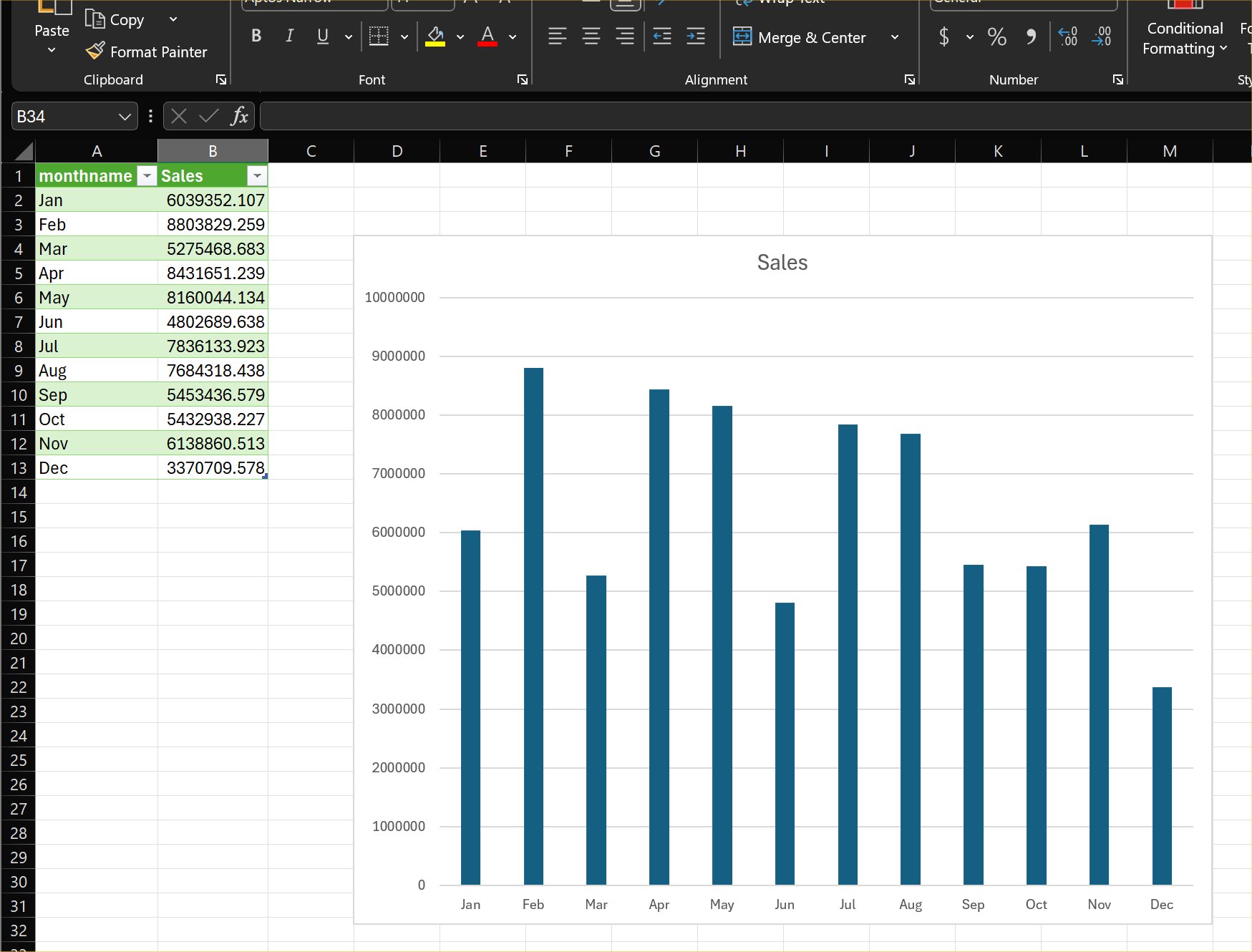
Brent  My advice is export your Access data to Excel and create an Excel chart, which doesn't rearrange your labels and always retain the original data's sort order (picture below).  This process can be done manually or automated with VBA.  In all my years, I've never used Access charts and its modern charts (which also have the same sorting problem).  Your users would probably much rather use Excel to work with charts also.
Kevin Yip  @Reply  
     
8 months ago

Brent Davis OP  @Reply  
     
8 months ago
Thanks for the  information guys!  I have it working and all the data is correct, just those dang months names only show as month nums. I agree Kevin, excel charts are much easier to work with, I was just wanting the chart on the form as a visual. Plus, I like to learn and it looks cool!
Kevin Yip  @Reply  
     
8 months ago
Brent To show months as names instead of numbers, use the Format() function on the date in your query:

     SELECT Format(MyDate, "mmm") AS MyMonth ...

But again, Access will sort the months alphabetically on the chart no matter what: Apr, Aug, Dec, Feb, Jan, etc.  Excel charts will not.
Brent Davis OP  @Reply  
     
8 months ago
I got it to work exactly as I wanted and even learned how to have the labels dynamically change when the data changes(that was the easy part). The months on the bottom of the chart are even correct!! That was an ordeal but the close to end result is cool. Been a long day with this one so I am going to put the finishing touches on it tomorrow.
Stanley Mc Keown  @Reply  
     
8 months ago
I have a slightly different situation -- all the above I'd got to work plus the quarters in the correct way ie next years quarter starts in April this year ( don't ask ) so I ended up with two lovely charts one for quarterly figures and one for monthly figures.
   When I showed the two charts to my boss he wants both on one chart cos that's what the format of industry standard needs to be.
    I thought no problem but oh boy. It seems I can't have two x axis ( one for months and one for quarters ) also you can't Ave or sum one series and have the other with 'none' ie no summing or averaging etc so that option is out. I've looked at a combo chart but it doesn't seem to allow a 'none' and a 'sum'.

  My queries are built for two 'nones' ie no summing, averaging or anything else and work perfectly on the two individual charts but the combo chart only works with a line and a bar not two bars ie I want to show a wide quarter bar with the individual months inside the wide bars in a different colour.

  Is this even possible?

This thread is now CLOSED. If you wish to comment, start a NEW discussion in Access Forum.
 

Next Unseen

 
New Feature: Comment Live View


The following is a paid advertisement
Computer Learning Zone is not responsible for any content shown or offers made by these ads.
 

Learn
 
Access - index
Excel - index
Word - index
Windows - index
PowerPoint - index
Photoshop - index
Visual Basic - index
ASP - index
Seminars
More...
Customers
 
Login
My Account
My Courses
Lost Password
Memberships
Student Databases
Change Email
Info
 
Latest News
New Releases
User Forums
Topic Glossary
Tips & Tricks
Search The Site
Code Vault
Collapse Menus
Help
 
Customer Support
Web Site Tour
FAQs
TechHelp
Consulting Services
About
 
Background
Testimonials
Jobs
Affiliate Program
Richard Rost
Free Lessons
Mailing List
PCResale.NET
Order
 
Video Tutorials
Handbooks
Memberships
Learning Connection
Idiot's Guide to Excel
Volume Discounts
Payment Info
Shipping
Terms of Sale
Contact
 
Contact Info
Support Policy
Mailing Address
Phone Number
Fax Number
Course Survey
Email Richard
[email protected]
Blog RSS Feed    YouTube Channel

LinkedIn
Copyright 2026 by Computer Learning Zone, Amicron, and Richard Rost. All Rights Reserved. Current Time: 6/20/2026 9:21:39 PM. PLT: 0s