Free Lessons
Courses
Seminars
TechHelp
Fast Tips
Templates
Topic Index
Forum
ABCD
 
Home   Courses   TechHelp   Forums   Help   Contact   Merch   Join   Order   Logon  
 
Back to Access Forum    Comments List
Upload Images   @Reply   Bookmark    Link   Email   Next Unseen 
Product List Question
Lee Shastid 
    
8 months ago
Previous POST:
I have a table called Inclusion...there are only 3 options to choose from (Included, Added, Need) this field in my combo box. If I run a query and choose this table to add to the query I get all the results for the Included, and Added but none of the Need data shows up. Am I missing something?


This is now happening in a product list and I have tried all 3 options in the joins and nothing changes. Any ideas?
Donald Blackwell  @Reply  
       
8 months ago
Hi Lee, we would need to see your query in design view in order to see what's amiss.
Lee Shastid OP  @Reply  
    
8 months ago
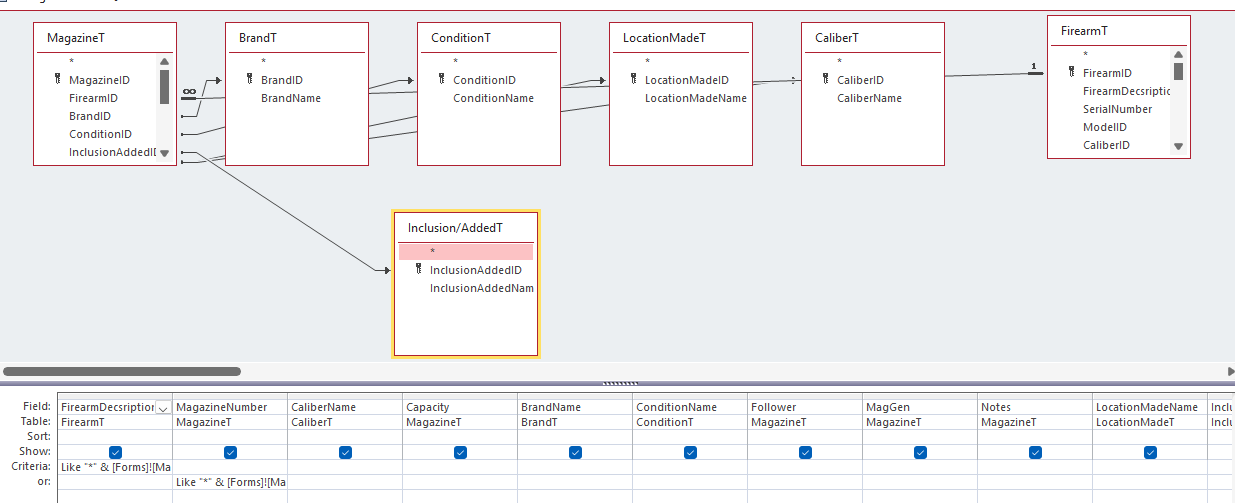
Donald I will attach a screenshot. The query is working fine, its now the product list I have is not showing up.
Lee Shastid OP  @Reply  
    
8 months ago

Donald Blackwell  @Reply  
       
8 months ago
Based on this your query looks good as far as that field. I do see a red flag in the Name of that table "Inclusion/AddedT". The "/" could give you trouble throughout your application. You'll always need to make sure that table is enclosed in square brackets [ ].

Beyond that, verify that none of the criteria in the query is limiting the recordset such that none of the records it finds have "Need" indicated.
Lee Shastid OP  @Reply  
    
8 months ago
The query works fine after I fixed the joins when Richard pointed it out. Not sure why it wont show the needed option on the product list which is continuous form of course.
Kevin Robertson  @Reply  
          
8 months ago
Create a new query with FirearmT, MagazineT & InclusionAddedT (with left joins)
Add each of the other tables one at a time testing after each is added until you find the Table that is breaking your query.
Lee Shastid OP  @Reply  
    
8 months ago
Kevin I shouldn't have put all that in the post I guess. But I fixed the query after Richard pointed out the joins. Query is fine, it is the product list which is a continuous form not showing the need options now.
Donald Blackwell  @Reply  
       
8 months ago
To be clear, the form is not showing any records that have "Need" or a combo box on the form isn't showing the "Need" option?
Lee Shastid OP  @Reply  
    
8 months ago
The "Need" option is not showing up on the form Product List. Only the Included or Added products are showing up.
Kevin Robertson  @Reply  
          
8 months ago
What is the Record Source of the Form?
Is there a Filter turned on?
Lee Shastid OP  @Reply  
    
8 months ago
alright let me see if i can explain what i just discovered. I have a form to enter my magazines. I then created a magazine list form with a continuous form. I normally just enter the firearm that the magazine goes and enter the data for that magazine and it goes into the list fine. But when I just enter the firearm and mag number needed it does not show up. I just discovered that I have to fill in every field in the mag form to make it show in the mag list form. I have never had to do that before. So basically i have to enter data in every field for it to work. Never had to do that before.
Raymond Spornhauer  @Reply  
          
8 months ago
Lee

This might be a government conspiracy!!!!!   =O    (extreme sarcasm)

In line with Kevin's prior comment... usually if I have issues with queries like this, it's because the join properties are not correct.  Double click on each join line and make sure these are setup correctly.

These should say "show all records from MagazineT"

-Raymond
Lee Shastid OP  @Reply  
    
8 months ago
Every join coming from MagazineT is from Magazine T on the join options. There are 5 tables and all are the same. Like I say IT IS NOT  the Query it is working fine. Its the Product list that is the problem.
Lee Shastid OP  @Reply  
    
8 months ago
Alright. Raymond is the winner he solved it..IT IS A CONSPIRACY....I FIXED it. I rebuilt the continuous form from scratch again and it is now working.
Donald Blackwell  @Reply  
       
8 months ago
Lee
Can you give us screenshots of your Product List Form in design view, specifically, the properties window of each tab.

And, if any text is cut off especially in the control source, filter, etc., either copy that content to a post or zoom in (shift-F2) and get a screenshot and if you have any kind of code or macros for the form that effects filters.

Likewise, similar property sheet and code/macro grabs for any filtering combos or buttons as well as fields that display (or are missing) the data your not getting.

I know it seems like a lot, but we'll need to see what you can see to point you in the right direction.

Don
Lee Shastid OP  @Reply  
    
8 months ago
Don
Thank you. I was able to solve it. I recreated the product list form from scratch and got it to work. Thank you everyone that has been trying to help me.

This thread is now CLOSED. If you wish to comment, start a NEW discussion in Access Forum.
 

Next Unseen

 
New Feature: Comment Live View


The following is a paid advertisement
Computer Learning Zone is not responsible for any content shown or offers made by these ads.
 

Learn
 
Access - index
Excel - index
Word - index
Windows - index
PowerPoint - index
Photoshop - index
Visual Basic - index
ASP - index
Seminars
More...
Customers
 
Login
My Account
My Courses
Lost Password
Memberships
Student Databases
Change Email
Info
 
Latest News
New Releases
User Forums
Topic Glossary
Tips & Tricks
Search The Site
Code Vault
Collapse Menus
Help
 
Customer Support
Web Site Tour
FAQs
TechHelp
Consulting Services
About
 
Background
Testimonials
Jobs
Affiliate Program
Richard Rost
Free Lessons
Mailing List
PCResale.NET
Order
 
Video Tutorials
Handbooks
Memberships
Learning Connection
Idiot's Guide to Excel
Volume Discounts
Payment Info
Shipping
Terms of Sale
Contact
 
Contact Info
Support Policy
Mailing Address
Phone Number
Fax Number
Course Survey
Email Richard
[email protected]
Blog RSS Feed    YouTube Channel

LinkedIn
Copyright 2026 by Computer Learning Zone, Amicron, and Richard Rost. All Rights Reserved. Current Time: 6/20/2026 7:54:39 PM. PLT: 1s