Free Lessons
Courses
Seminars
TechHelp
Fast Tips
Templates
Topic Index
Forum
ABCD
 
Home   Courses   TechHelp   Forums   Help   Contact   Merch   Join   Order   Logon  
 
Back to Access Developer Forum    Comments List
Upload Images   @Reply   Bookmark    Link   Email   Next Unseen 
Number of Possible Fields in a Query
John Schreiber 
      
6 months ago
I have need of a query that can have 32 possible fields.  How many fields can one query possibly have?
Donald Blackwell  @Reply  
       
6 months ago
You can have up to 255 fields, although I wouldn't recommend it unless you absolutely need them
Alex Hedley  @Reply  
           
6 months ago
Richard Rost  @Reply  
          
6 months ago
Alex great idea for a video. Thanks. What are the maximum limits and the practical maximum limits.
John Schreiber OP  @Reply  
      
6 months ago
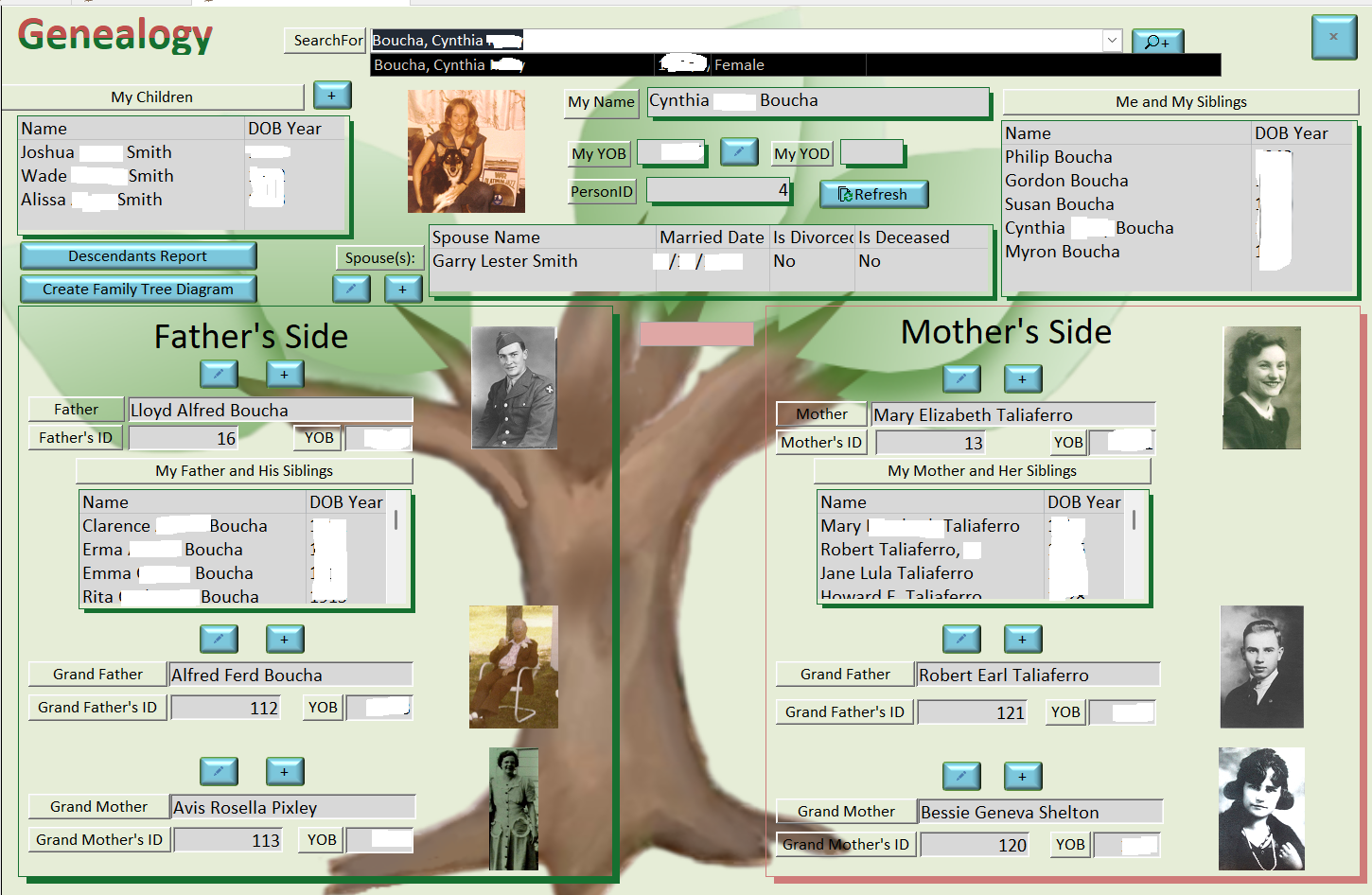
Alex. I looked at the Query specs and did not see how many fields I can add horizontally in a Query. Did I miss something? Don I will be building a pedigree DB for dogs. I will go 4 generations. That will be 31 fields of Dog and parents. But I will need more information also adding a few more fields into the fray. Back several years MS Access would not allow more than 22 fields on the create Query.  Are you sure I can add up to 225? I would never do that high but I just want to know. Richard, how do you work with multiple generations in your genealogy data base?
Donald Blackwell  @Reply  
       
6 months ago
Hi John,

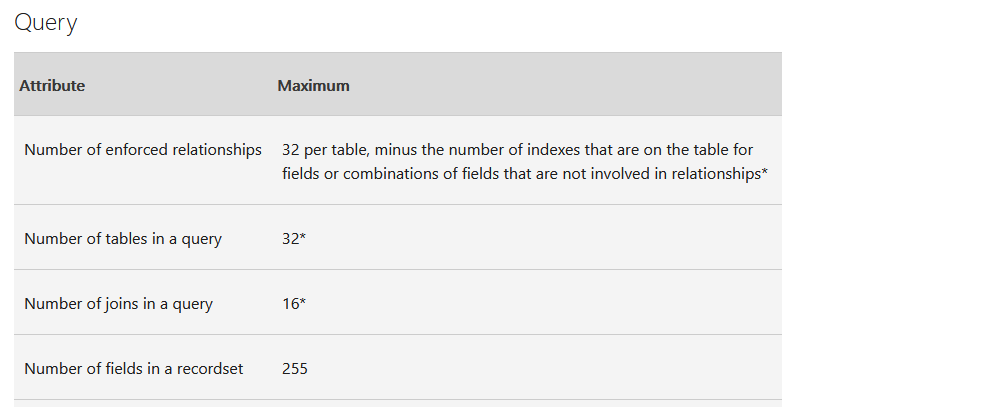
Yeah, I re-verified it and below is a snip of the page that Alex linked that shows the limitation. It refers to them as "fields in a recordset" as that's what a query will generate, a set of records that match the defined criteria.

Not seeing the actual layout of the data, I can't say that having the 255 is a good idea, but I'm not clearly seeing in my head your goal. I would think a small number per-dog and then a foreign key linking to parent etc with each of those having their own fields then they could be listed in subform or subreport. Maybe when you get it done,you'll be able to show us screenshots of what it looks like so we can understand and learn from you too :)
Donald Blackwell  @Reply  
       
6 months ago

Kevin Yip  @Reply  
     
6 months ago
John  It's not necessarily bad to have many fields.  What's bad is when you are unsure of how many fields to have and want an upper limit high enough to accommodate any future scenarios.  Any design where you are unsure of the number of fields is a bad design.  That's what rows are for.  The number of rows can grow as high as it can willy-nilly.  But the number of columns *cannot* grow willy-nilly.  If you are unsure of the amount of info for you dogs, put them in rows instead of columns.  Use one-to-many relationships.
John Schreiber OP  @Reply  
      
6 months ago
Thanks to all for your comments. So here is my quandary. I have a puppy (1). The puppy has a mom and pop (2) the mom and Pop have 2 parents each (4). These parents have 2 parents each (8). Each of these also have 2 parents each (16). So, this makes 33 counting the puppy. This is needed for a 4-generation pedigree. How would you recommend storing these in tables with obvious master and foreign keys. Would you have a tabled for each generation? OR? There is a uniqueness here - a parent can be present in more than one level of the pedigree. Example: a dog (or bitch) can show up in level 2 of the pedigree and maybe again in level 4. This is different than a human pedigree in almost all cases.
Donald Blackwell  @Reply  
       
6 months ago
I would just have one table that holds the information related to any dog - i.e. birth, breed, color, anything specific about a dog.

Then, create a junction table to link each dog to each other dog with a field that indicated, for example dogID, parentID, relationshipID (for example mother, father, etc.)

This is similar to Richard's examples in the Students & Parents series.

Your master table would contain specific information about each dog regardless of parentage. Then the junction table would indicate the dog you are relating, and the Mother and any specific information about that link. And then the junction table would have another entry for dog and the Father, again with any specific information about that link.

Then you could traverse both ways up and down the lineage and even include siblings, etc. if needed.
Alex Hedley  @Reply  
           
6 months ago
Garry Smith  @Reply  
    
6 months ago
Alex is correct. This is all the information that is needed.
Garry Smith  @Reply  
    
6 months ago

John Schreiber OP  @Reply  
      
6 months ago
Thanks again Donald and I will give this a try.  I may also do the seminar at some point in the future. It is a little too pricey right now.

This thread is now CLOSED. If you wish to comment, start a NEW discussion in Access Developer Forum.
 

Next Unseen

 
New Feature: Comment Live View


The following is a paid advertisement
Computer Learning Zone is not responsible for any content shown or offers made by these ads.
 

Learn
 
Access - index
Excel - index
Word - index
Windows - index
PowerPoint - index
Photoshop - index
Visual Basic - index
ASP - index
Seminars
More...
Customers
 
Login
My Account
My Courses
Lost Password
Memberships
Student Databases
Change Email
Info
 
Latest News
New Releases
User Forums
Topic Glossary
Tips & Tricks
Search The Site
Code Vault
Collapse Menus
Help
 
Customer Support
Web Site Tour
FAQs
TechHelp
Consulting Services
About
 
Background
Testimonials
Jobs
Affiliate Program
Richard Rost
Free Lessons
Mailing List
PCResale.NET
Order
 
Video Tutorials
Handbooks
Memberships
Learning Connection
Idiot's Guide to Excel
Volume Discounts
Payment Info
Shipping
Terms of Sale
Contact
 
Contact Info
Support Policy
Mailing Address
Phone Number
Fax Number
Course Survey
Email Richard
[email protected]
Blog RSS Feed    YouTube Channel

LinkedIn
Copyright 2026 by Computer Learning Zone, Amicron, and Richard Rost. All Rights Reserved. Current Time: 4/30/2026 6:53:56 PM. PLT: 1s