Free Lessons
Courses
Seminars
TechHelp
Fast Tips
Templates
Topic Index
Forum
ABCD
 
Home   Courses   TechHelp   Forums   Help   Contact   Merch   Join   Order   Logon  
 
Back to Access Forum    Comments List
Upload Images   @Reply   Bookmark    Link   Email   Next Unseen 
Checkbox to Filter Combobox
Brent Davis 
     
7 months ago
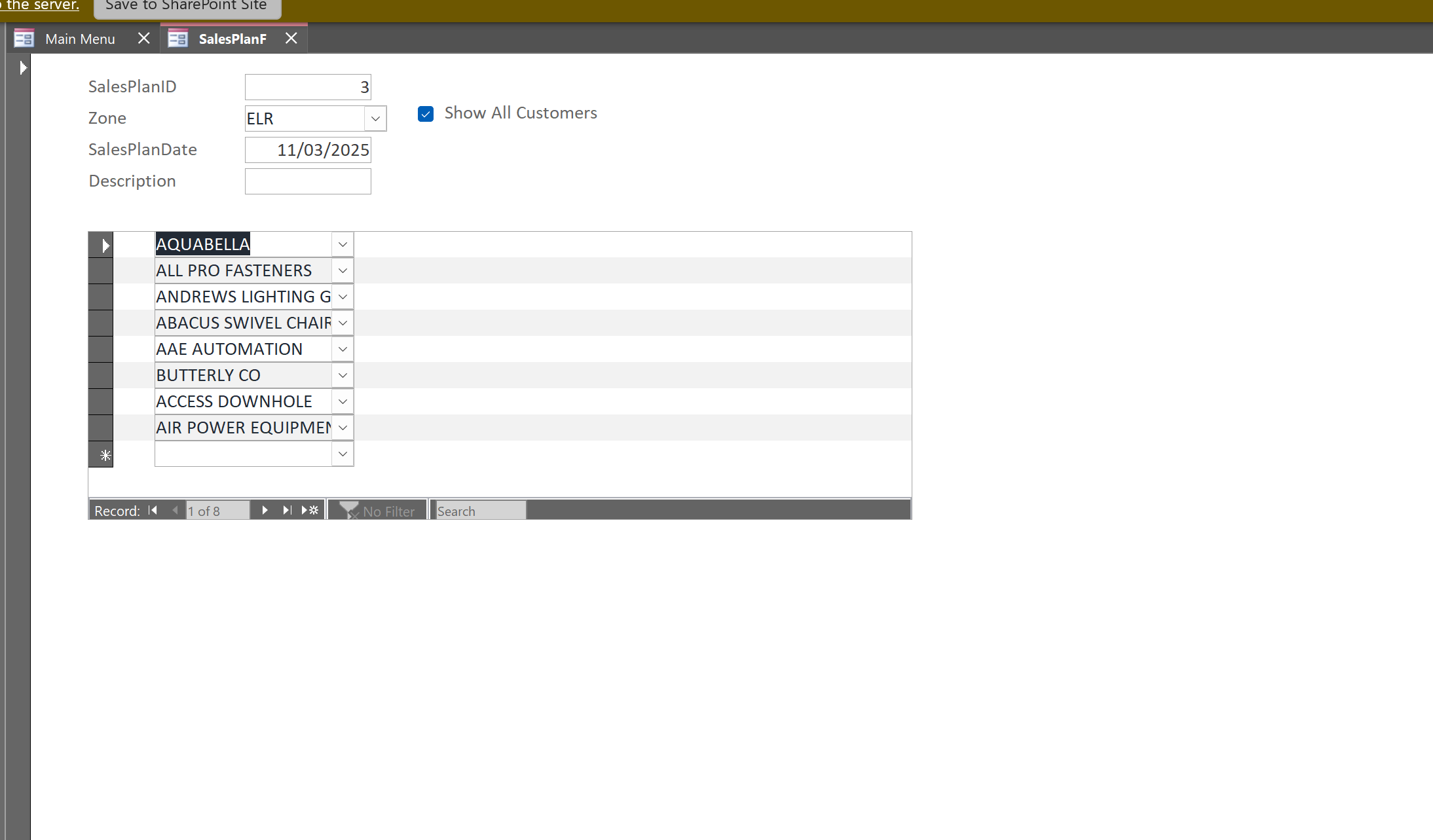
I have a main form with a combo box(ZoneCombo) and a combo box on the subform(CustomerCombo).  I want to have a checkbox on the main form to filter the subform combo(CustomerCombo) by the main form combo(ZoneCombo). When the form opens the value in the checkbox will be false and only show those customers in the selected zone and when checked the value in the checkbox will be true to show all customers in the database. I have that working. My issue, if I check the checkbox and select a customer from outside the shown zone and add them to the subform they are visible. But if I check the checkbox again to only show customers in that zone the out of zone customer record blanks until I check the checkbox again. How can I get the customer out of the zone to stay visible even when the checkbox is false?  Also, the main form is a single form and the subform is a continuos form. Thanks for any assistance.
Juan Rivera  @Reply  
            
7 months ago
Please provide screen shots
Brent Davis OP  @Reply  
     
7 months ago

Brent Davis OP  @Reply  
     
7 months ago

Brent Davis OP  @Reply  
     
7 months ago
The first image is where the checkbox is showing all customers. The second image is when the check box is not checked and only shows the customer from that zone. Below is the code in the subform. And the last piece in the code in the main form.

DetailsOption Compare Database
Option Explicit

Private Sub RefreshCustomerList()
    Dim sql As String
    Dim zID As Long
    Dim accID As Long
    Dim showAll As Boolean

    On Error Resume Next

    zID = Nz(Me.Parent!cboZoneList, 0)
    accID = Nz(Me!cboAccount, 0)
    showAll = Nz(Me.Parent!chkShowAll, False)

    If showAll Then
        'Show all customers
        sql = "SELECT AccountID, [Company Name] FROM [Customer List] ORDER BY [Company Name];"
    Else
        'Show only customers in selected zone + currently selected account
        sql = "SELECT AccountID, [Company Name] FROM [Customer List] " & _
              "WHERE ZoneListID=" & zID & " OR AccountID=" & accID & _
              " ORDER BY [Company Name];"
    End If

    Me.cboAccount.RowSource = sql
    Me.cboAccount.Requery
End Sub

Private Sub Form_Current()
    RefreshCustomerList
End Sub

Private Sub cboAccount_GotFocus()
    RefreshCustomerList
End Sub

Main Form code

Private Sub chkShowAll_AfterUpdate()

    Me.SalesPlanDetailF.Form.cboAccount.Requery
    
End Sub

Brent Davis OP  @Reply  
     
7 months ago
Also, I changed the combo box names per the code
Brent Davis OP  @Reply  
     
6 months ago
The code I used to figure this out!  This method does not require the overlapping text box over the combo box in the subform and ithe combobox in the subform changes very smoothly.

DetailsFunction GetCurrentCustomerIDs() As String

    'MsgBox "Is it running?"
    
    Dim rs As DAO.Recordset
    Dim strIDs As String

    Set rs = Me.SalesPlanDetailF.Form.RecordsetClone
    

    If rs.RecordCount = 0 Then
        GetCurrentCustomerIDs = ""
        rs.Close
        Set rs = Nothing
        Exit Function
    End If

    'rs.MoveLast
    rs.MoveFirst
    
    Do While Not rs.EOF
        If Not IsNull(rs!AccountID) Then
            Debug.Print "AccountID found: " & rs!AccountID ' Debug print each ID
            If strIDs = "" Then
                strIDs = rs!AccountID
            ElseIf InStr("," & strIDs & ",", "," & rs!AccountID & ",") = 0 Then
                strIDs = strIDs & "," & rs!AccountID
            End If
        Else
            Debug.Print "Null AccountID skipped"
        End If
        rs.MoveNext
    Loop

    rs.Close
    Set rs = Nothing
    GetCurrentCustomerIDs = strIDs
End Function
    
' Call this subroutine from your relevant main form control event(s) to update the subform customer combo box.
Sub UpdateSubformCustomerCombo()
Dim strIDs As String
Dim strSQL As String

strIDs = GetCurrentCustomerIDs() ' Get current visible CustomerIDs in subform

' Check the state of the checkbox to determine filtering
If Nz(Me.chkShowAllCustomers.Value, False) = True Then
' Show all customers, ignoring zone filter
strSQL = "SELECT AccountID, [Company Name], AccountNumber FROM [Customer List]"
Else
' Filter customers by selected zone plus those already in subform records
strSQL = "SELECT AccountID, [Company Name], AccountNumber FROM [Customer List] WHERE ZoneListID = " & Me.cboZone.Value

' Include existing customers in subform to avoid blanks
If strIDs <> "" Then
strSQL = strSQL & " OR AccountID IN (" & strIDs & ")"
End If
End If

' Apply row source and refresh combo box on subform
Me.SalesPlanDetailF.Form!CustomerCombo.RowSource = strSQL
Me.SalesPlanDetailF.Form!CustomerCombo.Requery
End Sub

' Example of calling UpdateSubformCustomerCombo when the zone combo box changes
Private Sub cboZone_AfterUpdate()
    UpdateSubformCustomerCombo
End Sub

Private Sub chkShowAllCustomers_AfterUpdate()

    If Me.Dirty Then Me.Dirty = False
    UpdateSubformCustomerCombo
    
End Sub

Private Sub Form_Current()

    UpdateSubformCustomerCombo
    
End Sub

This thread is now CLOSED. If you wish to comment, start a NEW discussion in Access Forum.
 

Next Unseen

 
New Feature: Comment Live View


The following is a paid advertisement
Computer Learning Zone is not responsible for any content shown or offers made by these ads.
 

Learn
 
Access - index
Excel - index
Word - index
Windows - index
PowerPoint - index
Photoshop - index
Visual Basic - index
ASP - index
Seminars
More...
Customers
 
Login
My Account
My Courses
Lost Password
Memberships
Student Databases
Change Email
Info
 
Latest News
New Releases
User Forums
Topic Glossary
Tips & Tricks
Search The Site
Code Vault
Collapse Menus
Help
 
Customer Support
Web Site Tour
FAQs
TechHelp
Consulting Services
About
 
Background
Testimonials
Jobs
Affiliate Program
Richard Rost
Free Lessons
Mailing List
PCResale.NET
Order
 
Video Tutorials
Handbooks
Memberships
Learning Connection
Idiot's Guide to Excel
Volume Discounts
Payment Info
Shipping
Terms of Sale
Contact
 
Contact Info
Support Policy
Mailing Address
Phone Number
Fax Number
Course Survey
Email Richard
[email protected]
Blog RSS Feed    YouTube Channel

LinkedIn
Copyright 2026 by Computer Learning Zone, Amicron, and Richard Rost. All Rights Reserved. Current Time: 5/2/2026 7:28:28 AM. PLT: 1s