Free Lessons
Courses
Seminars
TechHelp
Fast Tips
Templates
Topic Index
Forum
ABCD
 
Home   Courses   TechHelp   Forums   Help   Contact   Merch   Join   Order   Logon  
 
Back to SQL 2 Seminar Lessons    Comments List
Upload Images   @Reply   Bookmark    Link   Email   Next Unseen 
SQL Seminar 2 Lesson 4
Ken Wykoff 
       
6 months ago
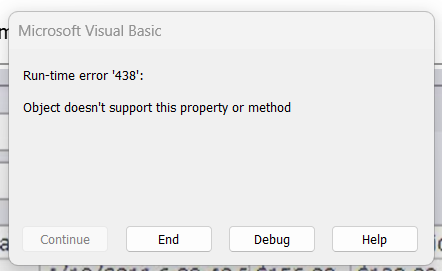
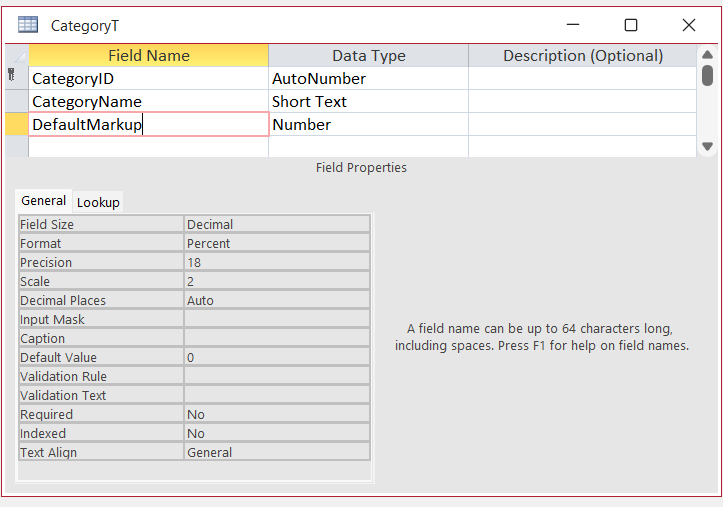
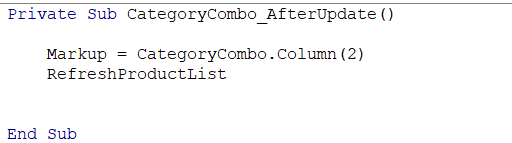
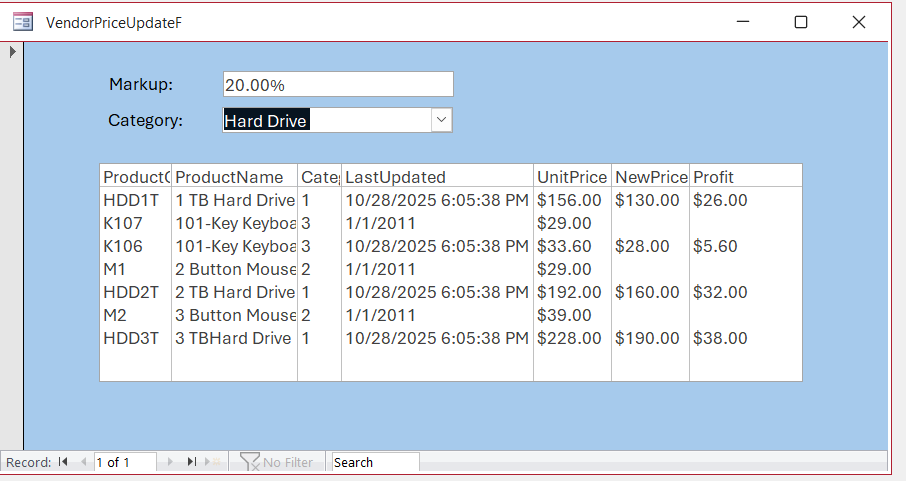
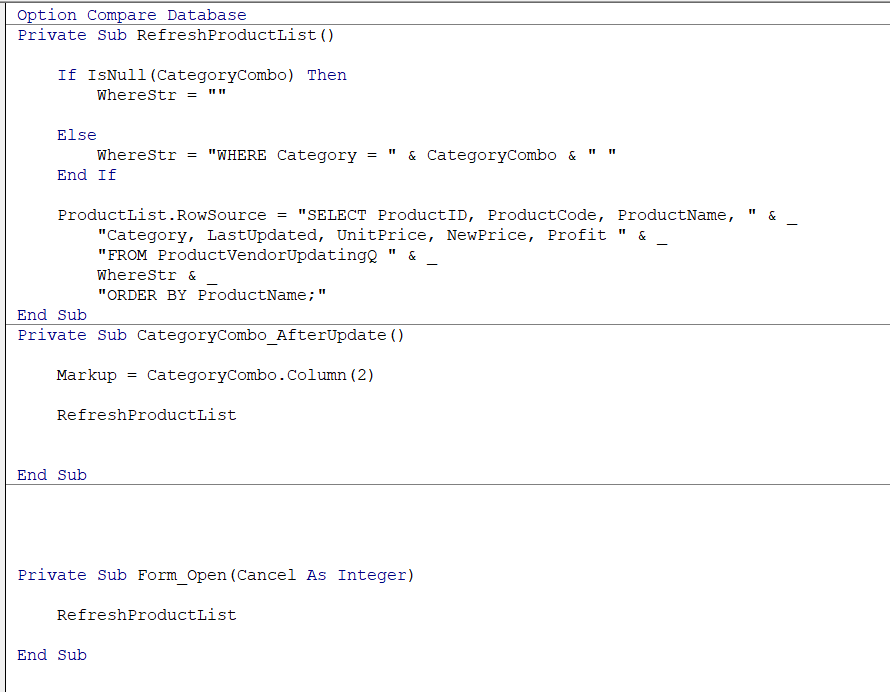
Hi Donald, or anyone who has a minute. If you have a minute to look over this one, I would appreciate it too. I am now on Lesson 4 in SQL Seminar 2, and up until we had to do some VBA coding to make the percent show in the Markup area from the pick of the Category area, it all worked well. This time I double checked spelling, made sure that I wrote to code in the AfterUpdate area correctly, but it now gives me an error message that I have no idea what it means.  I have attached 3 screenshots ot the error code, the category table setting, and the VBA code I wrote from the video. Again, it's probably something small I am missing, and I really need the help again.
Ken Wykoff OP  @Reply  
       
6 months ago

Ken Wykoff OP  @Reply  
       
6 months ago

Ken Wykoff OP  @Reply  
       
6 months ago

Richard Rost  @Reply  
          
6 months ago
Which line is throwing the error. Double-check your spelling of "Markup" on your form.
Kevin Robertson  @Reply  
          
6 months ago
I think the error is likely to be in RefreshProductList.
Ken Wykoff OP  @Reply  
       
6 months ago
Richard Richard it is the Markup = CategoryCombo.Column (2) that highlights in yellow.
Ken Wykoff OP  @Reply  
       
6 months ago

Kevin Robertson  @Reply  
          
6 months ago
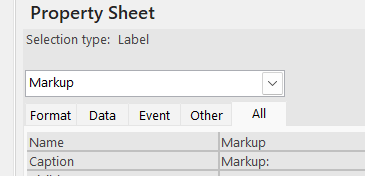
Did you change the Name of the Label to Markup instead of the Text Box?
Ken Wykoff OP  @Reply  
       
6 months ago
Kevin Hi Kevin, Yes, I did that following the video. I checked again and even removed the colon at the end to see if that was causing the trouble between the name and the label. Very puzzling for sure
Ken Wykoff OP  @Reply  
       
6 months ago

Ken Wykoff OP  @Reply  
       
6 months ago
Above is the entire VBA window for this project so far.
Kevin Robertson  @Reply  
          
6 months ago
Name, not Caption.
Donald Blackwell  @Reply  
       
6 months ago
Hi Ken, Kevin is likely right. You might have changed the name of the label to markup instead of the textbox. That would be why "object doesn't support property" since labels don't have value.
Ken Wykoff OP  @Reply  
       
6 months ago
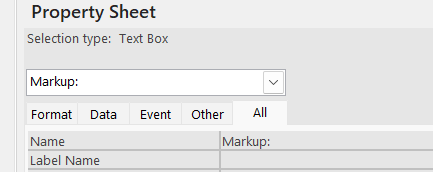
Kevin Kevin, this is what is happening, see the 2 new screenshots. when I set the Markup box to the proper settings, save, close, and open again, the other screenshot is what shows up and I have no idea how to fix that or what causes it.
Ken Wykoff OP  @Reply  
       
6 months ago

Ken Wykoff OP  @Reply  
       
6 months ago

Ken Wykoff OP  @Reply  
       
6 months ago
Donald Hi Donald, I have the label name as Markup: and the text box as Markup. However, as you can see from the two screenshots last, it literally changes itself once I save, close, and reopen.
Kevin Robertson  @Reply  
          
6 months ago
Rename the label to something else, for example lblMarkup.
Then remove the colon from the name of the Text Box.
That should solve your problem.
Ken Wykoff OP  @Reply  
       
6 months ago
Thanks Kevin, Let me try that. This is so strange, have never had this happen before. I'll let you know what happens.
Ken Wykoff OP  @Reply  
       
6 months ago
Kevin Kevin, that worked perfectly! I wonder why it would not work like it did for Richard? I was sure I followed every detail. Again, thanks.
Donald Blackwell  @Reply  
       
6 months ago
If Kevin's last suggestion doesn't work, then you might need to clear system memory - empty your clipboard history, delete the label and control from the form and save it and close it. Maybe even do a Compact & Repair (just in case something is trapped in the system tables). Close Access then restart and try adding it again to see if that works.
Ken Wykoff OP  @Reply  
       
6 months ago
Donald It did work, the only thing is that the Markup window will not refresh back to the 20% unless I close the window completely and bring it back up. Maybe as I venture further down this lesson, there will be something that will show to fix that, too.
Richard Rost  @Reply  
          
6 months ago
You've got a case of the Gremlins. :)
Joe Holland  @Reply  
      
5 months ago
Tip: add "Option Explicit" below "Option Compare Dabatase".

https://599cd.com/blog/display-article.asp?ID=2231
Kevin Robertson  @Reply  
          
5 months ago
Joe Option Explicit wouldn't have helped in this case. Markup was a valid name but was giving to the Label instead of the Text Box. Easy mistake to make. I've done it myself.
Joe Holland  @Reply  
      
5 months ago
Kevin: I agree you solved his problem. My comment was just something I saw that will help his programming in the future.
Ken Wykoff OP  @Reply  
       
5 months ago
Richard  Richard, I wish I had a spray to get rid of them all...lol. It mostly works now. When I press the button, it doesn't show anything in percentages or update pricing, but I will revisit that part another time, I guess. Kind of feel bad bothering everyone all the time when an issue keeps appearing that I can't explain or find an answer to. So onto the next lesson.
Ken Wykoff OP  @Reply  
       
5 months ago
Joe Thanks, Joe, for the info. I will definitely hold onto this information for future issues.
Richard Rost  @Reply  
          
5 months ago
Ken it's absolutely no bother. Ask away.
Ken Wykoff OP  @Reply  
       
5 months ago
Richard Afternoon Richard, I just wanted you and the others to know that after looking at it again, I tried a few experiments to see if it would change with new percentages, and it did. It changes so fast it's hard to notice. I then changed it back to the original percentages, and it changed back too. Thank you all for the help on this lesson.

This thread is now CLOSED. If you wish to comment, start a NEW discussion in SQL 2 Seminar Lessons.
 

Next Unseen

 
New Feature: Comment Live View


The following is a paid advertisement
Computer Learning Zone is not responsible for any content shown or offers made by these ads.
 

Learn
 
Access - index
Excel - index
Word - index
Windows - index
PowerPoint - index
Photoshop - index
Visual Basic - index
ASP - index
Seminars
More...
Customers
 
Login
My Account
My Courses
Lost Password
Memberships
Student Databases
Change Email
Info
 
Latest News
New Releases
User Forums
Topic Glossary
Tips & Tricks
Search The Site
Code Vault
Collapse Menus
Help
 
Customer Support
Web Site Tour
FAQs
TechHelp
Consulting Services
About
 
Background
Testimonials
Jobs
Affiliate Program
Richard Rost
Free Lessons
Mailing List
PCResale.NET
Order
 
Video Tutorials
Handbooks
Memberships
Learning Connection
Idiot's Guide to Excel
Volume Discounts
Payment Info
Shipping
Terms of Sale
Contact
 
Contact Info
Support Policy
Mailing Address
Phone Number
Fax Number
Course Survey
Email Richard
[email protected]
Blog RSS Feed    YouTube Channel

LinkedIn
Copyright 2026 by Computer Learning Zone, Amicron, and Richard Rost. All Rights Reserved. Current Time: 4/12/2026 10:35:00 PM. PLT: 1s