Free Lessons
Courses
Seminars
TechHelp
Fast Tips
Templates
Topic Index
Forum
ABCD
 
Home   Courses   TechHelp   Help   Contact   Merch   Join   Order   Logon   Forums   
 
Back to Access Forum    Comments List
Upload Images   @Reply   Bookmark    Link   Email   Next Unseen 
Continuous Subform with Cascading Combo Boxes And
Kathy Johnson 
      
10 months ago
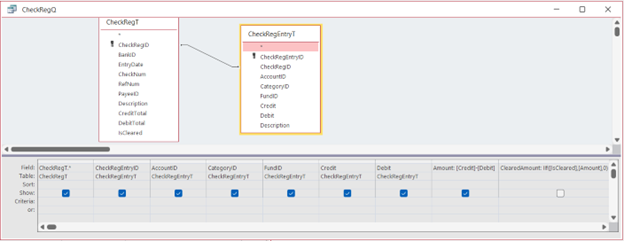
I am trying to create a single form with a continuous form sub-form that has cascading combo boxes. The sub-form also has totals that I would like to have show up in the parent form. I am running into several issues. Pictures loaded below.
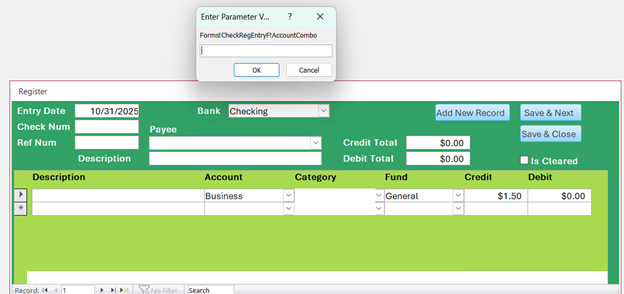
1. I get the Parameter Value Error upon opening the form.
2. When I get to the Account combo box, I get the error again and the Category Combo box won't load.
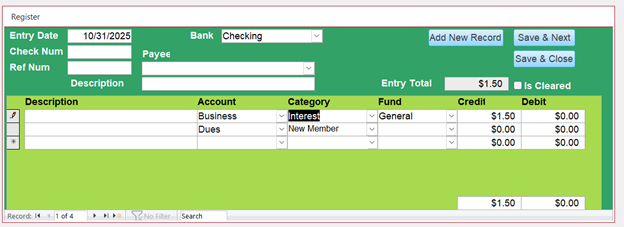
3. I would like to have the totals of my sub-form load into the totals boxes in the main form.

The whole purpose of this is that I may write a check to someone for different items that I need to track or I make a deposit for multiple accounts/categories. Having a total at the top makes it easier for bank reconciliation at the end of the month.
Kathy Johnson OP  @Reply  
      
10 months ago

Kathy Johnson OP  @Reply  
      
10 months ago

Kathy Johnson OP  @Reply  
      
10 months ago

Kathy Johnson OP  @Reply  
      
10 months ago
The cascading combo boxes work just fine in the form CheckRegEntryF when it is opened by itself. It fails when it is loaded as a sub-form.
Adam Schwanz  @Reply  
           
10 months ago
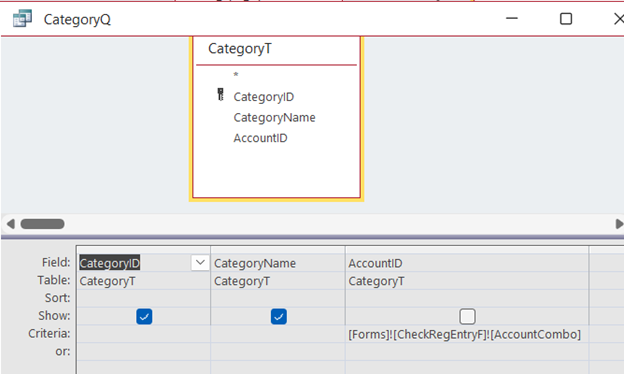
You need to change your criteria to point to the subform.
Value From Subform
Raymond Spornhauer  @Reply  
          
10 months ago
Kathy

When you have comboboxes on subforms, changing the query on the combobox changes it for all comboboxes on all records.

So when you change the query on a combobox, you're probably getting an error because now you have combobox values (in other records)  that do not meet the query criteria of the combobox you're trying to set.

There are a couple solutions for this:

You need to have 2 comboboxes in your subform.  One on top that you can see which has a recordsource of all values.  Then have another combobox behind it that you use to change values for the record you're changing.

When a user goes to change a value in the combobox, it's OnFocus event should set focus to the combobox behind it.  In the AfterUpdate, Set Focus back to the combobox in front.

Run all of your Totals on the displayed comboboxes with all values.

Hope this makes sense.

-Raymond
Raymond Spornhauer  @Reply  
          
10 months ago
Kathy

Another Solution:

Do not make changes to comboboxes in the subforms, put them in the form header or footer.

-Raymond
Kathy Johnson OP  @Reply  
      
10 months ago
Adam Thank you. I was able to get that part to work.
Kathy Johnson OP  @Reply  
      
10 months ago
Raymond I built my cascading combo boxes the way Richard taught in in the Cascading Combo Tech help/Extended cut with the overlaying of a text box. It works just fine until I put it in as a sub-form. I can't put them in the main form because that defeats the purpose of having multiple entries for 1 parent record. A second popup window also defeats the purpose for data entry.  There has got to be a short piece of code that I am missing to make this work. I'm sorry but, your explanation confuses me.
Raymond Spornhauer  @Reply  
          
10 months ago
Kathy

Rick built his on a Single Form.

What I was trying to tell you is that you can't update the recordsource for a combobox in Continuous Form without it affecting the combobox of every record.

-Raymond
Raymond Spornhauer  @Reply  
          
10 months ago
Kathy

Example:

Form Details Section:
====================================
Record     ComboBox(State)     ComboBox(County)
1               Texas                           Foard County
2               Florida                         Marion
3               Ohio                            Brown
4               New York                     Queens
====================================

The ComboBox(County) for Record Source 1 is set by ComboBox(State)

If you Select Florida in ComboBox(State) on Record 2... the ComboBox(County) for every record gets changes.
-This makes the combobox value in Record 1, 3 and 4 all invalid values.  

This is why you're getting the error, which I tried to explain in my first post.

You have to implement the solution I gave you for it to work.

-Raymond
Kathy Johnson OP  @Reply  
      
10 months ago
Raymond Unfortunately, I am a visual learner. I need more specific information than what is being provided. What you are explaining with the State/County combos is not what is happening on my form. When my form first loads (before I even have a chance to enter any data) the enter parameter value box pops up. If I enter a value, say 1 for Business, the Account box fills just fine and the Category box loads. When I move to the next line to add a new record in the sub-form, the Account box has all my options but when I select one, the enter Parameters box pops again. If put a value i it, say 3 for Dues, the Category Box loads the correct information and does not bother the record above it.
Kathy Johnson OP  @Reply  
      
10 months ago

Kevin Yip  @Reply  
     
10 months ago
Kathy When cascading combo boxes are used in a subform, your form reference needs to refer to the parent form as well.  E.g.:

      [Forms]![ParentFormNameHere]![CheckRegEntryF].[Form]![AccountCombo]

If you want to make CheckRegEntryF work as a stand-alone form again, you need to change the form reference back to:

      [Forms]![CheckRegEntryF]![AccountCombo]

If you want to do the switch automatically (instead of manually switching every time), you need some VBA trickery.  You need to use VBA to check if CheckRegEntryF has a parent form.  If it does, it is a subform.  A subform's parent form is referred to as Parent in VBA.  E.g.:

      Debug.Print Parent.Name     ' This prints the name of the parent form.

If it doesn't have a parent form, the above code returns an error.  So you need to use On Error to check if Parent exists or not without causing an error:

Sub MySub()
     On Error Goto NoParent
     Debug.Print Parent.Name
     On Error Goto 0
     ...
     Exit Sub
NoParent:
     ' If this line is run, parent doesn't exist - stand-alone form
     ...
End Sub

Kathy Johnson OP  @Reply  
      
10 months ago
Kevin Thank you! I knew it had to be something simple. I have made that change and it works great. There should never be a time when the CheckRegEntryF is used by itself but I appreciate the heads up about needing to change it and how I would do that. You guys are all awesome to take your time to help. I truly appreciate it.
Kevin Yip  @Reply  
     
10 months ago
Kathy  The problem Raymond mentioned affects subform combo boxes with hidden bound columns, which seems to apply to you from your screenshots.  This is something to watch out for as well.  (In my old job, I just avoided this kind of combos in my subforms.)

This thread is now CLOSED. If you wish to comment, start a NEW discussion in Access Forum.
 

Next Unseen


What's This?


The following is a paid advertisement
Computer Learning Zone is not responsible for any content shown or offers made by these ads.
 

Learn
 
Access - index
Excel - index
Word - index
Windows - index
PowerPoint - index
Photoshop - index
Visual Basic - index
ASP - index
Seminars
More...
Customers
 
Login
My Account
My Courses
Lost Password
Memberships
Student Databases
Change Email
Info
 
Latest News
New Releases
User Forums
Topic Glossary
Tips & Tricks
Search The Site
Code Vault
Collapse Menus
Help
 
Customer Support
Web Site Tour
FAQs
TechHelp
Consulting Services
About
 
Background
Testimonials
Jobs
Affiliate Program
Richard Rost
Free Lessons
Mailing List
PCResale.NET
Order
 
Video Tutorials
Handbooks
Memberships
Learning Connection
Idiot's Guide to Excel
Volume Discounts
Payment Info
Shipping
Terms of Sale
Contact
 
Contact Info
Support Policy
Mailing Address
Phone Number
Fax Number
Course Survey
Email Richard
[email protected]
Blog RSS Feed    YouTube Channel

LinkedIn
Copyright 2026 by Computer Learning Zone, Amicron, and Richard Rost. All Rights Reserved. Current Time: 9/15/2026 11:25:53 AM. PLT: 0s