Free Lessons
Courses
Seminars
TechHelp
Fast Tips
Templates
Topic Index
Forum
ABCD
 
Home   Courses   TechHelp   Forums   Help   Contact   Merch   Join   Order   Logon  
 
Back to Access Forum    Comments List
Upload Images   @Reply   Bookmark    Link   Email   Next Unseen 
Charge Price of Multiple Items or Services
James Hopkins 
     
7 months ago
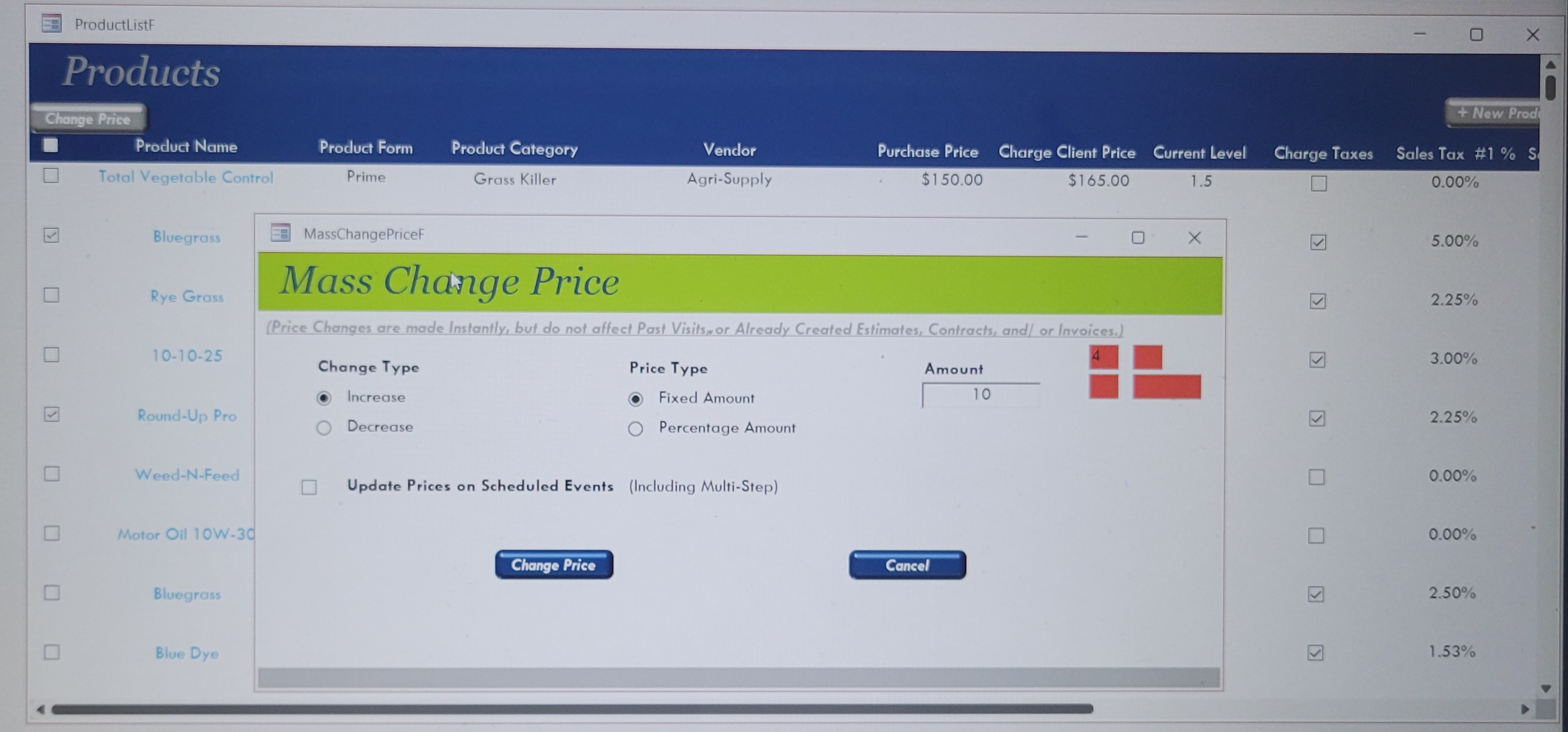
Hey Richard and the Guys, I need to adjust pricing across the multiple Items or Services at once. I am trying to use the Modular Form that created. The Form allow will me to make Bulk Price updates. I am wanting to select if to Increase or Decrease Prices, then select if wanting by a Fixed Dollar Amount or a Percentage of the selected Items or Services on the Continuous Form. What is best way to achieve this correct? I have figured out the Calculations but haven’t came up with the Update of the Original Prices to New Price in the Table.
Richard Rost  @Reply  
          
7 months ago
There's a lot of information there. Can you break it down a little more, and perhaps some screen shots / examples of what you're trying to do?
James Hopkins OP  @Reply  
     
7 months ago
Richard, I have create a Function to Update the Items and Services, but I

Here's the Code:

Dim NewPrice As Long, SelChkPro As Long, SelChkSer As Long
    
    If Not IsNull(ProductID) Then
    
        SelChkPro = Forms!ProductListF!LnSelect

        If OptIncreasePrice = True Then
            If OptFixedAmount Then
                NewPrice = UnitPriceToClientCharge + ChangeAmount
            ElseIf OptPercentageAmount Then
                NewPrice = UnitPriceToClientCharge - ChangeAmount
            End If
        ElseIf OptDecreasePrice = True Then
            If OptFixedAmount Then
                NewPrice = (UnitPriceToClientCharge + ChangeAmount) + UnitPriceToClientCharge
            ElseIf OptPercentageAmount Then
                NewPrice = (UnitPriceToClientCharge - ChangeAmount) - UnitPriceToClientCharge
            End If
        End If

        CurrentDb.Execute "UPDATE ProductT SET UnitPriceToClientCharge = NewPrice WHERE SelChkPro=" & True, dbFailOnError
        
        Forms!ProductListF.Form.Requery
Richard Rost  @Reply  
          
7 months ago
James,

I do not quite understand what you are trying to do from your description, so I fed your question and code into ChatGPT to see if it could help straighten it out. Here is the summary it came back with, which matches what I think you are after.

GPT:
You have a continuous form that lists your products or services. You want to tick a checkbox on the rows you want to change, then choose whether to increase or decrease the price, choose whether that change is a fixed dollar amount or a percentage, type in the amount, and then apply that update to all of the selected rows. That is really all this needs to do.

Your current code is doing that in a very roundabout way. For where you are right now (Expert level, not Developer yet), the simplest approach is just to loop through the records on the form and update each selected one. Here is the cleaned up version ChatGPT suggested:

CodePrivate Sub CmdUpdatePrices_Click()

Dim Rs As DAO.Recordset, NewPrice As Currency, ChangeAmount As Currency, Pct As Double, IsIncrease As Boolean, IsFixed As Boolean

ChangeAmount = Nz(Me.ChangeAmount, 0)
IsIncrease = Me.OptIncreasePrice
IsFixed = Me.OptFixedAmount

Set Rs = Me.RecordsetClone

If Rs.RecordCount = 0 Then
    Rs.Close
    Set Rs = Nothing
    Exit Sub
End If

Rs.MoveFirst

While Not Rs.EOF

    If Nz(Rs!LnSelect, False) = True Then

        NewPrice = Nz(Rs!UnitPriceToClientCharge, 0)

        If IsFixed Then
            'Fixed dollar amount
            If IsIncrease Then
                NewPrice = NewPrice + ChangeAmount
            Else
                NewPrice = NewPrice - ChangeAmount
            End If
        Else
            'Percentage amount, where 10 means 10 percent
            Pct = ChangeAmount / 100
            If IsIncrease Then
                NewPrice = NewPrice * (1 + Pct)
            Else
                NewPrice = NewPrice * (1 - Pct)
            End If
        End If

        Rs.Edit
        Rs!UnitPriceToClientCharge = NewPrice
        Rs.Update

    End If

    Rs.MoveNext

Wend

Rs.Close
Set Rs = Nothing

Me.Requery

End Sub


That walks the records on the form, finds each row where LnSelect is checked, calculates the new price based on your option buttons and the ChangeAmount, writes it back to UnitPriceToClientCharge in the table, and then requeries the form so you see the updated numbers.

James Hopkins OP  @Reply  
     
7 months ago
Thank Richard, I check this out and see what I can come up with. Also, Happy Thanksgiving.
Richard Rost  @Reply  
          
7 months ago
Same to you.
James Hopkins OP  @Reply  
     
7 months ago

James Hopkins OP  @Reply  
     
7 months ago
Hey, I am using two different Forms to achieve this. I may have to change the RecordsetClone to a Lookup setup.
James Hopkins OP  @Reply  
     
7 months ago
Here's the charge I did, but I keep get all the Price Charges not the ones select on the Continuous Form.

DetailsPrivate Sub BtnSaveChangePrice_Click()
    
    Dim Rs As DAO.Recordset, db As DAO.Database, NewPrice As Currency, ChangeAmount As Currency, LnSelect As Variant
    
    ChangeAmount = Nz(Me.ChangeAmount, 0)
    
    ' Open the Database
    Set db = CurrentDb
    Set Rs = db.OpenRecordset("ProductT")
    
    NewPrice = Nz(UnitPriceToClientCharge, 0)
    LnSelect = DLookup("LnSelect", "ProductT")
    
    While Not Rs.EOF
        If Nz(LnSelect, False) = True Then
            If FrameChangeType = 1 Then
                If FramePriceType = 1 Then
                    NewPrice = NewPrice + ChangeAmount
                ElseIf FramePriceType = 2 Then
                    NewPrice = NewPrice - ChangeAmount
                End If
            ElseIf FrameChangeType = 2 Then
                If FramePriceType = 1 Then
                    NewPrice = (NewPrice * ChangeAmount) + NewPrice
                ElseIf FramePriceType = 2 Then
                    NewPrice = (NewPrice * ChangeAmount) - NewPrice
                End If
            End If
      
            Rs.Edit
            Rs!UnitPriceToClientCharge = NewPrice
            Rs!LnSelect = False
            Rs.Update
        End If
    
        Rs.MoveNext
    Wend
    
    Rs.Close
    Set Rs = Nothing
    
    DoCmd.Close acForm, Me.Name, acSaveYes
    Forms!ProductListF.Recordset.Requery
        
End Sub
Donald Blackwell  @Reply  
        
7 months ago
James is your checkbox bound to a field in the table or is it unbound?
James Hopkins OP  @Reply  
     
7 months ago
Donald, yes the LnSelect the named check box field the Table.
Donald Blackwell  @Reply  
        
7 months ago
James dolt, sorry, I should have looked closer at your code.

In your code, you have a DLookup to set the value of LNSelect. However, it's not inside your recordset loop so it's only pulling that value once then applying it to every record unlike the version Richard gave you that checked the value for each row of the form. You're only checking what's in the table.

Since you're using a different form, instead of "Me", give the name of the form. Then, make sure your getting your values from inside the loop:

DetailsPrivate Sub BtnSaveChangePrice_Click()
    
    Dim Rs As DAO.Recordset, NewPrice As Currency, ChangeAmount As Currency

   ChangeAmount = Nz(Me.ChangeAmount, 0)
  
    ' Clone the Recordset
    Set rs = Forms!ProductListF.RecordsetClone

    If Rs.RecordCount = 0 Then
        Rs.Close
        Set Rs = Nothing
        Exit Sub
    End If
    
    rs.MoveFirst
    While not rs.eof
    
        If Nz(Rs!LnSelect, False) = True Then

            NewPrice = Nz(Rs!UnitPriceToClientCharge, 0)
                If FramePriceType = 1 Then
                    NewPrice = NewPrice + ChangeAmount
                ElseIf FramePriceType = 2 Then
                    NewPrice = NewPrice - ChangeAmount
                End If
            ElseIf FrameChangeType = 2 Then
                If FramePriceType = 1 Then
                    NewPrice = (NewPrice * ChangeAmount) + NewPrice
                ElseIf FramePriceType = 2 Then
                    NewPrice = (NewPrice * ChangeAmount) - NewPrice
                End If
            End If
      
            Rs.Edit
            Rs!UnitPriceToClientCharge = NewPrice
            Rs!LnSelect = False
            Rs.Update
        End If
    
        Rs.MoveNext
    Wend
    
    Rs.Close
    Set Rs = Nothing
    
    DoCmd.Close acForm, Me.Name, acSaveYes
    Forms!ProductListF.Recordset.Requery
        
End Sub

James Hopkins OP  @Reply  
     
7 months ago
Hey, thank you Donald for your help. I finally got it working correct. Your code charge was Perfect.
Donald Blackwell  @Reply  
        
7 months ago
Happy to help!

This thread is now CLOSED. If you wish to comment, start a NEW discussion in Access Forum.
 

Next Unseen

 
New Feature: Comment Live View


The following is a paid advertisement
Computer Learning Zone is not responsible for any content shown or offers made by these ads.
 

Learn
 
Access - index
Excel - index
Word - index
Windows - index
PowerPoint - index
Photoshop - index
Visual Basic - index
ASP - index
Seminars
More...
Customers
 
Login
My Account
My Courses
Lost Password
Memberships
Student Databases
Change Email
Info
 
Latest News
New Releases
User Forums
Topic Glossary
Tips & Tricks
Search The Site
Code Vault
Collapse Menus
Help
 
Customer Support
Web Site Tour
FAQs
TechHelp
Consulting Services
About
 
Background
Testimonials
Jobs
Affiliate Program
Richard Rost
Free Lessons
Mailing List
PCResale.NET
Order
 
Video Tutorials
Handbooks
Memberships
Learning Connection
Idiot's Guide to Excel
Volume Discounts
Payment Info
Shipping
Terms of Sale
Contact
 
Contact Info
Support Policy
Mailing Address
Phone Number
Fax Number
Course Survey
Email Richard
[email protected]
Blog RSS Feed    YouTube Channel

LinkedIn
Copyright 2026 by Computer Learning Zone, Amicron, and Richard Rost. All Rights Reserved. Current Time: 6/20/2026 2:55:41 PM. PLT: 1s