Free Lessons
Courses
Seminars
TechHelp
Fast Tips
Templates
Topic Index
Forum
ABCD
 
Home   Courses   TechHelp   Forums   Help   Contact   Merch   Join   Order   Logon  
 
Back to Access Developer Forum    Comments List
Upload Images   @Reply   Bookmark    Link   Email   Next Unseen 
Timer Events, Sendkeys, Passwords
Gary Becker 
     
4 months ago
I'm trying to automate a file import. When the database opens, with a form Onopen event, there would be a message box asking if I want to Import with a timer event and if there is no user intervention, (i.e. clicking NO and exiting the sub) then it continues to run code that begins an import script connecting to a different database with ODBC. Which will generate a Windows Login & password message box that I'd like to be able to populate (after a brief delay) with SendKeys. Anyone have some direction for me or if this is even possible?
Alex Hedley  @Reply  
           
4 months ago
SendKeys is very temperamental, I'd advise looking for another way if possible.

Has the ODBC connection intentionally not had the credentials saved with it?
Richard Rost  @Reply  
          
4 months ago
Short answer, this usually will not work, and Windows is intentionally blocking it.

SendKeys can sometimes work for application windows you own, like Access forms or even a browser page you launched yourself, but once you hit a Windows security dialog such as an ODBC login, Windows credentials, or UAC prompt, that is a protected desktop. Access cannot see it, cannot reliably focus it, and SendKeys is specifically prevented from interacting with it for security reasons. That is why SendKeys feels temperamental here, it is not just flaky, it is being shut down on purpose. If the ODBC connection is prompting for credentials, the correct fix is almost always to handle authentication properly by saving credentials in the DSN if allowed, using Windows authentication, using a DSN-less connection string with credentials supplied in code, or running the import under a Windows account that already has permission to the target database. Trying to wait a few seconds and fire SendKeys at a Windows login box usually ends in frustration, especially after Windows updates. Alex's advice is spot on here. If you can share what database you are connecting to and how the ODBC connection is set up, there is almost always a cleaner solution that avoids SendKeys entirely.
Gary Becker OP  @Reply  
     
4 months ago
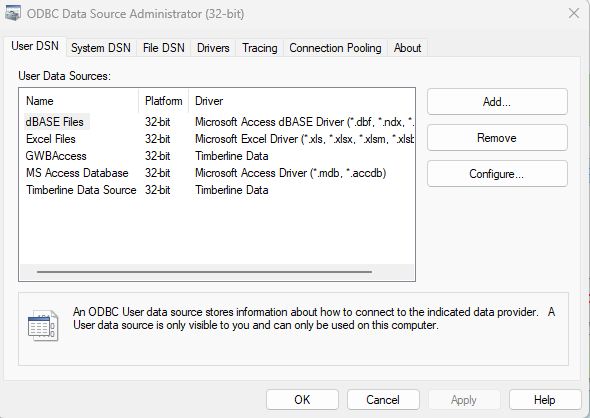
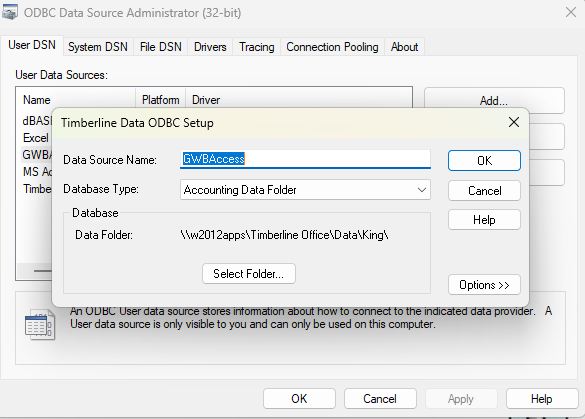
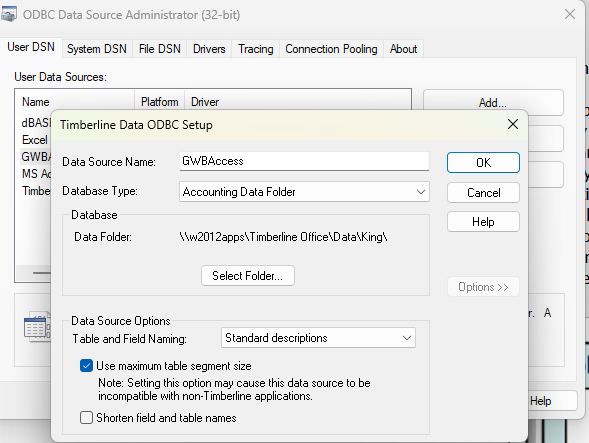
Sage 300 Construction and Real Estate or CRE 300 (formerly known as Timberline). The database it uses is Actian Zen (formerly Pervasive PSQL).  I don't know how to save the database credentials in Access. I have saved them in Excel. I'm attaching some pictures of the ODBC setup.
Gary Becker OP  @Reply  
     
4 months ago

Gary Becker OP  @Reply  
     
4 months ago

Gary Becker OP  @Reply  
     
4 months ago

Gary Becker OP  @Reply  
     
4 months ago
I saw my question in Quick Queries today! A friend who knows the software that we use gave me this work around. I made a separate LINKED.accdb and LINKED the tables. The ODBC driver does allow the password credentials to be SAVED when the tables are LINKED. Then I created MakeTableQueries to create the tables in the main BackEnd.accdb from the linked tables. I have code that runs when the database loads, the tables are created, and the database closes. If it all works, the Linked.accdb is supposed to load and run early every day with the Task Scheduler.
Richard Rost  @Reply  
          
4 months ago
That's a very elegant solution. Just again be aware that your password is saved in that linked table. That's one of the problems I have with Access: they didn't encrypt that at all.

I remember doing something similar to this way back when - were going back probably about 10-15 years now. I set up a solution for a client of mine that had this issue. They had to connect some front-office users to their SQL server, but they didn't want everybody having directly linked tables, so I set up a backend Access table that linked to the server. The other people linked to that database. It was a weird setup that I had going, but it worked. Basically, they had a middle computer that copied data between the two, and that's the only one that had the passwords.

This thread is now CLOSED. If you wish to comment, start a NEW discussion in Access Developer Forum.
 

Next Unseen

 
New Feature: Comment Live View


The following is a paid advertisement
Computer Learning Zone is not responsible for any content shown or offers made by these ads.
 

Learn
 
Access - index
Excel - index
Word - index
Windows - index
PowerPoint - index
Photoshop - index
Visual Basic - index
ASP - index
Seminars
More...
Customers
 
Login
My Account
My Courses
Lost Password
Memberships
Student Databases
Change Email
Info
 
Latest News
New Releases
User Forums
Topic Glossary
Tips & Tricks
Search The Site
Code Vault
Collapse Menus
Help
 
Customer Support
Web Site Tour
FAQs
TechHelp
Consulting Services
About
 
Background
Testimonials
Jobs
Affiliate Program
Richard Rost
Free Lessons
Mailing List
PCResale.NET
Order
 
Video Tutorials
Handbooks
Memberships
Learning Connection
Idiot's Guide to Excel
Volume Discounts
Payment Info
Shipping
Terms of Sale
Contact
 
Contact Info
Support Policy
Mailing Address
Phone Number
Fax Number
Course Survey
Email Richard
[email protected]
Blog RSS Feed    YouTube Channel

LinkedIn
Copyright 2026 by Computer Learning Zone, Amicron, and Richard Rost. All Rights Reserved. Current Time: 5/6/2026 8:04:44 PM. PLT: 1s