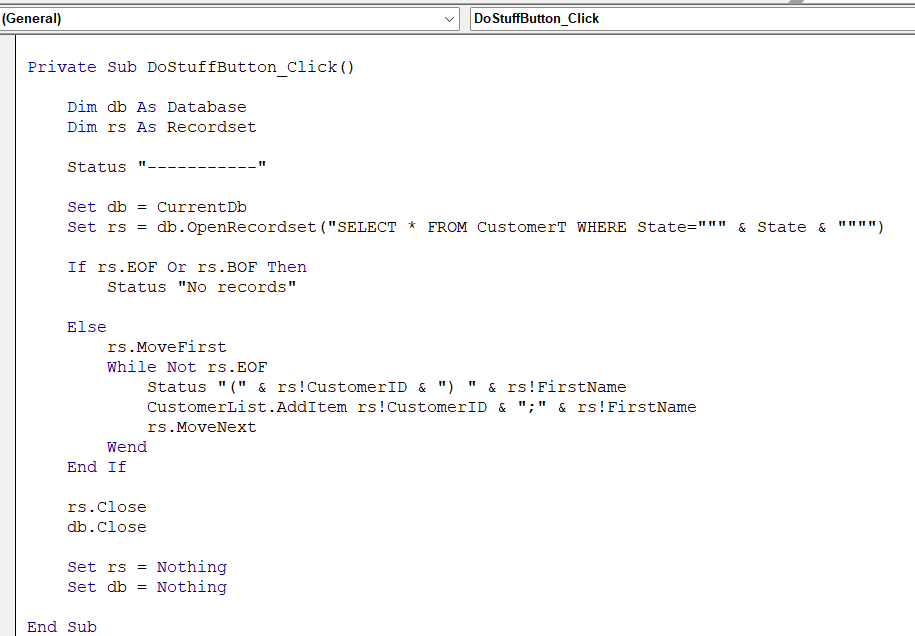
After changing to a combo box for the Add Record and making code adjustments to the DoStuffBtn, that button no longer enters items into it. Not sure why. I checked the coding against the code in the lesson database we have from the class, and it looks the same. Since the buttons on the lesson do not all list names, it is difficult to find where new codes are assigned to mine, with names corresponding to the buttons. Attached is the code from my database. Also, the handbook that came with the lesson is this an updated version? I just noticed that someone wrote about missing items and wanted to be sure I have an updated version.
Ken WykoffOP
@Reply 8 months ago
Kevin Robertson
@Reply 8 months ago
Which button isn't working? Do Stuff or Add Record?
Ken WykoffOP
@Reply 8 months ago
Do Stuff
Kevin Robertson
@Reply 8 months ago
Does the button do anything when it is clicked?
Ken WykoffOP
@Reply 8 months ago
nothing at all. It worked fine till the combo box was made and the code placed into the dostuffbtn.
Kevin Robertson
@Reply 8 months ago
Perhaps the code has detached from the button. Open the Property Sheet for the button. Click on the Events tab. In the Click event it should say [Event Procedure]. Have you renamed the button at all since entering the code?
Ken WykoffOP
@Reply 8 months ago
Kevin, I just checked, and I apparently placed the wrong name on the button property. I am so used to using btn, cbo, etc for names, I forgot this time I was doing it like Robert has been in some videos as a button. Now that I corrected that, it is working again. I still have to check the databases from the downloads of databases because lately, instead of naming everything, it has been left as a command or just the name without the combobox, listbox, or button. Not always,s but this lesson I have to watch closer how it is entered per the video, as to the way I have been trying to do. Thanks again for your time on this.
If you are a Visitor, go ahead and post your reply as a
new comment, and we'll move it here for you
once it's approved. Be sure to use the same name and email address.
This thread is now CLOSED. If you wish to comment, start a NEW discussion in
Access Developer 17.