Free Lessons
Courses
Seminars
TechHelp
Fast Tips
Templates
Topic Index
Forum
ABCD
 
Home   Courses   TechHelp   Forums   Help   Contact   Merch   Join   Order   Logon  
 
Back to Access Forum    Comments List
Upload Images   @Reply   Bookmark    Link   Email   Next Unseen 
Struggling with Access Relationships
Lee Shastid 
    
5 months ago
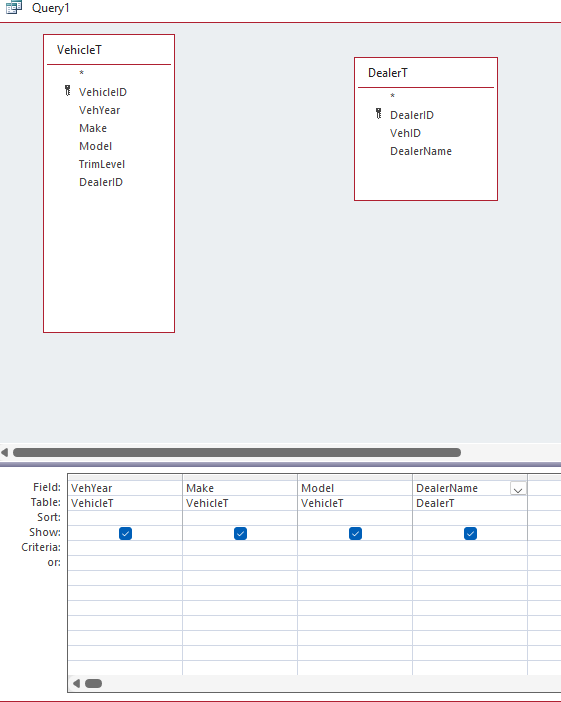
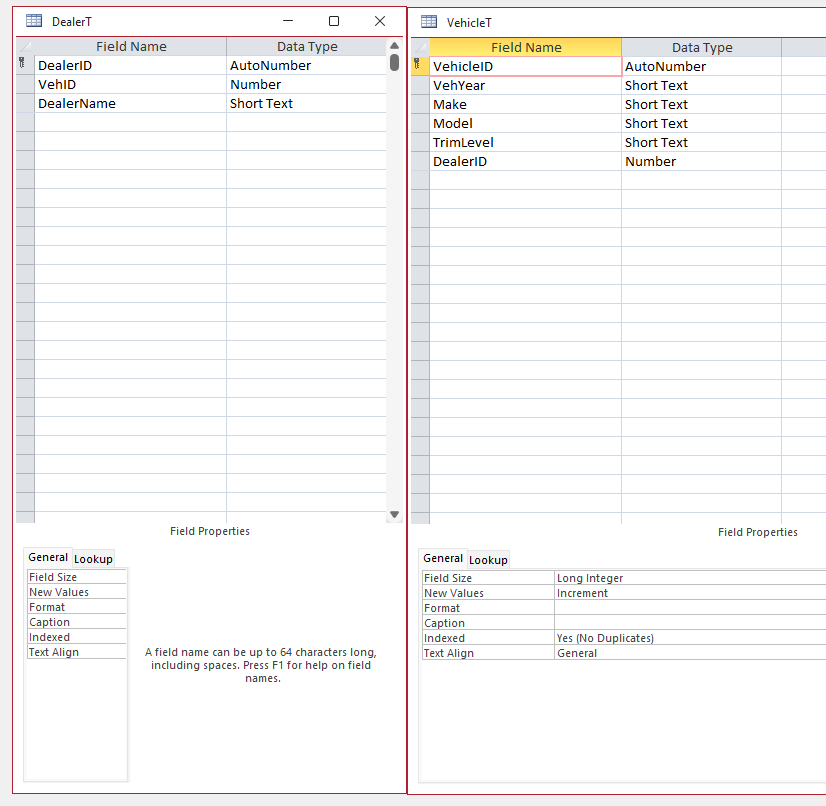
As you can see from earlier post I am struggling. Raymond tried to help me but I couldn't get it figured out. So I went back to very basic. This is not a true attempt to build a DB yet. I created this to work with and try and learn the concept better. I am forgetting something somewhere. No matter what relationships, joins I create I can not get the simple results in the query. I have watched so many videos over & over I am seeing videos all the time. Not necessarily a bad thing but when I am not gaining ground it is. Can someone tell me what I am missing. I think I am missing something in my table/s. Thank you
Lee Shastid OP  @Reply  
    
5 months ago

Lee Shastid OP  @Reply  
    
5 months ago

Richard Rost  @Reply  
          
5 months ago
Well, why don't you explain exactly what you're trying to do here? I see you get vehicle and dealer. You're trying to just indicate which vehicle belongs to which dealer. Is that the way it's going, because it could be the other way? It could be dealers that have multiple vehicles or vehicles that belong to multiple dealers. Explain what you're trying to do, and also keep your field names the same thing. If it's VehicleID in one table, make it VehicleID in the other table. That way, access can see that they're the same field and make the relationship for you.
Lee Shastid OP  @Reply  
    
5 months ago
Gotcha....Trying to match the dealer to the vehicle
Lee Shastid OP  @Reply  
    
5 months ago
Richard to give you more details I just want to create a repair, maintenance log basically for three vehicles to keep up with the cost. Vehicle ID has been fixed.
Tom Juric  @Reply  
      
5 months ago
Join VehicleT.VehicleID to DealerT.VehicleID.  as a 1 to many
Lee Shastid OP  @Reply  
    
5 months ago
Tom Thank you for your reply. That has been done and here is what happens. Join 1 no returns on query join 2 only vehicle information returns join 3 only dealer information returns
Paul Kiener  @Reply  
      
5 months ago
Did you remove DealerID from Table VehicleT?
Richard Rost  @Reply  
          
5 months ago
Did you watch this: Vehicle Maintenance
Lee Shastid OP  @Reply  
    
5 months ago
Paul I have done so much to be honest I am not sure. If you think it is a factor I am starting over again and see what I can do and I will not put that in there. Richard I did not know of that one but I will. I have never ran across that one before.
Richard Rost  @Reply  
          
5 months ago
Watch that and if you still have problems, post back here and let me know.
Lee Shastid OP  @Reply  
    
5 months ago
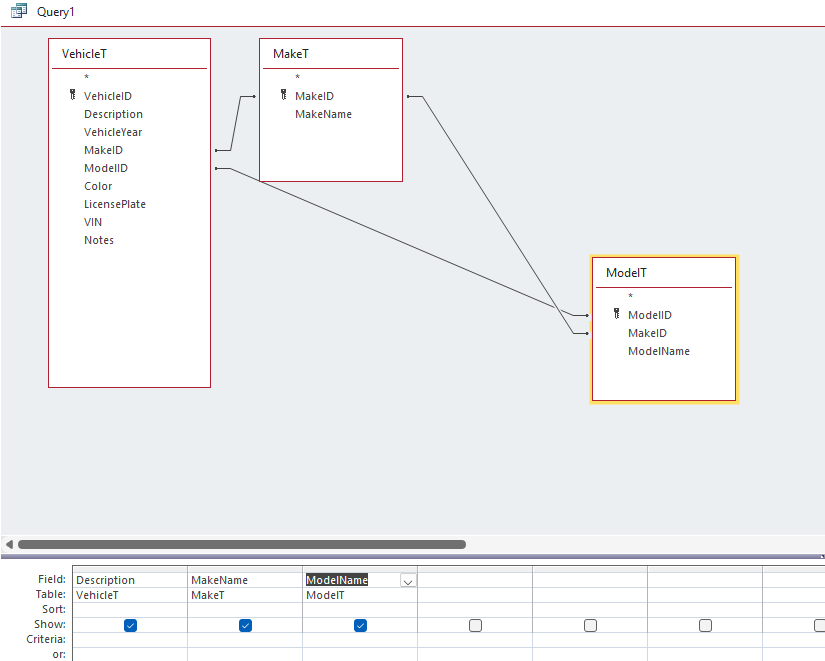
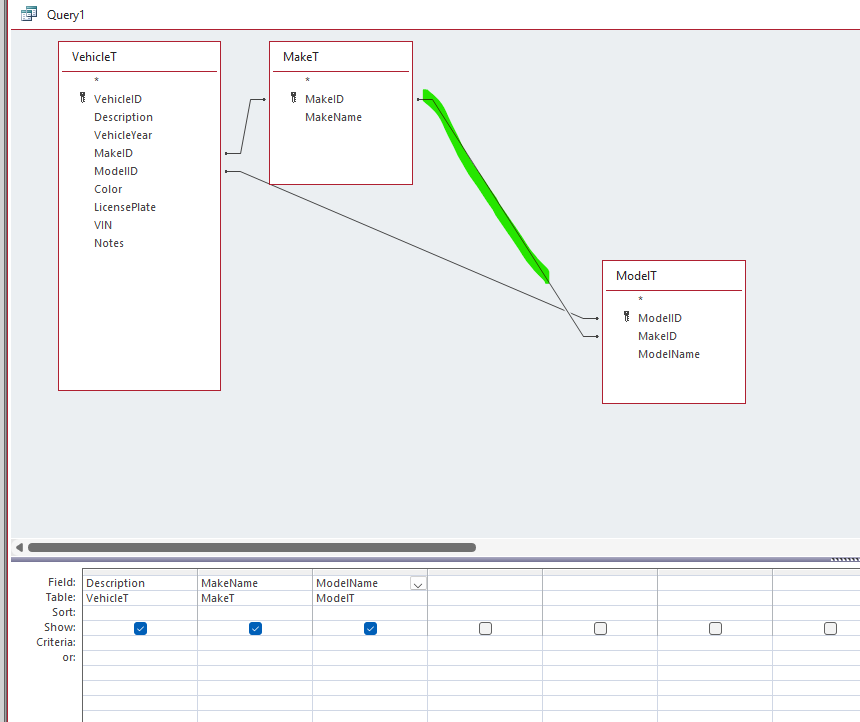
Okay Richard I watched your video couple f times and then I built my DB by following your video. The only thins I did different was I DID NOT use a Contacts Table, and nor did I do cascading combo boxes. I only have 3 or 4 vehicles that I will be using this for. First screen shot is a query design and I get no results. The Second screen shot is I get results if I remove the relationship that is highlighted in green. I have not SET any relationships. Access did these when building everything. So if i remove this relationship that it created which works for me, will it affect something else later? Thank you
Lee Shastid OP  @Reply  
    
5 months ago

Lee Shastid OP  @Reply  
    
5 months ago

Lisa Snider  @Reply  
       
5 months ago
Good catch Lee.  The reason the query showed no results earlier is that all three joins were inner joins.  Access would only return rows where EVERY join found a match.  VehicleT.MakeID would have to match BOTH MakeT.MakeID AND ModelT.ModelID, and MakeT.MakeID would also have to match ModelT.MakeID.  If ANY of those failed, or any were null, that vehicle would get dropped, and if it fails for ALL vehicles, you get no results.  Removing the relationship between MakeT and ModelT was the right move, and should not effect anything going forward, unless any of your vehicles are missing either a make or model.
Lee Shastid OP  @Reply  
    
5 months ago
Lisa Thank you for your help. I just wasn't sure since it was created by access and not myself.
Matt Hall  @Reply  
          
5 months ago
Lee, normally if you want the MakeID to be in the VehicleT, you don't want it in the ModelT and if you want it in the ModelT, you don't want it in the VehicleT.  In the odd case where you would need it in both, you can add the MakeT again and it will come in as [MakeT_1].
Lee Shastid OP  @Reply  
    
5 months ago
Well Matt as you can tell I struggle with the access relationships. I made it exactly like Richard did in his vehicle maintenance tech help hide. I did it step by step following. That is the result I got.
Matt Hall  @Reply  
          
5 months ago
I should have reviewed Richard's video first.  What Lisa said will get you working.
Lee Shastid OP  @Reply  
    
5 months ago
Thank you and everyone for help.
Lee Shastid OP  @Reply  
    
5 months ago
Matt and Lisa to give you an update on what I found out ( I think this is correct). The issue I was having was with what Matt was trying to say. He is correct, however I think the reason it was in there from Richards video is he was using Cascading combo boxes. I did not use Cascading combo boxes because of the amount of vehicles I will be storing. So I removed MakeID out of the MOdelT and it went away and everything worked fine after that. I didn't have to manually delete that relationship. I hope I explained it the way I am thinking it works. If Richard sees this maybe he can verify what I am trying to get out there, or anyone for that matter. I knmow everything works fine for me since I did that. Thank you all again.
Matt Hall  @Reply  
          
5 months ago
You put together exactly where I was going with my comment.  You are right  about the cascading combos, too.  As Richard says, there  are many ways to put the legos together.  After posting, i realized I might be adding new questions instead of answering the one you had.  Lisa did that directly.
Lee Shastid OP  @Reply  
    
5 months ago
It’s all good. I just happen to think of it that way after you made me start thinking through things. It didn’t make sense at the time till I figured out it was the cascading combo box way. It’s all worked out.

This thread is now CLOSED. If you wish to comment, start a NEW discussion in Access Forum.
 

Next Unseen

 
New Feature: Comment Live View


The following is a paid advertisement
Computer Learning Zone is not responsible for any content shown or offers made by these ads.
 

Learn
 
Access - index
Excel - index
Word - index
Windows - index
PowerPoint - index
Photoshop - index
Visual Basic - index
ASP - index
Seminars
More...
Customers
 
Login
My Account
My Courses
Lost Password
Memberships
Student Databases
Change Email
Info
 
Latest News
New Releases
User Forums
Topic Glossary
Tips & Tricks
Search The Site
Code Vault
Collapse Menus
Help
 
Customer Support
Web Site Tour
FAQs
TechHelp
Consulting Services
About
 
Background
Testimonials
Jobs
Affiliate Program
Richard Rost
Free Lessons
Mailing List
PCResale.NET
Order
 
Video Tutorials
Handbooks
Memberships
Learning Connection
Idiot's Guide to Excel
Volume Discounts
Payment Info
Shipping
Terms of Sale
Contact
 
Contact Info
Support Policy
Mailing Address
Phone Number
Fax Number
Course Survey
Email Richard
[email protected]
Blog RSS Feed    YouTube Channel

LinkedIn
Copyright 2026 by Computer Learning Zone, Amicron, and Richard Rost. All Rights Reserved. Current Time: 6/16/2026 11:22:23 AM. PLT: 1s