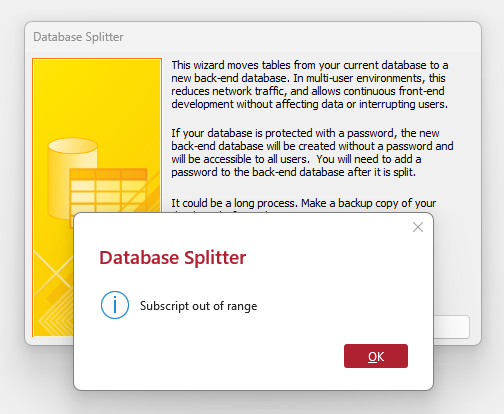
Hi Richard! I have been using the database for several years and now need to split it for 3 users. I got up to the "Database Tools -> Access Database" and then got an error message Subscript out of range. Any ideas what could cause this, or any advice on how I can fix this myself? Regards, Jean-Pierre Christen
JeanPierre ChristenOP
@Reply 7 months ago
Alex Lewis
@Reply 7 months ago
Are your tables in any files other than Access?
If you have tables from Excel, for example, field/columns names must be exactly the same.
JeanPierre ChristenOP
@Reply 7 months ago
Hi Alex. No, all my tables are in Access. Tried to compile then decompile, still getting the same error
Alex Lewis
@Reply 7 months ago
You can try to split your database manually:
1. Create a copy of your database for just your tables (back-end); delete your forms, reports and queries from your back-end
2. On the Ribbon for your front end, click “External Data” -> “New Data Source” -> “From Database -> “Access”
3. On the Import screen, select “Link to a New Data Source”
4. On the file dialog, pick the back end file you just created
5. Select your tables from your backend that you wish to link
If that option doesn’t work, try the Access Troubleshooter to find a possible solution: https://599cd.com/Trouble
JeanPierre ChristenOP
@Reply 7 months ago
Many many thanks Alex!
Now I have another minor issue: Queries. Majority of my Forms use queries as a Record Source. I can manually go to each Query, substitute the original tables (like HelperT) with the "Link" tables (like HelperT1) but this will take me many hours, probably a day with no sleep. Any chance you know a method for doing this quick?
Alex Lewis
@Reply 7 months ago
If your database is already split, it shouldn't affect your queries or structures at all.
The only difference between a Linked Table and a Local Table is that a Linked Table is stored in a separate database file. But as long as the linked tables are in your database, you should be able to use them just as you would a Local Table.
Hope this helps!
Sorry, only students may add comments.
Click here for more
information on how you can set up an account.
If you are a Visitor, go ahead and post your reply as a
new comment, and we'll move it here for you
once it's approved. Be sure to use the same name and email address.
This thread is now CLOSED. If you wish to comment, start a NEW discussion in
Access Expert 21.