Free Lessons
Courses
Seminars
TechHelp
Fast Tips
Templates
Topic Index
Forum
ABCD
 
Home   Courses   TechHelp   Forums   Help   Contact   Merch   Join   Order   Logon  
 
Back to Access Forum    Comments List
Upload Images   @Reply   Bookmark    Link   Email   Next Unseen 
Open Form Error
Kim Nielsen 
      
4 months ago
Maybe someone can assist me, I have used this code many times with no issue, now it will not work.  When i press the corresponding button along a specific I want another form "EditTransactionF" to open the specified record based on the TransID.

Here is the code i am using:
DoCmd.OpenForm "EditTransactionF", , , "TransID = '" & TransID & "'"

What am i doing wrong, what am i missing?

Thanks
Adam Schwanz  @Reply  
           
4 months ago
Is TransID supposed to be a text?
If it's the autonumber/number primary key, you dont need the single quotes.
DoCmd.OpenForm "EditTransactionF", , , "TransID = " & TransID

Otherwise, what is it doing? Do you get an error or what happens?
Alex Hedley  @Reply  
           
4 months ago
Is TransID a number or text?
Kim Nielsen OP  @Reply  
      
4 months ago
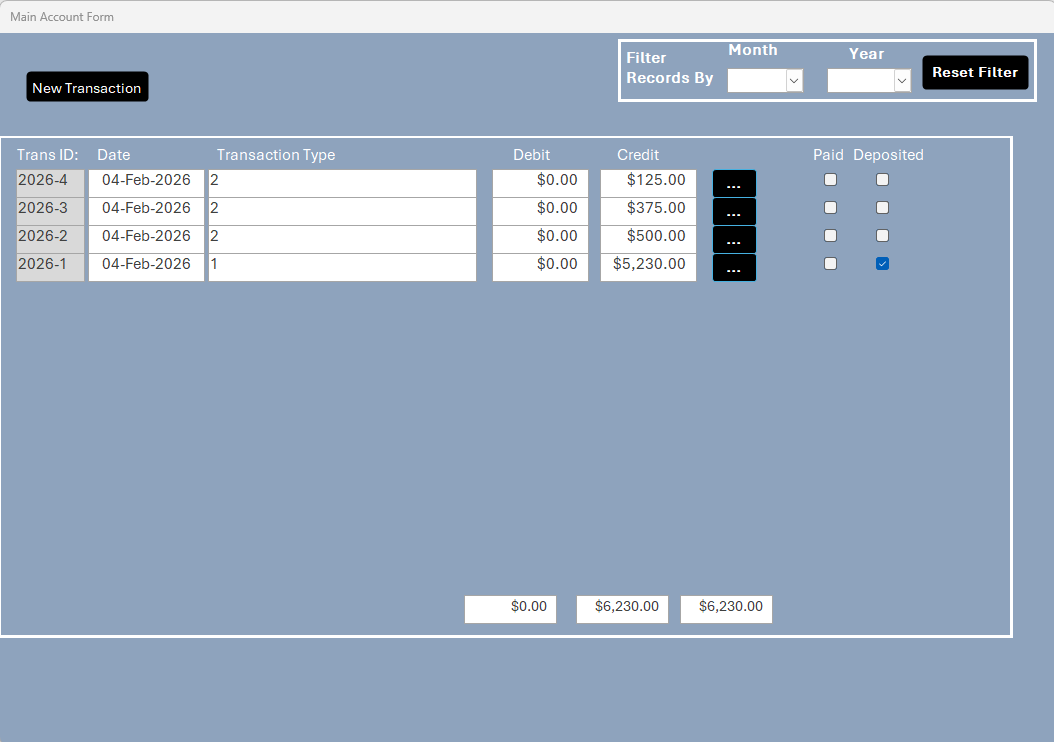
number returns 2026-4 in increments
Kim Nielsen OP  @Reply  
      
4 months ago
Sorry text did not realize this
Kim Nielsen OP  @Reply  
      
4 months ago

Kim Nielsen OP  @Reply  
      
4 months ago

Kim Nielsen OP  @Reply  
      
4 months ago
the black button is where i am placing the code, it is a short text generating a yyyy-## file id in increments
Kim Nielsen OP  @Reply  
      
4 months ago
even Tried the following code:
    Dim Trec As String
    Trec = TransID
    DoCmd.OpenForm "EditTransactionF", , , "TransID = '" & Trec & "'"
Donald Blackwell  @Reply  
       
4 months ago
If you're generating the TransID, where is that defined? It basically looks like it doesn't know what that is. Clearly, already existent TransID's populate your form properly, but the code in your button generating it may not be properly declaring it.
Kim Nielsen OP  @Reply  
      
4 months ago
When a new transaction is entered into the NewTransaction Form, the Field record TransID is auto generated using the year and numeric number in that year, as displayed in the overview form.  2026-1, 2026-2, 2026-3, 2026-n.  So the idea is to edit that record, by pressing the black button on the record, it is supposed to open up the EditTransaction form based on the TransID value. I have used this code many times before and this is the first time it would not work, drives one crazy...
Kim Nielsen OP  @Reply  
      
4 months ago
I patterned my code from another DBase as follows:
    Dim FDRec As String
    
    FDRec = Me.FDRecordID
    DoCmd.OpenForm "DeptEditFillRecordF", , , "FDRecordID = '" & FDRec & "'"

works great, the same should work in the new DBase, replacing the fields with the new DBase form fields...
Donald Blackwell  @Reply  
       
4 months ago
Then, from what you've shown, the only thing I can't think of would be to verify that the name of the form is "EditTransactionF" and the spelling is correct and from there maybe try putting " TransID = """" & CStr(TransID) & """" just to make sure access isn't trying to evaluate it.

Beyond that, looking at any other code block preceding your code that may be newer. Make sure that they are properly closing out so that Access is actually seeing the block you're showing and not including as part of a previous sub or function. Like a missing or misspelled End Sub or End Function or an If/then block that didn't close properly, etc.
Kim Nielsen OP  @Reply  
      
4 months ago
Thanks, I checked the spelling for the form, it is correct "EditTransactionF" The outline you gave worked, weird how the old code works in another DBase but not in this one with very similar layouts. Shakes Head... Thank you very much!!!

This thread is now CLOSED. If you wish to comment, start a NEW discussion in Access Forum.
 

Next Unseen

 
New Feature: Comment Live View


The following is a paid advertisement
Computer Learning Zone is not responsible for any content shown or offers made by these ads.
 

Learn
 
Access - index
Excel - index
Word - index
Windows - index
PowerPoint - index
Photoshop - index
Visual Basic - index
ASP - index
Seminars
More...
Customers
 
Login
My Account
My Courses
Lost Password
Memberships
Student Databases
Change Email
Info
 
Latest News
New Releases
User Forums
Topic Glossary
Tips & Tricks
Search The Site
Code Vault
Collapse Menus
Help
 
Customer Support
Web Site Tour
FAQs
TechHelp
Consulting Services
About
 
Background
Testimonials
Jobs
Affiliate Program
Richard Rost
Free Lessons
Mailing List
PCResale.NET
Order
 
Video Tutorials
Handbooks
Memberships
Learning Connection
Idiot's Guide to Excel
Volume Discounts
Payment Info
Shipping
Terms of Sale
Contact
 
Contact Info
Support Policy
Mailing Address
Phone Number
Fax Number
Course Survey
Email Richard
[email protected]
Blog RSS Feed    YouTube Channel

LinkedIn
Copyright 2026 by Computer Learning Zone, Amicron, and Richard Rost. All Rights Reserved. Current Time: 6/16/2026 7:02:38 PM. PLT: 1s